
smpl 57025
SMPL One-Touch Music Player & Radio User Manual
Modél: 57025
Merek: smpl
1. Bubuka
The SMPL One-Touch Music Player & Radio is designed to provide an easy and enjoyable audio experience, particularly for seniors. Its simple, one-touch operation and durable wooden enclosure make it a user-friendly device for listening to music and radio broadcasts.

Figure 1.1: The SMPL One-Touch Music Player & Radio, showcasing its compact design and included USB stick.
This player supports MP3 audio files via an included 8GB USB drive and features an FM radio tuner. It comes pre-loaded with 75 nostalgic hits, offering immediate entertainment. The device can be powered by batteries for portability or via an AC adapter for continuous use.
Video 1.1: Hiji leuwihview of the SMPL brand and its commitment to simple, user-friendly technology for caregivers and their loved ones.
2. Fitur Produk
- Operasi Hiji-Toél: Designed for simplicity, allowing users to play music or radio with minimal effort.
- Sora kualitas luhur: Equipped with a powerful speaker for clear and room-filling audio.
- Puteran Musik Serbaguna: Maénkeun MP3 files from an included 8GB USB drive, pre-loaded with 75 nostalgic songs. Users can also add their own music.
- Tuner Radio FM: Provides access to local radio stations.
- Pilihan Daya Ganda: Operates on battery power for portability or plugs into a wall outlet for continuous use.
- No Wi-Fi, No Fees: A standalone device that does not require internet connectivity or subscription fees.
- Durable & Retro Design: Features a sturdy wooden enclosure with a classic, nostalgic appearance.

Figure 2.1: Key features of the SMPL Music Player, emphasizing its ease of use and versatile playback options.

Figure 2.2: The player's design focuses on simplicity and accessibility for senior users, promoting engagement through music.
3. Setélan
3.1 Powering Alat
The SMPL Music Player can be powered in two ways:
- Adaptor AC: For continuous use, plug the provided AC adapter into the DC IN port on the back of the unit and into a wall outlet.
- Batré: For portable use, open the battery compartments on the back of the unit. Insert 6 x D-size batteries (not included) into each compartment, ensuring correct polarity. Close the battery covers securely.
3.2 Inserting the USB Drive
The player comes with an 8GB USB drive pre-loaded with 75 songs. To use the music player function:
- Locate the USB port on the back of the unit.
- Carefully insert the provided USB drive into the port. Ensure it is fully seated.
3.3 Extending the Antenna
For optimal FM radio reception, extend the telescopic antenna located on the back of the unit. Adjust its position for the best signal.
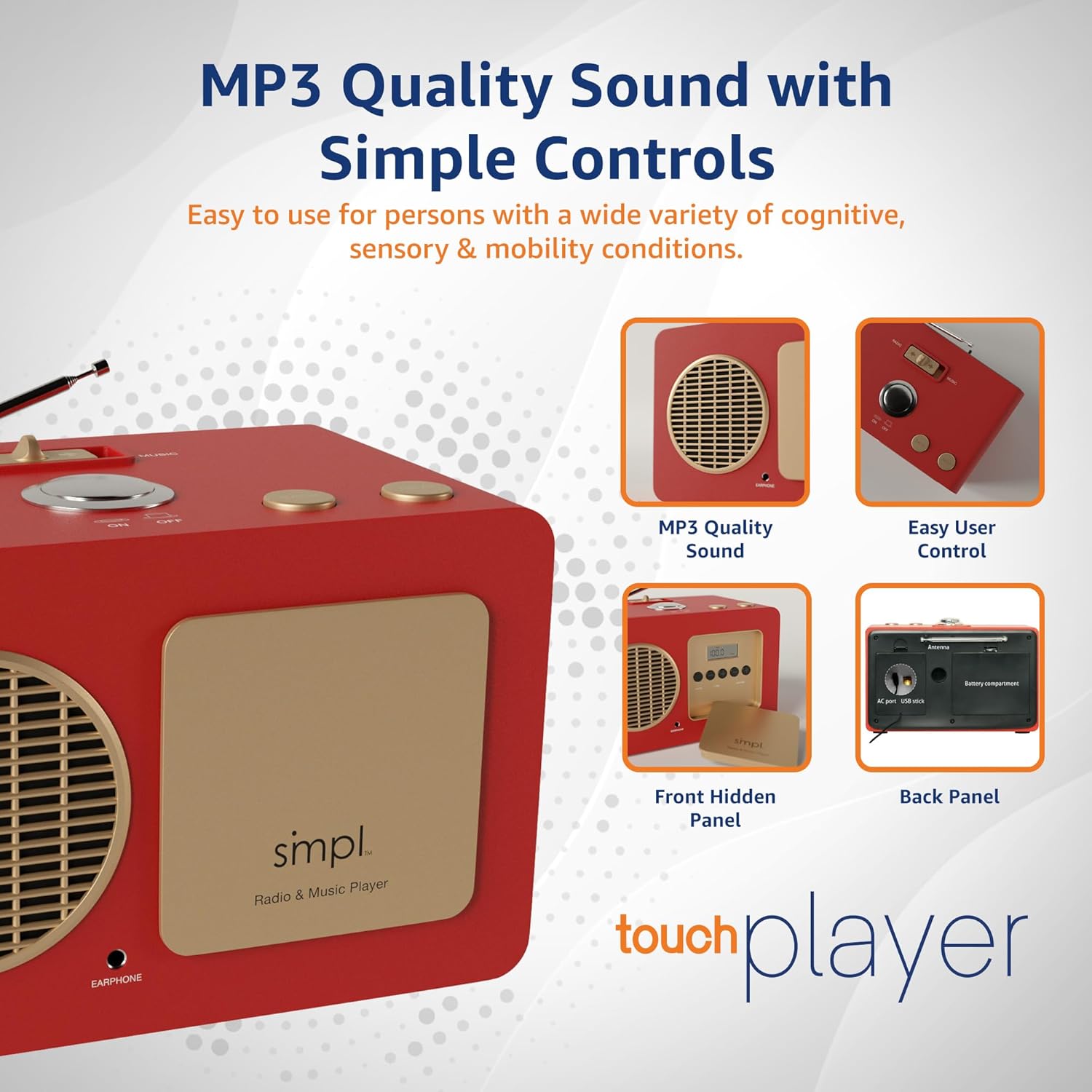
Gambar 3.1: Tukangeun view of the player, illustrating the battery compartments and USB input for music playback.
Video 3.1: A demonstration of how to set up and use the SMPL Music Player, including power options and basic controls.
4. Parentah Operasi
4.1 Daya Hurung/Pareuman
Pikeun ngahurungkeun alat ON or Pareum, press the large central button on the top panel.
4.2 Switching Between Radio and Music Modes
Use the slider switch located on the top panel to select between "RADIO" and "MUSIC" modes.
4.3 Music Playback (MUSIC Mode)
When in "MUSIC" mode:
- The player will automatically begin playing songs from the inserted USB drive.
- Pencét éta TERAS tombol pikeun skip ka lagu salajengna.
- Pencét éta BALIK tombol pikeun pindah ka lagu saméméhna.
4.4 Radio Operation (RADIO Mode)
When in "RADIO" mode:
- The player will tune into FM radio stations.
- Pikeun ngaganti stasiun, anggo TERAS or BALIK buttons on the top panel.
- For fine-tuning or to switch between AM/FM bands, open the hidden front panel. Use the "AM/FM" button to select the band and the "TUNE" buttons (+/-) for precise station selection.
4.5 Nyaluyukeun Volume
The main volume control is located behind the hidden front panel. Open the panel and use the "VOLUME" buttons (+/-) to adjust the sound level.
Video 4.1: A demonstration of the one-touch controls and how to switch between music and radio modes on the player.
5. Pangropéa
- beberesih: Anggo kaén anu garing sareng lemes pikeun ngabersihan bagian luar unit. Hindarkeun pembersih abrasive atanapi pangleyur.
- Ngagantian batré: If using battery power, replace all 6 D-size batteries when the sound becomes distorted or the unit stops functioning. Ensure proper polarity when inserting new batteries.
- Panyimpenan: When not in use for extended periods, remove batteries to prevent leakage and store the unit in a cool, dry place.
- Perawatan Drive USB: Handle the USB drive carefully. Avoid exposing it to extreme temperatures, moisture, or physical impact.
6. Cara ngungkulan
| Masalah | Mungkin Cukang lantaranana | Solusi |
|---|---|---|
| Music not playing continuously from USB. | Teu cocog file format (not MP3) or presence of metadata files. | Ensure all music files are in MP3 format. If transferring from a Mac, delete any hidden metadata files (e.g., files starting with "._"). Reformat the USB drive to FAT32 if issues persist, then re-add MP3s. |
| Drive USB teu dikenal. | Incorrect USB format or faulty drive. | Ensure the USB drive is formatted to FAT32. Try a different USB drive to rule out a faulty drive. |
| panarimaan radio goréng. | Antenna henteu ngalegaan atanapi daérah sinyal goréng. | Fully extend the telescopic antenna. Try repositioning the unit or the antenna for better signal reception. |
| Teu aya sora atanapi sora distorsi. | Volume too low, batteries low/dead, or power issue. | Check and adjust the volume using the controls behind the hidden front panel. If on battery power, replace batteries. If using AC adapter, ensure it is securely plugged in. |
| Tombol teu ngaréspon. | Temporary software glitch or power issue. | Turn the unit off and then on again. If on battery power, replace batteries. If using AC adapter, unplug and replug. |
7. Spésifikasi
| Fitur | Rincian |
|---|---|
| merek | smpl |
| Nomer modél | 57025 |
| Dimensi produk | 12.17 x 8.15 x 7.91 inches (approx. 10"L x 5.75"W x 6"H) |
| Item Beurat | 4.86 pon |
| Warna | Beureum |
| Téhnologi konektipitas | USB |
| Fitur husus | Radio FM |
| Sumber Daya | Battery Powered (6 x D-size batteries, not included) or AC Adapter |
| Pita Radio Dirojong | AM/FM |
| Included USB Drive | 8GB with 75 pre-loaded nostalgic hits |
8. Jaminan & Dukungan
For any questions, technical assistance, or warranty inquiries, please contact SMPL Technology directly. The product is designed with "Live Support" in mind to ensure a smooth user experience.
Please refer to the product packaging or the official SMPL Technology websitus pikeun inpormasi kontak sareng detil jaminan anu paling ayeuna.
Note: Specific warranty terms and conditions may vary. Please retain your proof of purchase for warranty claims.
Ask a question about this manual
Ask about setup, troubleshooting, compatibility, parts, safety, or missing instructions. Manuals+ will review the question and use this page’s manual context to help answer it.