1. Bubuka
Thank you for choosing the PRITECH PBP-303 Metal Tripod. This lightweight and versatile tripod is designed to provide stable support for your mobile phone or camera, enhancing your photography and videography experience. Please read this manual carefully before use to ensure proper operation and maintenance.
2. Fitur Produk
- Lightweight Metal Construction: Durable yet easy to carry.
- 3-Way Panhead: Allows for smooth pan, tilt, and rotation adjustments (360°).
- 4-Section Legs: Adjustable height for various shooting scenarios.
- Quick Lever Locks: For fast and secure leg adjustments.
- Rubber Leg Tips: Provides stability on different surfaces.
- Kasaluyuan Universal: Suitable for mobile phones and cameras.
3. Eusi Paket
Mangga parios pakét kanggo barang-barang ieu:
- PRITECH PBP-303 Metal Tripod
- Mobile Phone Holder (if included in your specific package)
- Mawa Kantong

Image: The PRITECH PBP-303 tripod folded, shown with its carrying bag and product packaging.
4. Parentah Setup
4.1 Unfolding Tripod
- Teundeun tripod dina datar, permukaan stabil.
- Lalaunan sebarkeun tilu suku ka luar dugi ka manjang sapinuhna sareng stabil.
- To adjust the height, open the quick lever locks on each leg section. Extend the legs to the desired height and then firmly close the lever locks to secure them.

Image: The PRITECH PBP-303 tripod shown fully extended, ready for use.
4.2 Attaching a Mobile Phone
- If using a mobile phone, attach the mobile phone holder to the tripod's mounting screw on the panhead. Twist clockwise until secure.
- Buka spring-sarat clamp tina wadah telepon.
- Carefully insert your mobile phone into the holder, ensuring it is centered and securely gripped.

Image: A mobile phone holder attached to a tripod, with a phone securely mounted. Dimensions of the holder are visible.
4.3 Attaching a Camera
- Locate the standard 1/4-inch mounting screw on the tripod's panhead.
- Align the camera's tripod mount with the screw.
- Twist the camera clockwise onto the screw until it is firmly attached. Do not overtighten.
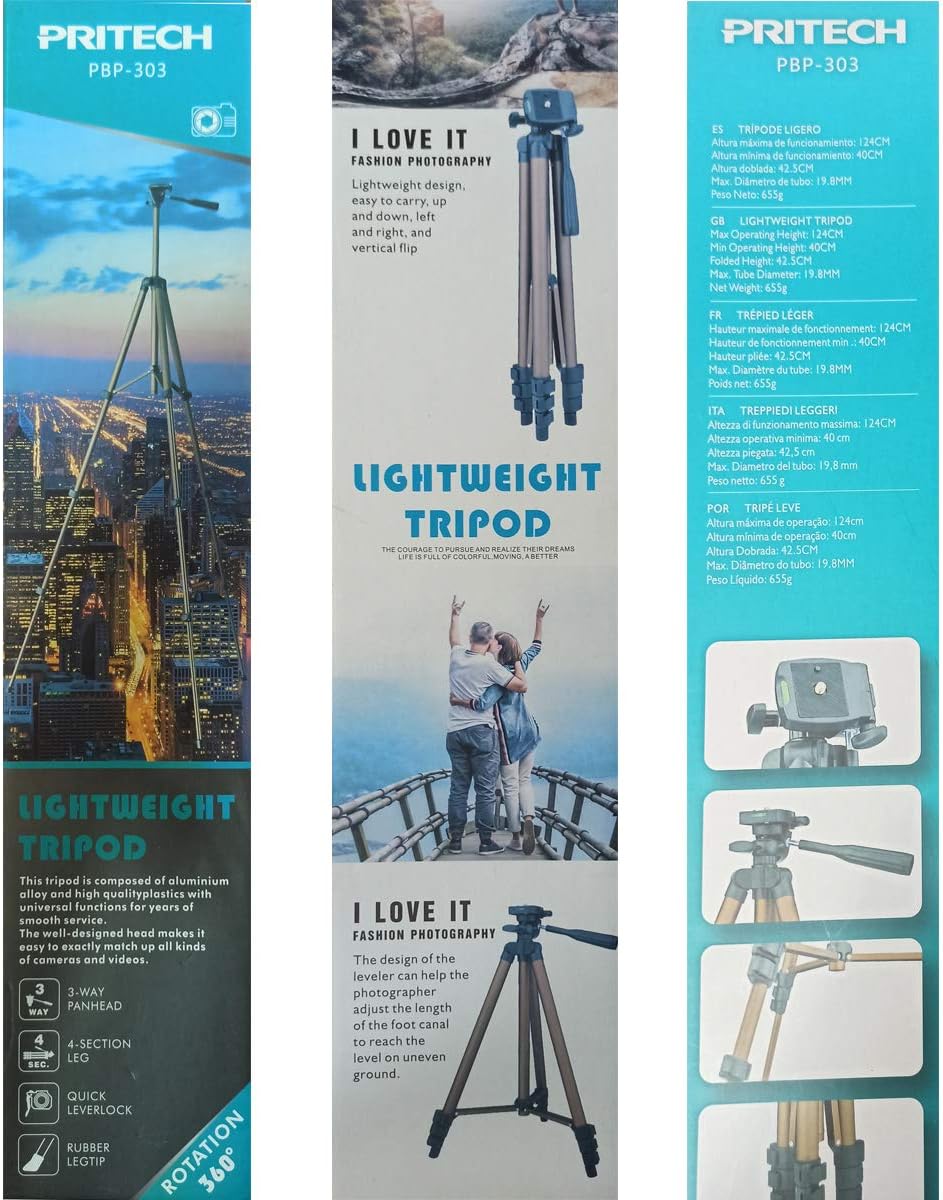
Image: The PRITECH PBP-303 tripod with a mobile phone attached, demonstrating its use for photography.
5. Parentah Operasi
5.1 Adjusting Pan and Tilt
The 3-way panhead allows for precise adjustments:
- Pan (Rotasi Horisontal): Loosen the horizontal lock knob (usually located at the base of the panhead). Rotate the camera/phone to the desired horizontal angle, then tighten the knob to secure.
- Miring (Rotasi Vertikal): Loosen the tilt lock handle. Adjust the camera/phone vertically to the desired angle, then tighten the handle to secure.
- Orientasi Potret/Bentang Alam: Loosen the side tilt knob to switch between portrait and landscape modes for your device, then tighten.
5.2 Nyaluyukeun Jangkungna
To adjust the tripod's height:
- Ensure your device is securely mounted.
- Open the quick lever locks on each leg section.
- Extend or retract the leg sections to achieve the desired height.
- Firmly close all quick lever locks to ensure stability before use.
- The center column can also be extended for additional height by loosening its lock knob, raising the column, and then tightening the knob.
6. Perawatan sareng Pangropéa
- beberesih: Wipe the tripod with a soft, dry cloth. Do not use harsh chemicals or abrasive cleaners.
- Panyimpenan: When not in use, fold the tripod completely and store it in its carrying bag in a dry, cool place away from direct sunlight and moisture.
- Lubrication: Moving parts are generally self-lubricating. Do not apply oil or grease unless specifically instructed by the manufacturer.
- Pamariksaan: Periodically check all screws, knobs, and leg locks to ensure they are tight and functioning correctly.
7. Cara ngungkulan
| Masalah | Mungkin Cukang lantaranana | Solusi |
|---|---|---|
| Tripod teu stabil. | Legs not fully extended or locks not secured. Uneven surface. | Ensure all leg sections are fully extended and quick lever locks are firmly closed. Place the tripod on a level surface. |
| Device not securely mounted. | Mounting screw loose. Phone holder not gripping properly. | Tighten the mounting screw. Ensure the phone holder's clamp is fully engaged with the phone. |
| Panhead movement is stiff. | Lock knobs are too tight. Dirt or debris in mechanism. | Loosen the pan and tilt lock knobs. Clean the panhead area with a soft cloth. |
8. Spésifikasi
- model: PBP-303
- Bahan: logam
- Maximum Operating Height: 124 cm (48.8 inci)
- Minimum Operating Height: 40 cm (15.7 inci)
- Jangkungna dilipat: 42.5 cm (16.7 inci)
- Diaméter tabung maksimum: 19.8 mm (0.78 inci)
- Beurat bersih: 655 g (1.44 lbs)
- Ukuran produk (L x W x H): 44 x 9 x 9 cm (narilep)
- Alat anu cocog: Mobile Phones, Cameras
9. Garansi jeung Rojongan
For warranty information or technical support, please refer to the documentation provided with your purchase or contact PRITECH customer service through their official websitus. Simpen resi pameseran anjeun salaku bukti pameseran.