
1. Bubuka jeung Leuwihview
The Escort EDM 1111A is a versatile digital multimeter designed for accurate measurement of various electrical parameters. This device is essential for electricians, technicians, and hobbyists for testing circuits, components, and power sources. It features a clear digital display and a rotary dial for selecting different measurement functions.

The Escort EDM 1111A Digital Multimeter with red and black test leads connected, ready for use.
Fungsi konci kalebet:
- DC Voltage (DCV) measurement
- AC Voltage (ACV) measurement
- DC Current (DCA) measurement
- AC Current (ACA) measurement
- Pangukuran résistansi (Ω).
- Capacitance (CX) measurement
- Diode and Transistor (hFE) testing
2. Setélan
2.1 Pamasangan batré
The Escort EDM 1111A requires a DC 9V 006P battery for operation. To install or replace the battery:
- Pastikeun multimeter dina kaayaan OFF.
- Tangtukeun lokasi kompartemen batré dina tonggong unit.
- Carefully slide open or unscrew the battery cover.
- Insert a new 9V 006P battery, observing the correct polarity (+/-).
- Ganti panutup batré kalayan aman.

Tukangeun view of the Escort EDM 1111A Digital Multimeter, showing the battery compartment cover and the product label.
2.2 Nyambungkeun Test Leads
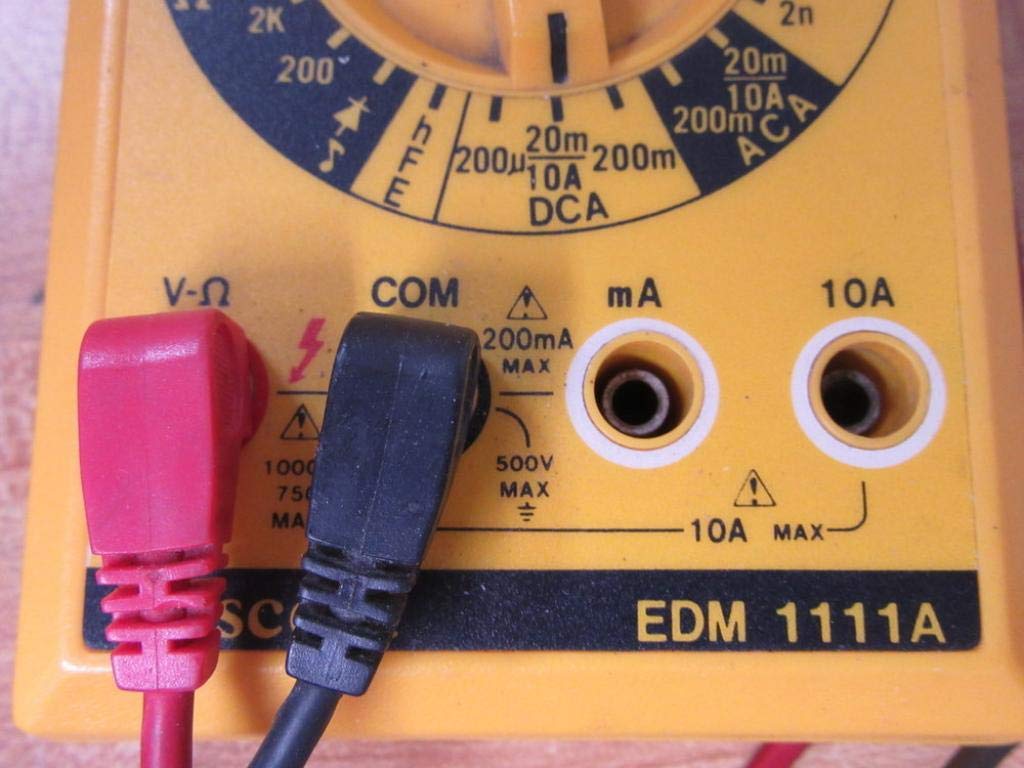
The multimeter comes with two test leads, typically one red (positive) and one black (negative/common). Proper connection is crucial for accurate and safe measurements.
- Pikeun kalolobaan voltage, resistance, and low current measurements, connect the black lead to the 'COM' (Common) jack.
- Connect the red lead to the 'V-Ω-mA' jack for voltage, lalawanan, sarta milliamppangukuran ayeuna.
- Pikeun pangukuran arus anu luhur (dugi ka 10A), sambungkeun kabel beureum kana jack '10A'. Always ensure the correct jack is used to prevent damage to the meter or circuit.

A closer look at the input jacks (V-Ω, COM, mA, 10A) and the lower portion of the rotary dial, indicating current measurement ranges.

The red and black test probes (leads) used with the Escort EDM 1111A Digital Multimeter, featuring pointed tips for electrical contact.
3. Parentah Operasi
Before taking any measurements, ensure the test leads are correctly connected and the rotary dial is set to the appropriate function and range.

Diwincik view of the rotary selector dial on the Escort EDM 1111A Digital Multimeter, displaying various measurement functions such as DCV, ACV, Ω, DCA, ACA, and CX.
3.1 Ngukur DC Voltage (DCV)
- Set the rotary dial to the desired DCV range (e.g., 200m, 2, 20, 200, 1000). Choose a range higher than the expected voltage.
- Connect the red lead to the positive (+) side of the circuit and the black lead to the negative (-) side.
- Baca voltage nilai dina tampilan.
3.2 Ngukur AC Voltage (ACV)
- Set the rotary dial to the desired ACV range (e.g., 200m, 2, 20, 200, 750). Choose a range higher than the expected voltage.
- Sambungkeun kabel uji kana voltase ACtage source. Polarity does not matter for AC voltage.
- Baca voltage nilai dina tampilan.
3.3 Ngukur Résistansi (Ω)
- Pastikeun sirkuit atanapi komponén parantos dipareuman énergina sateuacan ngukur résistansi.
- Set the rotary dial to the desired Ω range (e.g., 200, 2K, 20K, 200K, 2M, 20M, 200M).
- Sambungkeun lead test kana komponén anu bakal diukur.
- Maca nilai résistansi dina tampilan.
3.4 Measuring DC Current (DCA)
- Pastikeun sirkuit de-energized.
- Set the rotary dial to the desired DCA range (e.g., 200µ, 2m, 20m, 200m, 10A).
- penting: For currents up to 200mA, use the 'V-Ω-mA' jack for the red lead. For currents up to 10A, use the '10A' jack.
- Break the circuit and connect the multimeter in series with the load. The current must flow through the multimeter.
- Re-energize the circuit and read the current value.
3.5 Measuring AC Current (ACA)
- Pastikeun sirkuit de-energized.
- Set the rotary dial to the desired ACA range (e.g., 200µ, 2m, 20m, 200m, 10A).
- penting: For currents up to 200mA, use the 'V-Ω-mA' jack for the red lead. For currents up to 10A, use the '10A' jack.
- Break the circuit and connect the multimeter in series with the load.
- Re-energize the circuit and read the current value.
3.6 Measuring Capacitance (CX)
- Pastikeun kapasitor discharged pinuh saméméh nguji.
- Set the rotary dial to the CX range (e.g., 2n, 20n, 200n, 2µ, 20µ).
- Sambungkeun lead test peuntas terminal kapasitor.
- Maca nilai kapasitansi dina tampilan.
3.7 Diode and Transistor (hFE) Testing
Refer to the specific markings on the dial for diode and transistor testing functions. Typically, diode test mode allows checking the forward voltage drop of a diode, and hFE mode is used for measuring the DC current gain of transistors.
4. Pangropéa
4.1 Ngagantian batré
Replace the 9V 006P battery when the low battery indicator appears on the display or if the multimeter fails to power on. Follow the instructions in Section 2.1.
4.2 beberesih
Pikeun ngabersihan multimeter, ngagunakeun lemes, damp lawon. Ulah nganggo pembersih atanapi pelarut anu abrasif, sabab tiasa ngaruksak casing or display. Ensure the device is turned off and disconnected from any circuits before cleaning.
4.3 Panyimpenan
When not in use for extended periods, store the multimeter in a cool, dry place, away from direct sunlight and extreme temperatures. Consider removing the battery to prevent leakage, which could damage the internal components.
5. Cara ngungkulan
| Masalah | Mungkin Cukang lantaranana | Solusi |
|---|---|---|
| Taya tampilan atawa taram tampilan | batré lemah atawa maot | Replace the 9V 006P battery. |
| Bacaan anu salah | Rentang anu dipilih salah Poor lead connection Damaged test leads Incorrect input jack used | Pilih rentang anu pas. Ensure leads are firmly connected. Inspect and replace damaged leads. Verify leads are in the correct V-Ω-mA or 10A jack. |
| "OL" (Overload) ditampilkeun | Measurement exceeds selected range | Pindah ka rentang nu leuwih luhur. |
| Taya bip continuity | Continuity function not selected Buka sirkuit | Ensure dial is on continuity/diode test. Check the circuit for breaks. |
6. Spésifikasi
| Parameter | Nilai |
|---|---|
| Modél | EDM 1111A |
| Ukuran produk (L x W x H) | 8 x 4 x 2 inci |
| Item Beurat | 1.84 pon |
| Sumber Daya | DC 9V 006P Battery |
| Tipe Pangukuran | Multimeter |
| Produsén | Ngiringan |
| Tanggal Kahiji Sadia | 21 Nopémber 2019 |
| DC Voltage Rentang | 200mV, 2V, 20V, 200V, 1000V |
| AC Voltage Rentang | 200mV, 2V, 20V, 200V, 750V |
| DC Current Ranges | 200µA, 2mA, 20mA, 200mA, 10A |
| AC Current Ranges | 200µA, 2mA, 20mA, 200mA, 10A |
| Rentang lalawanan | 200Ω, 2KΩ, 20KΩ, 200KΩ, 2MΩ, 20MΩ, 200MΩ |
| Capacitance Ranges | 2nF, 20nF, 200nF, 2µF, 20µF |
7. Émbaran jaminan
For specific warranty details regarding your Escort EDM 1111A Digital Multimeter, please refer to the documentation provided at the time of purchase or contact the manufacturer directly. Warranty terms typically cover defects in materials and workmanship under normal use.
8. Rojongan Palanggan
If you encounter any issues or have questions not covered in this manual, please contact Escort customer support. Have your product model number (EDM 1111A) and serial number (if applicable, found on the back label) ready when contacting support for faster assistance.
The product label on the back of the Escort EDM 1111A, indicating 'DIGITAL MULTIMETER DC 9V 006P BATTERY', serial number, and 'MADE IN TAIWAN R.O.C.'.