
TWS i17
i17 Dual Earbuds User Manual
Model: i17 | Brand: TWS
1. Bubuka
Hatur nuhun pikeun meuliasing the TWS i17 Dual Earbuds. This manual provides essential information for setting up, operating, and maintaining your new wireless earbuds. Please read this manual thoroughly before use to ensure optimal performance and longevity of your device.
2. Émbaran Kasalametan
To prevent damage to your earbuds or injury to yourself or others, please observe the following precautions:
- Ulah ngantepkeun earbud atanapi wadah ngecas ka suhu, kalembaban, atanapi cairan anu ekstrim.
- Hindarkeun ngaragragkeun, mangaruhan, atanapi ngabongkar alat.
- Do not use abrasive cleaners or solvents. Clean with a soft, dry cloth.
- Dengekeun dina tingkat polumeu sedeng pikeun nyegah karuksakan dédéngéan.
- Jauhkeun tina jangkauan barudak.
- This product is not water resistant. Avoid exposure to water or excessive moisture.
3. Eusi Paket
Pastikeun yén sadaya item aya dina pakét anjeun:
- TWS i17 Dual Earbuds (Left and Right)
- Ngecas Case
- Kabel Ngecas USB
- Manual pamaké

Image: The TWS i17 Dual Earbuds, with one earbud partially removed from its charging case, showcasing desain hideung sleek.
4. Setélan
4.1 Ngecas Earbuds sareng Case
Saméméh dipaké munggaran, eusian pinuh ku earbuds jeung wadah ngecas.
- Lebetkeun dua earbud kana wadah ngecas. Pastikeun duanana dipasang kalayan leres.
- Connect the USB charging cable to the charging port on the bottom of the case and the other end to a USB power source (e.g., computer, wall adapter).
- The indicator light on the case will show charging status. It will turn off or change color when fully charged.
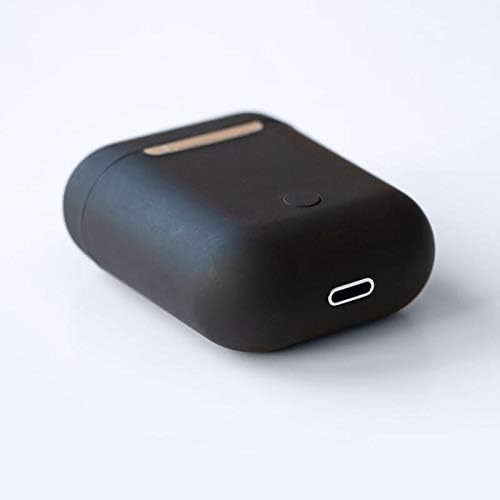
Gambar: A close-up view of the bottom of the TWS i17 charging case, highlighting the USB charging port and a small button.
4.2 Nyapasangkeun sareng Alat Anjeun
The i17 earbuds use Bluetooth for wireless connection.
- Pastikeun yén earbuds dieusi.
- Buka wadah ngecas. Earbuds bakal otomatis asup kana mode papasangan (lampu indikator bakal hurung).
- On your mobile phone or Bluetooth-enabled device, go to Bluetooth settings and turn Bluetooth on.
- Milarian pikeun available devices. Select "i17" from the list.
- Once connected, the indicator lights on the earbuds will stop flashing. You are now ready to use your earbuds.

Image: The TWS i17 Dual Earbuds resting inside their open charging case, ready for pairing or use.
5. Parentah Operasi
5.1 Daya Hurung/Pareuman
- Daya Hurung: Take the earbuds out of the charging case. They will automatically power on and connect to the last paired device.
- Pareum listrik: Teundeun earbuds deui kana wadah ngecas. Aranjeunna bakal otomatis pareum sareng ngawitan ngecas.
5.2 Puterkeun Musik
- Puter / Reureuh: Ketok boh earbud sakali.
- Lagu salajengna: Ketok dua kali earbud katuhu.
- Lagu Sateuacanna: Ketok dua kali earbud kénca.
5.3 Manajemén Telepon
- Ngajawab / mungkas Telepon: Ketok boh earbud sakali.
- Nolak Telepon: Pencét jeung tahan boh earbud salila 2 detik.
5.4 Asistén Sora
- Aktipkeun Asisten Sora (Siri / Asisten Google): Ketok tilu kali boh earbud.
6. Pangropéa
Proper maintenance ensures the longevity of your earbuds:
- beberesih: Anggo lawon anu lemes, garing, sareng henteu buluan pikeun ngabersihkeun earbud sareng wadah ngecas. Entong nganggo cairan atanapi semprotan.
- Panyimpenan: Upami teu dianggo, simpen earbud dina wadah ngecasna pikeun ngajaga sareng ngajaga supaya tetep dicas. Simpen di tempat anu tiis sareng garing.
- Perawatan batré: To prolong battery life, avoid fully discharging the earbuds frequently. Charge them regularly.

Image: The TWS i17 Dual Earbuds securely stored within their closed charging case, ready for transport or charging.
7. Cara ngungkulan
| Masalah | Mungkin Cukang lantaranana | Solusi |
|---|---|---|
| Earbuds teu dipasangkeun | Low battery; Out of range; Not in pairing mode; Bluetooth off on device. | Charge earbuds; Move closer to device; Ensure case is open for pairing; Turn on Bluetooth on device. |
| Ngan hiji earbud jalan | One earbud not charged; Earbuds not properly synced. | Ensure both earbuds are charged; Place both earbuds back in case, close, then reopen to re-sync. |
| Taya sora | Volume too low; Not connected; Media paused. | Increase volume on device; Reconnect earbuds; Check media playback status. |
| Kasus ngecas teu ngecas | Faulty cable/adapter; Loose connection. | Try a different USB cable or power adapter; Ensure cable is securely plugged in. |
8. Spésifikasi
| Fitur | Rincian |
|---|---|
| Nomer modél | i17 |
| merek | TWS |
| Téhnologi konektipitas | Nirkabel (Bluetooth) |
| Headphone Bentuk Faktor | Dina-Ceuli |
| Mikropon Kaasup | Sumuhun |
| Noise Canceling | No |
| Cocog Jeung | Handphone |
| Warna | Hideung |
| Bahan | palastik |
| Fitur kabel | Cable-free |
| Tingkat Résistansi Cai | Henteu Tahan Cai |
| Ukuran Pangiriman | 12.6 x 8.8 x 3.6 cm |
| Beurat | 96 gram |
| Tanggal Sadia munggaran | 15 Januari 2020 |
9. Garansi jeung Rojongan
For warranty information and customer support, please refer to the contact details provided on the product packaging or the official TWS websitus. Simpen bukti pameseran anjeun pikeun klaim garansi.
For further assistance, please contact TWS customer service.
Ask a question about this manual
Ask about setup, troubleshooting, compatibility, parts, safety, or missing instructions. Manuals+ will review the question and use this page’s manual context to help answer it.