
1. Bubuka
Thank you for choosing the FLEXISPOT EG1 Electric Height Adjustable Desk. This manual provides essential information for the safe assembly, operation, and maintenance of your new desk. Please read these instructions carefully before use and retain them for future reference.

Image 1.1: The FLEXISPOT EG1 Electric Height Adjustable Desk in use, demonstrating its standing functionality.
2. Émbaran Kasalametan
- Baca sagala parentah: Ensure you understand all assembly and operating instructions before using the desk.
- Kapasitas beban: Do not exceed the maximum load capacity of 70 kg (dynamic) / 85 kg (static) on the desktop. Overloading can cause damage or injury.
- Majelis: Assemble the desk carefully according to the instructions. It is recommended that dua jalma ngalaksanakeun perakitan.
- Sasayogian tanaga: Use only the provided power adapter. Ensure the power cord is not damaged or pinched.
- Clearance: Keep the area around the desk clear during height adjustments to prevent obstructions or collisions.
- Barudak jeung Pets: Jauhkeun barudak sareng piaraan tina méja salami operasi pikeun nyegah kacilakaan.
- Sistem Anti Tabrakan: The desk is equipped with an anti-collision system. However, always exercise caution during adjustments.
- Pangropéa: Pegatkeun sambungan catu daya sateuacan beberesih atanapi ngalaksanakeun pangropéa naon waé.
Awas: Assemble the desk carefully according to the instructions and do not exceed the load capacity of 70 kg without the desktop to prevent risk of injury or damage to the desk.
3. Eusi Paket
Verify that all components are present and undamaged before beginning assembly. All necessary assembly tools are included in the package.
- Desktop (120 x 60 cm, White)
- Pigura Méja (Bodas)
- Motorized Lifting Columns
- Panél kontrol
- Adaptor Daya sareng Kabel
- Dulang Manajemén Kabel
- Side Hooks
- Majelis Hardware jeung Pakakas
- Manual pamaké
4. Parentah Majelis
Follow the included assembly manual for detailed, step-by-step instructions. Ensure all connections are secure before use. Assembly is required and recommended for two people.
4.1 Cable Management Tray Installation
The desk includes a small drawer under the desktop for cable management, helping to keep your workspace tidy and safe. Install this tray as indicated in the assembly guide.

Image 4.1: Under-desk cable management tray, designed to organize power strips and cables.
4.2 Side Hooks Attachment
Attach the provided hooks to either side of the desk frame. These hooks are useful for hanging laptop bags, headphones, or other accessories, optimizing your workspace.

Image 4.2: The desk features dual side hooks for accessories, anti-slip foot pads for stability, and a wheel-compatible design for mobility.
5. Parentah Operasi
The FLEXISPOT EG1 desk features a motorized lifting mechanism for easy height adjustments and a smart control panel for personalized settings.
5.1 adjustment jangkungna
The motorized lifting mechanism allows for smooth height adjustments from 71 cm to 121 cm. The adjustment speed is approximately 2.5 cm/s, with a low noise level of less than 50 dB during operation.

Image 5.1: The desk offers a comfortable height range from 73.5 cm to 118 cm, suitable for various users and activities.
5.2 Panel Kontrol Pinter
The control panel features up/down buttons for manual adjustment and four memory presets to save your preferred sitting and standing heights. The LED display shows the current desk height.
- Tombol Naék / Turun: Press and hold the ▲ (Up) or ▼ (Down) buttons to manually adjust the desk height. Release to stop.
- Preset Mémori (1, 2, 3, 4): To save a height, adjust the desk to your desired position, then press the 'M' button followed by one of the number buttons (1, 2, 3, or 4). To recall a saved height, simply press the corresponding number button.
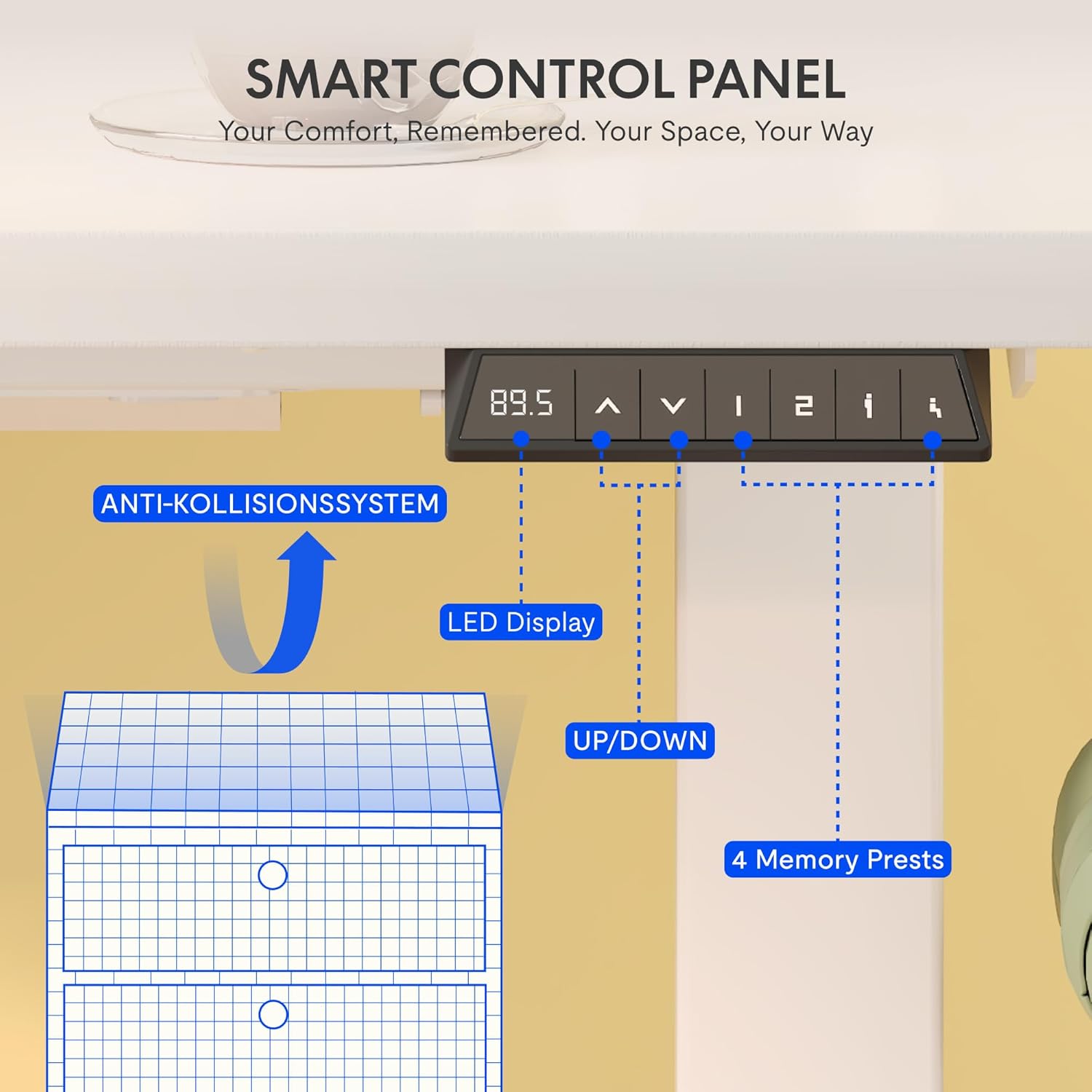
Image 5.2: The smart control panel features an LED display, up/down controls, and four programmable memory presets.
5.3 Sistem Anti-Tabrakan
The desk is equipped with an anti-collision rebound function. If the desk encounters an obstacle during height adjustment, it will automatically stop and reverse slightly to prevent damage or injury.

Image 5.3: The anti-collision system detects obstacles and reverses desk movement to prevent damage.
6. Pangropéa
- beberesih: Wipe clean with a dry cloth. Avoid using abrasive cleaners or harsh chemicals that may damage the surface.
- Pamariksaan: Pariksa sadaya sekrup sareng sambungan sacara berkala pikeun mastikeun éta pageuh. Kencengkeun deui upami diperyogikeun.
- Manajemén Kabel: Regularly check power cables for any signs of wear or damage. Ensure they are properly routed in the cable management tray.
7. Cara ngungkulan
If you encounter any issues with your FLEXISPOT EG1 desk, please refer to the following common troubleshooting steps:
- Meja teu obah:
- Pariksa naha kabel daya parantos dipasang pageuh kana méja sareng stop kontak dina témbok.
- Pastikeun teu aya halangan anu ngahalangan gerakan.
- Try resetting the desk (refer to the full assembly manual for specific reset procedures, if available).
- Gerakan anu teu rata:
- Pastikeun meja teu overloaded sarta beurat disebarkeun merata.
- Check for any loose connections in the frame or lifting columns.
- Control panel not responding:
- Pariksa catu daya.
- Unplug the desk for 10 seconds and plug it back in to perform a soft reset.
If the problem persists, please contact FLEXISPOT customer support for assistance.
8. Spésifikasi
Detailed technical specifications for the FLEXISPOT EG1 Electric Height Adjustable Desk.

Gambar 8.1: Leuwihview of key technical specifications and dimensions of the FLEXISPOT EG1 desk.
| Fitur | Spésifikasi |
|---|---|
| Nomer modél | EC1+PR1206 Bianco |
| UPC | 810000747115 |
| Ukuran produk (L x W x H) | 120D x 60B x 123H cm |
| Item Beurat | 29.4 kg |
| Rekomendasi beurat maksimum | 85 kg (Static) / 70 kg (Dynamic) |
| Jangkungna Minimum | 71 cm |
| Jangkungna maksimum | 121 cm |
| Mékanisme Angkat | Electric (Mono-motor) |
| Bahan Dasar | Alloy Steel |
| Tipe Bahan Top | Engineered Wood (MDF with high-pressure laminate) |
| Tipe rengse | Dilapis bubuk |
| Fitur husus | Height Adjustable, Anti-Collision System, Cable Management Tray, Side Hooks |
| Majelis Diperlukeun | Sumuhun |
| Jalma Disarankeun pikeun Majelis | 2 |
| All Assembly Tools Included | Sumuhun |
| Parentah Pangropéa | Ngusap beresih ku lawon garing |
9. Garansi jeung Rojongan
FLEXISPOT is committed to providing high-quality ergonomic products. Our desks undergo rigorous testing to meet international industry standards (CE / BIFMA / ROHS certified).
- Garansi pigura: 5 taun
- Garansi Motor sareng Kontroler: 3 taun
- Bantosan Téknis: Pangrojong téknis hirup gratis
For any technical assistance, warranty claims, or product inquiries, please contact FLEXISPOT customer support through the official FLEXISPOT websitus atanapi pangecér Anjeun.