
1. Bubuka
Thank you for choosing the DEERC D10 Foldable Drone. This user manual provides essential information for the safe operation, setup, and maintenance of your drone. Please read this manual thoroughly before operating the drone to ensure proper use and to maximize your flying experience.
2. Naon dina Box
The DEERC D10 package includes the following components:
- DEERC D10 Drone
- Jauh Controller
- 2 x Batré Litium Polimér
- 4 x Propeller hansip
- Kabel Ngecas USB
- Baling-balik cadang
- Obeng
- Manual pamaké

Gambar 2.1: Contents of the DEERC D10 package, showing the drone, remote controller, and two batteries.
3. Fitur Produk
The DEERC D10 drone is equipped with several advanced features for an intuitive and enjoyable flight:
- Gampang dianggo: One-key start/landing, Altitude Hold, Headless Mode, and Speed Adjustment functions make it suitable for all experience levels.
- Dipanjangkeun Waktu Penerbangan: Two powerful batteries provide up to 24 minutes of flight. Modular battery design simplifies charging.
- Stable and Clear Views: Built-in 720P HD lens with FPV real-time transmission for clear footage up to 100m.
- Ketok Hiber: Draw a flight course on your smartphone, and the drone will follow the path automatically.
- Kontrol Gesture: Show your palm or a 'V' sign to the front camera to automatically take photos or videos.
- Kontrol pinter: Control the drone with voice commands (e.g., "take off", "landing") or by waving your smartphone using Gravity Control.
- Lipat sareng Portabel: Compact design allows for easy transport and storage.
4. Setup Guide
4.1. Ngecas Batré
Before first use, fully charge both drone batteries and the remote controller (if applicable). Use the provided USB charging cable. The modular design of the drone batteries makes them easy to remove and charge.
4.2. Masang Pelindung Baling-baling
For enhanced flight safety, especially for beginners, attach the four propeller guards to the drone. These guards protect the propellers from damage during collisions.
4.3. Drone and Remote Controller Pairing
- Tempatkeun drone dina permukaan anu rata, rata.
- Turn on the drone. The indicator lights will flash.
- Hurungkeun kadali jauh.
- Push the left joystick up and then pull it down. The drone lights will stop flashing and remain solid, indicating successful pairing.
4.4. Instalasi App sarta Sambungan
Download the "DE FPV" app from your smartphone's app store. Once installed:
- Ensure the drone is powered on.
- Go to your smartphone's Wi-Fi settings and connect to the drone's Wi-Fi network (usually named "DEERC-D10-XXXXXX").
- Open the "DE FPV" app. You should see the live video feed from the drone's camera.

Gambar 4.1: The DEERC D10 drone's 720P HD FPV Wi-Fi camera for live video transmission.
5. Parentah Operasi
5.1. Kadali hiber dasar
- Hiji-Konci Takeoff/Barat: Pencét tombol khusus dina remot atanapi dina aplikasi pikeun otomatis lepas landas atanapi badarat.
- Ketinggian Tahan: The drone maintains a stable altitude, making it easier to control direction.
- Mode tanpa sirah: Eliminates the need to adjust the drone's position before flight, as the forward direction is relative to the pilot.
- Pangaluyuan Kacepetan: Toggle between different speed modes (low, medium, high) to suit your skill level and environment.
5.2. Fungsi hiber canggih
- Transmisi FPV Real-Time: View live video from the drone's camera directly on your smartphone via the app. This allows for immersive flying and easy capture of footage.
- Ketok Hiber: In the app, draw a desired flight path on the screen. The drone will then automatically fly along the specified route.
- Kontrol Gesture: Position yourself in front of the drone's camera and make specific hand gestures (e.g., palm, 'V' sign) to trigger photo or video capture.
- Kontrol Sora Smart: Control the drone using simple voice commands through the app, such as "take off" or "landing."
- Kontrol gravitasi: Tilt your smartphone to control the drone's flight direction, adding an interactive element to your flying experience.
- Salinan 3D: Execute impressive aerial stunts with the press of a button.

Gambar 5.1: FPV Real-Time Transmission allows sharing incredible views directly from the drone.

Gambar 5.2: The Tap Fly feature enables the drone to follow a pre-drawn flight course on your smartphone.

Gambar 5.3: Use hand gestures for convenient photo or video capture with Gesture Control.

Gambar 5.4: Smart Voice Control allows hands-free operation using simple commands.

Gambar 5.5: Gravity Control enables drone movement by tilting your smartphone.
5.3. Bisa dilipet jeung dibawa-bawa
The DEERC D10 drone features a foldable design for easy storage and transport. Gently fold the arms inward when not in use to reduce its size.
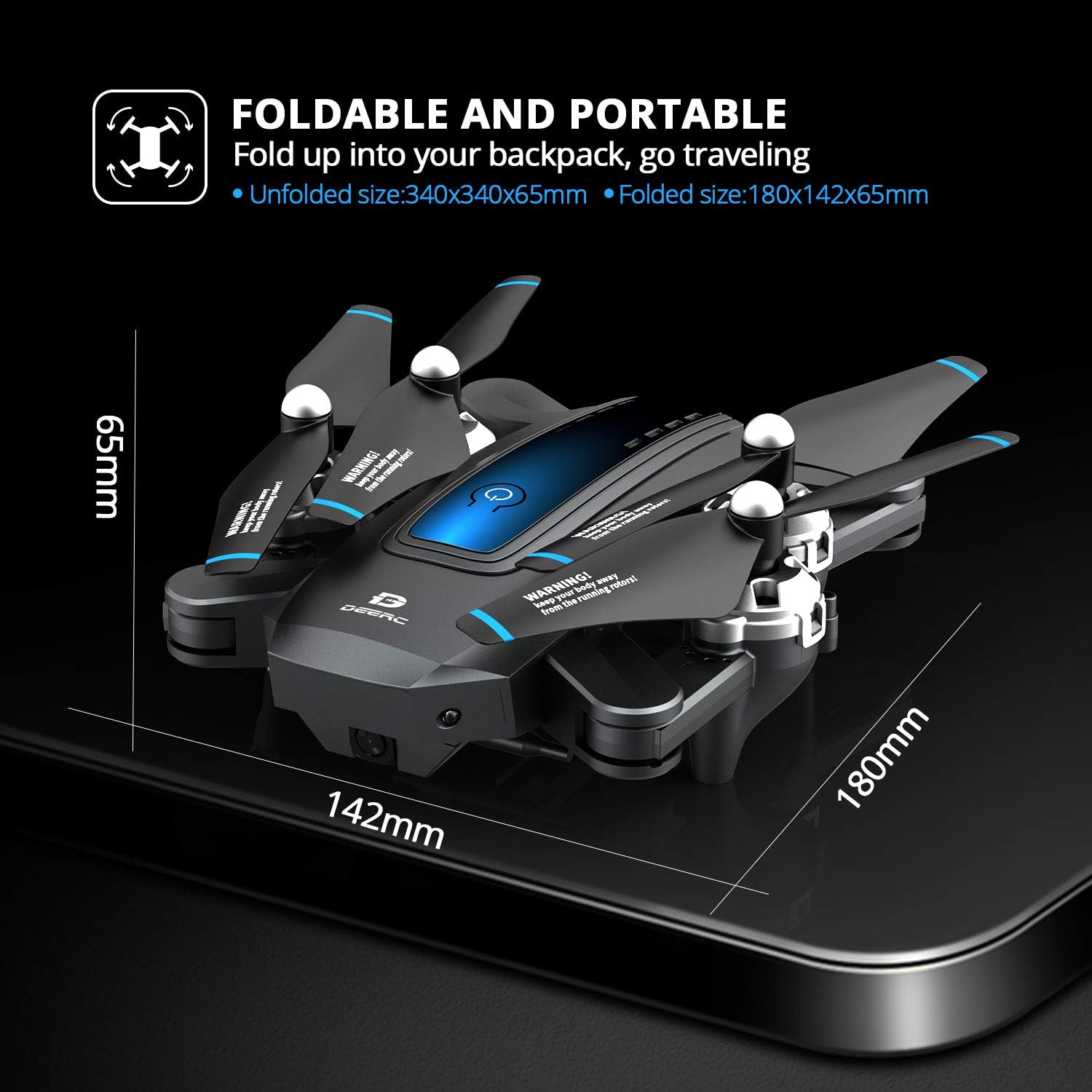
Gambar 5.6: The DEERC D10 drone in its folded state, highlighting its compact dimensions for portability.
6. Pangropéa
- Perawatan batré: Always fully charge batteries before use. Do not overcharge or completely drain them. Store batteries in a cool, dry place.
- Inspeksi Baling-Baling: Regularly check propellers for any signs of damage (cracks, bends). Replace damaged propellers immediately using the provided spares.
- beberesih: Use a soft, dry cloth to clean the drone body. Avoid using water or harsh chemicals.
- Panyimpenan: When not in use for extended periods, remove batteries from the drone and remote controller. Store the drone in its original packaging or a protective case.
7. Cara ngungkulan
| Masalah | Mungkin Cukang lantaranana | Solusi |
|---|---|---|
| Drone teu ngaréspon kana remot. | Teu dipasangkeun; batré lemah; di luar jangkauan. | Pasangkeun deui drone sareng remot; ngecas batré; pastikeun drone aya dina jangkauan operasi. |
| Drone drifts salila hiber. | Not calibrated; strong wind. | Perform gyroscope calibration; fly in calm conditions. |
| Teu aya eupan vidéo FPV. | Wi-Fi teu nyambung; masalah aplikasi. | Ensure phone is connected to drone's Wi-Fi; restart app/phone/drone. |
| waktos hiber pondok. | Batré teu dicas pinuh; batré heubeul. | Fully charge battery; consider replacing old batteries. |
| Drone sering ngadat. | Pilot error; propeller damage. | Practice in open areas; install propeller guards; replace damaged propellers. |
For more detailed troubleshooting or specific issues, please refer to the DE FPV app's help section or contact DEERC customer support.
8. Spésifikasi
| Fitur | Rincian |
|---|---|
| merek | DEERC |
| Ngaran modél | D10 |
| Resolusi Capture Video | 720p (1280x720 piksel) |
| Téhnologi konektipitas | Wifi |
| Tingkat kaahlian | pamula |
| Béntang Max | 100 méter |
| Jenis Batré | Litium Polimér (2 kaasup) |
| Item Beurat | 1.43 pon |
| Disarankeun Umur | 14 taun ka luhur |
| Ukuran Dilipat | 180mm x 142mm x 65mm (kira-kira.) |
| Ukuran Unfolded | 340mm x 340mm x 65mm (kira-kira.) |
9. Garansi jeung Rojongan
For warranty information, technical support, or any inquiries regarding your DEERC D10 drone, please visit the official DEERC websitus atanapi ngahubungi layanan palangganna sacara langsung. Simpen bukti pameseran anjeun kanggo klaim garansi.