
1. Bubuka
Thank you for choosing the DELUX M625BU(3050) RGB Wired Gaming Mouse. This manual provides detailed instructions for setting up, operating, and maintaining your gaming mouse to ensure optimal performance and an enhanced gaming experience. Please read this manual thoroughly before use.
2. Eusi Paket
- DELUX M625BU(3050) RGB Wired Gaming Mouse
- Manual pamaké
3. Produk Langkungview
The DELUX M625BU(3050) is an ergonomic wired gaming mouse designed for precision and customization. It features a high-performance A3050 PixArt optical sensor, 7 programmable buttons, and customizable RGB lighting.
3.1 Mouse Layout and Buttons
Familiarize yourself with the buttons and their default functions:

Image: DELUX M625BU(3050) Gaming Mouse Button Layout
- Tombol kénca: Fungsi klik primér.
- Tombol katuhu: Fungsi klik sekundér.
- Gulung kabayang: Gulung ka luhur/ka handap, klik tengah.
- Tombol DPI: Siklus ngaliwatan setélan DPI.
- Tombol Maju: Navigates ka hareup web panyungsi/aplikasi.
- Tombol Mundur: Navigates ka tukang web panyungsi/aplikasi.
- Tombol seuneu: Rapid-fire function (default).
3.2 Desain ergonomic
The mouse features an ergonomic streamline structure and non-slip rubber sides, designed to fit comfortably in your palm for extended gaming sessions.
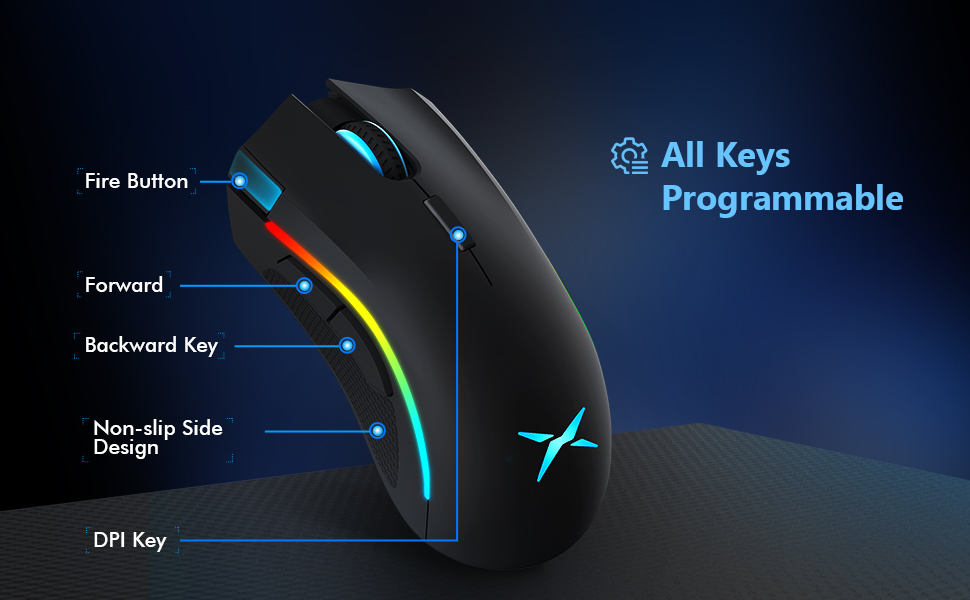
Image: Ergonomic Design Features
4. Setélan
The DELUX M625BU(3050) mouse is a plug-and-play device, requiring no additional drivers for basic functionality.
- Sambungkeun Mouse: Plug the USB connector of the mouse's 1.8m braided cable into an available USB port on your computer.
- Pangenal Sistim: Your operating system (Windows XP, Vista, 7, 8, or 10) will automatically detect and install the necessary drivers.
- Optional Software Installation: For advanced customization of buttons, DPI, and RGB lighting, download and install the DELUX Pro Game Software from the official DELUX websitus.

Image: Plug and Play Connectivity
5. Parentah Operasi
5.1 Adjusting DPI (Dots Per Inch)
The mouse features an A3050 PixArt optical sensor with adjustable DPI settings. You can cycle through preset DPI levels by pressing the DPI button located behind the scroll wheel.

Image: DPI Adjustment Levels
- Available DPI levels: 800, 1600, 3200, 4000.
- Each press of the DPI button will switch to the next level.
- The current DPI level may be indicated by a specific LED color or pattern (refer to software for detailed customization).
5.2 Pangaruh cahaya RGB
The mouse features customizable RGB lighting with various effects.
- Ngarobah Modeu Cahya: Press the Left Button, Scroll Wheel, and Right Button simultaneously for 3 seconds to cycle through different lighting modes (e.g., full lighting, breathing, floating).
- Customization via Software: Use the DELUX Pro Game Software to customize RGB backlight effects from 16.8 million colors, adjust lighting direction, and speed.
5.3 Tombol sareng Parangkat Lunak anu Tiasa Diprogram
All 7 buttons on the M625BU(3050) mouse are programmable using the DELUX Pro Game Software.
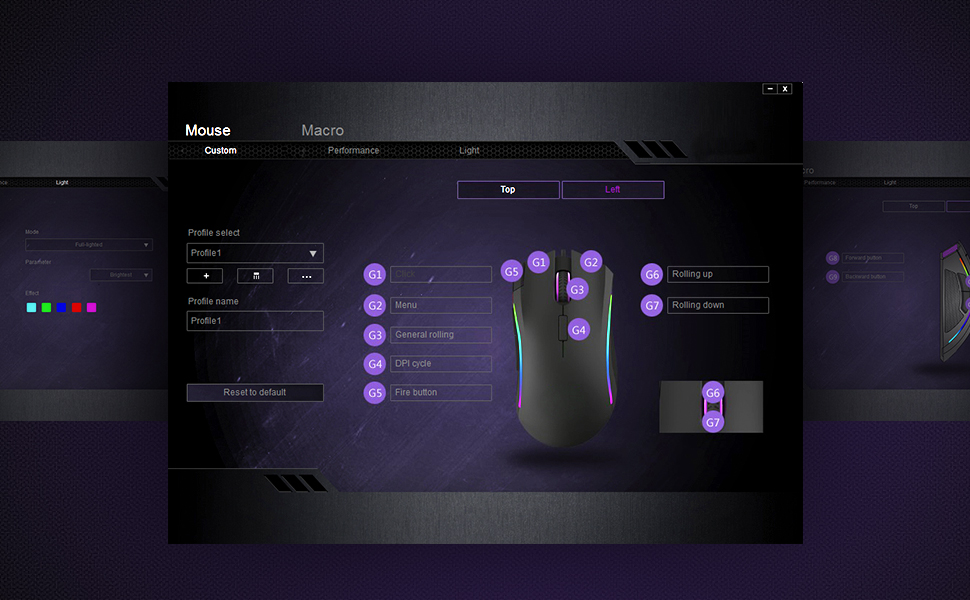
Image: Pro Game Software Interface for Customization
- Fungsi Tombol: Reassign any button to perform different functions, including keyboard keys, multimedia controls, or specific file palaksanaan.
- Macro: Create and assign complex macro sequences to buttons for automated actions.
- Sensitivity and Polling Rate: Fine-tune pointer speed, DPI sensitivity, and polling rate (125/250/500/1000Hz) for precise control.
6. Pangropéa
To ensure the longevity and optimal performance of your DELUX M625BU(3050) gaming mouse, follow these maintenance guidelines:
- beberesih: Anggo kaén anu lembut sareng garing pikeun ngusap permukaan beurit. Keur kokotor bandel, rada dampen lawon ku cai atawa solusi beberesih hampang. Hindarkeun bahan kimia anu kasar.
- Perawatan sénsor: Keep the optical sensor on the underside of the mouse clean and free from dust or debris. Use a cotton swab if necessary.
- Perawatan kabel: Ulah tikungan anu seukeut atanapi narik kabel anu kepang kaleuleuwihi pikeun nyegah karusakan.
- Panyimpenan: Simpen beurit dina lingkungan anu bersih sareng garing nalika henteu dianggo.
7. Cara ngungkulan
If you encounter issues with your DELUX M625BU(3050) mouse, refer to the following common solutions:
| Masalah | Solusi anu mungkin |
|---|---|
| Beurit teu ngabales |
|
| Cursor movement is erratic or imprecise |
|
| Lampu RGB teu jalan atanapi teu leres |
|
| Programmable buttons not functioning |
|
| Scroll wheel behaves erratically (e.g., scrolls opposite direction) |
|
8. Spésifikasi
| Fitur | Rincian |
|---|---|
| Nomer modél | M625BU(3050) |
| Konektipitas | Wired (1.8m Braided Cable) |
| Sénsor | A3050 PixArt Optical Sensor |
| Setélan DPI | 800 / 1600 / 3200 / 4000 DPI |
| Laju Polling | 125 / 250 / 500 / 1000Hz |
| Kancing | 7 Tombol anu tiasa diprogram |
| cahayaan | Customizable RGB Lighting Effects |
| Érgonomi | Ergonomic Streamline Structure, Non-slip Rubber Side |
| Dimensi produk | 5.14 x 2.71 x 1.67 inci |
| Item Beurat | 3.53 ons |
| Kasaluyuan | Windows XP, Vista, 7, 8, 10 |
9. Garansi jeung Rojongan
All DELUX products include a 12-garansi sasih from the date of purchase. Additionally, DELUX provides dukungan téknis gratis salami hirup pikeun produk ieu.
For warranty claims, technical assistance, or further inquiries, please contact DELUX customer support through the official DELUX websitus atanapi pangecér Anjeun.