
1. Bubuka
This manual provides detailed instructions for the installation, operation, and maintenance of your D-Link DCS-8627LH Full HD Outdoor Wi-Fi Camera with Spotlight. Please read this manual thoroughly before using the device to ensure proper setup and functionality. Keep this manual for future reference.
2. Produk Langkungview
The D-Link DCS-8627LH is an outdoor Wi-Fi camera designed for security monitoring, featuring Full HD 1080p resolution, a built-in spotlight, and advanced detection capabilities. It integrates with the mydlink app for remote access and smart home ecosystems like Google Assistant and Amazon Alexa.
2.1 Eusi pakét
- D-Link DCS-8627LH Full HD Kaméra Wi-Fi outdoor
- Pakakas Pemasangan (sekrup, colokan témbok)
- Adaptor kakuatan
- Guide Instalasi Gancang
2.2 Fitur kaméra
- Resolusi Full HD 1080p: Ngarekam pidéo anu jelas dina 30 pigura per detik.
- Sorotan Terpadu: Enhances color night vision and acts as a deterrent.
- Infrabeureum Night Vision: Provides clear video up to 7 meters in low light conditions.
- Audio Dua Arah: Diwangun-di mikropon jeung spiker pikeun komunikasi.
- Deteksi Gerakan sareng Sora: Triggers recording and sends notifications.
- Konektipitas Wi-Fi: Setélan nirkabel anu gampang sareng aksés.
- Panyimpenan Lokal: Supports microSD card for video recording.
- Desain tahan cuaca: Cocog jeung instalasi outdoor.
- Integrasi Smart Home: Compatible with mydlink app, Google Assistant, Amazon Alexa, and IFTTT.
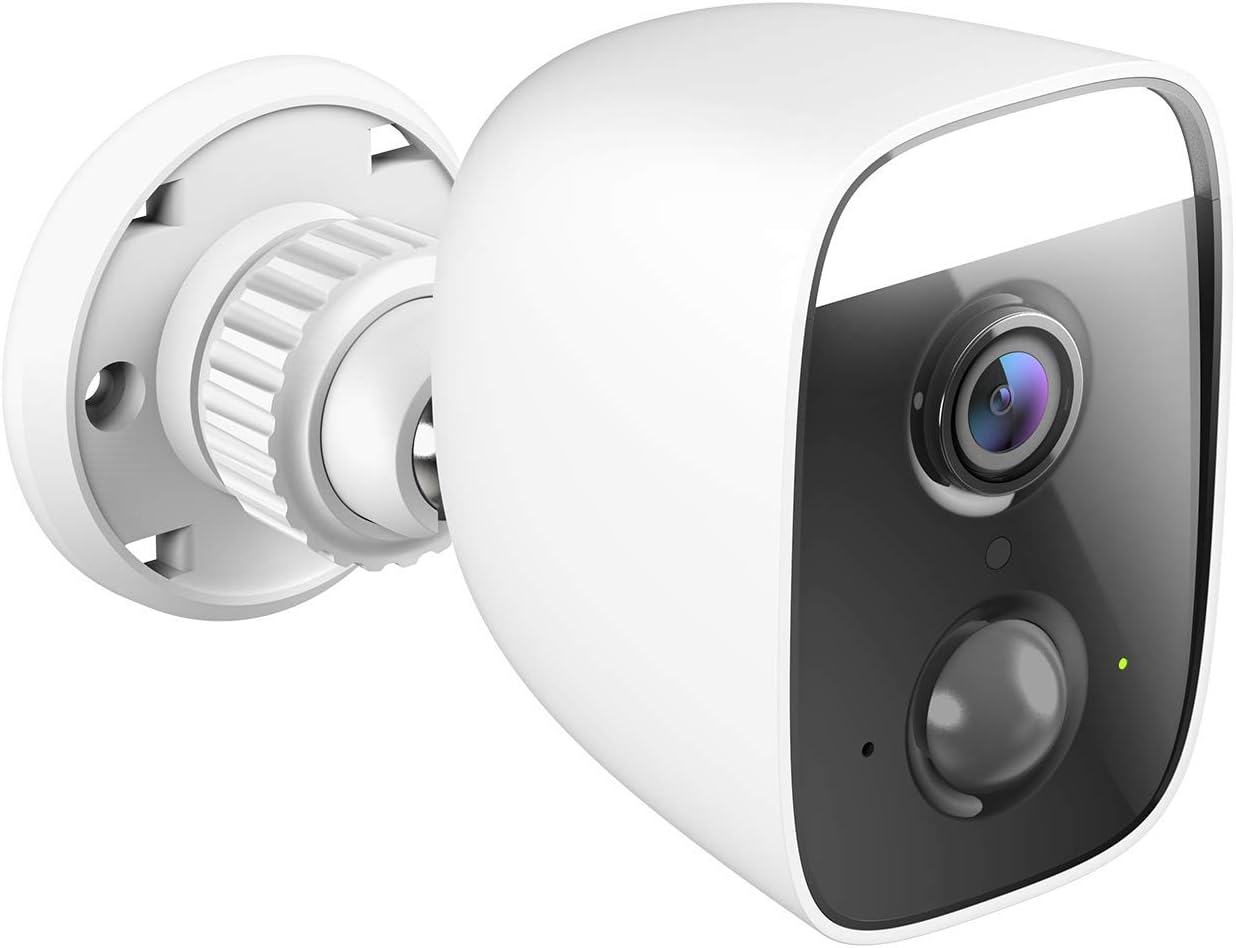
Gambar 1: Angled view of the D-Link DCS-8627LH camera, showcasing its compact design and integrated spotlight.

Gambar 2: Hareupeun view of the D-Link DCS-8627LH camera, highlighting the lens, motion sensor, and spotlight.
3. Setélan
3.1 Sateuacan Anjeun Ngawitan
- Ensure your Wi-Fi network is active and you have the Wi-Fi password.
- Have your smartphone or tablet ready.
- Choose a suitable outdoor location for installation, ensuring Wi-Fi signal strength and access to a power outlet.
3.2 mydlink App Installation
- Download the free mydlink app from the App Store (iOS) or Google Play (Android).
- Launch the mydlink app and create a new account or log in with an existing one.
3.3 Adding the Camera to mydlink
- Plug the camera into a power outlet near your Wi-Fi router for initial setup.
- Wait for the camera's LED indicator to flash orange, indicating it's ready for setup.
- In the mydlink app, tap the menu icon (☰) and select "Add a Device."
- Scan the setup QR code located on the camera or its packaging.
- Turutan pitunjuk dina layar dina aplikasi pikeun nyambungkeun kaméra ka jaringan Wi-Fi anjeun.
- Once connected, the LED indicator will turn solid green.
3.4 Instalasi fisik
The DCS-8627LH camera is designed for wall or pole mounting. Ensure the chosen location provides a clear view and is within range of your Wi-Fi signal and a power source.
- Use the provided mounting template to mark screw holes on the wall or pole.
- Bor liang pilot sareng pasang colokan témbok upami dipasang dina pasangan bata.
- Secure the mounting bracket to the surface using the screws.
- Pasangkeun kaméra kana braket pemasangan teras atur sudutna sakumaha diperyogikeun.
- Connect the power adapter to the camera and plug it into a weather-protected outdoor power outlet.

Gambar 3: Angled view of the D-Link DCS-8627LH camera, showing the adjustable mounting base.

Gambar 4: Tukangeun view of the camera, indicating the location of the microSD card slot and reset button.
4. Parentah Operasi
The D-Link DCS-8627LH camera is primarily operated through the mydlink app.
4.1 Using the mydlink App
- Hirup View: Tap on your camera in the app to view feed video hirup.
- Ngarékam: Manually record video or configure event-based recording (motion/sound detection).
- Playback: Access recorded videos stored on the microSD card or mydlink cloud (if subscribed).
- Bewara: Receive push notifications on your smartphone when motion or sound is detected.
- Audio Dua Arah: Anggo ikon mikropon dina siaran langsung view pikeun nyarios ngalangkungan spiker kaméra.
- Kontrol Sorotan: Manually turn the spotlight on/off or configure it to activate upon motion detection.

Gambar 5: A smartphone screen showing a mydlink app notification for motion detection, with options for live view or contacting security.
4.2 Deteksi Gerakan sareng Sora
Configure detection zones and sensitivity levels within the mydlink app settings for your camera. This allows you to customize when the camera triggers recordings and sends alerts.
4.3 Pamaduan Smart Home
The DCS-8627LH supports integration with:
- Asisten Google: Paké paréntah sora pikeun view feed kaméra anjeun dina alat anu cocog.
- Amazon Alexa: Kontrol kaméra anjeun sareng view its feed using Alexa-enabled devices.
- IFTTT (Lamun Ieu Lajeng Éta): Create custom automation rules with other smart devices and services.
Refer to the respective platform's documentation or the mydlink app for detailed setup instructions for these integrations.
5. Pangropéa
5.1 Ngabersihan Kaméra
Périodik ngabersihan lénsa kaméra jeung perumahan ku lemes, damp cloth. Avoid using harsh chemicals or abrasive materials that could damage the lens or finish.
5.2 Apdet firmware
D-Link regularly releases firmware updates to improve performance and add new features. Check for and install updates via the mydlink app to ensure your camera has the latest enhancements and security patches.
5.3 Manajemén Kartu MicroSD
If using a microSD card for local storage, ensure it is properly inserted and formatted through the mydlink app. Regularly check the card's status and consider replacing it if errors occur or its performance degrades.
6. Cara ngungkulan
This section addresses common issues you might encounter with your D-Link DCS-8627LH camera.
6.1 Masalah Sambungan
- Henteu aya sambungan: Ensure the camera is powered on and within Wi-Fi range. Check your router's internet connection.
- Sinyal Wi-Fi lemah: Relocate the camera closer to your router or consider using a Wi-Fi extender.
- Setup Failure: Try resetting the camera and repeating the setup process in the mydlink app.
6.2 Masalah Kualitas Gambar
- Gambar kabur: Clean the camera lens. Ensure there are no obstructions in front of the lens.
- Panglihatan Peuting Anu Goréng: Ensure the infrared LEDs are not obstructed. Check for reflective surfaces close to the camera.
6.3 Notifications Not Received
- Check mydlink app settings to ensure notifications are enabled for your camera.
- Verify your smartphone's notification settings for the mydlink app.
- Adjust motion/sound detection sensitivity and zones in the app.
6.4 Ngareset kaméra
To perform a factory reset, locate the reset button (refer to Figure 4). With the camera powered on, use a paperclip to press and hold the reset button for approximately 10 seconds until the LED changes color. Release the button and wait for the camera to restart. You will then need to set up the camera again through the mydlink app.
7. Spésifikasi
| Fitur | Spésifikasi |
|---|---|
| Nomer modél | DCS-8627LH |
| Resolusi Video | 1080p Full HD (1920x1080) |
| Laju pigura | 30 pigura per detik |
| Viewdina Angle | 123.8 derajat |
| Wengi Sawangan Sawangan | Nepi ka 7 méter (Infrared) |
| Konéktipitas Wireless | Wi-Fi (2.4 GHz), Bluetooth (for setup) |
| Sumber Daya | Electric cable (12 Volts) |
| Tahan cai | Tahan cai |
| Suhu Operasi | Up to 45 degrees Celsius |
| Ukuran (L x W x H) | 12.6 x 6 x 8.4 cm |
| Beurat | 237 gram |
| Panyimpenan Lokal | slot kartu MicroSD |
| Alat nu cocog | Smartphone (mydlink app), Google Assistant, Amazon Alexa |
8. Garansi jeung Rojongan
8.1 Garansi Produsén
The D-Link DCS-8627LH camera comes with a 2-taun jaminan produsén urang ti tanggal beuli. Garansi ieu nyertakeun cacad dina bahan sareng pagawean dina panggunaan normal. Punten tahan bukti pameseran anjeun pikeun klaim garansi.
8.2 Kasadiaan suku cadang
Spare parts for this product are available for a period of 2 taun ti tanggal beuli.
8.3 Rojongan Téknis
For technical assistance, troubleshooting beyond this manual, or warranty inquiries, please visit the official D-Link support website or contact their customer service. Contact information can typically be found on the D-Link websitus pikeun wewengkon Anjeun.