
SENTRY KX200
Sentry Industries Inc. HPXKX200 Gaming Keyboard + Mouse 2 Pack
Model: KX200 User Manual
Bubuka
Hatur nuhun pikeun meuliasing the Sentry Industries Inc. HPXKX200 Gaming Keyboard and Mouse 2 Pack. This combo kit is designed to enhance your gaming and computing experience with its responsive keyboard and precise mouse. The keyboard features 104 keys with RGB backlighting, while the mouse offers 7200 DPI sensitivity and RGB lighting. Both devices connect via USB for reliable performance.
This manual provides detailed instructions for setup, operation, maintenance, and troubleshooting to ensure optimal use of your new gaming peripherals.
Eusi pakét
- 1 x Sentry HPXKX200 104-Key RGB USB Gaming Keyboard
- 1 x Sentry HPXKX200 7200 DPI RGB Gaming Mouse
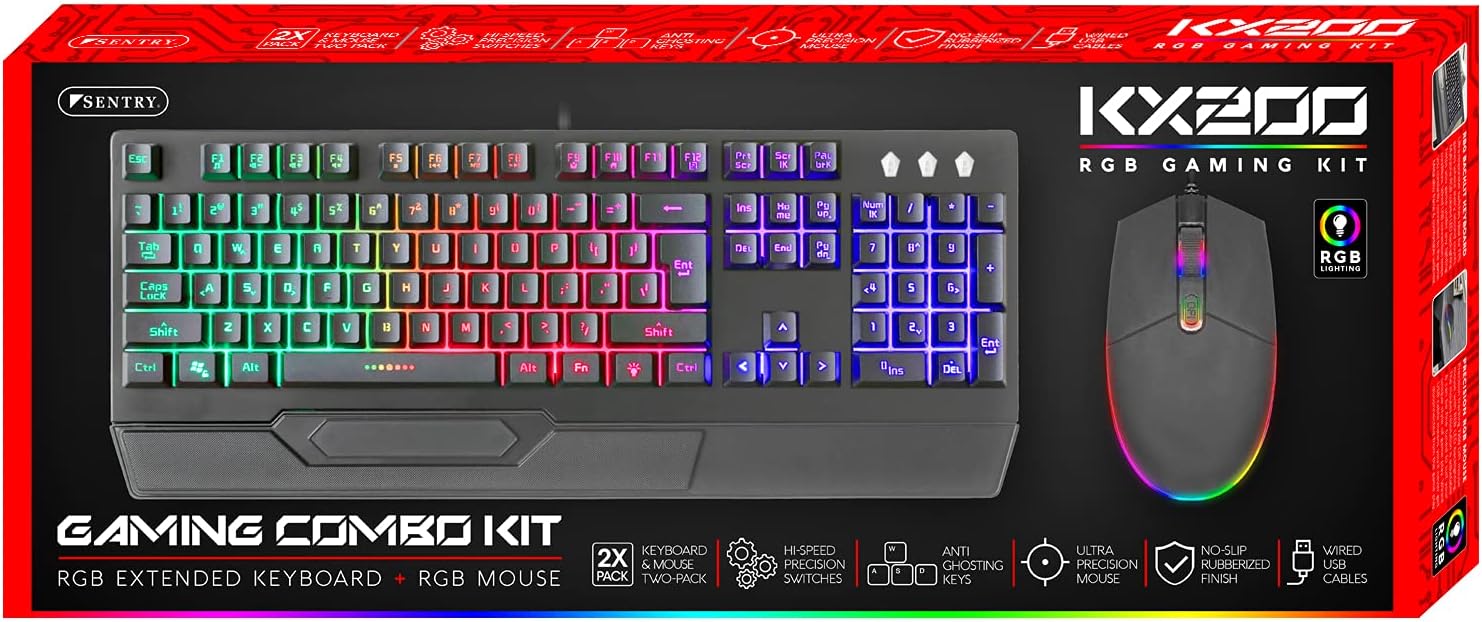
Image: The retail packaging for the Sentry HPXKX200 Gaming Keyboard and Mouse combo kit, showing both devices and key features.
Parentah Setup
Follow these steps to connect your Sentry HPXKX200 Gaming Keyboard and Mouse to your computer:
- Bongkarkeun Alat-alatna: Cabut kibor sareng beurit tina bungkusna kalayan ati-ati.
- Sambungkeun kibor: Pilari port USB anu sayogi dina komputer anjeun. Selapkeun konektor USB kibor pageuh kana port USB.
- Sambungkeun Mouse: Locate another available USB port on your computer. Insert the USB connector of the mouse firmly into the USB port.
- Pamasangan supir: Your operating system (e.g., Windows) should automatically detect and install the necessary drivers. This process may take a few moments.
- Pariksa sambungan: Once drivers are installed, the keyboard and mouse RGB lighting should illuminate, indicating they are ready for use.

Image: The Sentry HPXKX200 Gaming Keyboard, showcasing its full layout and attached USB cable for connection.

Image: The Sentry HPXKX200 Gaming Mouse, highlighting its ergonomic design and attached USB cable.

Gambar: A close-up view of a standard USB-A connector, which is used to connect both the keyboard and mouse to a computer.
Parentah Operasi
Pamakéan kibor
The 104-key layout provides a full range of standard typing and function keys. The RGB backlighting enhances visibility and aesthetics.
- Ngetik: Use the alphanumeric keys for standard text input.
- Tombol Fungsi (F1-F12): These keys perform various functions, often in combination with the 'Fn' key, depending on your operating system and applications.
- Kontrol Lampu RGB: Specific key combinations (e.g., Fn + Scroll Lock, Fn + Home/End) may cycle through different RGB lighting modes or adjust brightness. Refer to the keyboard's specific key legends for lighting controls.
Pamakéan Beurit
The 7200 DPI RGB mouse offers precise tracking and comfortable use.
- Klik Kénca: Aksi primér, seleksi.
- Klik katuhu: Menu kontéks.
- Gulung kabayang: Gulung ngaliwatan dokumén jeung web kaca. Roda gulung ogé fungsina salaku tombol klik tengah.
- Penyesuaian DPI: The DPI button (often located near the scroll wheel) allows you to cycle through different sensitivity settings (DPI levels) to match your preference for various tasks or games. The mouse supports up to 7200 DPI.
- Lampu RGB: The mouse features integrated RGB lighting that typically changes based on DPI settings or cycles through colors automatically.

Image: The Sentry HPXKX200 Gaming Keyboard and Mouse side-by-side, illustrating their design and illuminated RGB features.
Pangropéa
Proper care will extend the life of your gaming peripherals:
- beberesih: Anggo lawon anu garing sareng lemes pikeun ngusap permukaan keyboard sareng beurit. Keur kokotor bandel, rada dampen lawon ku cai atawa hampang, cleaner non-abrasive. Hindarkeun Uap kaleuleuwihan.
- Ngaleungitkeun lebu: Use compressed air to remove dust and debris from between the keyboard keys and from the mouse's optical sensor.
- Hindarkeun Cairan: Do not immerse the devices in water or expose them to excessive liquids.
- Panyimpenan: Store the keyboard and mouse in a cool, dry place when not in use.
Pamérésan masalah
If you encounter issues with your Sentry HPXKX200 Gaming Keyboard and Mouse, try the following solutions:
| Masalah | Solusi anu mungkin |
|---|---|
| Keyboard / Mouse teu ngabales |
|
| Lampu RGB teu jalan |
|
| Kursor beurit teu teratur atawa teu gerak |
|
| Keys not registering on keyboard |
|
spésifikasi
| Fitur | Rincian |
|---|---|
| merek | SENTRY |
| Nomer modél | KX200 |
| Téhnologi konektipitas | USB (Kabel) |
| Tipe kibor | 104-Key RGB USB Keyboard |
| Mouse DPI | 7200 DPI RGB Mouse |
| Warna | Hideung |
| Kasaluyuan System Operasi | Windows (and generally compatible with other OS supporting USB peripherals) |
| Ukuran Produk (Keyboard) | Kira-kira 21.65 x 9.84 x 3.15 inci |
| Item Beurat | Approximately 2.2 pounds (combined) |
Garansi sareng Rojongan
Sentry Industries Inc. products are manufactured to high-quality standards. For information regarding warranty coverage, technical support, or service inquiries, please refer to the warranty card included with your product or visit the official Sentry Industries Inc. websitus. Punten tahan bukti pameseran anjeun pikeun klaim garansi.