
1. Bubuka
This manual provides essential information for the safe and efficient operation of your Smart Tech 55UA10V3 55-inch 4K Smart TV. Please read these instructions thoroughly before using the television and retain them for future reference. This television features a 55-inch 4K display, integrated Wi-Fi, LAN connectivity, and DVB-T2/S2/C tuners for a comprehensive entertainment experience.
2. Émbaran Kasalametan
- Sasayogian tanaga: Pastikeun TV disambungkeun ka catu daya dina vol nu ditangtukeuntage range. Ulah ngaleuwihan kapasitas stop kontak.
- Ventilasi: Ulah meungpeuk bukaan ventilasi. Ngidinan spasi nyukupan sabudeureun TV pikeun aliran hawa ditangtoskeun pikeun nyegah overheating.
- Cai sareng Uap: Ulah ngalaan TV ka hujan atawa beueus. Ulah nempatkeun barang-barang anu dieusi cairan, sapertos vas, dina TV.
- beberesih: Cabut TV sateuacan beberesih. Paké lawon lemes, garing. Ulah make cleaners cair atawa cleaners aerosol.
- panempatan: Teundeun TV dina permukaan datar anu stabil. Hindarkeun nempatkeunna dina sinar panonpoé langsung atanapi caket sumber panas.
- Palayanan: Ulah nyobian ngalayanan TV sorangan. Rujuk sadayana jasa ka tanaga jasa anu mumpuni.
3. Eusi Paket
Punten parios yén barang-barang ieu kalebet dina pakét TV anjeun:
- Smart Tech 55UA10V3 55-inch 4K Smart TV
- Kadali jauh
- TV Stand (if applicable)
- Kabel Daya
- Manual pangguna (dokumén ieu)

Gambar 1: Hareupeun view of the Smart Tech 55UA10V3 TV, showing its dimensions and the included remote control. The screen displays a smart TV interface with various app icons.
4. Setélan
4.1. Installing the TV Stand or Wall Mounting
Carefully place the TV face down on a soft, flat surface. Attach the stand according to the instructions provided with the stand components. Ensure all screws are securely fastened. If wall mounting, follow the instructions of your wall mount bracket and ensure it is suitable for the TV's weight and VESA pattern.
4.2. Nyambungkeun Alat éksternal
Connect your external devices (e.g., cable box, Blu-ray player, game console) to the appropriate ports on the TV. The TV features:
- 3 HDMI Ports: Pikeun audio sareng pidéo definisi luhur.
- 2 port USB: Pikeun playback média ti drive USB.
- 1 Port VGA: For PC connection.
- Port LAN: Pikeun sambungan internét kabel.
- Input anteneu: For DVB-T2/S2/C signals.
- Slot Antarmuka Umum (CI): Pikeun modul aksés kondisional.
- Audio Digital kaluar: Pikeun nyambungkeun ka sistem audio éksternal.
- Kaluaran Headphone 3.5mm: Pikeun déngékeun pribadi.
4.3. Power On jeung Setup Awal
- Sambungkeun kabel kakuatan ka TV terus ka stop kontak témbok.
- Pencét tombol daya dina kadali jauh atanapi dina TV.
- Follow the on-screen instructions to complete the initial setup, including language selection, network connection (Wi-Fi or LAN), and channel scanning for DVB-T2/S2/C signals.
5. Nyuping
5.1. Fungsi Jauh Jauh
Remot kontrol ngamungkinkeun anjeun pikeun nganapigasi fitur TV. Tombol umum kalebet:
- kakuatan: Ngahurungkeun atawa mareuman TV.
- Sumber: Selects input source (HDMI, USB, TV).
- Volume +/-: Nyetél polumeu.
- Saluran +/-: Robah saluran TV.
- Tombol Navigasi (Kaluhur/Turun/Kénca/Katuhu) & OK: Pikeun menu navigasi jeung pilihan.
- Balik / Kaluar: Mulih ka layar saméméhna atawa kaluar hiji ménu.
- TV Pinter/Imah: Accesses the Smart TV interface.
5.2. Fitur TV Smart
Your Smart Tech TV offers a range of smart features:
- Konektipitas Internét: Connect to the internet via integrated Wi-Fi or the LAN port to access online content.
- Aplikasi: Access pre-installed applications and download more from the app store (if available).
- Web Browser: Kotektak internét langsung dina TV anjeun.
- Google Home Compatibility: Integrate your TV with Google Home for voice control (requires compatible Google Home device).
5.3. DVB-T2/S2/C Tuner Operation
The TV includes integrated tuners for digital terrestrial (DVB-T2), satellite (DVB-S2), and cable (DVB-C) broadcasts. After initial channel scanning, you can switch between these sources using the 'Source' button on your remote control.
5.4. Fungsi HDR
This TV supports HDR (High Dynamic Range), providing enhanced contrast and a wider range of colors for compatible content. Ensure your content source and settings are configured for HDR to experience its full benefits.
6. Pangropéa
- Ngabersihan layar: Lembut usap layar nganggo lawon anu lemes sareng teu aya serat. Pikeun tanda nekad, rada dampen lawon kalawan cai atawa cleaner layar husus (larapkeun kana lawon, teu langsung ka layar).
- beberesih Kabinet: Anggo lawon anu garing sareng lemes pikeun ngabersihan kabinet TV.
- Debu: Regularly dust the ventilation openings to prevent dust buildup.
- Kabel listrik: Periodically check the power cord for any damage. If damaged, replace it with an approved cord.
7. Cara ngungkulan
| Masalah | Mungkin Cukang lantaranana | Solusi |
|---|---|---|
| Taya kakuatan | ari kakuatan teu disambungkeun; stop kontak listrik teu jalan. | Pastikeun kabel listrik dicolokkeun sacara aman. Uji stop kontak nganggo alat anu sanés. |
| Henteu aya gambar, tapi aya sora | Sumber input salah dipilih; masalah lampu tukang. | Press the 'Source' button on the remote to select the correct input. |
| Henteu aya sora, tapi aya gambar | Volume muted atawa low teuing; masalah sistem audio éksternal. | Hurungkeun TV atawa tambahkeun polumeu. Pariksa sambungan ka alat audio éksternal. |
| Teu bisa nyambung ka Wi-Fi | Incorrect password; router too far; router issue. | Verify Wi-Fi password. Move TV closer to router or use LAN cable. Restart router. |
| Kadali jauh teu jalan | Batré béak; halangan antara remote jeung TV. | Ganti batréna. Cabut sagala halangan. |
8. Spésifikasi
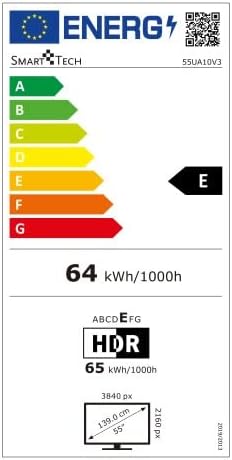
Gambar 2: Energy efficiency label for the Smart Tech 55UA10V3 television, indicating an energy class of E and a power consumption of 64 kWh per 1000 hours for standard dynamic range content, and 65 kWh per 1000 hours for HDR content.
- merek: Smart Tech
- Jumlah modél: 55UA10V3
- Ukuran tampilan: 55 inci
- Resolusi: 4K (3840x2160)
- Téknologi tampilan: LED (Full LED/Direct LED)
- HDR Function: Sumuhun
- TV Tuner: DVB-T2, DVB-S2, DVB-C
- Wifi: terpadu
- LAN: Sumuhun
- Port HDMI: 3
- Port USB: 2
- Port VGA: 1
- Kaluaran Headphone (3.5mm): 1
- Kaluaran Audio Digital: 1
- Common Interface (CI): Sumuhun
- Bluetooth: No
- Daya Kaluaran Audio: 16 W (2 spiker)
- Mode Audio: Sakuriling
- Kasaluyuan Smart Home: Imah Google
- Dimensions with Stand (W x H x D): 122.85 cm x 75.13 cm x 27.2 cm
- Dimensions without Stand (W x H x D): 122.85 cm x 71.07 cm x 7.68 cm
- Beurat produk: 10.6 kg
9. Garansi jeung Rojongan
Information regarding product warranty and specific support contacts is not available in the provided product details. Please refer to the warranty card included with your product or contact your retailer for details on warranty coverage and technical support.