
1. Bubuka
The D-Link DGS-1100-05PDV2 is a 5-Port Gigabit Smart Managed PoE Powered Switch/Extender designed for small, medium, and enterprise network environments. This switch is unique as it receives its power via Power over Ethernet (PoE) from an upstream PoE switch or injector, eliminating the need for a local AC power source. It also features PoE Pass-through capabilities, allowing it to supply power to one or two downstream PoE-enabled devices. The DGS-1100-05PDV2 incorporates energy-saving technologies like IEEE 802.3az Energy Efficient Ethernet and D-Link Green, ensuring efficient operation. Management is facilitated through an intuitive web-based interface, providing comprehensive control over network settings and features.
2. Fitur konci
- PoE Powered Operation: Receives power from an upstream PoE Switch or PoE injector, eliminating the need for a dedicated AC power supply.
- PoE Pass-through: Provides PoE power to one or two downstream devices, extending network and power reach.
- 5 Port Gigabit: Offers high-speed network connectivity for various devices.
- Smart Managed Capabilities: Features include 802.1Q VLAN support, Quality of Service (QoS), and Bandwidth Limiting for optimized network performance.
- Fitur Kaamanan Canggih: Includes Static MAC, Storm Control, and IGMP Snooping to enhance network security and stability.
- Énergi Éfisién: Compliant with IEEE 802.3az Energy Efficient Ethernet (EEE) and D-Link Green technology for reduced power consumption.
- Manajemén Gampang: Configurable via an intuitive web-based management interface for simplified network administration.
- Alat diagnostik: Features Loopback Detection and Cable Diagnostics to assist in quickly identifying and resolving network issues.
- Desain tanpa kipas: Ensures silent operation and contributes to a longer product lifespan.
- Pamasangan fleksibel: Supports both desktop and wall mount placement.
- Garansi saumur hirup: Backed by a D-Link Lifetime Warranty for long-term reliability.
3. Eusi Paket
Pariksa yén pakét anjeun ngandung barang-barang ieu:
- DGS-1100-05PDV2 Gigabit Switch
- Suku karét
- Pamasangan screws
- Pituduh instalasi gancang
- Kartu jaminan
Note: A PoE injector or an upstream PoE switch is required to power the DGS-1100-05PDV2 and is not included in the package.
4. Parentah Setup
4.1 Instalasi fisik
The DGS-1100-05PDV2 switch is designed for flexible placement, supporting both desktop and wall mounting. Ensure the installation location provides adequate ventilation and is free from excessive heat or moisture.

Gambar 4.1: Hareupeun view of the D-Link DGS-1100-05PDV2 switch, showing five Gigabit Ethernet ports and LED indicators.
4.2 Ngahurungkeun Saklar
This switch is PoE-powered. It receives power from an upstream PoE switch or a PoE injector. Connect an Ethernet cable from a PoE-enabled port on your upstream device to any of the five ports on the DGS-1100-05PDV2. The switch will draw power through this connection.
The switch also features a grounding screw for enhanced safety. If required by your installation environment, connect a grounding wire to the "SWITCH GND" terminal on the rear panel of the device.

Gambar 4.2: Kelample network diagram illustrating PoE power input and connections to various devices.
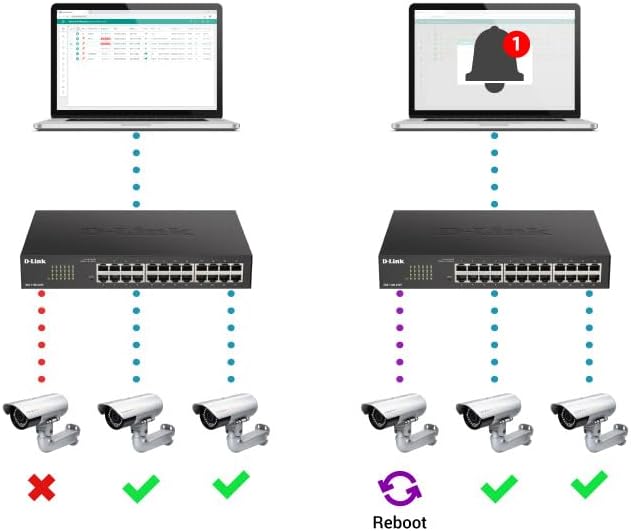
Figure 4.3: Rear panel of the switch, highlighting the "SWITCH GND" terminal for grounding.
4.3 Konfigurasi Awal (Web-Based Management)
The DGS-1100-05PDV2 can be managed via a web-based interface. By default, the switch may have a static IP address (e.g., 10.90.90.90) or obtain one via DHCP. To access the web panganteur:
- Sambungkeun komputer langsung ka salah sahiji port Ethernet switch urang.
- Configure your computer's IP address to be in the same subnet as the switch's default IP (e.g., if the switch is 10.90.90.90, set your computer to 10.90.90.x with a subnet mask of 255.255.255.0).
- Buka a web browser and enter the switch's default IP address (e.g., http://10.90.90.90).
- Log in using the default credentials (typically username: admin, kecap akses: admin or blank). Refer to the Quick Installation Guide for specific default credentials.
- Once logged in, you can configure network settings, including changing the IP address to DHCP or a different static IP, and enable desired features. Remember to save your configuration changes to ensure they persist after a reboot.
5. Ngoperasikeun Switch
The DGS-1100-05PDV2 is a Smart Managed switch, offering various functionalities to optimize your network. After initial setup, you can utilize the web-based management interface to configure and monitor the switch.
5.1 PoE Pass-through Functionality
The switch supports PoE Pass-through on ports 1 and 2. This means that if the switch itself is powered by PoE (e.g., from an 802.3at source), it can then provide power to up to two downstream PoE-enabled devices connected to ports 1 and 2. The maximum PoE budget available for downstream devices depends on the input power received by the switch.
5.2 Network Management Features
Ngaliwatan éta web interface, you can configure advanced Layer 2 features:
- VLAN (Jaringan Area Lokal Virtual): Segment your network for improved security and performance (e.g., 802.1Q VLAN support, Voice VLAN, Surveillance VLAN).
- Kualitas Pelayanan (QoS): Prioritize network traffic for critical applications like VoIP and video streaming.
- Kontrol Bandwidth: Manage bandwidth allocation per port to prevent network congestion.
- Static MAC: Manually assign MAC addresses to ports for enhanced security.
- Kontrol Badai: Prevent network disruptions caused by broadcast, multicast, or unknown unicast storms.
- IGMP Snooping: Optimize multicast traffic delivery, useful for IPTV and other multicast applications.
- Palabuan Eunteung: Monitor lalu lintas jaringan ku cara ngirim salinan pakét ti hiji port ka port anu sanés.
- Spanning Tree Protocol (STP/RSTP): Prevent network loops in complex topologies.
6. Pangropéa
The DGS-1100-05PDV2 is designed for minimal maintenance due to its fanless operation, which reduces moving parts and potential points of failure. However, regular checks and best practices are recommended:
- Pembaruan firmware: Periodically check the D-Link support website for firmware updates to ensure optimal performance, security, and access to new features.
- Inspeksi Fisik: Ensure the switch is placed in a well-ventilated area, free from dust and obstructions that could impede airflow. Keep the device clean using a soft, dry cloth.
- Manajemén Kabel: Pastikeun sadaya kabel Ethernet disambungkeun aman tur leres routed pikeun nyegah disconnections teu kahaja atawa karuksakan.
- Cadangan Konfigurasi: Regularly back up your switch configuration settings through the web interface. This allows for quick restoration in case of accidental changes or device replacement.
7. Cara ngungkulan
This section provides solutions to common issues you might encounter with your DGS-1100-05PDV2 switch.
7.1 No Power / Switch Not Turning On
- Verify that the switch is connected to a functioning PoE source (e.g., a PoE switch or PoE injector).
- Ensure the PoE source is active and providing sufficient power (e.g., 802.3at for full functionality, or 802.3af for basic operation).
- Check the Ethernet cable connecting the switch to the PoE source for damage or improper connection.
7.2 Teu Bisa Aksés Web Manajemén Panganteur
- IP Address Mismatch: Ensure your computer's IP address is in the same subnet as the switch's IP address. If the switch is at its default static IP (10.90.90.90), configure your computer with a static IP like 10.90.90.x (where x is not 90) and a subnet mask of 255.255.255.0.
- DHCP Issue: If the switch is configured for DHCP, use an IP scanner tool or check your router's DHCP client list to find the IP address assigned to the switch.
- Incorrect Credentials: Double-check the username and password. Default credentials are often admin pikeun duanana.
- Kasaluyuan browser: Try accessing the interface with a different web browser.
- Reset ka Default Pabrik: If all else fails, perform a factory reset. Locate the 'Reset' button on the front panel (often recessed, requiring a paperclip to press) and hold it for approximately 5-10 seconds until the LEDs indicate a reset. Perhatosan: Ieu bakal mupus sadaya konfigurasi khusus.
7.3 Masalah Konektipitas Jaringan
- Diagnostik kabel: Utilize the built-in Cable Diagnostics feature via the web interface to test the integrity of connected Ethernet cables.
- Deteksi Loopback: If enabled, this feature can detect and prevent network loops. Check the switch logs for loopback events.
- Indikator LED: Observe the Link/Act LEDs on the switch ports. A solid green or amber light indicates a valid link, while a blinking light indicates activity. No light suggests a cable issue or a problem with the connected device.
- Konfigurasi VLAN: Ensure devices are assigned to the correct VLANs if VLANs are configured on the switch.
8. Spésifikasi Téknis
| Atribut | Rincian |
|---|---|
| Nomer modél | DGS-1100-05PDV2 |
| Jumlah Palabuhan | 5 Gigabit Ethernet palabuhan |
| Rojongan PoE | PoE Powered (Input), PoE Pass-through on ports 1 & 2 (Output) |
| Laju Mindahkeun Data | 10/100/1000 Mbps (Gigabit) |
| Tipe panganteur | RJ45 |
| Bahan Kasus | logam |
| Ukuran produk (L x W x H) | 10.16" x 8.26" x 2.79" (25.8 cm x 21 cm x 7.1 cm) |
| Item Beurat | 0.5 Pon (kira-kira 227 gram) |
| Suhu Operasi | 32°F nepi ka 104°F (0°C nepi ka 40°C) |
| Énergi Énergi | IEEE 802.3az Énergi Énergi Ethernet (EEE) |
| Manajemén | Web-based GUI, D-Link Network Assistant |
| Rojongan VLAN | 802.1Q VLAN, Voice VLAN, Surveillance VLAN |
| Garansi | Garansi saumur hirup |

Figure 8.1: Dimensions of the DGS-1100-05PDV2 switch.
9. Garansi sareng Rojongan Téknis
9.1 Garansi Saumur hirup
The D-Link DGS-1100-05PDV2 is backed by a Garansi saumur hirup, which includes Next Business Day (NBD) hardware replacement. This warranty provides long-term confidence in the product's reliability. Please refer to the included warranty card or the D-Link official websitus pikeun istilah lengkep sareng kaayaan.
9.2 Rojongan Téknis
For technical assistance, product documentation, and firmware updates, please visit the official D-Link support websitus:
- Dukungan AS: http://support.dlink.com
- Rojongan Kanada: http://support.dlink.ca
D-Link Systems, Inc. is located at 14420 Myford Road, Suite 100, Irvine, CA 92606, USA.