
Bubuka
Thank you for choosing the ErGear Gas Spring Monitor Mount, Model EGSS6-E. This professional monitor arm is engineered from aviation die-cast aluminum, designed to securely hold ultra-wide, curved, or gaming monitors ranging from 13 to 35 inches, with a weight capacity of up to 12 kg (26.5 lbs). It provides robust support and flexible adjustment options to enhance your viewing experience and workspace ergonomics.
This manual provides detailed instructions for assembly, operation, maintenance, and troubleshooting to ensure optimal performance and longevity of your monitor mount. Please read it thoroughly before installation and keep it for future reference.

Gambar: Leuwihview of the ErGear Gas Spring Monitor Mount, showing the arm, pole, and two mounting options (C-clamp and grommet base).
Setup sareng Instalasi
The ErGear monitor mount is designed for quick and easy assembly, typically taking less than 15 minutes. All necessary tools and accessories are included, with parts clearly numbered for straightforward installation. The detachable VESA plate simplifies monitor attachment.
Kasaluyuan
- Ukuran Monitor: 13 to 35 inches (flat or curved)
- Kapasitas beurat: 4.4 nepi ka 26.5 lbs (2 nepi ka 12 kg)
- Pola VESA: 75x75mm jeung 100x100mm

Image: Illustrates monitor compatibility, showing a user with a mounted monitor and icons indicating support for 22-34" flat/curved monitors, 4.4-26.5 lbs capacity, and VESA 75x75mm/100x100mm patterns.
Pilihan Pamasangan
The mount offers two installation methods to suit various desk types:
- C-Clamp Pamasangan: Ideal for desks with a thickness between 1.0 and 3.2 inches. This method clamps tempatna dipasang di sisi méja anjeun.
- Pamasangan Grommet: Suitable for desks with a pre-existing grommet hole or if you prefer to drill one. This option supports desk thicknesses between 0.8 and 3.5 inches.

Image: Demonstrates the quick assembly process and illustrates the two mounting options: C-Clamp for desk edges (1.0-3.2" thickness) and Grommet Mounting for desk holes (0.8-3.5" thickness).
Léngkah-léngkah Instalasi (General Overview)
- Pilih Metode Pemasangan: Select either C-Clamp or Grommet mounting based on your desk and preferences.
- Dasar ngumpul: Attach the chosen base to the desk according to the detailed instructions provided in the packaging.
- Attach Pole and Arm: Secure the main pole to the base, then slide the monitor arm onto the pole.
- Gantelkeun Plat VESA ka Monitor: Fasten the detachable VESA plate to the back of your monitor using the provided screws.
- Pasang Monitor: Slide the monitor (with VESA plate attached) onto the arm's VESA head. Ensure it clicks securely into place.
- Atur Tegangan Pegas Gas: Once the monitor is mounted, adjust the gas spring tension using the included hex key to match your monitor's weight. This ensures the monitor stays at the desired height. Turn clockwise to decrease tension for lighter monitors, counter-clockwise to increase tension for heavier monitors.
Operasi sarta adjustment
The ErGear monitor mount offers a full range of motion, allowing you to position your monitor for optimal ergonomic comfort and viewing angles. The gas spring mechanism provides smooth and effortless adjustments.
Gerakan Fleksibel
- Penyesuaian Jangkungna: Effortlessly raise or lower your monitor up to a maximum height of 36 cm (14.1 inches) from the desk surface. The gas spring ensures smooth vertical movement.
- Ékstensi/Panyabutan: Extend the monitor arm up to 61 cm (24 inches) or retract it closer to the pole, providing flexibility for various viewing jarak.
- Dengdekkeun: Adjust the monitor screen tilt from +85° (upward) to -30° (downward) to reduce glare and find your preferred viewsudut ing.
- Putar: Pivot the monitor 180° (90° left to 90° right) at the arm joint, allowing you to share your screen or change viewarahna.
- Rotasi: Rotate the monitor 360° (from landscape to portrait orientation) for different work tasks or content viewing.

Image: Illustrates the full range of motion, including tilt (+85°/-30°), swivel (180°), and 360° rotation, demonstrating how to achieve various ergonomic positions.
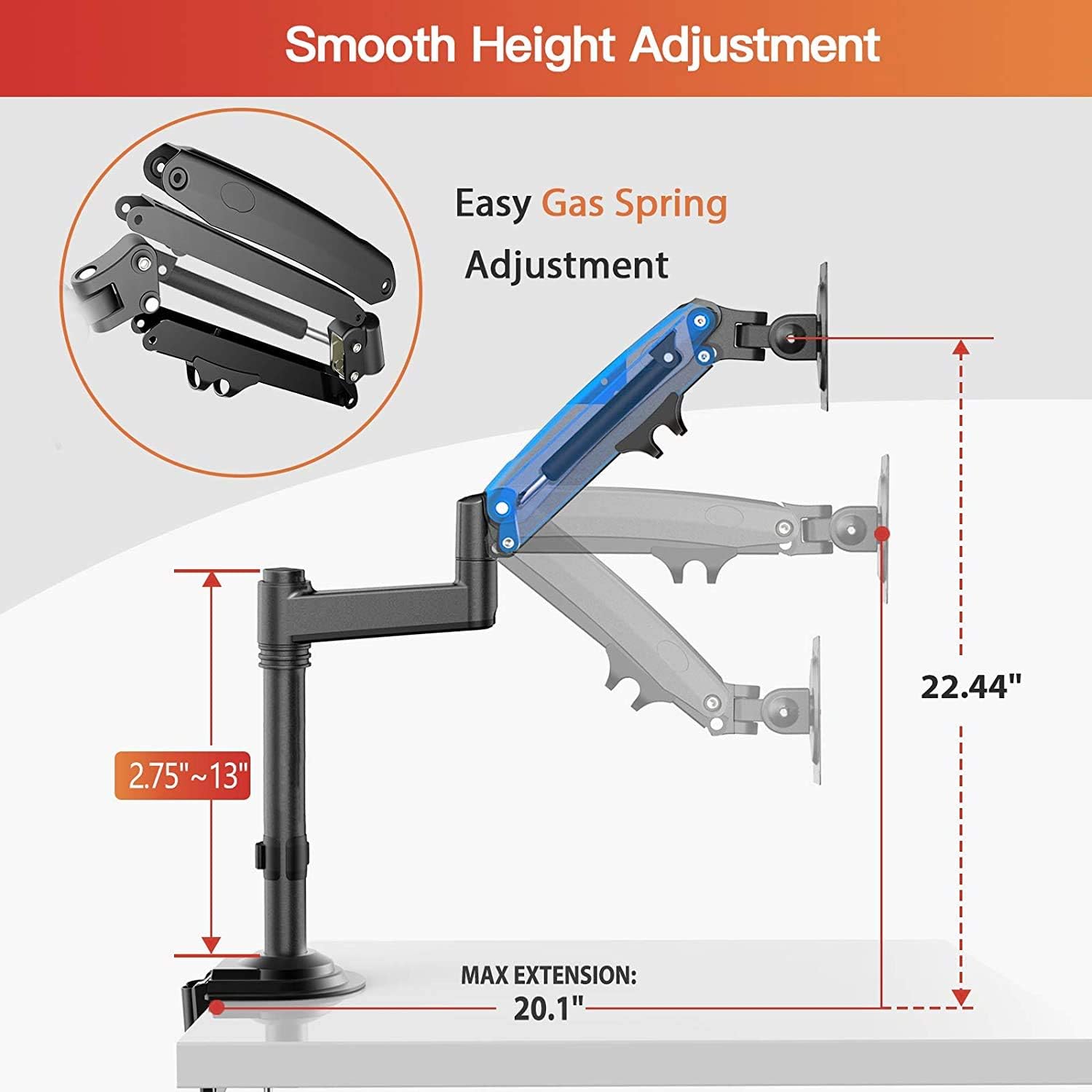
Image: Shows the gas spring mechanism and the range of height adjustment (2.75" to 13" from the arm pivot point, total height up to 22.44" from desk) and maximum extension (20.1").

Image: A user adjusting the height of a monitor mounted on the ErGear arm in an office environment, demonstrating the smooth vertical movement.
Manajemén kabel
The monitor arm features integrated cable management channels. Route your monitor cables through these channels to keep them organized and out of sight, contributing to a cleaner and more efficient workspace.
Pangropéa
Regular maintenance ensures the longevity and smooth operation of your ErGear monitor mount.
- beberesih: Lap permukaan dudukan ku kaén anu lemes,amp lawon. Hindarkeun pembersih abrasive atanapi pangleyur anu tiasa ngaruksak finish.
- Pariksa sambungan: Periodically check all screws and bolts to ensure they are tight and secure. Loose connections can affect stability and adjustment.
- Pangaluyuan Pegas Gas: If your monitor feels too loose or too stiff, re-adjust the gas spring tension as described in the installation section to match the monitor's weight.
Pamérésan masalah
If you encounter any issues with your ErGear monitor mount, refer to the following common troubleshooting tips:
- Monitor Sags or Doesn't Stay at Desired Height:
- The gas spring tension may be too low for your monitor's weight. Use the included hex key to increase the tension (turn counter-clockwise).
- Ensure your monitor's weight is within the specified range (4.4 - 26.5 lbs / 2 - 12 kg).
- Monitor is Difficult to Move or Adjust:
- The gas spring tension may be too high. Use the included hex key to decrease the tension (turn clockwise).
- Check if any bolts at the joints are overtightened. Loosen them slightly if necessary, ensuring the arm still holds position.
- Mount Feels Unstable or Wobbly:
- Pastikeun C-clamp or grommet base is securely tightened to the desk.
- Verify that all connections on the arm and pole are tightened.
- Confirm your desk surface is stable and capable of supporting the mount and monitor weight.
- Monitor Cannot Be Attached to VESA Plate:
- Check if your monitor supports VESA 75x75mm or 100x100mm patterns.
- Ensure you are using the correct screws for your monitor's VESA holes.
spésifikasi
| merek | ErGear |
| Nomer modél | EGSS6-E |
| Warna | Hideung |
| Kasaluyuan Ukuran layar | 13 - 35 inci |
| Kapasitas beurat | 4.4 - 26.5 lbs (2 - 12 kg) |
| Kasaluyuan VESA | 75x75mm, 100x100mm |
| Height Adjustment (Max) | 36 cm (14.1 inci) |
| Arm Extension (Max) | 61 cm (24 inci) |
| Rentang Dengdekkeun | +85 ° / -30 ° |
| Rentang putar | 180° |
| Rentang Rotasi | 360° |
| C-Clamp Kandel méja | 1.0 - 3.2 inci |
| Kandel Méja Pemasangan Grommet | 0.8 - 3.5 inci |
Garansi sareng Rojongan
For specific warranty information or technical support, please refer to the documentation included with your product packaging or visit the official ErGear websitus. Inpormasi ngeunaan kasadiaan suku cadang teu disayogikeun dina manual ieu.