
Bmax X15
Bmax X15 Laptop User Manual
Modél: X15
Bubuka
This manual provides comprehensive instructions for the setup, operation, and maintenance of your Bmax X15 laptop. Please read this manual carefully before using your device to ensure proper functionality and longevity.
Produk Leuwihview
Hareupeun View

The Bmax X15 features a vibrant 15.6-inch Full HD display, providing clear and crisp visuals for all your computing needs.
Kibor sareng Touchpad

Equipped with a full-sized keyboard including a numeric keypad and a large 4.7-inch multi-touch touchpad for comfortable and efficient input.
Sisi Profile jeung Palabuhan

The slim design incorporates essential ports including two USB 3.0 ports, a Micro HDMI output, a DC power input, and a headphone jack for versatile connectivity.
Tukangeun View

The Bmax X15 features a durable metal back cover, enhancing both its aesthetic appeal and structural integrity.
Disetél
Mimiti Power-On
- Ngeusi batre: Before first use, connect the included power adapter to the laptop's DC port and a power outlet. Allow the battery to charge fully. The charging indicator light will typically change color or turn off when fully charged.
- Daya Hurung: Open the laptop lid and press the power button, usually located on the top right of the keyboard area.
- Setup Windows: Follow the on-screen prompts to complete the Windows 10 Pro setup. This includes selecting your language, region, connecting to a Wi-Fi network, and creating a user account.
Nyambungkeun Periferal
- Alat USB: Connect USB mice, keyboards, or external drives to the USB 3.0 ports on the sides of the laptop.
- Tampilan éksternal: Use a Micro HDMI cable to connect the laptop to an external monitor or TV. Ensure the external display is set to the correct input source.
- Alat Audio: Colokkeun headphone atanapi speaker éksternal kana jack audio 3.5mm.
- Kartu Micro-SD: Insert a Micro-SD card into the designated slot for additional storage.
Parentah Operasi
Panggunaan Kibor sareng Touchpad
The Bmax X15 features a responsive keyboard and a large touchpad. The touchpad supports multi-touch gestures for enhanced navigation. Refer to Windows settings for customizing touchpad gestures.
Setélan tampilan
The 15.6-inch Full HD IPS display offers excellent clarity. You can adjust display settings such as brightness, resolution, and scaling through Windows Display Settings.
Ékspansi gudang
Expandable M.2 SSD Slot
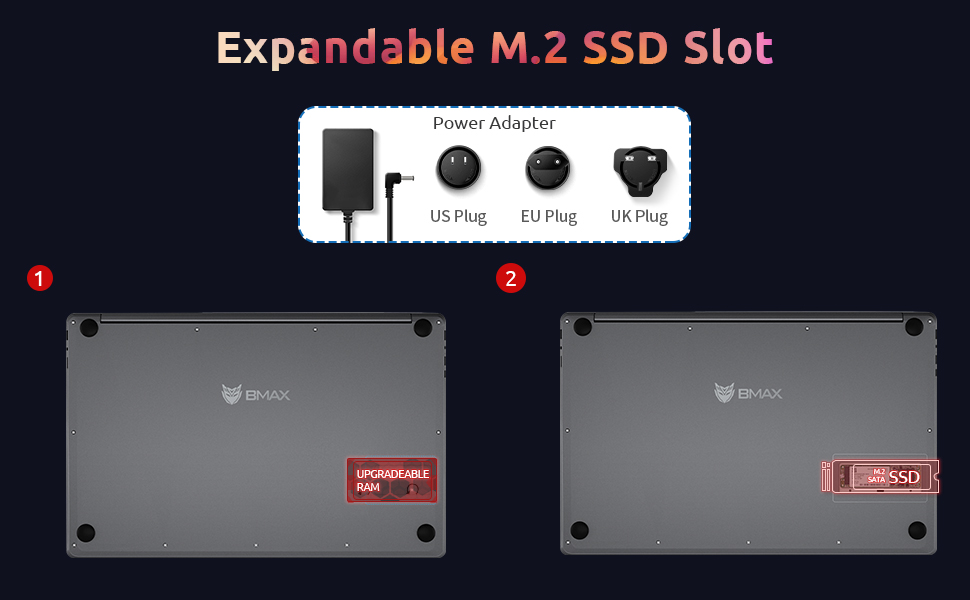
The Bmax X15 comes with a 256GB SSD and supports further storage expansion via an M.2 SATA SSD slot. This allows for significant upgrades to your storage capacity.
Pangropéa
beberesih
- layar: Make kaen nu lemes, teu aya lint rada dampDieusian ku cai atanapi pembersih layar. Ulah nyemprot cairan langsung kana layar.
- Keyboard sareng Chassis: Paké lawon lemes, garing. Pikeun kokotor nekad, a rada damp lawon bisa dipaké, mastikeun euweuh cairan anu asup kana liangna.
- Palabuhan: Paké hawa dikomprés pikeun gently mupus lebu tina palabuhan.
Perawatan batré
- Hindarkeun sering-sering ngeusi batre.
- Simpen laptop di tempat anu tiis sareng garing upami henteu dianggo kanggo waktos anu lami, kalayan batré anu dicas dugi ka sakitar 50%.
- Use only the original Bmax power adapter.
Software Apdet
Regularly check for and install Windows updates to ensure system stability, security, and optimal performance. Go to Setélan> Update & Kaamanan> Windows Update.
Pamérésan masalah
| Masalah | Mungkin Cukang lantaranana | Solusi |
|---|---|---|
| Laptop teu hurung. | Low battery; Power adapter issue; Hardware fault. | Ensure power adapter is securely connected and outlet is working. Allow battery to charge for at least 30 minutes before attempting to power on again. |
| Tampilan kosong atanapi kedip-kedip. | Incorrect display settings; Driver issue; Hardware fault. | Pencét Fn + F1 (or relevant display toggle key) to cycle through display modes. Update graphics drivers. Restart the laptop. |
| Masalah sambungan Wi-Fi. | Wi-Fi adapter off; Router issue; Driver issue. | Ensure Wi-Fi is enabled in Windows settings. Restart your router. Update network drivers. |
| kinerja lalaunan. | Too many programs running; Low storage space; Malware. | Close unnecessary applications. Free up disk space. Run a virus scan. Consider upgrading SSD or RAM if consistently slow. |
spésifikasi
| Fitur | Rincian |
|---|---|
| Modél | Bmax X15 |
| Prosesor | Intel Celeron N4120 Quad Core (up to 2.6 GHz) |
| Ram | 8 GB DDR4 |
| Panyimpenan | 256 GB SSD (Expandable via M.2 SATA SSD slot) |
| tampilan | 15.6-inch Full HD (1920x1080) IPS |
| Grafika | Intel UHD Graphics 600 (Terpadu) |
| Sistem operasi | Windows 10 Pro (Supports Linux OS) |
| Konéktipitas Wireless | Wi-Fi 802.11ac, Bluetooth |
| Palabuhan | 2x USB 3.0, 1x Micro HDMI, 1x DC Power, 1x 3.5mm Headphone Jack, 1x Micro-SD Card Reader |
| Webkaméra | 0.3 MP |
| Kahirupan batré | Nepi ka 5 jam (pamakéan has) |
| Ukuran (L x W x H) | 14.8 x 9.6 x 0.8 inci |
| Beurat | 4.4 pon |
Garansi sareng Rojongan
Bmax offers a worry-free 30-day return policy and a 12-month warranty for the X15 laptop. For technical support or warranty claims, please refer to the contact information provided with your product packaging or visit the official Bmax support websitus.
Customer service is available 7 days a week, 24 hours a day.
Kanggo inpo nu leuwih lengkep, anjeun tiasa nganjang ka Bmax Store on Amazon.