
OSD Audio BK-SAM300
OSD Black 300W Subwoofer AmpManual Pamaké lifier
Model: BK-SAM300
1. Bubuka
Thank you for choosing the OSD Black 300W Subwoofer Amplifier, Model BK-SAM300. This amplifier is designed to provide powerful and precise low-frequency amplification for passive subwoofers, enhancing your home theater or audio system experience. With its robust Class AB output stage and versatile connectivity options, the BK-SAM300 delivers deep, impactful bass for movies, music, and games.
This manual provides detailed instructions for the proper installation, operation, and maintenance of your subwoofer amppangleyur. Mangga baca heula kalawan saksama sateuacan dianggo sareng simpen kanggo rujukan ka hareup.
2. Émbaran Kasalametan
PERHATOSAN: Pikeun ngirangan résiko kahuruan atanapi kejutan listrik, ulah ngalaan alat ieu ka hujan atanapi lembab.
- Baca sagala parentah saméméh operasi amppangagung.
- Simpen manual ieu kanggo rujukan ka hareup.
- Heed all warnings on the amplifier and in this manual.
- Turutan sagala parentah.
- Entong nganggo alat ieu caket cai.
- Ngabersihan ngan ku kaén garing.
- Ulah meungpeuk sagala bukaan ventilasi. Pasang saluyu sareng parentah produsén.
- Entong dipasang di deukeut sumber panas sapertos radiator, register panas, kompor, atanapi aparat sanésna (kalebet ampLiifiers) anu ngahasilkeun panas.
- Ulah eleh tujuan kaamanan colokan polarized atawa grounding-tipe. A colokan polarized boga dua wilah jeung hiji leuwih lega ti lianna. A colokan tipe grounding boga dua wilah jeung prong grounding katilu. Agul lega atawa prong katilu disadiakeun pikeun kaamanan Anjeun. Upami colokan anu disayogikeun henteu pas kana stop kontak anjeun, konsultasi ka tukang listrik pikeun ngagantian stop kontak anu tos lami.
- Nangtayungan kabel listrik tina leumpang atawa diciwit, utamana dina colokan, wadah merenah, jeung titik dimana aranjeunna kaluar tina aparat.
- Ngan anggo kantétan/aksésori anu ditunjuk ku produsén.
- Cabut colokan alat ieu nalika badai kilat atanapi nalika henteu dianggo kanggo waktos anu lami.
- Rujuk sadayana jasa ka tanaga jasa anu mumpuni. Diperlukeun ngalayanan nalika aparatur ruksak ku cara naon waé, sapertos kabel catu daya atanapi colokan rusak, cairan tumpah atanapi barang murag kana aparatur, aparatur parantos kakeunaan hujan atanapi lembab, henteu beroperasi normal. , atawa geus turun.
3. Eusi Paket
Mangga cék kotak pikeun item di handap ieu:
- OSD Black 300W Subwoofer Amplifier (BK-SAM300)
- Kabel listrik
- Manual pangguna (dokumén ieu)
4. Produk Langkungview
4.1 Kadali Panel hareup
The front panel of the BK-SAM300 features essential controls for power and audio adjustments.

Gambar 4.1: Hareup jeung tukang View of the BK-SAM300 Amplifier. This image displays both the front panel with its controls and the rear panel with all input/output connections.
- Tombol Daya: Toggles ka amphurung atawa pareumna daya liifier.
- Phase Control (0° - 180°): Adjusts the phase of the subwoofer output relative to the main speakers. This helps to ensure that the subwoofer's sound waves align correctly with those of the main speakers, preventing cancellation or reinforcement issues at the crossover frequency.
- FREQ (Crossover Frequency) Control: Sets the upper frequency limit for the subwoofer. Frequencies above this setting will be filtered out. Adjustable from approximately 40Hz to 120Hz.
- GAIN (Volume) Control: Adjusts the overall output level of the subwoofer amplifier. Use this to balance the subwoofer's volume with the rest of your audio system.
4.2 Sambungan Panel Rear sarta kadali
The rear panel houses all the input and output connections, along with additional settings for advanced configuration.
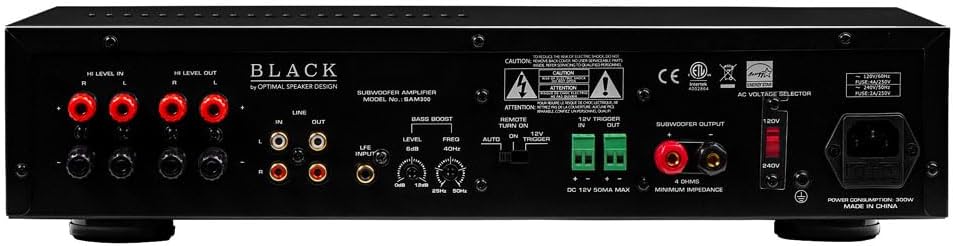
Figure 4.2: Rear Panel of the BK-SAM300 Amplifier. This image provides a detailed view of all input and output terminals, including Hi Level, Line, LFE, Bass Boost, 12V Trigger, and Subwoofer Output.
- HI LEVEL IN (Speaker Level Input): Connects directly to the speaker outputs of your receiver or amplifier. Use this if your receiver does not have a dedicated subwoofer output or LFE output.
- HI LEVEL OUT (Speaker Level Output): Passes the full-range audio signal from the HI LEVEL IN to your main speakers.
- LINE IN (RCA Input): Standard RCA stereo inputs for connecting to the pre-out or line-out of your receiver or audio source.
- LINE OUT (RCA Output): Passes the audio signal from the LINE IN to another amplifier atawa alat audio.
- LFE INPUT (RCA Input): Dedicated input for connecting to the LFE (Low-Frequency Effects) output of an AV receiver. This bypasses the amplifier's internal crossover, relying on the receiver's bass management.
- BASS BOOST (Level & Freq):
- Level (0dB to 12dB): Adjusts the intensity of the bass boost.
- Freq (25Hz to 50Hz): Selects the center frequency at which the bass boost is applied.

Figure 4.3: Detail of Bass Boost Controls. This image highlights the Level and Freq knobs for fine-tuning the bass boost.
- REMOTE TURN ON (Manual, Auto, 12V Trigger): Milih anu amplifier's power-on mode.
- Manual: Amplifier is turned on/off manually via the front panel power button.
- Otomatis: Amplifier automatically turns on when an audio signal is detected and enters standby mode when no signal is present for a period.
- 12V pemicu asup/kaluar: Ngidinan dina amplifier to be turned on/off by a 12V DC trigger signal from a compatible receiver or control system.
- SUBWOOFER OUTPUT (Binding Posts): Connects to your passive subwoofer using speaker wire. Ensure correct polarity (+ to + and - to -). The amplifier stabil turun ka 4 ohm impedansi.

Figure 4.4: Detail of Subwoofer Output and 12V Trigger. This image shows the binding posts for subwoofer connection and the 12V trigger terminals.
- AC VOLTAGE SELECTOR (120V/240V): Milih vol input luyutage pikeun wewengkon Anjeun. Ensure this is set correctly before plugging in the amppangagung.
- Inlet Daya AC: Nyambungkeun kabel listrik anu disayogikeun.
5. Setélan
5.1 Nempatkeun
Tempatna amplifier in a location that allows for adequate ventilation. Avoid enclosed spaces or stacking other components directly on top of the amplifier. Keep it away from direct sunlight, heat sources, and moisture. Ensure it is placed on a stable, level surface.
5.2 Nyambungkeun ka Amppangagung
Choose one of the following connection methods based on your audio system's capabilities:
Method A: Using LFE Input (Recommended for AV Receivers with Subwoofer Output)
- Connect an RCA cable from the LFE or Subwoofer Pre-Out jack on your AV receiver to the LFE INPUT jack on the BK-SAM300.
- Sambungkeun subwoofer pasif anjeun ka OUTPUT SUBWOOFER binding posts on the BK-SAM300 using appropriate gauge speaker wire. Ensure correct polarity (+ to + and - to -).
- Proceed to Section 5.3 for power connection.
Method B: Using Line Level Inputs (for Stereo Receivers or Pre-Outs)
- Connect RCA cables from the Pre-Out or Line-Out jacks of your receiver/pre-amplifier ka LINE IN (Left and Right) jacks on the BK-SAM300.
- Sambungkeun subwoofer pasif anjeun ka OUTPUT SUBWOOFER binding posts on the BK-SAM300 using appropriate gauge speaker wire. Ensure correct polarity (+ to + and - to -).
- Proceed to Section 5.3 for power connection.
Method C: Using High Level Inputs (for Receivers without Dedicated Subwoofer/Pre-Outs)
- Connect speaker wires from the main speaker outputs of your receiver/amplifier ka HI TINGKAT DI (Left and Right) binding posts on the BK-SAM300. Ensure correct polarity.
- (Optional) If you wish to pass the signal through to your main speakers, connect speaker wires from the HI TINGKAT OUT binding posts on the BK-SAM300 to your main speakers.
- Sambungkeun subwoofer pasif anjeun ka OUTPUT SUBWOOFER binding posts on the BK-SAM300 using appropriate gauge speaker wire. Ensure correct polarity (+ to + and - to -).
- Proceed to Section 5.3 for power connection.
5.3 Sambungan Daya
- Before connecting the power cord, ensure the AC VOLTAGE PEMILIH switch on the rear panel is set to the correct voltage for your region (120V or 240V). Incorrect setting can damage the unit.
- Sambungkeun kabel daya anu disayogikeun ka Inlet Daya AC on the rear panel of the amppangagung.
- Colokkeun tungtung kabel listrik anu sanés kana stop kontak témbok anu cocog.
6. Parentah Operasi
6.1 Powering on / Pareum
The BK-SAM300 offers three power-on modes:
- Modeu Manual: Nyetél REMOTE ON switch to "Manual". Press the front panel Tombol Daya pikeun ngahurungkeun amplifier atawa mareuman.
- Modeu Otomatis: Nyetél REMOTE ON switch to "Auto". The amplifier will automatically turn on when an audio signal is detected at the inputs and will enter standby mode after approximately 15-20 minutes of no audio signal.
- 12V Trigger Mode: Connect a 12V DC trigger cable from your source component (e.g., AV receiver) to the 12V TRIGGER IN terminal. Set the REMOTE ON switch to "12V Trigger". The amplifier will power on/off with the source component.
6.2 Ngaluyukeun kadali
Optimal sound quality depends on proper adjustment of the amplifier's controls to match your subwoofer and listening environment.
- GAIN (Volume): Start with the GAIN control at its minimum setting. Play some audio with significant bass content. Slowly increase the GAIN until the subwoofer's output blends seamlessly with your main speakers. Avoid setting the gain too high, as this can lead to distortion.
- FREQ (Crossover Frequency):
- Upami nganggo LFE INPUT, this control is bypassed. Set your AV receiver's subwoofer crossover frequency.
- Lamun ngagunakeun LINE IN or HI TINGKAT DI, adjust the FREQ control to blend the subwoofer's output with your main speakers. A good starting point is typically 80Hz-100Hz, but this may vary depending on the size and frequency response of your main speakers. Smaller main speakers usually require a higher crossover frequency.
- PHASE (0° - 180°): The phase control helps to ensure that the subwoofer's sound waves are in sync with your main speakers.
- Play music with a consistent bass line.
- While listening from your primary listening position, slowly adjust the PHASE control from 0° to 180°.
- Stop at the position where the bass sounds the loudest and most impactful. If the bass sounds weak or hollow, try adjusting the phase.
- BASS BOOST: Use the BASS BOOST controls (Level and Freq) to fine-tune the low-frequency response.
- Frékuénsi: Select the specific low frequency (25Hz to 50Hz) you wish to boost.
- tingkat: Adjust the amount of boost (0dB to 12dB) at the selected frequency. Use sparingly to avoid muddy or boomy bass.
7. Pangropéa
- beberesih: Pegatkeun sambungan nu amplifier from power before cleaning. Use a soft, dry cloth to wipe down the exterior. Do not use liquid cleaners or aerosol sprays.
- Ventilasi: Ensure that the ventilation openings are not blocked by dust or debris. Periodically check and clean if necessary to maintain proper airflow.
- Panyimpenan: Lamun nyimpen éta amplifier for an extended period, disconnect it from power and store it in a cool, dry place, away from direct sunlight and extreme temperatures.
8. Cara ngungkulan
| Masalah | Mungkin Cukang lantaranana | Solusi |
|---|---|---|
| Teu daya/ Amplifier teu hurung. |
|
|
| Taya sora tina subwoofer. |
|
|
| Distorted or muddy bass. |
|
|
| Sora ngahiung atawa ngagaur. |
|
|
9. Spésifikasi
| Fitur | Rincian |
|---|---|
| Modél | BK-SAM300 |
| Daya Kaluaran | 300 Watt (RMS) |
| Stabilitas Impedansi | 4-ohm Stable |
| Amplifier Kelas | Kelas AB |
| Réspon Frékuénsi | 20Hz - 160Hz |
| Frékuénsi Crossover | Adjustable 40Hz - 120Hz |
| Kontrol fase | 0° - 180° Variable |
| Naekeun Bass | 25Hz - 50Hz, up to 12dB |
| Input | Low-level (RCA), High-level (Speaker), LFE (RCA), 12V Trigger |
| Kaluaran | Subwoofer Output (Binding Posts), High-level Pass-through, 12V Trigger |
| Modeu kakuatan | Manual, Auto-Sensing, 12V Trigger |
| Konsumsi Daya Sayaga | Kurang ti 1 Watt |
| Ukuran (W x H x D) | 17.25 x 3.75 x 13.88 inci (43.8 x 9.5 x 35.2 cm) |
| Beurat | 20 pon (9.07 kg) |
| Bahan Chassis | Heavy-duty steel with brushed aluminum faceplate |
| Voltage | Switchable 120V/240V |
10. Garansi jeung Rojongan
OSD Audio products are designed and manufactured to the highest quality standards. For specific warranty information regarding your BK-SAM300 Subwoofer Ampliifier, mangga tingali kartu garansi anu kalebet dina produk anjeun atanapi kunjungi OSD Audio resmi websitus. Sarat jaminan biasana nutupan cacad dina bahan sareng pagawean dina panggunaan normal.
For technical support, troubleshooting assistance, or service inquiries, please contact OSD Audio customer support through their official website or the contact information provided with your purchase. Please have your model number (BK-SAM300) and purchase date ready when contacting support.
Sumberdaya Online: For the latest information, FAQs, and additional support, please visit the Audio OSD websitus.
Ask a question about this manual
Ask about setup, troubleshooting, compatibility, parts, safety, or missing instructions. Manuals+ will review the question and use this page’s manual context to help answer it.