
Bubuka
This manual provides comprehensive instructions for setting up, operating, and maintaining your Macally Bluetooth Keyboard. Designed for multi-device compatibility, this wireless keyboard features a built-in stand, a rechargeable battery, and 78 keys for efficient typing across various devices including tablets, smartphones, and computers.

Image: The Macally Bluetooth Keyboard in white, with a tablet securely docked in its integrated stand, showcasing its compact design and functionality.
Naon dina Box
Upon unboxing your Macally Bluetooth Keyboard, please ensure all the following items are present:
- Macally Bluetooth Keyboard
- Kabel Ngecas USB
- Manual pangguna (dokumén ieu)
If any items are missing or damaged, please contact Macally customer support.
Fitur produk
The Macally Bluetooth Keyboard is designed for versatility and convenience, offering several key features:
- Konektipitas Multi-Alat: Seamlessly switch between up to 3 Bluetooth-enabled devices (e.g., tablet, smartphone, computer).
- Stand Alat Terpadu: Features a built-in 10.5-inch slot to securely hold your smartphone or tablet.
- Kompak sareng Portabel: Small enough to fit into most bags, making it ideal for on-the-go use.
- Batré anu tiasa dicas deui: Dilengkepan batré anu tiasa dicas deui 280mAh kanggo panggunaan anu lami.
- Efficient Layout: Includes 78 quiet scissor-switch keys and 13 convenient shortcut/media keys for enhanced productivity.

Image: The keyboard demonstrating seamless Bluetooth connectivity with a 30ft wireless range, compatible with Apple, Windows, iOS, and Android operating systems.

Image: A visual representation of the keyboard's multi-device capability, showing it paired with a laptop, a desktop computer, and a smartphone simultaneously.

Image: The keyboard positioned on a desk, with both a tablet and a smartphone docked in its integrated 10.5-inch stand, highlighting its "setup anywhere" convenience.
Disetél
Ngecas kibor
Before first use, fully charge your Macally Bluetooth Keyboard. Connect the provided USB charging cable to the keyboard's charging port and the other end to a USB power source (e.g., computer USB port, USB wall adapter). The charging indicator light will show the charging status.

Image: The keyboard with its charging cable connected, illustrating the rechargeable 280mAh battery and the included charging cable.
Papasangan Bluetooth
Follow these steps to pair your keyboard with a device:
- Ensure the keyboard is charged and powered on. The power switch is located on the top right of the keyboard.
- On your device (tablet, smartphone, computer), enable Bluetooth.
- Pencét jeung tahan tombol Fn konci sareng salah sahiji konci saluran Bluetooth (B1, B2, atawa B3) simultaneously for a few seconds until the corresponding Bluetooth indicator light starts blinking rapidly. This indicates the keyboard is in pairing mode.
- On your device, search for "Macally Keyboard" or a similar name in the Bluetooth device list and select it to connect.
- Once connected, the indicator light will stop blinking and remain solid for a moment before turning off, indicating successful pairing.
To pair additional devices, repeat steps 3-5 using a different Bluetooth channel key (B1, B2, or B3).
Parentah Operasi
Ngalihkeun Antara Alat
To switch between paired devices, simply press the Fn konci sareng konci saluran Bluetooth anu saluyu (B1, B2, atawa B3) for the desired device. The keyboard will quickly connect to the selected device.
Using Shortcut Keys
The keyboard features 13 dedicated shortcut/media keys for quick access to common functions. These keys are typically located on the top row (F1-F12 and an additional key). Functions may vary slightly depending on the operating system of your connected device.
Common shortcut functions include:
- Kontrol playback média (muter/reureuh, lagu salajengna/saméméhna)
- Volume control (mute, volume up/down)
- Pangaturan kacaangan layar
- Home screen/desktop access
- fungsi pilarian
Refer to your device's operating system documentation for specific compatibility and functionality of these keys.

Gambar: A lengkep view of the keyboard's layout, emphasizing its 78 quiet scissor-switch keys and the 13 dedicated shortcut/media keys for efficient use.
Pangropéa
To ensure the longevity and optimal performance of your Macally Bluetooth Keyboard, follow these maintenance guidelines:
- beberesih: Anggo lawon anu lemes, garing, sareng henteu ngaganggu pikeun ngabersihkeun permukaan kibor. Pikeun kokotor anu bandel, rada diusapampen lawon ku cai atawa hampang, cleaner non-abrasive. Hindarkeun Uap kaleuleuwihan.
- Panyimpenan: Lamun teu dipaké pikeun période nambahan, nyimpen kibor dina tiis, tempat garing jauh ti sinar panonpoé langsung jeung hawa ekstrim.
- Perawatan batré: To preserve battery life, avoid fully discharging the keyboard frequently. Recharge it when the low battery indicator appears. If storing for a long time, charge it to about 50% every few months.
- Hindarkeun Tumpahan: Jauhkeun cairan tina keyboard pikeun nyegah karusakan internal.
Pamérésan masalah
If you encounter issues with your Macally Bluetooth Keyboard, try the following solutions:
| Masalah | Solusi anu mungkin |
|---|---|
| Kibor teu hurung. | Ensure the keyboard is charged. Connect it to a power source using the USB cable. |
| Unable to pair the keyboard. |
|
| Keyboard sering pegat sambungan. |
|
| Konci teu ngabales. |
|
If these solutions do not resolve the issue, please contact Macally customer support for further assistance.
spésifikasi
| Fitur | Rincian |
|---|---|
| Nomer modél | BTTABKEYBAT |
| Téhnologi konektipitas | Bluetooth |
| Jumlah konci | 78 |
| Jenis Batré | 1 batré Litium Ion (kaasup) |
| Item Beurat | 1.92 pon |
| Ukuran Paket | 13.98 x 7.91 x 2.48 inci |
| Produsén | Mace Grup Nyarita / Macally périferal |
| Alat nu cocog | PC, Tablet, Apple devices, Windows Desktop/Laptop, Surface, Chromebook, Smartphones, TVs (any device with Bluetooth) |
| Dianjurkeun Mangpaat | Office, School, Everyday Use, Personal, Education, Business |
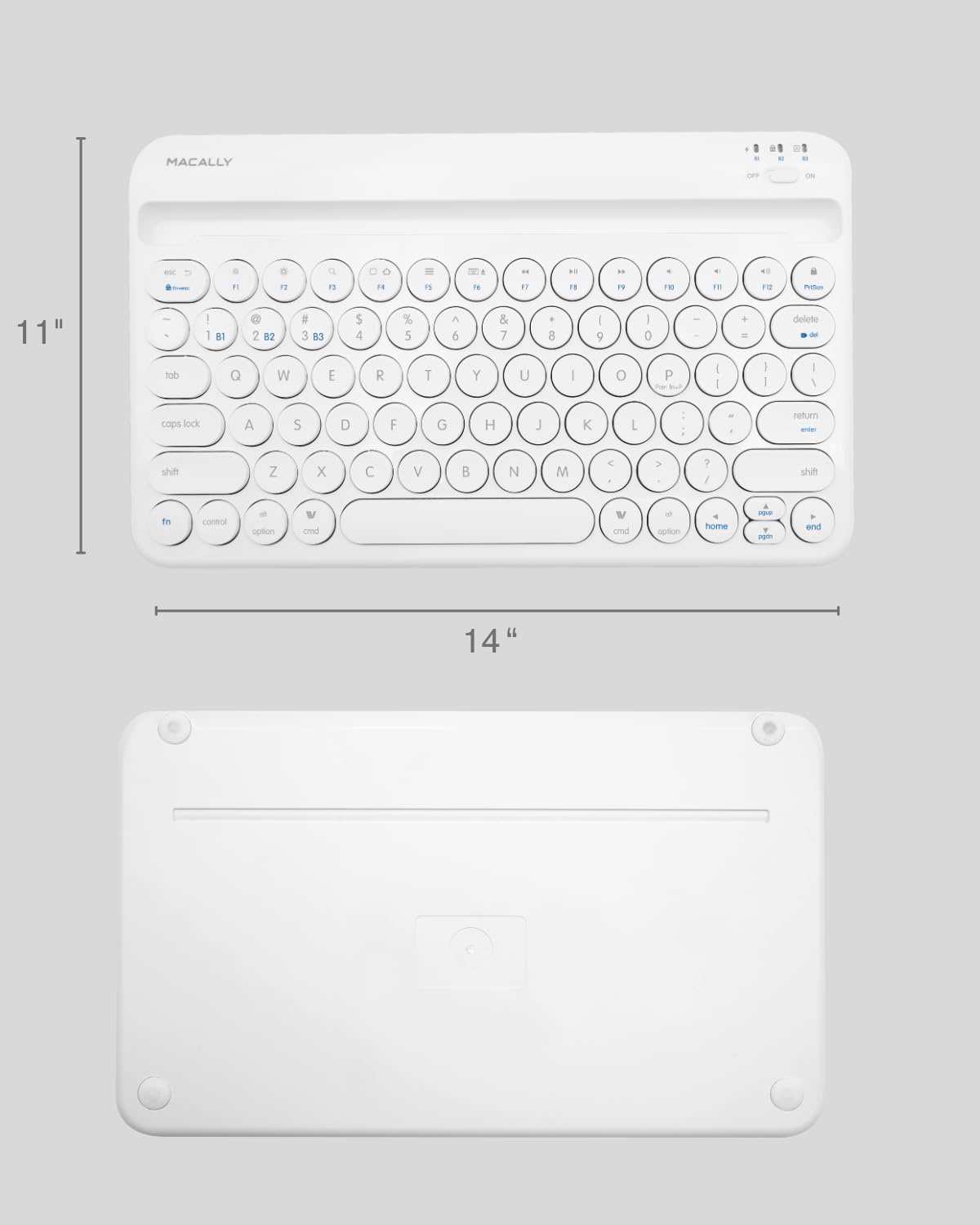
Image: The physical dimensions of the keyboard, measuring approximately 11 inches in width and 14 inches in length.

Image: The keyboard fitting easily into a backpack, demonstrating its compact size and suitability for travel and on-the-go use.
Garansi sareng Rojongan
Macally products are designed for quality and reliability. For information regarding product warranty, technical support, or service, please visit the official Macally websitus atanapi ngahubungan departemén layanan palanggan maranéhna. Simpen resi pameseran anjeun salaku bukti pameseran pikeun klaim garansi.
Anjeun tiasa mendakan langkung seueur inpormasi sareng dukungan dina Macally Store on Amazon.


