
Bubuka
Thank you for choosing the FLEXISPOT EN2 Electric Height Adjustable Standing Desk. This manual provides essential information for the proper assembly, operation, and maintenance of your new workstation. Please read it thoroughly before use to ensure optimal performance and safety.

Figure 1: The FLEXISPOT EN2 60x24 Inch Electric Height Adjustable Standing Desk.
Setup sareng Majelis
Your FLEXISPOT EN2 desk will arrive in two separate packages, which may be shipped independently. Ensure all components are present before beginning assembly.
Komponén Kaasup:
- Bingkai méja
- Motor
- Kontroler Digital 6-Tombol
- Sistem Manajemén Kabel
- Méja Clamp Kakuatan Strip
- 60x24 Inch Whole-Piece Desktop (White)
Assembly may require an electric drill, which is not included in the package. Please refer to the detailed assembly instructions provided in the box for step-by-step guidance. Avoid using a power drill for all screws to prevent stripping, especially for pre-drilled holes. Hand tools are often sufficient and recommended for certain steps.

Gambar 2: Leuwihview of all components included for assembly.

Figure 3: The desk components are shipped in two separate packages.
Video Majelis:
Video 1: Official FLEXISPOT Standing Desk Frame Installation Guide. This video provides visual instructions for assembling the desk frame.
Parentah Operasi
Penyesuaian Jangkungna:
The FLEXISPOT EN2 desk features a 6-button digital controller with 4 programmable memory presets. The motorized system allows for smooth height adjustments from 28.1 inches to 45.7 inches. The motor operates quietly, producing less than 50 dB of noise.
- Ngagunakeun éta Up jeung Turun arrow buttons to manually adjust the desk height.
- Pencét jeung tahan salah sahiji 4 memory preset buttons (1, 2, 3, 4) to save your preferred sitting or standing heights.
- Tap a saved preset button to automatically move the desk to your desired height.
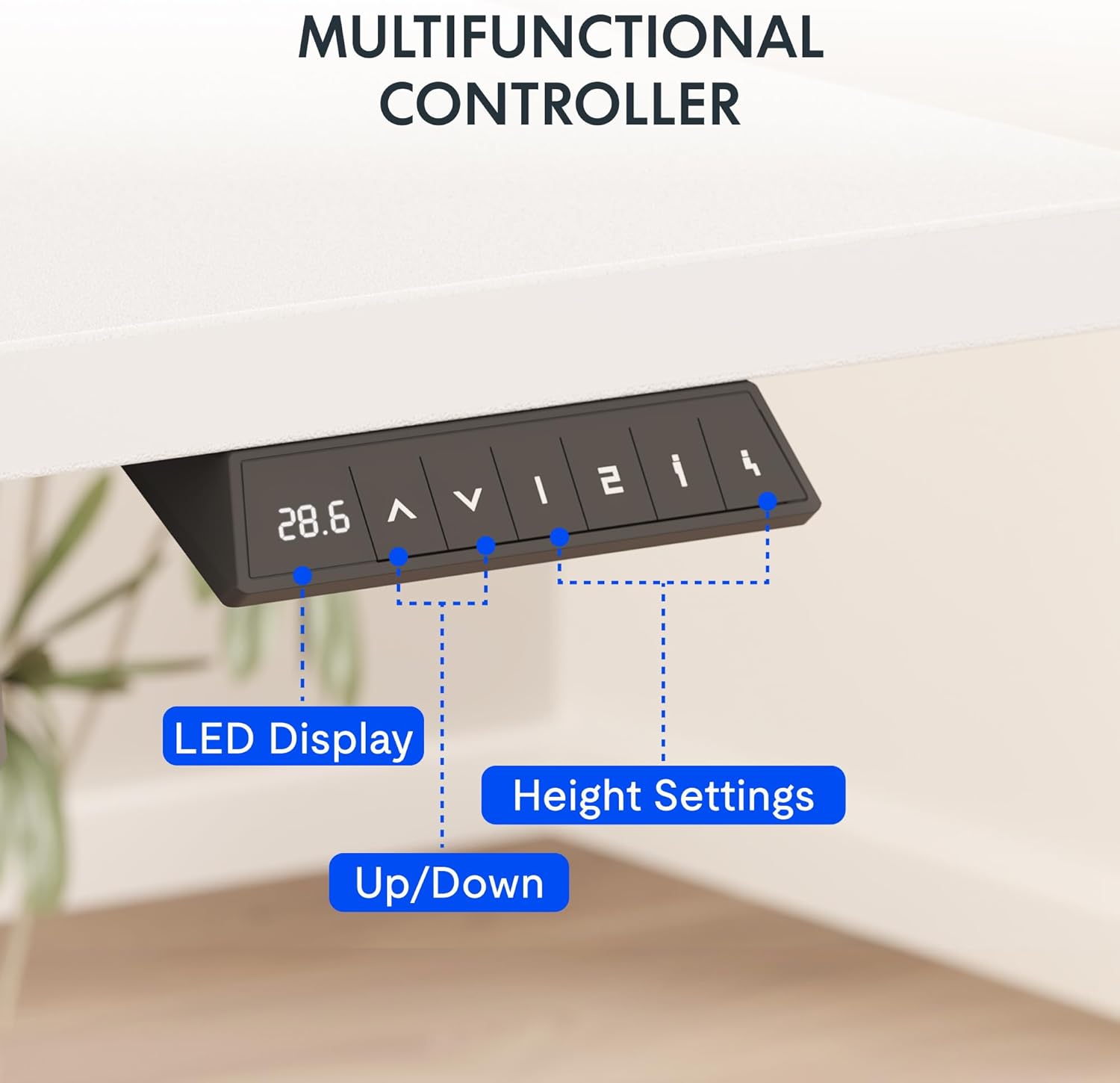
Figure 4: The multifunctional digital controller for height adjustment.
Stopkontak Terpadu:
The desktop includes a removable clamp power strip with 3 AC outlets (125V/12A) and 2 USB charging ports (5V/2A). This allows for convenient charging of electronic devices directly from your desk. The power strip can be clipped to the back or side of the desk.

Figure 5: The built-in power outlet for convenient charging.
Manajemén Kabel:
Utilize the included cable management system to keep your workspace tidy and organized, preventing cable clutter.

Figure 6: Effective cable management for a clean workspace.
Video Operasi:
Video 2: Showcase of the FLEXISPOT EN1 Electric Stand Up Desk. This video demonstrates the desk's operation, including height adjustment and features.
Pangropéa sareng Perawatan
Kapasitas beurat:
The desk is constructed with an industrial-grade steel frame and a solid FSC-Certified wood tabletop, capable of holding up to 176 pounds (69.9 kilograms). Ensure the desk is not loaded with more than 176 lbs to maintain stability and structural integrity.
beberesih:
Pikeun beberesih umum, usap méja sareng pigura nganggo kaén anu lemes,amp cloth. Avoid using harsh chemicals or abrasive cleaners that may damage the finish.
Pamérésan masalah
Desk Stability:
The desk is designed for high stability. If you experience any wobbling, ensure all assembly screws are tightened correctly. Avoid overloading the desk beyond its 176 lbs weight capacity.
Masalah Penyesuaian Jangkungna:
If the desk does not adjust smoothly or encounters an obstruction, the built-in Smart Anti-Collision System will stop movement to prevent damage. Clear any obstructions and try again. If issues persist, refer to the full troubleshooting guide on the FLEXISPOT websitus atanapi ngahubungan rojongan customer.
Stripped Screws during Assembly:
To prevent stripped screws, it is recommended to use hand tools for assembly, especially for attaching components to the desktop. An electric drill may apply too much torque, leading to damage. If a pre-drilled hole is not present, a thin nail and lightweight hammer can be used to create a starter hole before inserting the screw manually.
spésifikasi
| Fitur | Rincian |
|---|---|
| merek | FLEXISPOT |
| Nomer modél | MAH0002873 |
| Dimensi produk | 24 "D x 60" W x 28" H |
| Ukuran Desktop | 60x24" |
| Bahan Desktop | Kai Bersertifikat FSC |
| Bahan Pigura | Alloy Steel |
| Warna | Atasan Bodas + Pigura Bodas |
| Jangkungna Minimum | 28.1 inci |
| Jangkungna maksimum | 45.7 inci |
| Rekomendasi beurat maksimum | 176 lbs (69.9 Kilogram) |
| Tingkat Noise | <50 dB |
| Outlet listrik | 3 Stop Kontak AC (125V/12A), 2 Port Pangecas USB (5V/2A) |
| Mékanisme Angkat | Listrik |
| Controller | 6-button digital with 4 memory presets |
Émbaran jaminan
FLEXISPOT provides the following warranty for your peace of mind:
- Garansi 5 Taun: Ngawengku pigura, motor, sareng alat mékanis anu sanésna.
- Garansi 2 Taun: Ngawengku controller, saklar, sareng éléktronika.
Rojongan Palanggan
For any questions, assistance, or warranty claims, please contact FLEXISPOT customer support. You can find more information and contact details on the official FLEXISPOT websitus.
Nganjang ka Toko FLEXISPOT di Amazon pikeun produk sareng sumber daya dukungan tambahan.