
Coredy R580
Coredy R580 Robot Vacuum Cleaner User Manual
Modél: R580
1. Bubuka
This manual provides essential information for the safe operation, maintenance, and troubleshooting of your Coredy R580 Robot Vacuum Cleaner. Please read this manual thoroughly before using the product and retain it for future reference.
The Coredy R580 is a versatile robotic vacuum cleaner designed to simplify your cleaning routine. It features powerful 2000Pa suction, Wi-Fi connectivity for app control, and compatibility with voice assistants like Amazon Alexa and Google Assistant. It supports both sweeping and mopping functions (water tank and mop cloth sold separately) and can transition seamlessly from hard floors to carpets, automatically boosting suction when needed. Its slim design allows it to clean under furniture, and it supports virtual boundaries (strips sold separately) to define cleaning areas.
2. Parentah Kasalametan
- Baca sadaya pitunjuk sateuacan ngaoperasikeun alat.
- Ulah ngantep barudak maén kalawan robot. Ngawaskeun barudak sareng piaraan nalika robot beroperasi.
- Ngan anggo adaptor daya asli anu disayogikeun ku produsén.
- Ulah dianggo robot dina lingkungan anu aya seuneu muka atanapi barang anu gampang rengat.
- Pastikeun robot dipareuman sareng dicabut tina stop kontak sateuacan beberesih atanapi ngalaksanakeun pangropéa.
- Do not immerse the robot or its charging dock in water.
- Hindarkeun ngagunakeun robot dina permukaan baseuh atanapi di daérah anu cai nangtung.
- Remove power cords, small objects, and loose rugs from the floor before operation to prevent entanglement.
3. Eusi Paket
Saatos muka bungkusan, mangga pastikeun sadaya barang anu didaptarkeun di handap ieu kalebet sareng dina kaayaan anu saé:
- Coredy R580 Robot vacuum cleaner
- Ngecas Dock
- Adaptor kakuatan
- Sikat samping (4x)
- High Efficiency Filter (1x extra)
- Kadali jauh
- Sikat beberesih
Note: The 300ML water tank, cleaning mop cloth, and boundary strips are sold separately and are not included in the standard package.
4. Produk Langkungview

Gambar 4.1: Top view of the Coredy R580 Robot Vacuum Cleaner with an accompanying smartphone displaying the control application. The robot is black with bronze accents and features a central power button and home button.
Komponén Robot
- Panel luhur: Power/Clean button, Home/Recharge button, Wi-Fi indicator.
- Bemper hareup: Sénsor tabrakan.
- Sikat samping: Two rotating brushes for edge and corner cleaning.
- Tong sampah: Ngumpulkeun runtah.
- Sikat utama: Central brush for deep cleaning.
- Roda nyetir: Pikeun gerakan sakuliah rupa surfaces.
- Ngecas Kontak: For automatic charging with the dock.
- Sénsor Cliff: Ngadeteksi ragragna tangga pikeun nyegah ragrag tina tangga.
5. Setélan
5.1 Ngecas Robot
Before first use, fully charge the robot. Place the charging dock against a wall in an open, uncluttered area. Ensure there is at least 1 meter (3 feet) of clear space to the front and 0.5 meters (1.5 feet) to each side of the charging dock. Connect the power adapter to the charging dock and plug it into a wall outlet. Place the robot on the charging dock, ensuring the charging contacts align. The indicator light on the robot will show charging status.
5.2 Masang Sikat Sikat
Attach the side brushes by pressing them onto the square posts at the bottom of the robot until they click into place. Ensure the brushes are securely fastened.
5.3 Nyambungkeun ka Wi-Fi sareng Setup Aplikasi
To utilize smart features, download the Coredy app from your smartphone's app store. Follow the in-app instructions to connect your R580 to your home Wi-Fi network. Note that the robot supports 2.4 GHz Wi-Fi networks only.

Figure 5.1: The Coredy smartphone application allows users to control cleaning, monitor status, schedule cleaning, and access support.
6. Ngoperasikeun Robot Vakum
6.1 Ngamimitian/Ngeureunkeun beberesih
- Mimitian Manual: Press the Power/Clean button on the robot or the remote control.
- Mimitian Aplikasi: Use the Coredy app to initiate cleaning.
- Paréntah sora: If connected to Alexa or Google Assistant, use voice commands like "Alexa, ask Coredy to start cleaning."
- To pause cleaning, press the Power/Clean button again. To send the robot back to the charging dock, press the Home/Recharge button.
6.2 Modeu beberesih
- beberesih otomatis: The robot automatically cleans in a systematic pattern.
- Beberesihan Tempat: Robot éta ngabersihkeun daérah anu khusus dina pola spiral.
- Bersihan Tepi: Robot cleans sapanjang tembok jeung edges jati.
6.3 Ngagunakeun Kontrol Sora
The Coredy R580 is compatible with Amazon Alexa and Google Assistant. Once connected through the Coredy app, you can use simple voice commands to start or stop cleaning.

Figure 6.1: The Coredy R580 can be controlled via voice commands through Amazon Alexa or Google Assistant for hands-free operation.
6.4 Virtual Boundary (Sold Separately)
The R580 supports virtual boundary strips to restrict the robot from entering certain areas. Place the boundary strips on the floor to create invisible barriers. The robot's specialized sensors will detect these strips and avoid crossing them.

Figure 6.2: Virtual boundary strips (sold separately) allow you to define specific areas where the robot vacuum should not clean.
6.5 Sweep and Mop Function (Accessories Sold Separately)
The R580 can perform wet-dry mopping when equipped with the optional 300ML water tank and cleaning mop cloth. Attach the water tank with the mop cloth to the robot for comprehensive cleaning on hard surface floors.
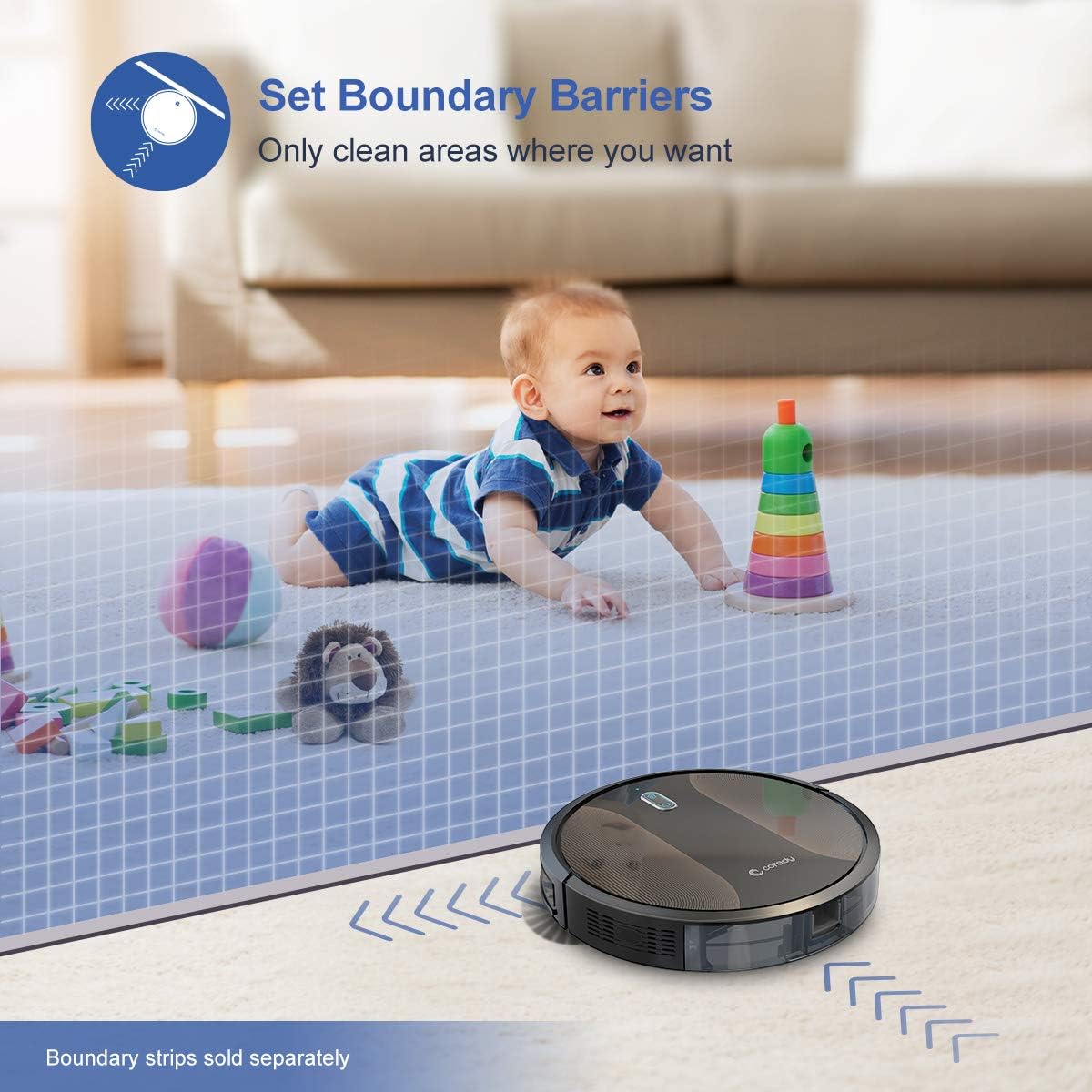
Figure 6.3: The Coredy R580 can be converted for mopping by attaching the optional water tank and mop cloth.
6.6 Boost-Intellect Technology
The robot is equipped with Boost-Intellect Technology, which automatically increases suction power when it detects carpeted surfaces, ensuring a deeper clean across different floor types.

Figure 6.4: Boost-Intellect Technology automatically adjusts suction power when the robot moves from hard floors to carpets.

Figure 6.5: The Coredy R580 provides strong suction power to effectively clean various types of debris from hard floors.
7. Pangropéa
Regular maintenance is crucial for optimal performance and longevity of your robot vacuum. Perform the following cleaning procedures regularly:
7.1 Ngosongkeun tong sampah
Press the dustbin release button and pull out the dustbin. Open the dustbin cover and empty its contents into a trash can. It is recommended to empty the dustbin after each cleaning cycle.
7.2 Ngabersihan Sikat Utama
Remove the main brush cover and lift out the main brush. Use the provided cleaning tool or a pair of scissors to remove any hair or debris tangled around the brush. Reinstall the main brush and cover.
7.3 Ngabersihan Sikat Sisi
Periodically check the side brushes for tangled hair or debris. Gently pull them off their posts to clean. If they are worn or damaged, replace them with new ones. Push them back onto the posts until they click.
7.4 Ngabersihan Filter
Remove the filter from the dustbin. Tap the filter against a trash can to remove dust. Do not wash the filter with water, as this can damage it. Replace the filter every 2-3 months, or more frequently depending on usage.
7.5 Ngabersihan Sénsor sareng Ngecas Kontak
Wipe the cliff sensors (located on the bottom of the robot) and the charging contacts (on the robot and charging dock) with a clean, dry cloth. Keeping these clean ensures proper navigation and charging.
8. Cara ngungkulan
If your Coredy R580 encounters issues, refer to the following table for common problems and solutions:
| Masalah | Mungkin Cukang lantaranana | Solusi |
|---|---|---|
| Robot teu hurung | batré lemah; Pareum listrik | Ngecas robot; Hurungkeun saklar daya utama. |
| Robot teu ngecas | Kontak ngecas kotor; Dok ngecas teu dialiri daya | Clean charging contacts on robot and dock; Ensure charging dock is plugged in. |
| Robot sering macét | Obstacles (cables, rugs); Cliff sensors dirty | Bersihkeun halangan tina beberesih jalur; Bersihkeun sensor gawir. |
| Kinerja beberesih goréng | Tempat sampah pinuh; Sikat kusut; Filter mampet | Tong sampah kosong; Sikat utama sareng sisi bersih; Ngabersihan atawa ngaganti saringan. |
| Masalah sambungan Wi-Fi | Sandi Wi-Fi salah; Router jauh teuing; jaringan 5GHz | Re-enter password; Move robot closer to router; Ensure 2.4GHz network is used. |
If the problem persists after trying the above solutions, please contact Coredy customer support for further assistance.
9. Spésifikasi
| Fitur | Rincian |
|---|---|
| merek | Coredy |
| Modél | R580 |
| Fitur husus | Filtrasi HEPA, Pakakas Piaraan, Vakum |
| Warna | Hideung |
| Jenis Filter | Kartrid |
| Kapasitas tong sampah | 0.3 liter |
| Sumber Daya | Batré Powered (1 batré Litium Ion kaasup) |
| Métode kontrol | Remote, Voice (Alexa, Google Home), App |
| Faktor Bentuk | Robotik |
| Ukuran (L x W x H) | 16.89 x 13.66 x 4.57 inci |
| Item Beurat | 8.91 pon |
| Daya nyeuseup | Nepi ka 2000Pa |
| Tingkat Noise | Dina 65dB |
10. Garansi jeung Rojongan
10.1 Émbaran jaminan
Coredy products are manufactured to the highest quality standards. For specific warranty details regarding your R580 Robot Vacuum Cleaner, please refer to the warranty card included in your product packaging or visit the official Coredy websitus. Garansi biasana nyertakeun cacad dina bahan sareng pagawean dina panggunaan normal.
10.2 Rojongan Palanggan
If you have any questions, require technical assistance, or need to report an issue with your Coredy R580, please contact Coredy customer support. Contact information can usually be found on the official Coredy website or on the product packaging. Please have your model number (R580) and purchase information ready when contacting support.