
Blackmagic Desain CINECAMPOCHDEF06P
Blackmagic Design Pocket Cinema Camera 6K Pro User Manual
Model: CINECAMPOCHDEF06P
1. Bubuka
Welcome to the user manual for your Blackmagic Design Pocket Cinema Camera 6K Pro. This document provides essential information for setting up, operating, maintaining, and troubleshooting your camera. The Pocket Cinema Camera 6K Pro is a high-performance digital film camera designed for cinematic quality video and high-resolution still photography.
2. Naon dina Box
Please verify that all items are present before proceeding with setup:
- Blackmagic Design Pocket Cinema Camera 6K Pro (Canon EF)
- Sasayogian tanaga
- Battery (NP-F570 type)
- DaVinci Resolve Studio Activation Key
3. Setup Guide
3.1. Pamasangan batré
The Blackmagic Pocket Cinema Camera 6K Pro uses NP-F570 type batteries. To install the battery, locate the battery compartment on the side of the camera grip. Open the compartment cover, insert the battery with the contacts facing inward, and close the cover securely.

Gambar: Sisi view of the Blackmagic Pocket Cinema Camera 6K Pro, highlighting the ergonomic grip where the battery is housed.
3.2. Kantétan lénsa
This camera features a Canon EF mount. To attach a compatible lens, align the red dot on the lens with the red dot on the camera's lens mount. Gently insert the lens and rotate it clockwise until it clicks into place. To remove, press the lens release button and rotate the lens counter-clockwise.
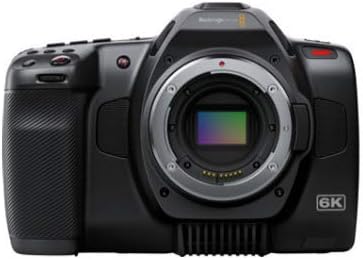
Gambar: Hareupeun view of the Blackmagic Pocket Cinema Camera 6K Pro, displaying the Canon EF lens mount.
3.3. Media Card Insertion
The camera supports CFast and SD UHS-II cards. Locate the card slots on the side of the camera. Insert the CFast card into the larger slot and the SD card into the smaller slot, ensuring the correct orientation. Press firmly until the card locks into place.
3.4. Ngahurungkeun
Press and hold the power button located on the top of the camera until the screen illuminates. The camera will boot up and display the main interface.
4. Ngoperasikeun kaméra
4.1. Kontrol Dasar sareng Antarmuka
The camera features a 5-inch touchscreen display for navigating menus and adjusting settings. Physical buttons are provided for quick access to essential functions such as ISO, Shutter Angle, White Balance, and Record.
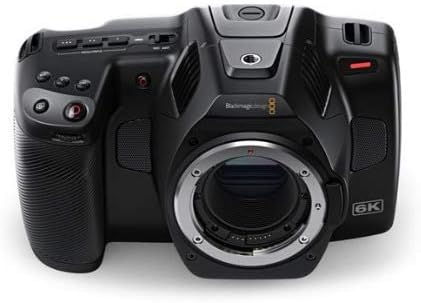
Gambar: Hareupeun view of the Blackmagic Pocket Cinema Camera 6K Pro, highlighting the various control buttons and the integrated screen.
4.2. Ngarékam Pidéo
The camera supports video capture resolutions up to 6K RAW (6144 x 3456) and ProRes 422. To begin recording, press the dedicated record button. Adjust resolution, frame rate, and codec settings via the touchscreen menu. The camera offers 13 stops of dynamic range for high-quality cinematic footage.
4.3. Capturing Still Images
Press the dedicated stills button to capture high-resolution still images. Images are saved as uncompressed 21.2-megapixel DNG frames, providing maximum image quality for post-processing and printing.
4.4. Using Built-in ND Filters
The 6K Pro model includes motorized IR ND filters (2, 4, and 6 stops). These filters reduce the amount of light entering the camera, allowing for wider apertures in bright conditions without overexposure. Access and control the ND filters through the camera's menu or dedicated buttons.
4.5. ISO Settings
The camera features dual native ISO up to 25,600, optimized for minimizing noise across various lighting conditions. The native ISO of 400 is suitable for well-lit environments, while the secondary high base ISO of 3200 is ideal for low-light shooting.
4.6. Storage and Data Transfer
Record directly to CFast or SD UHS-II cards. For extended recording times or direct capture to external drives, utilize the high-speed USB-C Expansion Port. Files can be transferred to a computer via USB-C or by removing the media cards.
5. Pangropéa
5.1. beberesih
- Awak kaméra: Anggo kaén anu lembut sareng garing pikeun ngusap awak kaméra. Pikeun kokotor nekad, a rada damp cloth can be used, followed by a dry cloth. Avoid abrasive cleaners.
- Lénsa sareng sénsor: Use a professional lens cleaning kit. For the sensor, use a sensor cleaning swab and solution specifically designed for camera sensors. Always refer to lens manufacturer guidelines for cleaning.
- layar: Use a microfiber cloth designed for electronics screens.
5.2. Panyimpenan
Store the camera in a cool, dry place away from direct sunlight and extreme temperatures. Use a protective case to prevent dust and physical damage. If storing for extended periods, remove the battery.
5.3. Kaperawatan batré
Charge batteries fully before use. Avoid completely draining batteries regularly to prolong their lifespan. Store batteries in a cool, dry place. If not used for a long time, charge them to about 50% capacity every few months.
6. Cara ngungkulan
This section addresses common issues you might encounter with your Blackmagic Pocket Cinema Camera 6K Pro.
| Masalah | Mungkin Cukang lantaranana | Solusi |
|---|---|---|
| Kaméra teu hurung. | Dead or improperly inserted battery; faulty power supply. | Ensure battery is fully charged and correctly inserted. Try powering with the AC adapter. |
| Camera does not turn off with power switch. | Software glitch. | Remove and reinsert the battery to force a restart. Check for firmware updates. |
| Rékaman eureun teu disangka-sangka. | Slow media card; card full; overheating. | Use high-speed CFast or UHS-II SD cards. Check available storage. Ensure adequate ventilation around the camera. |
| Blue tint on LCD screen. | Known display calibration issue. | This may be a characteristic of some units. Blackmagic Design may release firmware updates to address display calibration. The issue typically does not affect recorded footage or HDMI output. |
| Images appear noisy in low light. | Incorrect ISO setting. | Ensure you are using the appropriate dual native ISO (3200 for low light) and proper exposure. |
7. Spésifikasi Téknis
| Fitur | Spésifikasi |
|---|---|
| Nomer modél | CINECAMPOCHDEF06P |
| Ukuran sénsor | Super 35 |
| Resolusi pribumi | 6144 x 3456 |
| Rentang dinamis | 13 Eureun |
| Dual Asli ISO | Nepi ka 25,600 |
| Built-in ND Filters | 2, 4, 6 Stop IR ND Filters |
| Resolusi Capture Video | 720p, 4K, 6K RAW |
| Format Capture Video | Blackmagic Raw, ProRes 422 |
| Format Gambar Leungit | 21.2MP DNG |
| Format Audio Dirojong | WAV, AAC, MP3 |
| Tipe Mémori Flash | CFast, SD UHS-II |
| Téhnologi konektipitas | USB-C |
| Ukuran layar | 5 inci |
| Téhnologi Sénsor Poto | CMOS |
| Aperture maksimum | f/2 |
| Item Beurat | 2.73 pon |
| Dimensi produk | 9.1 x 9.1 x 9.1 inci |
| Batré Diperlukeun | 1 batré Litium Metal |
8. Garansi jeung Rojongan
Your Blackmagic Design Pocket Cinema Camera 6K Pro is covered by a manufacturer's warranty. For detailed warranty terms and conditions, please refer to the documentation included with your product or visit the official Blackmagic Design website. For technical support, firmware updates, and additional resources, please visit the Blackmagic Design support page online.
Sumberdaya Online:
- Blackmagic Design Official Websitus: www.blackmagicdesign.com
- Halaman Rojongan: www.blackmagicdesign.com/support
Ask a question about this manual
Ask about setup, troubleshooting, compatibility, parts, safety, or missing instructions. Manuals+ will review the question and use this page’s manual context to help answer it.