
Émbaran Kasalametan penting
Please read all instructions carefully before using your Smart-Tech 40-inch FHD Smart TV. Keep this manual for future reference. Failure to follow these safety guidelines may result in fire, electric shock, or other injuries.
- Ulah meungpeuk bukaan ventilasi. Pastikeun spasi nyukupan sabudeureun TV pikeun aliran hawa ditangtoskeun.
- Ulah nempatkeun TV deukeut sumber panas kayaning radiators, registers panas, kompor, atawa alat sejenna nu ngahasilkeun panas.
- Nangtayungan kabel listrik tina leumpang atawa diciwit, utamana dina colokan, wadah merenah, jeung titik dimana aranjeunna kaluar tina aparat.
- Ngan anggo kantétan/aksésori anu ditunjuk ku produsén.
- Cabut colokan alat ieu nalika badai kilat atanapi nalika henteu dianggo kanggo waktos anu lami.
- Rujuk sadayana ngalayanan ka tanaga jasa anu mumpuni. Pelayanan diperyogikeun nalika aparat parantos rusak sagala cara.
Eusi pakét
Pastikeun yén sadaya item anu didaptarkeun di handap kalebet kana pakét anjeun:
- Smart-Tech 40-inch FHD Smart TV
- Kadali jauh
- Stand TV (2 buah)
- Screws pikeun Nangtung Attachment
- Kabel Daya
- Manual pangguna (dokumén ieu)
Disetél
1. Ngagantelkeun Stand
Pikeun ngagantelkeun stand ka TV anjeun:
- Teundeun TV sacara saksama dina permukaan anu lemes sareng bersih pikeun nyegah karusakan layar.
- Sejajarkeun unggal potongan nangtung sareng slot anu cocog dina handapeun TV.
- Ngamankeun unggal sapotong nangtung ngagunakeun screws disadiakeun. Pastikeun aranjeunna tightened pageuh.

Image: Smart-Tech 40-inch FHD Smart TV with stand, illustrating its placement.
2. Pamasangan Tembok (Opsional)
If you choose to wall mount your TV, you will need a VESA-compatible wall mount kit (not included). The TV supports a VESA mount pattern of 200mm x 100mm.
- Remove the stand if it has been attached.
- Follow the instructions provided with your wall mount kit for proper installation.
- Ensure the wall mount is securely fastened to a sturdy wall capable of supporting the TV's weight.

Image: Rear panel of the TV showing VESA mounting holes (200mm x 100mm) and port locations.
3. Nyambungkeun périferal
The TV features a variety of ports for connecting external devices. Refer to the image above for port locations.
- USB 1 / USB 2: Sambungkeun alat panyimpen USB pikeun playback média atanapi apdet software.
- EARPHONE OUT: Sambungkeun headphone pikeun ngupingkeun swasta.
- CI +: Insert a Common Interface Plus module and smart card for encrypted digital channels.
- DVB_T/T2: Connect an aerial for terrestrial digital TV signals.
- DVB_S/S2: Connect a satellite dish for satellite digital TV signals.
- AV IN: Sambungkeun alat anu langkung lami nganggo kabel video komposit sareng audio stereo.
- HDMI 1 / HDMI 2 / HDMI 3: Connect high-definition devices such as Blu-ray players, game consoles, or set-top boxes. HDMI 3 supports Audio Return Channel (ARC).
- RJ45: Sambungkeun kabel Ethernet pikeun sambungan internét kabel.
- OPTIKAL: Connect to a digital audio receiver or soundbar for high-quality audio output.
Parentah Operasi
1. Daya Awal Hurung sareng Setup Wizard
After connecting the TV to power and an antenna/satellite dish, press the power button on the remote control. The TV will guide you through an initial setup wizard to select language, country, network settings, and channel scanning.
2. Fungsi Jauh Jauh
Kadali jauh ngamungkinkeun anjeun pikeun nganapigasi fitur TV. Biasakeun diri sareng tombol utama:

Image: Remote control for the Smart-Tech TV.
- Tombol Daya: Ngahurungkeun atawa mareuman TV.
- Tombol Nomer: Pilih saluran sacara langsung.
- Volume Kaluhur/Turun: Saluyukeun tingkat sora.
- Saluran luhur/handap: Change channels sequentially.
- Tombol Navigasi (Kaluhur/Turun/Kénca/Katuhu) jeung OK: Napigasi ménu sareng konpirmasikeun pilihan.
- Balik / Kaluar: Return to the previous menu or exit current function.
- Sumber: Select input source (HDMI, AV, TV, etc.).
- Tombol Aplikasi Pinter: Dedicated buttons for quick access to Netflix, YouTube, and Prime Video.
3. Fitur TV Smart
Your Smart-Tech TV comes with integrated smart features, including access to popular streaming services and HbbTV.
- Sambungan Internét: Connect your TV to the internet via Wi-Fi or Ethernet (RJ45 port) to access smart features.
- Aplikasi streaming: Use the dedicated buttons or navigate to the Smart TV menu to launch applications like Netflix, YouTube, and Prime Video. An active subscription may be required for some services.
- HbbTV 1.5: Hybrid Broadcast Broadband TV allows access to interactive services from broadcasters, such as catch-up TV, video-on-demand, and electronic program guides (EPG).
4. Channel Tuning
The TV supports DVB-T/T2 (terrestrial), DVB-S/S2 (satellite), and DVB-C (cable) digital tuners.
- Go to the TV's main menu.
- Select 'Channel' or 'Installation'.
- Choose your desired tuning method (e.g., 'Auto Scan' for DVB-T/T2 or 'Satellite Setup' for DVB-S/S2).
- Follow the on-screen prompts to complete the channel scan.
5. Putereun Média (USB)
Anjeun tiasa maénkeun rupa-rupa média files tina alat panyimpenan USB.
- Insert your USB device into one of the USB ports on the TV.
- The TV may automatically detect the device and prompt you to open the media browser. If not, select the USB source from the input menu.
- Napigasi ngaliwatan Anjeun files and select the desired media to play.
- Dirojong file systems: FAT16, FAT32, NTFS.
- Supported media formats include: Music (MP3, WAV, AAC), Photo (JPG, JPEG, BMP, PNG), Video (AVI, MP4, MOV, MPG, MKV, DAT, VOB, TS, TRP, TP).
Pangropéa
Ngabersihkeun TV
To ensure the longevity and optimal performance of your TV, follow these cleaning guidelines:
- Salawasna cabut TV tina stop kontak sateuacan beberesih.
- Paké lawon lemes, garing, lint-haratis pikeun gently ngusap layar tur kabinet.
- Pikeun tanda pengkuh, enteng dampBilas lawon ku cai atanapi pembersih layar anu hampang sareng henteu abrasif. Entong nyemprotkeun cairan langsung kana TV.
- Hindarkeun nganggo pembersih abrasive, lilin, atanapi pangleyur sabab tiasa ngaruksak finish TV.
Panyimpenan
If you need to store the TV for an extended period, ensure it is kept in a cool, dry place, away from direct sunlight and extreme temperatures. Use the original packaging if available to protect it from dust and physical damage.
Pamérésan masalah
If you encounter issues with your TV, consult the table below for common problems and solutions. If the problem persists, contact customer support.
| Masalah | Mungkin Cukang lantaranana | Solusi |
|---|---|---|
| Taya kakuatan | Kabel listrik teu nyambung; Teu aya listrik tina stop kontak | Pastikeun kabel listrik dicolokkeun sacara aman; Pariksa stop kontak listrik ku alat sejen. |
| Henteu aya gambar, tapi aya sora | Incorrect input source selected; Loose cable connection | Press the 'Source' button on the remote to select the correct input; Check all cable connections. |
| Henteu aya sora, tapi aya gambar | Volume is muted or too low; External audio system issue | Increase volume or unmute; Check connections to external audio devices. |
| Kadali jauh teu jalan | Batréna pareum atanapi dipasangna teu leres; Halangan antara remot sareng TV | Ganti batré; Pastikeun polaritasna leres; Cabut sagala halangan. |
| Teu bisa nyambung ka Wi-Fi | Sandi salah; Masalah router; TV jauh teuing ti router | Verify Wi-Fi password; Restart router; Move TV closer to router or use wired connection. |
spésifikasi
Detailed technical specifications for the Smart-Tech 40-inch FHD Smart TV (SMT40N30FV1U1B1).
| Fitur | Spésifikasi |
|---|---|
| Nomer modél | SMT40N30FV1U1B1 |
| Ukuran layar | 40 inci (100 cm) |
| Resolusi | 1920 x 1080 (HD lengkep) |
| Téknologi tampilan | LED (D-LED Backlight) |
| Refresh Laju | 60 Hz |
| Kaluaran Audio | 2 x8 w |
| Téhnologi Audio | Dolby Digital, AC-3 Decoder |
| Tuners | DVB-T, DVB-T2, DVB-S, DVB-S2, DVB-C |
| Fitur pinter | HbbTV 1.5, Netflix, YouTube, Prime Video |
| Palabuhan HDMI | 3 (HDMI-ARC, HDMI-CEC supported) |
| palabuhan USB | 2 |
| Konéktipitas séjén | RF Antenna In, SAT In, Headphone Jack, CI+, CVBS + Audio In, Digital Optical Out, RJ45 (Ethernet), Wi-Fi |
| USB File Sistem | FAT16 / FAT32 / NTFS |
| USB Video System | HEVC / H.265, MPEG4 / H.264, VP9 |
| Konsumsi Daya (Operasi) | 70 W |
| Konsumsi Daya (Siaga) | <0.50 W |
| Energy Class (New Label) | F |
| Dimensions with Stand (L x H x P) | 903.5 x 561.4 x 222 mm |
| Dimensions without Stand (L x H x P) | 903.5 x 517.5 x 78.1 mm |
| Beurat bersih | 5.66 kg |
| VESA Mount Pattern | 200 mm x 100 mm |
Émbaran Label énergi
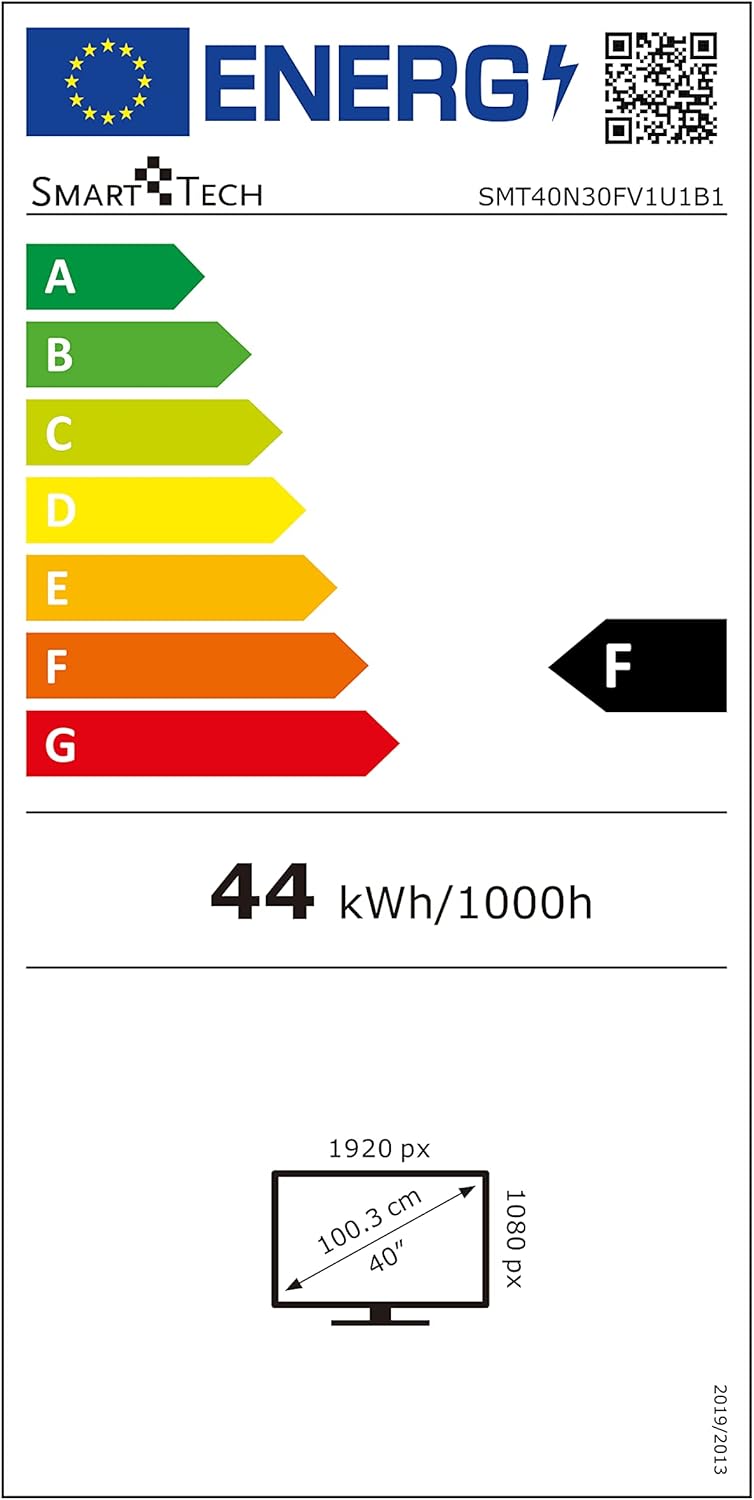
Image: EU Energy Label for Model SMT40N30FV1U1B1.
This television is rated Energy Class F under the new EU energy labeling system, with an energy consumption of 44 kWh per 1000 hours. For more detailed information, you can visit the official EPREL database: https://eprel.ec.europa.eu/qr/366834
Garansi sareng Rojongan
Your Smart-Tech TV is covered by a manufacturer's warranty. Please refer to the warranty card included with your product for specific terms and conditions, including the warranty period and coverage details. For technical support, service inquiries, or to report any issues not covered in this manual, please contact Smart-Tech customer service through the contact information provided on your warranty card or the official Smart-Tech websitus.
Please note that availability of spare parts and software updates may vary. Information regarding spare parts availability and guaranteed software updates is not available at this time.