
AM alphamount APRTS03D, APPSTVS12
Manual pamaké
AM alphamount TV Console Cabinet & Universal TV Stand
Model: APRTS03D (TV Console Cabinet), APPSTVS12 (Universal TV Stand)
Produk Leuwihview
This manual provides instructions for the assembly, operation, and maintenance of your AM alphamount TV Console Cabinet (Model APRTS03D) and Universal TV Stand (Model APPSTVS12). These products are designed to enhance your home entertainment setup, offering both storage and flexible TV placement.

Image: The AM alphamount TV Console Cabinet and Universal TV Stand shown together, illustrating the complete product package.
Setup sareng Majelis
Carefully unpack all components and verify against the parts list provided in your product packaging. Assembly for both the TV console and the universal TV stand is designed to be straightforward.
TV Console Cabinet (APRTS03D) Assembly
The TV console cabinet features a natural color and wood grain finish, designed for easy integration into various home decor styles. Assembly typically takes less than 40 minutes with the provided tools and instructions.
- Identify all wooden panels and hardware.
- Follow the step-by-step instructions to connect the panels, forming the main structure.
- Pasang rak anu tiasa diatur kana posisi anu dipikahoyong.
- Attach the classic handle and ensure the cabinet door operates smoothly.
- Utilize the integrated cable management features for a tidy setup.

Image: Detailed dimensions of the TV Console Cabinet, showing overall width, height, depth, and internal shelf measurements.
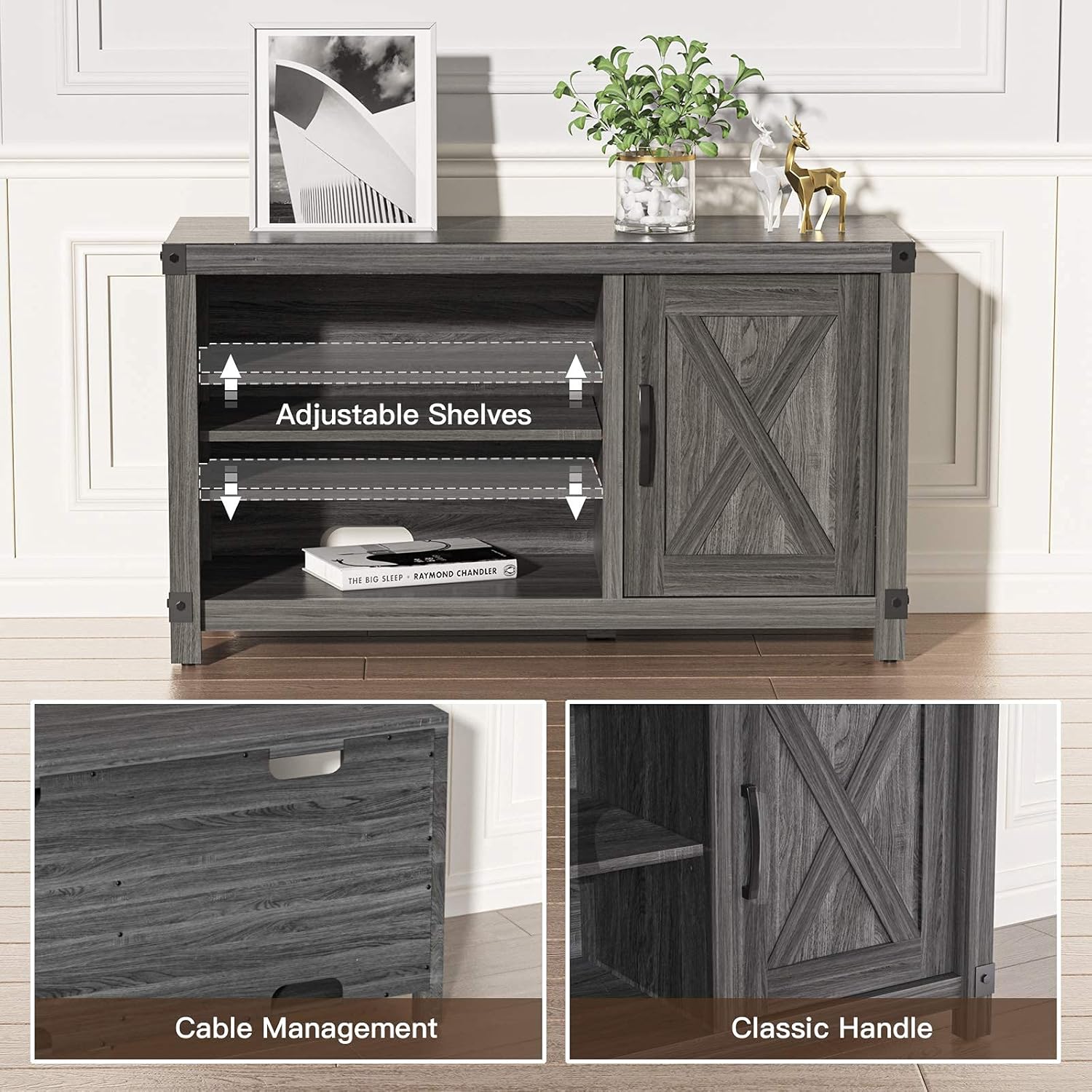
Gambar: Deukeut views highlighting the adjustable shelves, cable management cutout, and classic handle design of the TV Console Cabinet.
Universal TV Stand (APPSTVS12) Installation
This tabletop TV stand is designed for easy installation and compatibility with a wide range of TV sizes.
- Ensure your TV's VESA mounting pattern is compatible (100x100mm to 400x400mm).
- Attach the mounting brackets to the back of your television using the appropriate screws.
- Assemble the base and vertical support column of the TV stand.
- Carefully lift and hook the TV onto the stand's mounting plate.
- Secure the TV in place according to the stand's instructions.
- Adjust the TV's level if necessary (up to ±3 degrees).

Image: A person demonstrating the ease of installation for the Universal TV Stand, showing the TV being mounted onto the stand.

Image: Diagram illustrating the VESA compatibility range (100x100mm to 400x400mm) for the Universal TV Stand, suitable for 26-55 inch TVs.
Parentah Operasi
TV Console Cabinet Usage
The TV console cabinet is designed for versatile use beyond just holding a television. Its two-tier open shelves and enclosed cabinet provide ample gudang.
- Panyimpenan Média: Use the shelves to store sound bars, media players, game consoles, and other electronic devices.
- Wewengkon tampilan: The top surface and open shelves are suitable for displaying books, photo frames, souvenirs, and decorative items.
- Pamakéan multifungsi: This unit can also serve as a corridor table, entrance table, sofa table, display table, office storage, or shoe cabinet, adapting to your needs.

Image: The TV Console Cabinet placed in a bedroom setting, showcasing its aesthetic appeal and storage capabilities for various items.
Universal TV Stand Operation
The universal TV stand offers enhanced viewing flexibility with its swivel feature.
- Fungsi puteran: The stand allows for a total of 60 degrees of swivel (30 degrees left and 30 degrees right). Gently rotate the television to adjust the viewing angle to your preferred position. This feature improves viewing range, allowing you to watch from various seating arrangements in the room.
- Manajemén Kabel: Utilize the integrated cable management system on the stand's column to route and conceal power and HDMI cables, maintaining a neat appearance.

Image: A diagram illustrating the 60-degree swivel capability of the Universal TV Stand, showing the TV rotating left and right.

Gambar: A close-up view of the back of a TV mounted on the Universal TV Stand, demonstrating how cables can be hidden within the stand's column.
Pangropéa
To ensure the longevity and appearance of your TV console cabinet and universal TV stand, follow these simple maintenance guidelines:
- beberesih: For the TV console cabinet, wipe surfaces with a soft, damp cloth. Avoid harsh chemicals or abrasive cleaners that could damage the finish. The smooth surface is designed to be easy to clean and resistant to water seepage.
- Debu: Regularly dust both the cabinet and the TV stand with a dry, soft cloth to prevent dust buildup.
- Pariksa Hardware: Periodically check all screws and fasteners on both units to ensure they remain tight. Retighten if necessary to maintain stability.
- Hindarkeun Overloading: Do not exceed the weight capacity of the shelves or the TV stand. Refer to the specifications for maximum load.
Pamérésan masalah
If you encounter any issues with your AM alphamount TV Console Cabinet or Universal TV Stand, please refer to the following common solutions:
- Masalah stabilitas: If the cabinet or stand feels wobbly, ensure all assembly screws are fully tightened. Verify that the unit is placed on a flat, level surface.
- Difficulty Swiveling (TV Stand): Check for any obstructions around the base or behind the TV. Ensure the TV is properly balanced on the stand.
- Bagian anu leungit: If any parts were missing upon unboxing, please contact customer support immediately with your purchase details.
- Damage During Assembly: If a component is damaged during assembly, stop and contact customer support for replacement parts. Do not attempt to force damaged parts.
For issues not covered here, please contact AM alphamount customer support.
spésifikasi
TV Console Cabinet (Model: APRTS03D)
| Ukuran Umum (W x H x D) | 44.09" x 24.13" x 15.75" |
| Shelf Dimensions (Open, Left) | 14.37" (L) x 15.16" (D) |
| Cabinet Interior Height | 18.5" (Upper), 15.75" (Lower) |
| Bahan | Engineered Wood with Wood Grain Finish |
| Fitur | Adjustable Shelves, Cable Management, Classic Handle |
Universal TV Stand (Model: APPSTVS12)
| Ukuran TV cocog | 26 - 55 Inci |
| Kasaluyuan VESA | 100x100mm, 200x100mm, 200x200mm, 300x200mm, 300x300mm, 400x300mm, 400x400mm |
| Rentang putar | ±30° (Total 60°) |
| adjustment jangkungna | Yes (Multiple height settings for mounting brackets) |
| Tipe Pamasangan | Tabletop Gunung |
| Fitur | Integrated Cable Management, Easy Installation |
Garansi sareng Rojongan
AM alphamount products are manufactured with quality and durability in mind. For specific warranty information regarding your TV Console Cabinet and Universal TV Stand, please refer to the warranty card included with your purchase or visit the official AM alphamount websitus.
If you require assistance with assembly, parts replacement, or have any questions about your product, please contact AM alphamount customer support:
- Websitus: Visit the AM alphamount Store on Amazon
- Surélék: Tingali kana bungkusan produk anjeun atanapi resmi websitus pikeun email kontak.
- Telepon: Tingali kana bungkusan produk anjeun atanapi resmi websitus pikeun nomer telepon kontak.
Please have your model numbers (APRTS03D, APPSTVS12) and purchase date ready when contacting support.