
1. Bubuka
This manual provides instructions for the safe and efficient operation and maintenance of your hOmeLabs Portable Air Scrubber. This heavy-duty air cleaner is designed for industrial and commercial use, featuring a 3-stage filtration system to improve air quality in various environments.
2. Émbaran Kasalametan
Please read all safety instructions before operating the unit to prevent injury or damage. Keep this manual for future reference.
- Salawasna mastikeun unit disimpen dina stabil, permukaan datar.
- Ulah ngajalankeun unit ku kabel kakuatan ruksak atawa colokan.
- Keep the air intake and exhaust clear of obstructions.
- Entong neuleumkeun unit dina cai atanapi cairan sanés.
- Unplug the unit before performing any maintenance or filter changes.
- This appliance is equipped with Auxiliary GFCI Outlets. Do not exceed the maximum amperage ratings for these outlets (12 Amps max with the unit OFF, 9 Amps max with the unit ON).
- The unit is ETL Listed and CARB Certified, indicating compliance with safety and air quality standards.

Image: ETL Listed and CARB Certified logos, indicating product compliance with safety and air quality standards.
3. Produk Langkungview
The hOmeLabs Portable Air Scrubber is designed to capture airborne particles and odors using a multi-stage filtration system. Its robust construction and portable design make it suitable for various demanding environments.
Fitur konci:
- 3-Stage Sistem Saringan: Includes a Pre-filter, Activated Carbon Filter, and HEPA Filter.
- Konstruksi tugas beurat: Rotomolded Polyethylene (LLDPE) housing for durability.
- Aliran Udara Tinggi: Filters up to 750 sq. ft. with a maximum airflow of 500 CFM.
- Desain Stackable: Can be stacked horizontally or vertically, allowing up to 3 units to be daisy-chained for a combined 1500 CFM.
- Portability: Equipped with a convenient handle and 360° swivel lockable casters for easy transport.
- Panel Kontrol Terpadu: Features variable speed control, time and amps tracker, HEPA filter change reminder, resettable circuit breaker, and auxiliary GFCI outlets.

Image: The hOmeLabs Portable Air Scrubber, showcasing desainna kompak sareng kuat.

Image: A detailed diagram illustrating the three stages of filtration: Pre-filter for large particles, Carbon filter for odors, and HEPA filter for fine particles.
4. Setélan
Follow these steps for initial setup of your air scrubber.
4.1 Ngabongkar sareng Inspeksi
- Carefully remove the air scrubber from its packaging.
- Pariksa unit pikeun tanda-tanda karusakan salami transit. Lamun karuksakan kapanggih, ulah beroperasi sarta ngahubungan rojongan customer.
- Ensure all filters are present and correctly installed. The unit comes with a complete set of filters.
- Remove the foam cap from the filter compartment before use.

Image: The unit includes a MERV-9 Pre-filter, Activated Carbon Filter, and HEPA Filter. It also shows the optional 14-inch inlet for ducting (ducting not included).
4.2 Nempatkeun
- Place the air scrubber in the desired location, ensuring adequate clearance around the air intake and exhaust vents.
- The unit can be used horizontally or vertically.
- For enhanced air purification in larger areas, multiple units can be daisy-chained and stacked. Up to 3 units can be connected, providing a combined airflow of 1500 CFM.

Image: Two air scrubbers are shown stacked, demonstrating the daisy-chain capability for increased air processing capacity.
4.3 Portability
- The unit features 360° swivel casters for easy movement. To lock the casters, press down on the lock plate on each wheel. To unlock, lift the lock plate.
- Use the integrated handle for single-handed relocation.

Gambar: A close-up view highlighting the lockable casters for stability and the ergonomic handle for easy transport.
5. Parentah Operasi
Familiarize yourself with the control panel for efficient operation.
5.1 Fungsi Panel Control

Image: The control panel features a variable speed dial, a resettable circuit breaker, a HEPA filter change indicator, and auxiliary GFCI outlets.
- Dial Speed Speed: Turn the dial to adjust the fan speed from OFF to MAX.
- Pamutus Sirkuit: Resettable circuit breaker protects the unit from electrical overload. If the unit stops working, check and reset the breaker.
- Waktos & Amps Tracker: Displays operational time and current amperage draw.
- HEPA Change Reminder: An indicator light will illuminate when it is time to inspect or change the HEPA filter.
- Outlet GFCI tambahan: Two 115V AC outlets are provided. Maximum load is 12 Amps when the air scrubber is OFF, and 9 Amps when the air scrubber is ON.
5.2 Mimitian Unit
- Colokkeun kabel listrik kana stop kontak listrik grounded.
- Turn the Variable Speed Dial from OFF to the desired speed setting.
- The unit will begin drawing air through its filtration system.
6. Pangropéa
Regular maintenance ensures optimal performance and extends the lifespan of your air scrubber.
6.1 Filter ngagantian
The HEPA filter change reminder light indicates when the HEPA filter may need inspection or replacement. The pre-filter and carbon filter should also be checked regularly.
- Unplug the air scrubber from the power outlet.
- Locate the filter access panel.
- Remove the old filters, starting with the pre-filter, then the carbon filter, and finally the HEPA filter. Dispose of used filters responsibly.
- Insert new filters in the reverse order: HEPA filter first, then the carbon filter, and finally the pre-filter. Ensure they are seated correctly.
- Tutup panel aksés filter aman.
- Colokkeun deui unit teras teraskeun deui operasina.
6.2 Ngabersihan Unit
- Usap bagian luar unit nganggo iklanamp lawon. Ulah make cleaners abrasive atawa pangleyur.
- Pastikeun euweuh cai asup kana panel kontrol atawa komponén listrik.
7. Cara ngungkulan
If you encounter issues with your air scrubber, refer to the following common problems and solutions.
| Masalah | Mungkin Cukang lantaranana | Solusi |
|---|---|---|
| Unit teu hurung | No power; Circuit breaker tripped; Power cord not fully plugged in | Check power outlet; Reset circuit breaker on control panel; Ensure power cord is securely plugged in. |
| Ngurangan aliran hawa | Clogged filters; Obstruction at intake/exhaust | Inspect and replace filters as needed; Remove any obstructions. |
| Noise mahiwal salila operasi | Loose component; Obstruction in fan; Unit not on a level surface | Unplug and inspect for loose parts or obstructions; Ensure unit is on a stable, level surface. |
| HEPA Change Reminder light is on | HEPA filter needs inspection or replacement | Pariksa jeung ngaganti saringan HEPA. |
8. Spésifikasi
| Fitur | Rincian |
|---|---|
| Modél | B096MS28PC |
| Ukuran produk (D x W x H) | 16 x 22.6 x 25.5 inci |
| Item Beurat | 47 pon |
| Sumber Daya | AC/DC |
| Métode kontrol | Button Control / Touch (Dial) |
| Jenis Filter | Pre-Filter, Activated Carbon Filter, HEPA Filter |
| Panutup Wewengkon Lantai | Nepi ka 750 suku pasagi |
| Aliran hawa maksimum | 500 CFM (1500 CFM when daisy-chained with 3 units) |
| Tingkat Noise | 65 desibel |
| Kamampuh Filtrasi Kontaminan | Cigarette smoke, dust, odors |
| Ducting Compatibility | 14 inch (optional, not included) |
| UPC | 810049720544 |
| Warna | kulawu |
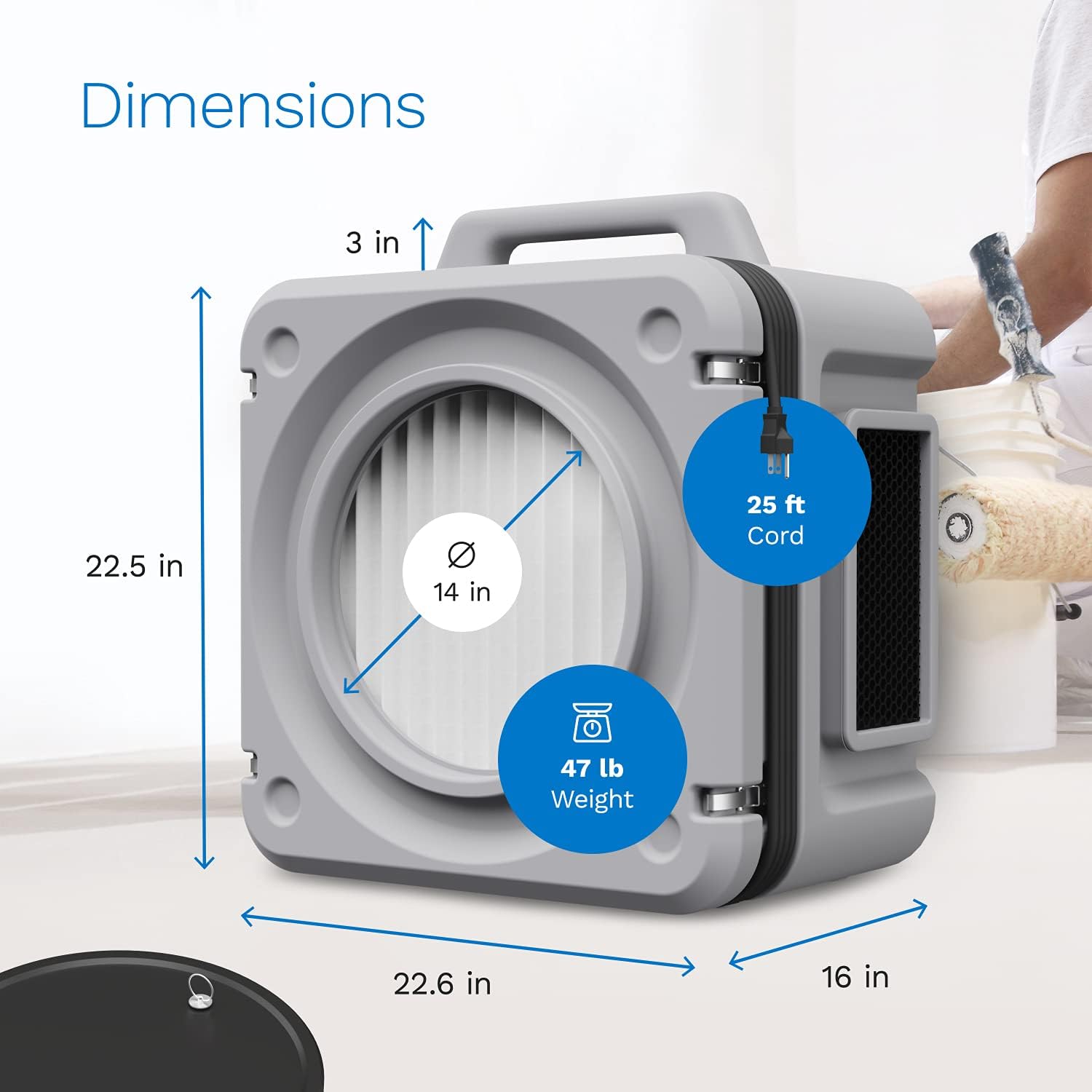
Image: The air scrubber's dimensions are 22.5 inches high, 22.6 inches wide, and 16 inches deep, with a weight of 47 lbs. It also shows a 25 ft power cord.
9. Garansi jeung Rojongan
For warranty information or technical support, please refer to the hOmeLabs official websitus atanapi ngahubungan layanan palanggan maranéhanana langsung. Simpen resi pameseran anjeun pikeun klaim jaminan.
For additional information or to purchase replacement filters, visit the hOmeLabs Store.