
1. Bubuka
Thank you for choosing the AIYIMA A05 TPA3221 Power Amplifier. This compact 2.0 channel stereo amplifier is designed to deliver high-fidelity audio to passive speakers, featuring both Bluetooth and RCA input options. This manual provides detailed instructions for setup, operation, and maintenance to ensure optimal performance and longevity of your device.
2. Parentah Kasalametan
- Sasayogian tanaga: Use only the specified power adapter (DC 12-32V) to prevent damage. Ensure the power outlet voltage kompatibel.
- Ventilasi: Tempatna amplifier in a well-ventilated area. Do not block ventilation openings. Avoid placing it on soft surfaces that may obstruct airflow.
- Uap: Keep the device away from water, humidity, and liquids. Do not operate with wet hands.
- Panas: Avoid direct sunlight, heat sources, or extreme temperatures.
- beberesih: Pegatkeun sambungan kakuatan saméméh beberesih. Paké lawon lemes, garing. Entong nganggo pembersih cair atanapi aerosol.
- Palayanan: Ulah nyobian ngalereskeun atanapi ngabongkar unitna nyalira. Serahkan sadaya perawatan ka tanaga anu mumpuni.
- Barudak: Jauhkeun tina jangkauan barudak.
3. Eusi Paket
Mangga parios pakét kanggo barang-barang ieu:
- AIYIMA A05 Bluetooth 5.0 Amppanguat x 1
- Antena Bluetooth x 1
- Buku Panduan x 1
- Kartu Garansi x 1
- Adaptor Daya DC 32V x 1

Gambar 3.1: Contents of the AIYIMA A05 amppakét liifier, kalebet amplifier unit, Bluetooth antenna, user manual, warranty card, and power adapter.
4. Produk Langkungview
4.1 Kadali Panel hareup
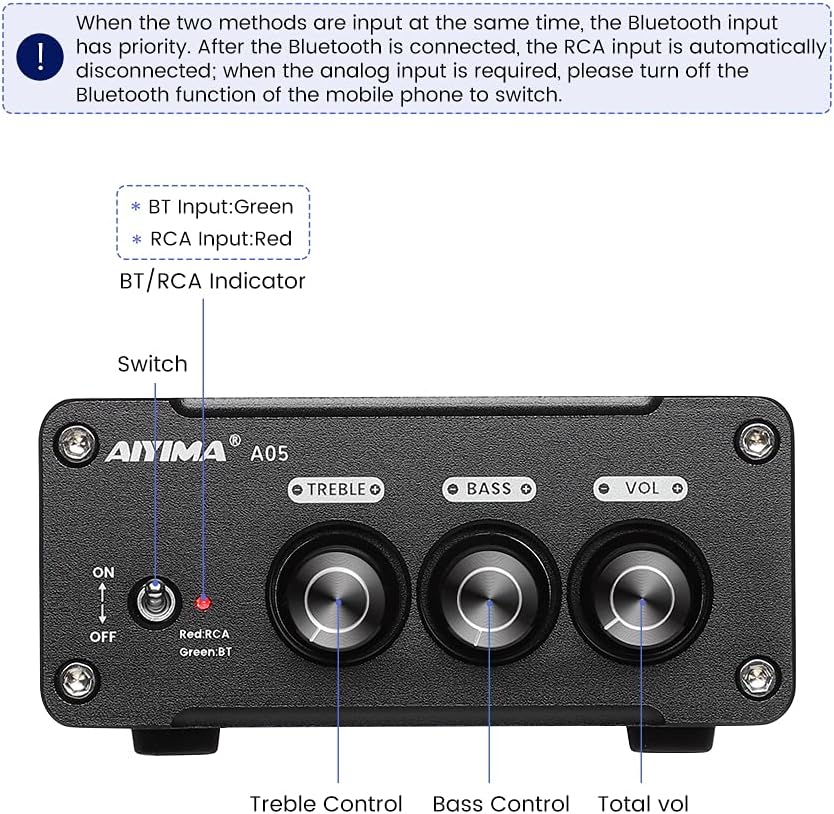
Gambar 4.1: Front panel of the AIYIMA A05 amplifier, showing the power switch, input indicator, treble, bass, and volume controls.
- Pindah Daya (ON/OFF): Toggles ka ampkakuatan Lifier.
- BT/RCA Indicator: Displays the active input source. Green indicates Bluetooth (BT) input, Red indicates RCA input.
- Kontrol Treble: Saluyukeun kaluaran audio frekuensi luhur.
- Kontrol Bass: Saluyukeun kaluaran audio frekuensi rendah.
- Kontrol volume: Adjusts the overall audio output level.

Gambar 4.2: Pahareup-hareup view of the power switch and the BT/RCA input indicator on the front panel.

Gambar 4.3: Pahareup-hareup view of the Treble, Bass, and Volume control knobs.
4.2 Sambungan Panel Rear

Gambar 4.4: Rear panel of the AIYIMA A05 amplifier, showing the Bluetooth antenna port, RCA audio input, speaker outputs, and DC power input.
- ANT (Bluetooth Antenna Port): Connect the included Bluetooth antenna here for wireless audio reception.
- AUDIO IN (RCA Input): Connect audio sources (e.g., CD player, TV, DAC) using RCA cables.
- SPEAKER (Audio Output): Connect passive speakers using speaker wires. Ensure correct polarity (+ to + and - to -).
- DC 24-32V (Power Input): Connect the provided DC power adapter.
5. Parentah Setup
Turutan léngkah-léngkah ieu pikeun nyetél AIYIMA A05 anjeun amppanguat:
- Sambungkeun Antena Bluetooth: Screw the included Bluetooth antenna into the ANT port on the rear panel.
- Sambungkeun Speaker: Connect your passive speakers to the SPEAKER output terminals on the rear panel. Ensure the positive (+) terminal of the amplifier connects to the positive (+) terminal of the speaker, and the negative (-) terminal connects to the negative (-).
- Sambungkeun Sumber Audio (RCA): If using a wired audio source, connect it to the AUDIO IN (RCA) ports on the rear panel using appropriate RCA cables.
- Sambungkeun Kakuatan: Connect the DC power adapter to the DC 24-32V input port on the rear panel, then plug the adapter into a wall outlet.
- Daya Hurung: Flip the power switch on the front panel to the "ON" position. The input indicator will light up.

Gambar 5.1: Rear panel of the amplifier with Bluetooth antenna, RCA cables, speaker wires, and power adapter connected.
6. Parentah Operasi
6.1 Powering on / Pareum
Pikeun kakuatan dina amplifier, flip the front panel switch to the "ON" position. To power off, flip the switch to the "OFF" position.
6.2 Sambungan Bluetooth
- Pastikeun amplifier is powered on and the BT/RCA indicator is green, indicating Bluetooth mode. If it's red, ensure no RCA cable is connected or disconnect it.
- On your mobile device (phone, tablet, etc.), enable Bluetooth and search for available devices.
- Select "AIYIMA A05" from the list of devices to pair.
- Once paired, the indicator light will remain green, and you can play audio from your device through the amppangagung.
6.3 RCA Input Usage
- Connect your audio source to the RCA input ports on the rear panel.
- Pastikeun amplifier is powered on. The BT/RCA indicator should be red, indicating RCA input mode.
- If the indicator is green (Bluetooth mode), ensure Bluetooth is disconnected on any paired device, or turn off Bluetooth on your mobile device to switch to RCA input.
6.4 Nyaluyukeun Audio
- Volume: Rotate the "VOL" knob clockwise to increase volume and counter-clockwise to decrease.
- Treble: Rotate the "TREBLE" knob to adjust high-frequency sounds to your preference.
- Bass: Rotate the "BASS" knob to adjust low-frequency sounds to your preference.
7. Pangropéa
- beberesih: Disconnect the power adapter before cleaning. Use a soft, dry, lint-free cloth to wipe the surface of the amplifier. Do not use harsh chemicals or abrasive materials.
- Panyimpenan: If not in use for an extended period, store the ampsimpen di tempat anu tiis sareng garing, jauh tina sinar panonpoé langsung sareng suhu anu ekstrim.
- Sambungan: Pariksa périodik sadaya sambungan kabel pikeun mastikeun aranjeunna aman tur bebas tina korosi.
8. Cara ngungkulan
Upami anjeun ngalaman masalah sareng AIYIMA A05 anjeun amplifier, mangga tingal masalah sareng solusi umum ieu:
| Masalah | Mungkin Cukang lantaranana | Solusi |
|---|---|---|
| Taya kaluaran sora |
|
|
| Distorted or buzzing sound |
|
|
| Bluetooth teu nyambung |
|
|
| Loud noise/ticking on startup |
|
|
If the problem persists after trying these solutions, please contact AIYIMA customer support for further assistance.
9. Spésifikasi

Gambar 9.1: Diménsi AIYIMA A05 amplifier: 107mm (4.2in) width, 87mm (3.4in) depth, 36mm (1.4in) height.
| Fitur | Spésifikasi |
|---|---|
| Modél | A05 |
| Daya Kaluaran | 105 Watts (at 4 Ω) |
| Jumlah Saluran | 2.0 (Stéreo) |
| Vérsi Bluetooth | QCC3034 APTX Bluetooth 5.0 |
| Chipset | TPA3221 |
| Pasokan Minimum Voltage | 12 Volt (DC) |
| Maksimum Suplai Voltage | 32 Volt (DC) |
| Item Beurat | 500 gram |
| Ukuran (Kira-kira.) | 107mm (W) x 87mm (D) x 36mm (H) |
10. Garansi jeung Rojongan
The AIYIMA A05 amplifier comes with a warranty. Please refer to the included Warranty Card for specific terms and conditions. For technical support, troubleshooting assistance, or warranty claims, please contact AIYIMA customer service through the retailer where the product was purchased or visit the official AIYIMA websitus.
Sumberdaya Online: For additional information and support, you may visit the AIYIMA store page: Toko Resmi AIYIMA