
1. Produk Langkungview
The AI Carecam NPK Intelligent Camera is a wireless indoor security camera designed for home and office use. It features 360° pan and tilt capabilities, 2MP 1080P Full HD resolution, night vision, two-way audio communication, and motion detection. The camera supports up to a 128GB Micro SD card for local storage and is controlled via a mobile application.
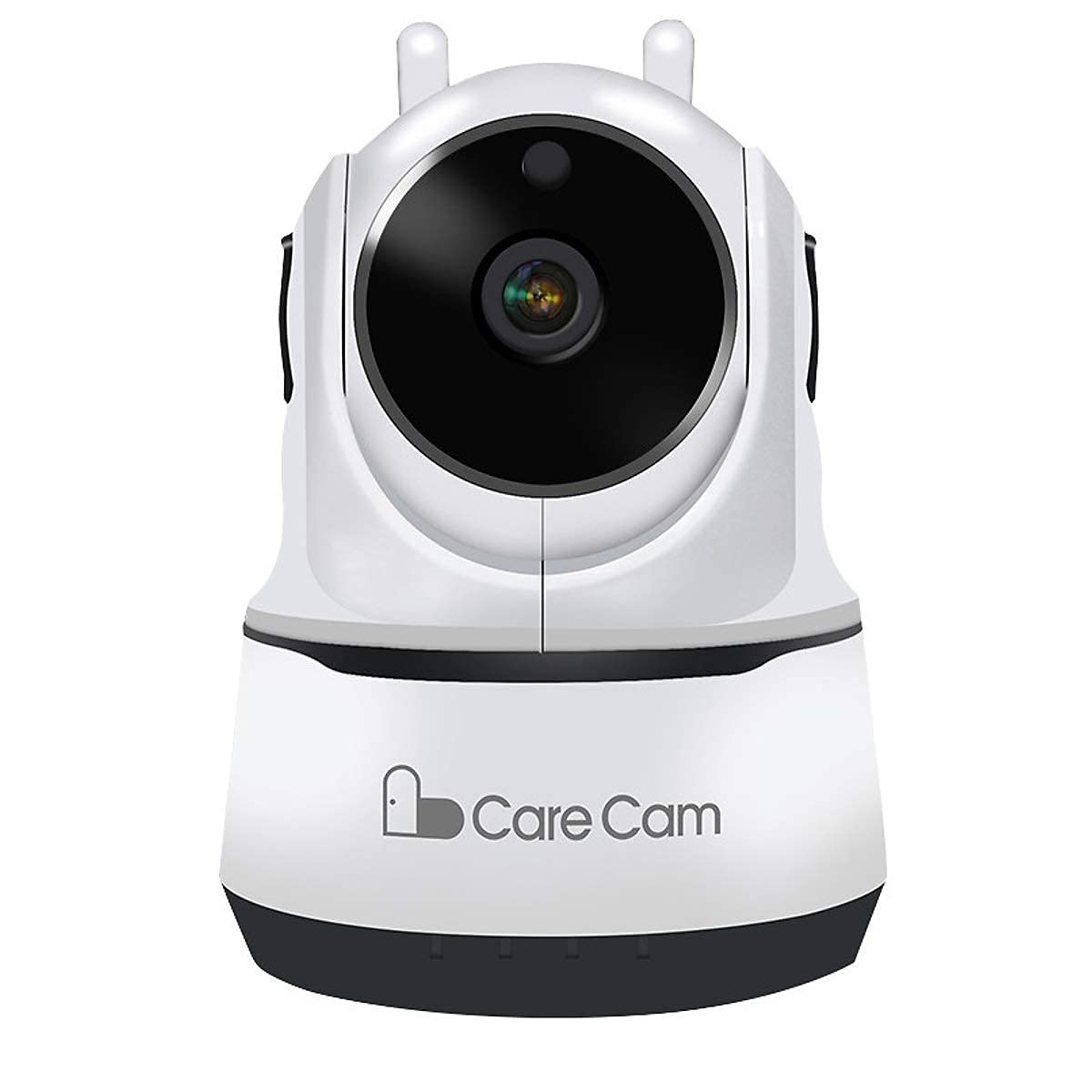
Gambar 1: Hareupeun view of the AI Carecam NPK Intelligent Camera, showing the lens and base.
2. Eusi Paket
- AI Carecam NPK Intelligent Camera
- Adaptor kakuatan
- Manual pangguna (dokumén ieu)
3. Parentah Setup
3.1 Identifying Camera Ports
Before setup, familiarize yourself with the camera's ports and interfaces.
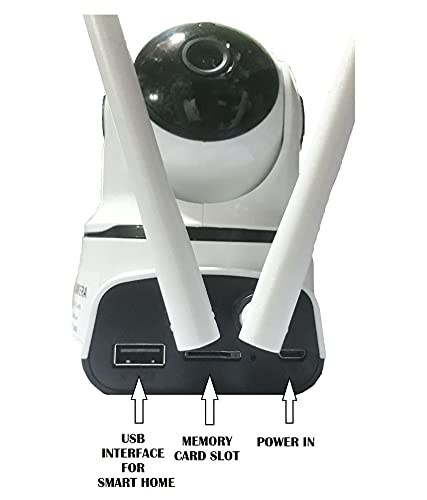
Gambar 2: Tukangeun view of the camera showing the USB interface, memory card slot, and power input port.
- Antarmuka USB: For smart home integration (if applicable).
- Slot Kartu Mémori: Insert a Micro SD card (up to 128GB) for local video storage.
- Kakuatan Dina: Sambungkeun adaptor kakuatan anu disayogikeun di dieu.
3.2 Ngahurungkeun kaméra
- Connect the provided power adapter to the "Power In" port on the camera.
- Colokkeun adaptor kana stop kontak listrik standar.
- The camera will power on and initiate its self-test sequence. Wait for the camera to indicate readiness (e.g., a specific LED indicator or voice prompt).
3.3 Installing the Mobile Application
The camera is controlled via a dedicated mobile application, compatible with Android and iOS devices. Milarian pikeun "Carecam" or the recommended app name in your device's app store.

Gambar 3: The camera supports control via Android and iOS mobile applications.
3.4 Nyambungkeun ka Wi-Fi
- Ensure your mobile device is connected to the 2.4GHz Wi-Fi network you intend to use for the camera.
- Open the installed Carecam application.
- Follow the in-app instructions to add a new device. This typically involves scanning a QR code on the camera or entering Wi-Fi credentials.
- Once connected, the camera's status indicator will change, and you will receive a confirmation in the app.
4. Parentah Operasi
4.1 Hirup View sarta Pan / Dengdekkeun Control
After successful setup, open the app to view the live feed from your camera. Use the on-screen controls to adjust the camera's viewsudut ing.

Gambar 4: Control the camera's 355° pan and 90° tilt movements directly from the mobile application.
- Roti: Puterkeun kaméra sacara horisontal nepi ka 355°.
- Dengdekkeun: Adjust the camera vertically up to 90°.
4.2 Komunikasi Audio Dua Arah
The camera supports two-way audio, allowing you to listen and speak through the camera using the mobile app.

Gambar 5: The camera features clear two-way audio with a sensitive microphone to restore vocals.
- Dina hirup view, ketok ikon mikropon pikeun nyarios.
- Ketok ikon spiker pikeun ngadangukeun audio tina lokasi kaméra.
4.3 Visi Peuting
The camera automatically switches to night vision mode in low-light conditions, providing clear monitoring even in darkness using infrared light.
4.4 Deteksi Gerak sareng Siaga
Configure motion detection settings within the app to receive alerts on your mobile device when movement is detected. The camera is designed for motion-only alerts.
- Navigate to the camera settings in the app.
- Locate the "Motion Detection" or "Alert Settings" section.
- Enable motion detection and customize sensitivity levels and alert schedules as needed.
4.5 Micro SD Card Storage
The camera supports local storage on a Micro SD card up to 128GB. Ensure a compatible card is inserted for continuous recording or event-triggered recordings.

Gambar 6: The camera supports Micro SD (TF) card storage up to 128GB for recording video footage.
- Insert the Micro SD card into the designated slot with the contacts facing the correct direction.
- Format the Micro SD card through the camera's app settings for optimal performance.
5. Pangropéa
5.1 Ngabersihan Kaméra
- Pastikeun kaméra pareum sareng dicabut tina colokan sateuacan dibersihkeun.
- Use a soft, dry cloth to gently wipe the camera body.
- For the lens, use a specialized lens cleaning cloth to avoid scratches. Do not use liquid cleaners directly on the lens.
5.2 Manajemén Kartu Micro SD
- Regularly check the storage status of your Micro SD card via the app.
- Format the card periodically to maintain optimal recording performance and free up space.
- Back up important recordings before formatting the card.
6. Cara ngungkulan
- Kaméra teu nyambung ka Wi-Fi:
- Pastikeun jaringan Wi-Fi anjeun 2.4GHz. Kaméra henteu ngadukung jaringan 5GHz.
- Verify the Wi-Fi password is entered correctly in the app.
- Pindahkeun kaméra ngadeukeutan ka router Wi-Fi pikeun ningkatkeun kakuatan sinyal.
- Balikan deui kaméra sareng router anjeun.
- Teu aya gambar atanapi kualitas gambar anu goréng:
- Check the power connection to ensure the camera is on.
- Pastikeun lensa kaméra beresih jeung bebas tina halangan.
- Pariksa kecepatan sambungan internét anjeun.
- Deteksi gerak henteu jalan:
- Check the motion detection settings in the app to ensure it is enabled and configured correctly.
- Saluyukeun tingkat sensitipitas.
- Pastikeun widang kaméra urang tina view geus jelas.
- Micro SD card not recording:
- Pastikeun kartu Micro SD diselapkeun leres.
- Format the Micro SD card through the app.
- Check if the card is full; if so, back up data and format it.
- Verify the card is not damaged.
7. Spésifikasi
| Fitur | Rincian |
|---|---|
| merek | AI |
| Ngaran modél | NPK Carecam (HVG Carecam) |
| Téhnologi konektipitas | Nirkabel (Wi-Fi) |
| Fitur husus | Kaméra 2MP |
| Pamakéan jero rohangan / outdoor | jero rohangan |
| Sumber Daya | Kabel Listrik |
| Protokol konektipitas | Wifi |
| Tipe Controller | Android, iOS (App) |
| Warna | Bodas |
| Faktor Bentuk | Kubah |
| Tingkat Résistansi Cai | Henteu Tahan Cai |
| Tipe Siaga | Gerak Ngan |
| Tipe Kamar | Kantor, Imah |
| Sumber Cahaya | Infrared (for Night Vision) |
| Métode kontrol | App |
| Téhnologi konektipitas jaringan | Nirkabel |
| Jenis Téhnologi Wireless | Wifi |
| Resolusi Capture Video | 1080P (FHD), H.264 |
| Format Capture Video | MP4, AVI |
| Visi Peuting | Warna Peuting |
| Item Dimensi | 10 x 10 x 10 cm |
| Item Beurat | 200 gram |
| Jumlah Unit | 1 Ngitung |
| Jumlah Item | 1 |
| Diwangun-Dina Media | Adaptor |
| Viewdina Angle | 360 darajat |
| Widang Of View | 360 darajat |
| Tipe Zum | Zoom optik |
| Téhnologi Sénsor Poto | CMOS |
| Tipe Mémori Flash | Micro SD (nepi ka 128GB) |
8. Émbaran jaminan
The AI Carecam NPK Intelligent Camera comes with a 1-taun jaminan produsén from the date of purchase. This warranty covers defects in materials and workmanship under normal use. Please retain your proof of purchase for warranty claims. The warranty does not cover damage caused by misuse, accidents, unauthorized modifications, or natural disasters.
9. Rojongan
For technical assistance, troubleshooting, or warranty inquiries, please contact the manufacturer or your point of purchase. The packer contact information is provided below:
Packer Contact: HOTSPOT ELECTRONICS, MUMBAI 400004
Please have your product model number (NPK Carecam) and proof of purchase ready when contacting support.