
1. Bubuka
Hatur nuhun pikeun meuliasing the AIYIMA TUBE T9 Bluetooth 5.0 6K4 Tube Amplifier. This device combines a tube preamplifier with a digital power amplifier, offering multiple audio inputs including Bluetooth 5.0, USB, Coaxial, Optical, and RCA. It features a classic VU meter and tone controls for a personalized audio experience. This manual provides detailed instructions for setup, operation, and maintenance to ensure optimal performance and longevity of your amppangagung.
2. Émbaran Kasalametan
- Sasayogian tanaga: Use only the provided DC24V power adapter. Ensure the voltage is within the specified range (DC18V-30V).
- Ventilasi: Tempatna amplifier in a well-ventilated area. Do not block ventilation openings.
- Uap: Jauhkeun alat ieu tina cai, kalembaban, sareng kalembaban anu luhur.
- Panas: Hindarkeun nempatkeun amptempatkeun di deukeut sumber panas atawa dina sinar panonpoé langsung.
- Tabung Pangolahan: Vacuum tubes can become hot during operation. Exercise caution when handling or replacing them. Allow the unit to cool down before touching the tubes.
- beberesih: Cabut daya sateuacan dibersihkeun. Anggo lawon anu lemes sareng garing. Entong nganggo pembersih cair atanapi aerosol.
- Palayanan: Ulah nyobian ngalereskeun produk ieu nyalira. Serahkan sadaya perawatan ka tanaga anu mumpuni.
3. Eusi Paket
Mangga parios pakét kanggo barang-barang ieu:
- AIYIMA TUBE T9 Amppanguat x 1
- 6K4 Vacuum Tube x 2
- Antena Bluetooth x 1
- DC24V Power Adapter x 1
- PC-USB Cable x 1
- Remote Control x 1 (AA batteries not included)
- Buku Panduan x 1
- Kartu Garansi x 1

Image: Contents included in the AIYIMA TUBE T9 amplifier package, showing the amplifier unit, two 6K4 tubes, a Bluetooth antenna, power adapter, USB cable, remote control, user manual, and warranty card.
4. Produk Langkungview
4.1 Panel payun
The front panel features controls for power, input selection, volume, and tone, along with a classic VU meter and input indicators.
- VU Méter: Displays audio signal level in real-time.
- Indikator Input: LEDs indicate the currently selected input (Bluetooth, PC-USB, RCA, Coaxial, Optical).
- Volume/Kenop Input: Rotate to adjust volume. Press to cycle through input sources. Press and hold to power on/off.
- Kontrol Bass: Nyaluyukeun kaluaran frékuénsi handap.
- Kontrol Treble: Nyaluyukeun kaluaran frékuénsi luhur.
- Panarima IR: For remote control commands.

Gambar: Detil view of the AIYIMA TUBE T9 amplifier's front panel, showing the VU meter, input indicators, volume knob, bass and treble controls, and the two visible 6K4 vacuum tubes.
4.2 Panel tukang
The rear panel provides all necessary audio input and output connections.
- Port Antena Bluetooth: Sambungkeun anteneu Bluetooth anu kalebet.
- Input RCA (Kiri/Katuhu): Pikeun sumber audio analog.
- Input Coaxial: Pikeun sumber audio digital.
- Input optik: Pikeun sumber audio digital.
- Input PC-USB: For connecting to a computer as a USB DAC.
- AUX Out (3.5mm): For connecting to an active subwoofer or another amppangagung.
- Kaluaran Spiker (Kiri/Katuhu): Connect passive speakers (3-8Ω).
- DC18-30V Power Input: Sambungkeun adaptor kakuatan.
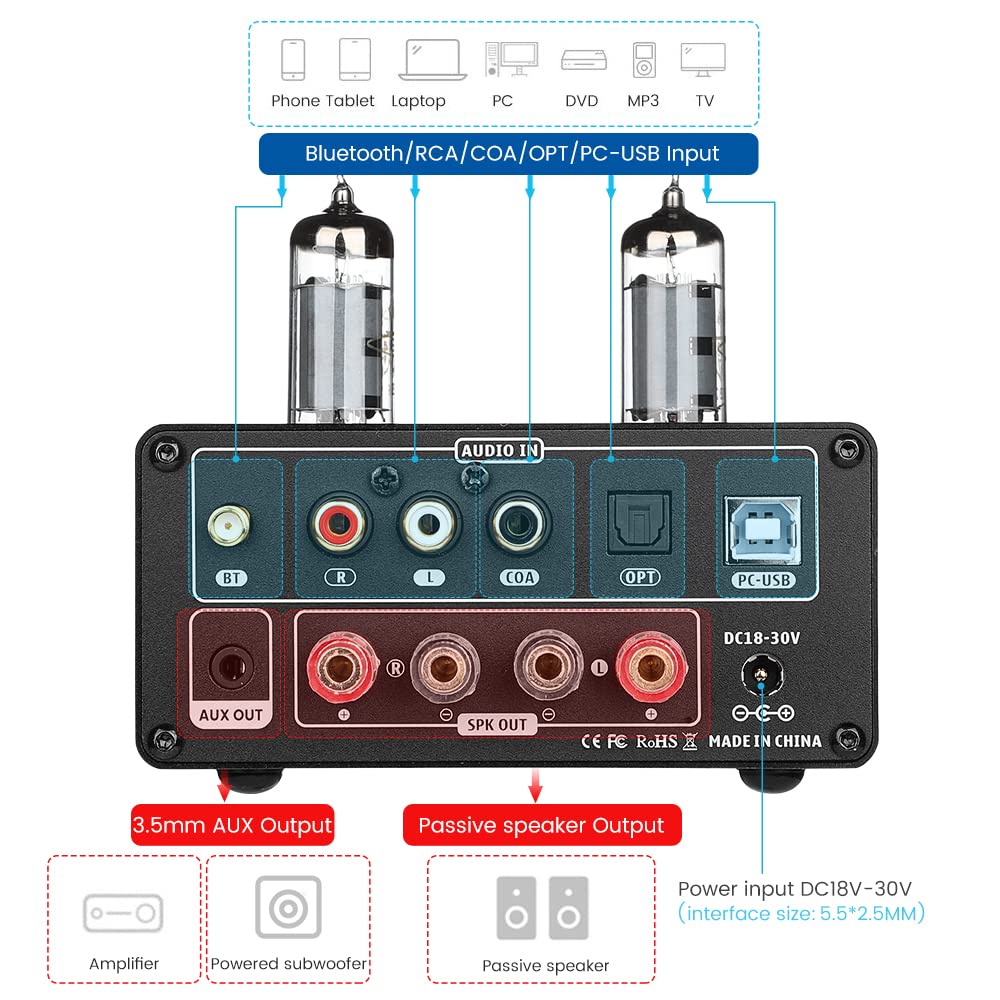
Gambar: Tukangeun view of the AIYIMA TUBE T9 amplifier, highlighting the various input and output ports including Bluetooth, RCA, Coaxial, Optical, PC-USB, AUX Out, speaker terminals, and power input.
5. Setélan
5.1 Pamasangan tube
- Carefully unpack the two 6K4 vacuum tubes.
- Align the pins of each tube with the corresponding holes on the amplifier's tube sockets.
- Gently push the tubes straight down into the sockets until they are firmly seated. Do not force them.
5.2 Nyambungkeun Speaker
The TUBE T9 is designed for passive speakers with an impedance of 3-8Ω.
- Sambungkeun speaker pasip anjeun ka Speaker Output (SPK OUT) terminal dina panel tukang. Pastikeun polaritasna leres (+ ka + sareng - ka -).
- For a 2.1 channel system, connect an active subwoofer to the AUX Out (3.5mm) palabuhan.
5.3 Nyambungkeun Sumber Audio
Connect your desired audio sources to the corresponding input ports:
- Bluetooth: Screw the included Bluetooth antenna into the BT palabuhan.
- PC-USB: Use the provided USB cable to connect your computer to the PC-USB palabuhan.
- RCA: Connect analog audio devices (e.g., CD player, streamer) using RCA cables to the RCA (L/R) asupan.
- Koaksial/Optik: Connect digital audio devices (e.g., TV, game console) using Coaxial or Optical cables to the respective inputs.
Catetan penting: Ieu amplifier does not have a built-in phono preamplifier. Do not connect a vinyl record player directly to the RCA input without an external phono preamp, as this may result in very low volume or distorted sound.

Image: Diagrams illustrating various connection scenarios for the AIYIMA TUBE T9 amplifier, including connecting to passive speakers, an amplifier, and different audio sources like phones, tablets, laptops, PCs, DVDs, and TVs.

Image: A visual warning indicating that the AIYIMA TUBE T9 amplifier cannot be directly connected to a vinyl record player without an external phono preamppangagung.
5.4 Sambungan Daya
- Pastikeun sadaya sambungan audio aman.
- Sambungkeun adaptor daya DC24V ka DC18-30V input port on the rear panel.
- Colokkeun adaptor kakuatan kana stop kontak témbok.
6. Parentah Operasi
6.1 Daya Hurung/Pareuman
Press and hold the main Volume/Input Knob on the front panel for approximately 1 second to power the amplifier on or off. The VU meter and tubes will illuminate upon power-on.
6.2 Pamilihan Input
Short press the main Volume/Input Knob to cycle through the available input sources: Bluetooth, PC-USB, RCA, Coaxial, Optical. The corresponding LED indicator on the front panel will light up.
6.3 Volume Control
Rotate the main Volume/Input Knob searah jarum jam pikeun ningkatkeun volume sareng berlawanan arah jarum jam pikeun ngirangan volume.
6.4 Kontrol Nada
Ngagunakeun éta Bass jeung Treble knobs on the front panel to adjust the low and high frequencies according to your preference. This allows for fine-tuning the sound profile.
6.5 Nyapasangkeun Bluetooth
- Select the Bluetooth input using the Volume/Input Knob. The Bluetooth indicator will flash.
- On your mobile device (phone, tablet, etc.), enable Bluetooth and search for available devices.
- Select "AIYIMA TUBE T9" from the list of devices to pair.
- Once paired, the Bluetooth indicator will stop flashing and remain solid. You can now play audio from your device.

Image: A smartphone connected via Bluetooth 5.0 to the AIYIMA TUBE T9 amplifier, demonstrating wireless audio streaming.
6.6 VU Méter
The integrated VU meter provides a visual representation of the audio output level. Its warm light and dynamic movement add a retro aesthetic to your listening experience. The meter is designed to respond to various volume levels.

Gambar: A close-up view of the illuminated VU meter on the AIYIMA TUBE T9 amplifier, showing its needle indicating audio levels.
7. Pangropéa
7.1 Panggantian Tabung
The 6K4 vacuum tubes can be replaced to customize the sound or if they wear out. Compatible tube models include:
- 6J1
- 6J2
- GE5654
- 6J3
- 6J4
- 6J5
- 6Ж1п (6Zh1p)
- 6AK5
To replace tubes:
- Pareuman amplifier and disconnect it from the power outlet.
- Allow the tubes to cool completely (this may take several minutes).
- Gently pull the existing tubes straight up from their sockets.
- Insert the new compatible tubes, aligning the pins carefully, and push them straight down until seated firmly.
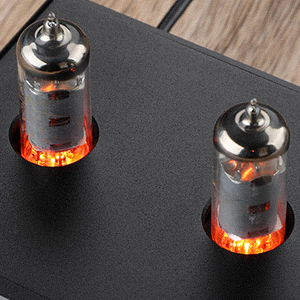
Gambar: A close-up view of the two 6K4 vacuum tubes installed on the AIYIMA TUBE T9 amplifier, showing their glowing filaments during operation.
7.2 beberesih
Ngusap nu ampbagian luar liifier ku lawon anu lemes sareng garing. Entong nganggo pembersih atanapi pangleyur anu abrasif.
7.3 Ventilasi
Mastikeun aliran hawa nyukupan sabudeureun éta amplifier to prevent overheating. Do not place objects on top of the unit that could obstruct ventilation.
8. Cara ngungkulan
| Masalah | Mungkin Cukang lantaranana | Solusi |
|---|---|---|
| Taya kaluaran sora |
|
|
| Sora distort |
|
|
| Masalah sambungan Bluetooth |
|
|
| Clicking sound after silence | Automatic hibernation mode engaging | The amplifier may enter a hibernation state after a period of no audio signal, producing a soft click. This feature can be disabled using the remote control: press the M1 button on the remote to toggle the hibernation prompt on/off. |
| VU Meter not moving | Very low volume or specific audio characteristics | The VU meter is designed to respond to audio levels. Ensure the volume is sufficiently high for the meter to register movement. This issue has been addressed in updated models to work at various levels. |
9. Spésifikasi

Image: The AIYIMA TUBE T9 amplifier shown with its physical dimensions and a table summarizing its key specifications.
| Fitur | Spésifikasi |
|---|---|
| Nomer modél | TUBE T9 |
| merek | AIYIMA |
| Input Interfaces | Bluetooth 5.0, PC-USB, RCA, Coaxial, Optical |
| Interfaces kaluaran | Passive Speaker Output, 3.5mm AUX Out (for active subwoofer/ampliifier) |
| Daya Kaluaran | 100W x 2 (at 4Ω load) |
| Impedansi spiker | 3-8Ω |
| Réspon Frékuénsi | 20-20kHz (±1dB) |
| Rasio Sinyal-ka-Noise (S/N) | ≥98dB |
| Gawé Voltage | DC18V-30V |
| Ukuran (L x W x H) | 22 x 22 x 10 cm (kira-kira 8.66 x 8.66 x 3.94 inci) |
| Item Beurat | 1 kg (kira-kira 2.2 lbs) |
| Sertifikasi | CE |
| Negara asal | Cina |
10. Garansi jeung Rojongan
10.1 Émbaran jaminan
According to the product specifications, there is no explicit warranty provided for this product. Please refer to your retailer's return policy for any issues within the initial purchase period.
10.2 Rojongan Palanggan
For technical assistance or inquiries, please contact the seller or AIYIMA customer support through their official channels. Keep your purchase receipt or order details handy for any support requests.