
1. Bubuka
This manual provides essential information for the safe and efficient use of your Aligator A675 Senior Double SIM 2G Mobile Phone. Please read it carefully before using the device and keep it for future reference. The Aligator A675 is designed for ease of use, featuring large buttons and a clear display, making it ideal for senior users.
2. Eusi Paket
Pastikeun sadaya item aya dina bungkusan:
- Aligator A675 Mobile Phone
- Batré
- Charger
- Manual pangguna (dokumén ieu)
Lamun aya item nu leungit atawa ruksak, mangga ngahubungan pangecér Anjeun.
3. Alat Leuwihview
Familiarize yourself with the key components of your Aligator A675 phone.

Gambar 3.1: Hareup jeung tukang view of the Aligator A675 mobile phone. The front shows the display, keypad, and navigation buttons. The back features the speaker and camera module.
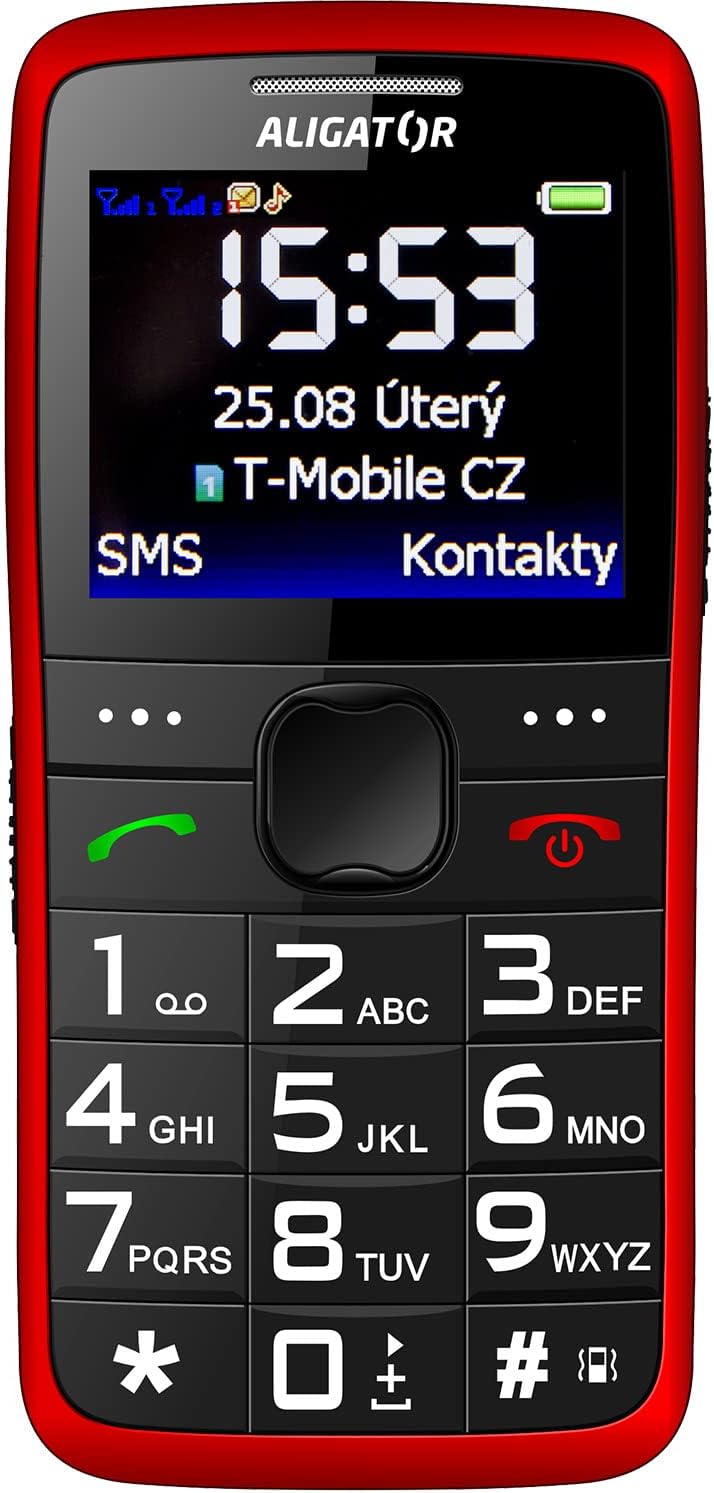
Gambar 3.2: Detil hareup view of the Aligator A675 mobile phone, highlighting the large display, clear numeric keypad, and dedicated call/end buttons.
3.1 Hareup View
- tampilan: Shows time, date, network status, battery level, and menu options.
- Konci Napigasi: Dipaké pikeun ngagulung ménu sareng pilihan.
- Tombol Telepon (Héjo): Ngamimitian telepon sareng ngajawab telepon anu lebet.
- End/Power Button (Red): Ends calls, returns to the home screen, and powers the phone on/off.
- Papan tombol: Numeric keys (0-9), asterisk (*), and hash (#) for dialing and text input.
3.2 Balik deui View
- Loudspeaker: For ringtones and hands-free calls.
- Kaméra: For basic photo capture.
- Tombol SOS: A dedicated button for emergency calls/SMS (refer to section 5.4 for setup).
4. Setélan
Follow these steps to prepare your phone for first use.
4.1 Nyelapkeun Kartu SIM
- Leupaskeun panutup tukang telepon ku gently prying eta muka tina kiyeu.
- Upami batréna parantos dipasang, cabut.
- Locate the SIM card slots. The Aligator A675 supports two SIM cards (Dual SIM).
- Carefully insert your 2G GSM SIM card(s) into the designated slot(s) with the gold contacts facing down, ensuring they are correctly oriented.
- Pastikeun kartu SIM parantos dipasang kalayan aman.
4.2 Nyelapkeun Batré
- Align the battery contacts with the contacts in the phone's battery compartment.
- Gently press the battery into place until it fits snugly.
- Pasang deui panutup tukang, pastikeun éta ngaklik kana tempatna.
4.3 Ngecas Telepon
- Connect the charger cable to the charging port on the phone (usually located at the bottom).
- Colokkeun carjer ka colokan listrik.
- The battery icon on the display will indicate charging status.
- Allow the phone to charge completely before first use. This typically takes a few hours.
5. Ngoperasikeun Telepon
Basic functions and features of your Aligator A675.
5.1 Powering on / Pareum
- Pikeun Ngahurungkeun: Pencét jeung tahan tombol End/Power Button (red button) until the screen lights up.
- Pikeun mareuman: Pencét jeung tahan tombol End/Power Button dugi ka pilihan mareuman alat nembongan, teras konfirmasi.
5.2 Nelepon jeung Narima Telepon
- Pikeun nelepon: Lebetkeun nomer telepon nganggo keypad teras pencét Tombol Telepon (green button).
- Pikeun Ngajawab Telepon: Pencét éta Tombol Telepon nalika telepon hurung.
- Pikeun ngeureunkeun telepon: Pencét éta End/Power Button.
5.3 Ngirim sareng Nampi SMS
- Navigate to the 'Messages' menu using the navigation key.
- Pilih 'Tulis Pesen' pikeun nyieun SMS anyar.
- Asupkeun nomer panarima atawa pilih ti kontak.
- Type your message using the keypad. Press the appropriate key multiple times for different letters (e.g., '2' for A, B, C).
- Pilih 'Kirim'.
- Incoming messages will be displayed on the screen and stored in the 'Inbox'.
5.4 Fungsi SOS
Fungsi SOS ngamungkinkeun anjeun pikeun gancang ngahubungi nomer darurat anu parantos disetel.
- Setting Up SOS Numbers: Go to 'Settings' > 'SOS Settings'. Add up to 5 emergency contact numbers.
- Aktipkeun SOS: Pencét jeung tahan tombol Tombol SOS di tukang telepon salami sababaraha detik.
- The phone will automatically send an emergency SMS to the pre-set numbers and then start dialing them one by one until a call is answered.
5.5 Kontak
- Nambahkeun Kontak: Go to 'Contacts' > 'Add New'. Enter the name and phone number, then save.
- Milarian Kontak: Go to 'Contacts' and use the navigation key to scroll or type the first letters of the name.
6. Pangropéa sarta perawatan
Proper care ensures the longevity of your Aligator A675 phone.
- beberesih: Anggo lawon anu lemes sareng garing pikeun ngabersihkeun permukaan telepon. Hindarkeun pembersih cair atanapi bahan anu kasar.
- Perawatan batré: Do not expose the battery to extreme temperatures. Avoid fully discharging the battery frequently.
- Panyimpenan: Simpen telepon di tempat anu tiis sareng garing, jauh tina sinar panonpoé langsung sareng kalembaban.
- Tahan cai: This phone is not water-resistant. Avoid contact with liquids.
7. Cara ngungkulan
Masalah umum sareng solusina.
| Masalah | Mungkin Cukang lantaranana | Solusi |
|---|---|---|
| Telepon teu hurung | Low battery; Battery not inserted correctly | Charge the battery; Reinsert the battery correctly |
| Teu bisa nyieun/nampa telepon | No network signal; SIM card not inserted; SIM card not activated | Move to an area with better signal; Reinsert SIM card; Contact your network provider |
| Henteu aya sora nalika nelepon | Volume too low; Speaker blocked | Increase call volume; Check if speaker is obstructed |
| Fungsi SOS teu jalan | SOS numbers not set; No network signal | Set up SOS numbers in settings; Ensure network coverage |
Lamun masalah persists, mangga ngahubungan rojongan customer.
8. Spésifikasi
Key technical details of the Aligator A675.
- merek: ALIGATOR
- model: A675
- Pamawa nirkabel: Henteu dikonci
- Téknologi Jaringan Nirkabel: GSM (2G)
- Ukuran layar: 3 inci
- Input Antarmuka Manusa: Papan tombol
- Dukungan SIM: Dual SIM
9. Garansi jeung Rojongan
Your Aligator A675 phone is covered by a standard manufacturer's warranty. Please refer to the warranty card included in your package for specific terms and conditions, including the warranty period and coverage details.
For technical support, service, or warranty claims, please contact your retailer or the official Aligator customer service. Contact information can typically be found on the manufacturer's websitus atanapi dina bungkusan.
Simpen bukti pameseran anjeun (struk atanapi faktur) sabab éta bakal diperyogikeun pikeun layanan garansi naon waé.