
SUPVAN E10 Black
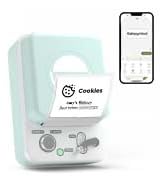
SUPVAN E10 Bluetooth Label Maker Mesin
Manual pamaké
Bubuka
The SUPVAN E10 Bluetooth Label Maker Machine is a versatile and inkless labeler designed for efficient organization in various environments, including home, kitchen, school, and office. This compact device connects wirelessly via Bluetooth to your smartphone, allowing you to create customized labels using a dedicated mobile application. Its thermal printing technology eliminates the need for ink or toner, offering a cost-effective and convenient labeling solution. The E10 supports both continuous and fixed-size label tapes, providing flexibility for different labeling needs.

Naon dina Box
Upon unboxing your SUPVAN E10 Label Maker, please ensure all the following components are present:
- Printer Label
- White Continuous Label * 1
- Kabel USB-C
- Manual

Disetél
1. Ngecas Alat
Before initial use, fully charge your SUPVAN E10 Label Maker using the provided USB-C cable. A full charge can provide approximately one month of standby time, ensuring readiness for your labeling tasks.

2. Masang Label Tape
The SUPVAN E10 supports both continuous and fixed-size label tapes. To install, open the label compartment, insert the tape roll with the label side facing up, and feed the leading edge of the tape through the output slot. Ensure the tape is properly aligned for optimal printing.

3. App Ngundeur tur Sambungan
The SUPVAN E10 operates via the "Katasymbol" mobile application, available for both Android and iOS devices. There are no fees or registration required to use the app.
- Unduh Aplikasi: Scan the QR code on the product packaging or search for "Katasymbol" in your device's app store.
- Aktipkeun Bluetooth: Pastikeun Bluetooth diaktipkeun dina smartphone Anjeun.
- Nyambung ka printer: Open the Katasymbol app. The app will guide you to connect to your E10 label maker via Bluetooth. Select "E10" from the list of available devices.

Video: This video demonstrates the process of connecting the SUPVAN E10 Label Maker to its mobile application via Bluetooth.
Parentah Operasi
1. Nyieun jeung Ngédit Labél
Once connected, use the Katasymbol app to design your labels. The app offers extensive customization options:
- téks: Input your desired text.
- hurup: Choose from over 40 available fonts.
- Ikon & Lambang: Access over 1000 icons and 450+ symbols to enhance your labels.
- Pigura: Select from 30 frames to add decorative borders.
- Fitur séjén: The app also supports QR codes, barcodes, and integration with Excel for batch printing.


Video: This video demonstrates how to create and customize labels using the E10 label maker and its app.
2. Nyitak Label
After designing your label, tap the "Print" button in the app. The E10 will quickly print your label using thermal technology. The built-in cutter allows for a precise and clean cut of the label tape.
3. Aplikasi Examples
The SUPVAN E10 is suitable for a wide range of labeling applications:
- Organisasi Imah: Label storage boxes, spice jars, food containers, and personal items.
- Kantor & Sakola: ngatur files, label office supplies, and create name tags.
- Manajemén Kabel: Identify cables and wires for electronic devices.
- Pawon & Kamar Mandi: Labels are waterproof, oil-proof, anti-scratch, and heat-resistant, making them ideal for these environments. They leave no residue upon removal.


Pangropéa
To ensure the longevity and optimal performance of your SUPVAN E10 Label Maker, follow these maintenance guidelines:
- beberesih: Periodically wipe the exterior of the device with a soft, dry cloth. If print quality degrades, gently clean the print head with a cotton swab lightly dampdibilas ku alkohol. Pastikeun alatna pareum sateuacan dibersihkeun.
- Ngaganti pita: Replace label tape rolls as needed. Always use genuine SUPVAN label tapes for best results.
- Panyimpenan: Nyimpen panyipta labél di tempat anu tiis sareng garing jauh tina sinar panonpoé langsung sareng suhu anu ekstrim.
Pamérésan masalah
If you encounter issues with your SUPVAN E10 Label Maker, refer to the following common solutions:
| Masalah | Mungkin Cukang lantaranana | Solusi |
|---|---|---|
| Alat teu hurung | batré lemah atawa euweuh muatan. | Connect the device to a power source using the USB-C cable and charge it fully. |
| Teu tiasa nyambung ka aplikasi | Bluetooth pareum, alat di luar jangkauan, atanapi masalah aplikasi. | Ensure Bluetooth is enabled on your phone. Move the device closer to your phone. Restart the app and the label maker. |
| Kualitas cetak goréng / labél luntur | Print head is dirty or tape is improperly installed. | Clean the print head. Reinstall the label tape, ensuring it is correctly aligned. |
| Label tape not feeding | Tape jam or incorrect installation. | Open the compartment and check for any obstructions. Reinstall the tape correctly. |
spésifikasi
| Fitur | Rincian |
|---|---|
| merek | SUPVAN |
| Ngaran modél | E10 |
| Dimensi produk | 1.1 "D x 3.07" W x 5.12" H |
| Item Beurat | 5.9 ons (167 gram) |
| Téhnologi konektipitas | Bluetooth |
| Téhnologi percetakan | Termal |
| Ukuran Media Printer Maksimum | 0.59in x 19.68ft (Continuous) |
| Resolusi | 203 DPI |
| Métode kontrol | App (Android / iOS) |
| Fitur husus | Waterproof, Lightweight, High Clarity, Works with continuous & fixed-size labels, Inkless |
| Komponén Kaasup | USB-C Cable, Label Printer, Manual, White Continuous Label * 1 |
| Sumber Daya | Rechargeable Battery (1 A battery required) |
Garansi sareng Rojongan
For detailed warranty information and further support, please refer to the official user guide provided with your product or visit the SUPVAN official website. You can also download the comprehensive User Guide in PDF format:
For direct assistance, please contact SUPVAN customer support through their official channels.
Ask a question about this manual
Ask about setup, troubleshooting, compatibility, parts, safety, or missing instructions. Manuals+ will review the question and use this page’s manual context to help answer it.