
1. Bubuka
Thank you for choosing the FLEXISPOT EG1 Electric Standing Desk. This manual provides essential information for the safe and efficient assembly, operation, and maintenance of your new height-adjustable desk. The EG1 desk is designed to promote a healthier work environment by allowing seamless transitions between sitting and standing positions, enhancing focus and comfort throughout your workday.
The FLEXISPOT EG1 features a wide height adjustment range, a smooth one-piece desktop, and an intuitive control panel for ease of use. Please read this manual thoroughly before assembly and operation to ensure proper functionality and longevity of your product.
2. Émbaran Kasalametan
- Pastikeun sadaya komponén aya sareng henteu ruksak sateuacan dirakit. Entong dianggo upami aya bagian anu leungit atanapi ruksak.
- Jauhkeun barudak sareng piaraan tina méja nalika dianggo pikeun nyegah cilaka.
- Ulah neundeun leungeun atawa barang séjén di deukeut bagian anu obah (contona, ngangkat kolom) nalika nyaluyukeun jangkungna.
- Pastikeun meja disimpen dina permukaan anu rata pikeun ngajaga stabilitas.
- Ulah ngabeuratan méja sacara kaleuleuwihi. Tingali spésifikasi pikeun kapasitas beurat maksimum.
- Ngan anggo adaptor daya sareng kabel anu disayogikeun.
- Pegatkeun sambungan kakuatan saméméh beberesih atawa perawatan.
- Ulah nepi ka cairan ngucur kana panel kontrol atawa komponén listrik.
- This desk is equipped with an anti-collision rebound function. However, always be aware of surroundings during movement.
3. Eusi Paket
The FLEXISPOT EG1 Electric Standing Desk is shipped in two separate packages to ensure better protection during transit. Please verify that all components listed below are present before beginning assembly.
- Desktop (1 piece)
- Desk Frame (includes legs, motor, control box)
- Panél kontrol
- Adaptor Daya sareng Kabel
- Majelis Hardware (screws, bolts, parabot)
- Instruksi Manual

Image: The FlexiSpot EG1 desk components are shipped in two distinct packages: one containing the desktop and another for the desk frame, ensuring secure delivery.
4. Setup jeung Majelis
Assembly of the FLEXISPOT EG1 desk is designed to be straightforward with pre-drilled holes and a complete set of tools included. Follow these general steps for assembly:
- Ngabongkar komponén: Sacara saksama piceun sadaya bagian tina bungkusan sareng teundeun dina permukaan anu bersih sareng lemes pikeun nyegah goresan.
- Pasang Rangka Meja: Attach the lifting columns to the crossbar, ensuring all screws are securely tightened.
- Pasangkeun Suku: Secure the foot pads to the bottom of the lifting columns. The anti-slip foot pads provide stability and protect your floor.
- Pasang Desktop: Carefully place the desktop upside down on a soft surface. Align the assembled desk frame with the pre-drilled holes on the desktop and secure it with the provided screws.
- Pasang Panel Kontrol: Attach the control panel to the underside of the desktop in a convenient location.
- Sambungkeun kabel: Connect the motor cables, control panel cable, and power adapter to the control box. Ensure all connections are firm.
- Manajemén Kabel: Use cable ties or clips (if provided) to organize and secure cables, preventing them from snagging during height adjustments.
- Meja Posisi: Carefully flip the desk upright and place it in its desired location. Ensure there is adequate clearance for height adjustments.

Image: The desk features a smooth, one-piece desktop, eliminating gaps and burrs often found in spliced desktops, contributing to a clean and stable work surface.
5. Parentah Operasi
The FLEXISPOT EG1 Electric Standing Desk is operated using a simple 2-button control panel, allowing for quick and easy height adjustments and memory presets.
5.1 Fungsi Panel Control

Image: The smart control panel features an LED display, up/down buttons for height adjustment, and four memory preset buttons for saving preferred desk heights.
- Témbong LED: Shows the current desk height in centimeters or inches.
- Tombol Luhur/Turun (▲ / ▼): Press and hold to move the desk up or down. Release the button to stop at the desired height.
- Preset Mémori (1, 2, 3, 4): Tombol-tombol ieu ngamungkinkeun anjeun nyimpen sareng nginget dugi ka opat jangkungna méja anu dipikahoyong.
5.2 Nyetél mémori prasetél
- Atur méja kana jangkungna anu dipikahoyong nganggo tombol Luhur/Turun.
- Press the 'M' or 'SET' button (if available, otherwise proceed to step 3). The display may flash.
- Press one of the numbered memory buttons (1, 2, 3, or 4) within a few seconds. The display will confirm the setting.
- To recall a saved height, simply press the corresponding numbered memory button. The desk will automatically move to that height.
5.3 Fitur Anti-Tabrakan
The desk is equipped with an anti-collision system. If the desk encounters an obstacle during height adjustment, it will automatically stop and reverse slightly to prevent damage. Always ensure the area around the desk is clear during operation.

Image: The desk offers a wide height range (71.5 to 116 cm), accommodating various users for comfortable sitting or standing positions.
6. Pangropéa
Regular maintenance ensures the longevity and optimal performance of your FLEXISPOT EG1 Electric Standing Desk.
- beberesih: Lap méja sareng pigura nganggo kaén anu lemes,amp lawon. Hindarkeun pembersih anu abrasif atanapi bahan kimia anu keras anu tiasa ngaruksak lapisan akhir. Pastikeun méja parantos dicabut tina colokan listrik sateuacan dibersihkeun.
- Manajemén Kabel: Periodically check cables for wear or damage. Ensure they are neatly organized and not pinched or tangled.
- Pariksa Fastener: Pariksa sakali-kali sadaya sekrup sareng baut pikeun mastikeun éta pageuh. Kencengkeun deui upami diperyogikeun.
- Cék gerakan: Operate the desk through its full height range periodically to ensure smooth and consistent movement.
7. Cara ngungkulan
If you encounter issues with your FLEXISPOT EG1 desk, refer to the following troubleshooting guide:
| Masalah | Mungkin Cukang lantaranana | Solusi |
|---|---|---|
| Méja teu obah. | Power cable disconnected, control box error, motor issue. | Check power connections. Unplug and replug the desk for 10 seconds to reset. If problem persists, contact customer support. |
| Méja obah teu rata atawa ngaluarkeun sora anu teu biasa. | Beban teu rata, pangiket leupas, halangan. | Ensure weight is evenly distributed. Check and tighten all assembly fasteners. Clear any obstructions. |
| Méja eureun nalika pangaturan. | Anti-collision activated, overload. | Remove any obstacles. Reduce weight on the desk if it exceeds maximum capacity. |
| Preset mémori teu tiasa dianggo. | Presets not properly saved. | Simpen deui prasetél mémori nuturkeun pitunjuk dina Bagian 5.2. |
8. Spésifikasi
Key specifications for the FLEXISPOT EG1 Electric Standing Desk:
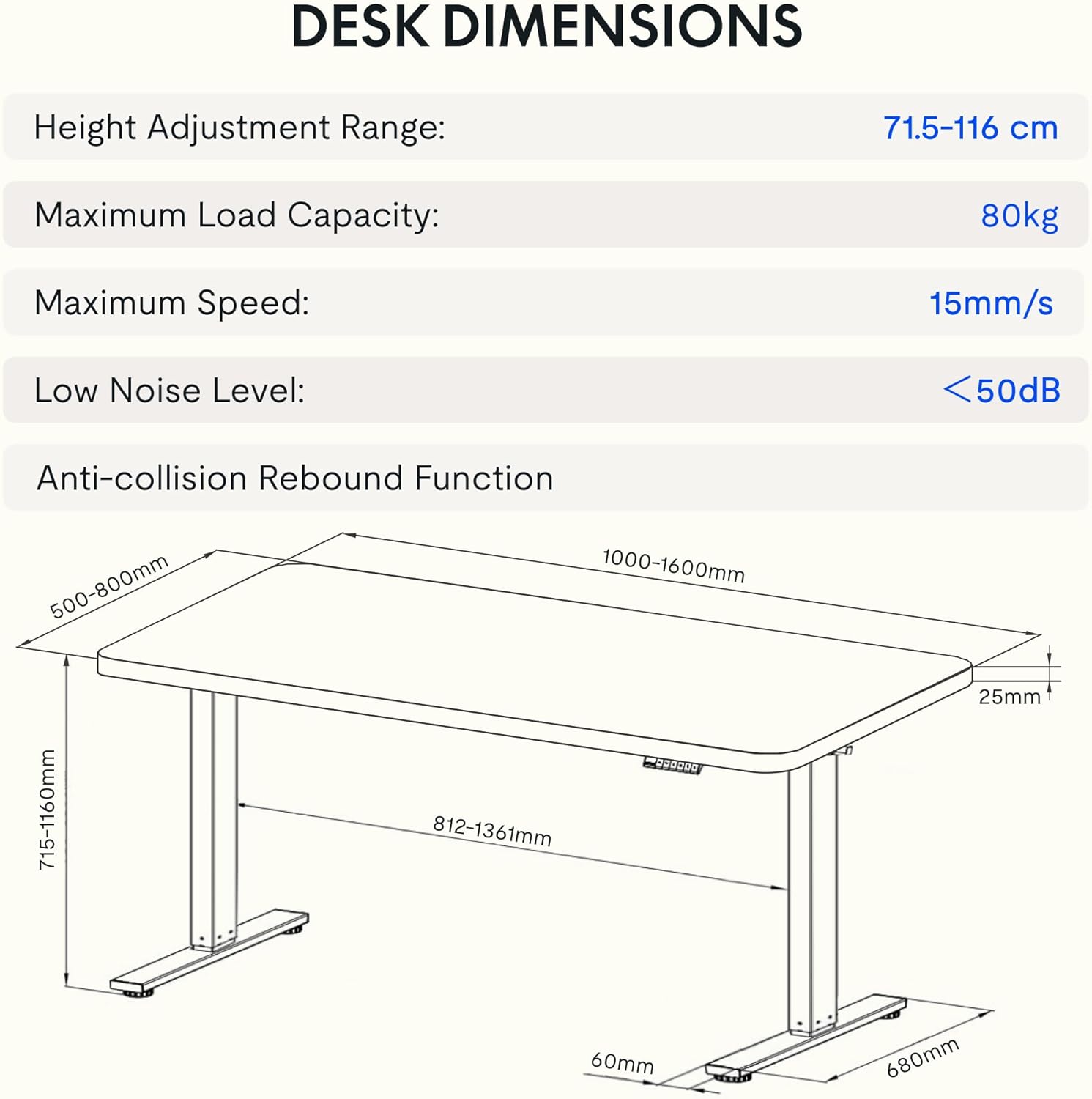
Image: Detailed diagram illustrating the desk's dimensions, height adjustment range (71.5-116 cm), maximum load capacity (80kg), maximum speed (15mm/s), and low noise level (<50dB).
| Fitur | Spésifikasi |
|---|---|
| Nomer modél | EG1B+TP1608-Black |
| Jangkungna adjustment Range | 71.5 - 116 cm (28 - 48 inci) |
| Kapasitas beban maksimum | 80 kg (176 lbs) |
| Laju maksimum | 15 mm/s |
| Tingkat Noise Lemah | <50 dB |
| Bahan Desktop | Wood (2.5 cm thickness) |
| Bahan Pigura | Baja |
| Ukuran produk (D x W x H) | 31.5" x 62.99" x 11.02" (packaged) |
| Item Beurat | 30 kg |
| Fitur husus | Electric, Anti-collision Rebound Function, 4 Memory Presets |
9. Garansi jeung Rojongan
FLEXISPOT is committed to providing high-quality ergonomic solutions. With over 20 years of experience, our products undergo rigorous testing and meet various European certifications (IGR, CE, TÜV).
For warranty information, technical support, or any questions regarding your FLEXISPOT EG1 Electric Standing Desk, please visit the official FLEXISPOT website or contact our customer service department. You can find more information and contact details on the Toko FLEXISPOT di Amazon.