
1. Bubuka
Thank you for choosing the HISTTON Fanless Mini PC J4125. This compact and robust industrial-grade mini computer is designed for stable and efficient operation in various environments. Featuring a fanless design for silent performance and dust protection, it is equipped with an Intel Celeron J4125 processor, ample RAM, and versatile connectivity options. This manual provides essential information for setting up, operating, maintaining, and troubleshooting your device.

Image 1.1: The HISTTON Fanless Mini PC J4125, a compact black device with a ribbed top for heat dissipation, featuring various ports on its front and back panels.
2. Eusi Paket
Mangga cék kotak pikeun item di handap ieu:
- 1 x HISTTON Mini PC (J4125)
- 1 x adaptor kakuatan
- 1 x Manual Pamaké
- 1 x Kabel HDMI
- 1 x Dudukan VESA
- 1 x Screw Set
- 1 x kabel SATA
3. Produk Langkungview
3.1 Fitur konci
- Prosesor: Intel Celeron J4125 (4 Cores 4 Threads, 2.00GHz Base, 2.70GHz Turbo)
- Grafik: Intel UHD Grafika 600
- Sistem operasi: Pre-installed Windows 11 Pro (64-bit, activated)
- Mémori: DDR4 RAM (Single SODIMM slot, up to 32GB supported)
- Panyimpenan: 1x mSATA SSD slot, 1x SATA 3.0 for 2.5-inch HDD/SSD
- Konektipitas: Dual Gigabit RJ45 LAN, Dual-band Wi-Fi (2.4G+5.0G), Bluetooth 4.0
- Kaluaran Video: 1x HDMI, 1x VGA (Dual display support)
- Palabuhan: 2x USB 3.0, 2x USB 2.0, 2x RS232 COM, 1x 3.5mm Mic/SPK out
- Fitur husus: Fanless design, RTC wake up, Wake on LAN, Auto Power on (BIOS setting), Network boot
3.2 Panels hareup jeung pungkur
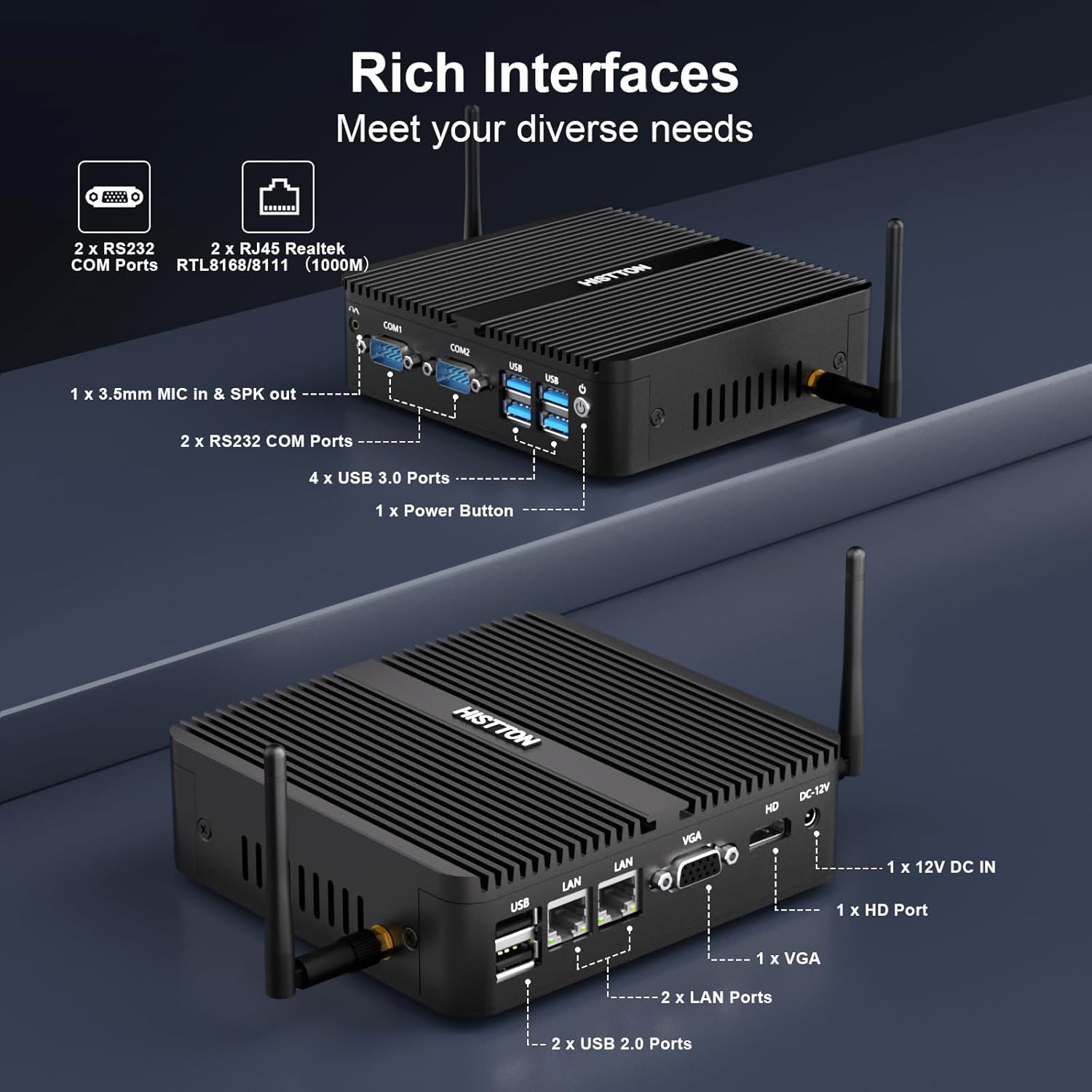
Gambar 3.1: Detil view of the HISTTON Mini PC's front and rear panels, highlighting the various input/output ports including USB, COM, LAN, HDMI, and VGA.
- Panel hareup: Power button, 2x USB 3.0 ports, 2x USB 2.0 ports, 2x RS232 COM ports (COM1, COM2), 3.5mm audio jack (Mic/SPK out).
- Panel Pungkur: DC-12V power input, 1x HDMI port, 1x VGA port, 2x Gigabit RJ45 LAN ports, Wi-Fi antenna connectors.
3.3 Internal Components and Expandability
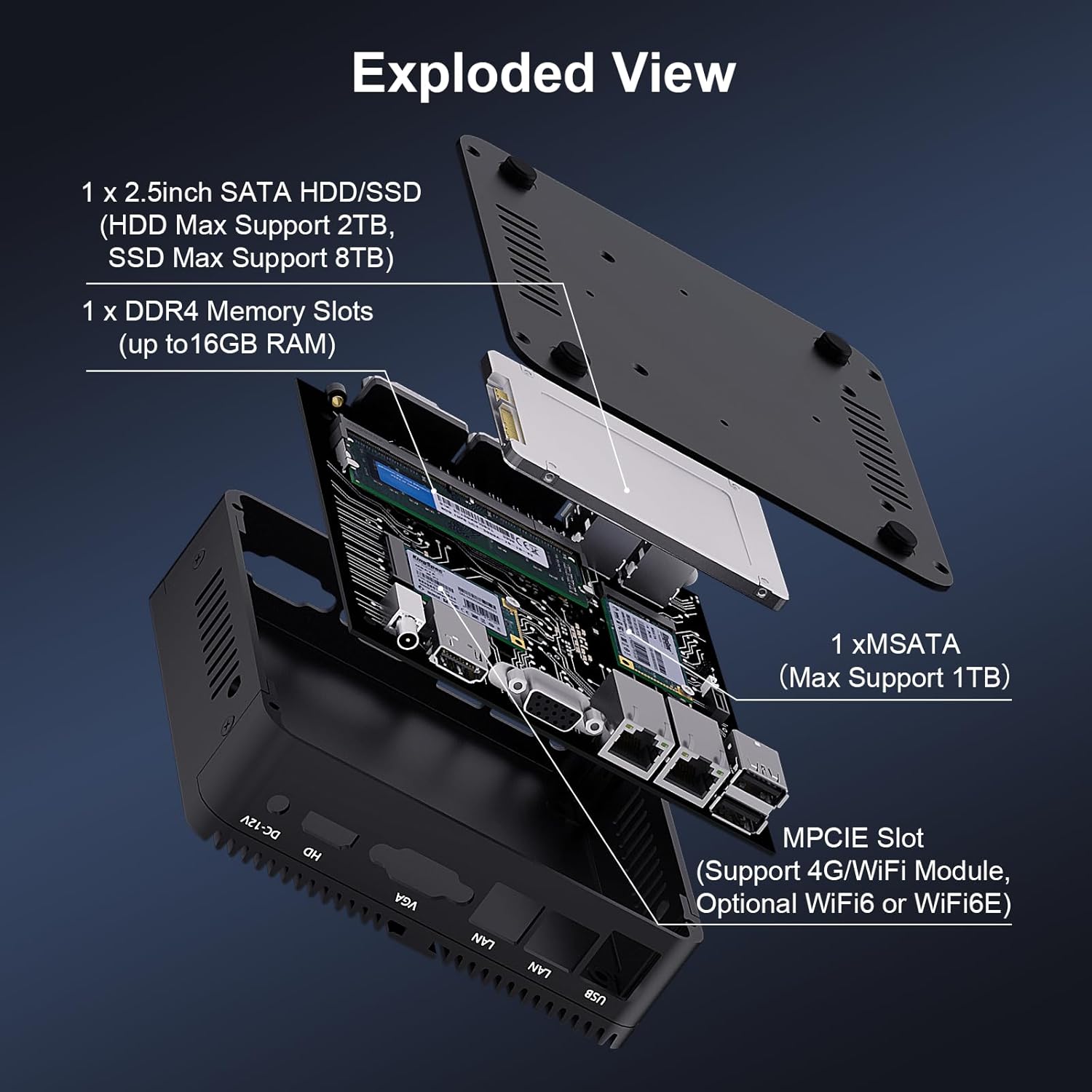
Gambar 3.2: Hiji ngabeledug view of the HISTTON Mini PC, showing the internal layout including the mSATA SSD slot, DDR4 memory slot, and space for a 2.5-inch SATA drive.
- RAM: Single SODIMM slot for DDR4 memory, supporting up to 32GB.
- SSD: 1x mSATA slot (Max Support 1TB).
- HDD/SSD: 1x SATA 3.0 port for a 2.5-inch HDD (Max Support 2TB) or SSD (Max Support 8TB).
- Nirkabel: MPCIE slot for 4G/WiFi module (Optional WiFi6 or WiFi6E).
4. Parentah Setup
4.1 Nyambungkeun périferal
- Connect your monitor(s) to the HDMI and/or VGA ports on the rear panel.
- Connect your keyboard and mouse to the USB ports on the front panel.
- Attach the Wi-Fi antennas to the connectors on the rear panel.
- For wired network access, connect an Ethernet cable to one of the RJ45 LAN ports.
- Connect the power adapter to the DC-12V input port on the rear panel, then plug it into a power outlet.
4.2 Powering On
Press the power button on the front panel to turn on the Mini PC. The power indicator light will illuminate.
4.3 Pamasangan VESA Mount (Opsional)
The Mini PC supports VESA mounting, allowing you to attach it to the back of a compatible monitor or to a wall mount. Use the provided VESA mount and screws to secure the Mini PC. Ensure the monitor's VESA holes are compatible with the mount.
Video 4.1: An official product video demonstrating the physical features of the HISTTON Fanless Mini PC and its VESA mounting process.
5. Parentah Operasi
5.1 Setup Windows Awal
Upon first boot, follow the on-screen instructions to complete the Windows 11 Pro setup, including language, region, network connection, and user account creation.
5.2 Setélan tampilan ganda
The Mini PC supports dual display output via its HDMI and VGA ports. Connect two monitors and configure display settings within Windows (Right-click on desktop > Display settings) to extend or duplicate your desktop.

Image 5.1: The HISTTON Mini PC connected to two monitors, demonstrating its dual display capability via HDMI and VGA ports.
5.3 Setélan mios
To access the BIOS, press the DEL key repeatedly during startup. The BIOS allows configuration of advanced features such as:
- RTC Wake Up: Schedule the PC to power on at a specific time.
- Hudang dina LAN: Power on the PC remotely via a network signal.
- Daya Otomatis Hurung: Automatically power on the PC when power is restored after an outage.
- Boot jaringan: Boot the PC from a network server.
6. Pangropéa
6.1 beberesih
Regularly clean the exterior of the Mini PC with a soft, dry cloth. Avoid using liquid cleaners or abrasive materials. As it is fanless, internal dust accumulation is minimized, but ensure the ribbed chassis remains clear of obstructions for optimal heat dissipation.
6.2 Apdet parangkat lunak
Tetep sistem operasi Windows anjeun sarta supir diropéa pikeun mastikeun kinerja optimal sarta kaamanan. Windows Update tiasa diaksés ngalangkungan Setélan> Windows Update.
7. Cara ngungkulan
| Masalah | Mungkin Cukang lantaranana | Solusi |
|---|---|---|
| Mini PC teu tiasa dihurungkeun. | Teu aya listrik, adaptor daya rusak, sambunganna kendor. | Pariksa sambungan kabel daya. Pastikeun adaptor daya tiasa dianggo. Cobi stop kontak anu sanés. |
| Henteu aya tampilan dina monitor. | Loose video cable, incorrect input source on monitor, monitor off. | Ensure video cables (HDMI/VGA) are securely connected. Select correct input source on monitor. Turn on monitor. |
| Teu aya konektivitas jaringan. | Loose Ethernet cable, Wi-Fi disabled, driver issue. | Check Ethernet cable connection. Ensure Wi-Fi is enabled and connected to a network. Reinstall network drivers if necessary. |
| kinerja lalaunan. | Seueur teuing aplikasi anu dijalankeun, rohangan panyimpen rendah, supir anu tos lami. | Close unnecessary applications. Free up disk space. Update drivers and Windows. |
8. Spésifikasi
| Fitur | Rincian |
|---|---|
| merek | HISTTON |
| Nomer modél | J4125 |
| Sistem operasi | Windows 11 Pro |
| Modél CPU | Celeron J4125 |
| Laju CPU | 2 GHz (up to 2.7 GHz Turbo) |
| Grafik Coprocessor | Intel UHD Grafika 600 |
| Mémori RAM Dipasang | 16 GB DDR4 (Max 32 GB) |
| Kapasitas Panyimpenan Mémori | 512 GB SSD |
| Katerangan hard disk | HDD, SSD (1x mSATA, 1x 2.5-inch SATA) |
| Panganteur Kaluaran Video | HDMI, VGA |
| Téhnologi konektipitas | Ethernet, HDMI, LAN, Wi-Fi, Bluetooth |
| Téhnologi nirkabel | Bluetooth 4.0, Dual-band Wi-Fi (2.4G+5.0G) |
| Item Dimensi | 5.31 x 5 x 1.54 inci (13.5 x 12.6 x 4.0 cm) |
| Item Beurat | 0.6 kg |
| Total palabuhan USB | 4 (2x USB 3.0, 2x USB 2.0) |
| Palabuhan COM | 2x RS232 |
| Port LAN | 2x Gigabit RJ45 |
9. Garansi jeung Rojongan
HISTTON provides customer support for your Mini PC. If you encounter any issues or have questions, please refer to the following contact methods:
- Rojongan Amazon: Log in to your Amazon account, navigate to "Your Orders," and select "Ask Product Question" for assistance.
- Rojongan saatos Penjualan: For direct technical assistance, you may send an email to the HISTTON After-Sales Team at minipc_service@yeah.net.
Punten tahan bukti pameseran anjeun pikeun klaim garansi.