
Chef Robot CR-7
Chef Robot Food Processor User Manual
Modél: CR-7
Brand: Chef Robot
Bubuka
The Chef Robot Food Processor is a versatile kitchen appliance designed to simplify your cooking process. It integrates multiple functions including kneading, blending, mixing, steaming, boiling, and stir-frying, all controlled via a built-in WiFi-enabled touch screen. This manual provides essential information for setting up, operating, maintaining, and troubleshooting your Chef Robot Food Processor.

Figure 1: Chef Robot Food Processor Main Unit
Fitur produk
- Konektipitas WiFi: Access an extensive and growing recipe platform directly from your device.
- Over 500+ Guided Recipes: Follow step-by-step instructions for various dishes directly on the screen.
- Time and Effort Saving: Automates cooking processes, reducing manual intervention and preparation time.
- Modeu ngabersihkeun diri: Simplifies cleanup after cooking.
- Sababaraha Modeu Masak: Includes Steaming, Kneading, Keep Warm, Sauteing, and a Manual mode for customized control over Speed, Time, Temperature, and Blade rotation.
- Versatile Food Preparation: Capable of slow-cooking, sous-vide, making doughs, yogurt, flours, sauces, and more.
Komponén
The Chef Robot Food Processor comes with the following components:
- Main Unit with Integrated Touch Screen
- Wadahna stainless steel
- Udung
- Sendok
- Majelis agul
- Steamer Basket (internal)
- Multi-Steamer (external, for larger steaming tasks)

angka 2: Sadaya komponén Kaasup
Disetél
- Ngabongkar: Sacara saksama miceun sadaya komponén tina bungkusan. Simpen bungkusan pikeun neundeun atanapi transportasi ka hareup.
- panempatan: Place the main unit on a stable, flat, and dry surface. Ensure adequate ventilation around the unit.
- Majelis:
- Insert the blade assembly into the stainless steel container.
- Place the container securely onto the main unit.
- Attach the lid firmly to the container.
- Sambungan Daya: Colokkeun kabel listrik kana stop kontak listrik anu cocog.
- Daya mimiti Hurung: Turn on the power switch located on the side of the unit. The touch screen will illuminate and display the Chef Robot logo.
- Setélan Basa sareng Waktos: Follow the on-screen prompts to select your preferred language and set the correct time zone.
- Sambungan WiFi: Navigate to the settings menu on the touch screen and connect to your home WiFi network. This is essential for accessing online recipes and updates.
Video 1: Chef Robot Introduction Video (Demonstrates setup, touch screen, and WiFi connection)
Parentah Operasi
Toél Control Screen
The Chef Robot features an intuitive touch control screen for easy operation. You can adjust time, temperature, and speed settings directly on the screen using the rotary knob and touch controls.
Accessing Recipes
The Chef Robot provides access to over 500 guided recipes. You can browse recipes by category, search for specific dishes, and follow step-by-step instructions directly on the screen. Recipes can also be pushed from a mobile application to the device.
Video 2: Chef Robot Demo (Shows recipe selection and cooking process)
Modeu Masak
The Chef Robot offers various preset and manual cooking modes:
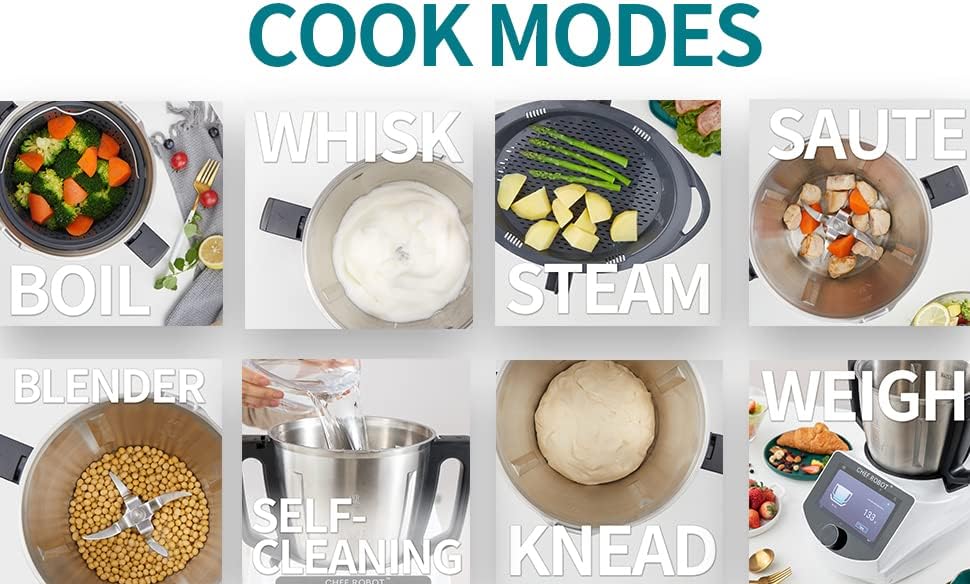
Gambar 3: Leuwihview of Cooking Modes
Ngukus
Utilize the internal steamer basket or the multi-steamer for healthy, efficient steaming of vegetables, fish, and other foods. The multi-steamer allows for steaming multiple items simultaneously.
Video 3: Chef Robot Introduction Video (See 0:45 for Multi-Steamer demonstration)
Kneading
The kneading function is ideal for preparing doughs for bread, pizza, and pastries. Simply add ingredients and select the kneading mode.
Blending, Emulsifying, Chopping, Grinding
The powerful blades can blend smoothies, emulsify sauces, chop vegetables, and grind ingredients like meat or nuts. Adjust speed settings for desired consistency.
Video 4: Chef Robot Introduction Video (See 1:18 for Emulsifying, 1:27 for Blending, 1:50 for Chopping, 2:20 for Grinding)
Video 5: Chef Robot Drinking Demo (Shows blending drinks)
Timbangan
The integrated scale allows for precise measurement of ingredients directly in the container. Simply select the weighing function and add your ingredients.
Ferméntasi
Use the fermenting mode to prepare homemade yogurt and other fermented foods.
Sous Vide
Achieve perfectly cooked results with the Sous Vide function, maintaining precise temperature control for delicate ingredients.
Stir-Frying / Sauteing
The Chef Robot can also be used for stir-frying and sauteing ingredients, providing even heat distribution for delicious results.
Pangropéa
Proper maintenance ensures the longevity and optimal performance of your Chef Robot Food Processor.
- beberesih: The container and accessories should be hand washed. The main unit can be wiped clean with a damp lawon. Ulah neuleumkeun unit utama dina cai.
- Modeu ngabersihkeun diri: Utilize the built-in self-cleaning mode for convenient and effective cleaning of the container after use.
- Perawatan Blade: Handle blades with care. Ensure they are clean and free of food debris after each use.
- Panyimpenan: Simpen alat dina tempat anu garing nalika henteu dianggo.
Pamérésan masalah
If you encounter issues with your Chef Robot Food Processor, please refer to the following common solutions:
- Alat Teu Nyala:
- Pastikeun kabel listrikna dipasang pageuh kana unit sareng kana stop kontak listrik.
- Check the power switch on the side of the unit to ensure it is in the 'On' position.
- Masalah Sambungan WiFi:
- Verify your WiFi network is active and within range.
- Double-check the entered WiFi password.
- Restart the Chef Robot and your router.
- Recipes Not Loading:
- Ensure a stable internet connection via WiFi.
- Check for any pending software updates for the Chef Robot.
- Noises atawa Bau mahiwal:
- Langsung mareuman sareng cabut colokan unit.
- Inspect the blade assembly and container for any obstructions or damage.
- Upami masalahna tetep, hubungi dukungan palanggan.
spésifikasi
| Fitur | Rincian |
|---|---|
| merek | Chef Robot |
| Nomer modél | CR-7 |
| Fitur husus | Programmable, WiFi Built-In |
| Dimensi produk | 16.8 "D x 15.4" W x 18.5" H |
| Warna | Pérak jeung Hideung |
| Dianjurkeun Mangpaat | Kitchen (Kneading, Blending, Mixing, Steaming, Boiling, Stir-Frying) |
| Jumlah Speeds | 10 |
| Parentah Perawatan Produk | Nyeuseuh leungeun |
| Nyaeta Dishwasher Aman | No |
| Bahan Sabeulah | Beusi sténless |
| Item Beurat | 20.9 pon |
| UPC | 195893549726 |
| Tanggal Kahiji Sadia | 25 Januari 2022 |

Gambar 4: Dimensi Produk
Garansi sareng Rojongan
For warranty information, technical support, or service inquiries, please refer to the warranty card included with your product or visit the official Chef Robot website. You can also contact Chef Robot customer service directly for assistance.
Nganjang ka Chef Robot Store on Amazon pikeun inpo nu leuwih lengkep jeung sumber.
Ask a question about this manual
Ask about setup, troubleshooting, compatibility, parts, safety, or missing instructions. Manuals+ will review the question and use this page’s manual context to help answer it.