
1. Bubuka
Thank you for choosing the ULANZI MT-44 Extendable Phone and Camera Tripod. This manual provides detailed instructions for the proper setup, operation, and maintenance of your tripod. Please read this manual thoroughly before use to ensure safe and effective operation.
2. Émbaran Kasalametan
- Do not exceed the maximum weight limit of 1.5 kg (3.3 lbs) to prevent damage to the tripod or attached devices.
- Ensure all locking mechanisms are securely tightened before use to prevent accidental collapse.
- Avoid exposing the tripod to extreme temperatures, direct sunlight for prolonged periods, or corrosive liquids.
- Jauhkeun tina jangkauan barudak.
3. Produk Langkungview
The ULANZI MT-44 is a versatile 2-in-1 integrated tripod designed for both phones and cameras. It features a telescopic design, a 360° panoramic ball head, and multiple expansion options for accessories.

Image: The ULANZI MT-44 tripod in its compact, folded state, showcasing its portable design.
4. Parentah Setup
Turutan léngkah-léngkah ieu pikeun nyetél tripod ULANZI MT-44 anjeun:
- Leupaskeun kenopna: Locate the red locking knob at the base of the ball head. Rotate it counter-clockwise to loosen.
- Buka Suku Tripod: Gently push down on the central column to extend the tripod legs outwards until they are fully spread.
- Kencengkeun Kenopna: Rotate the red locking knob clockwise to secure the tripod legs in place.
- Saluyukeun Jangkungna: Rotate the red ring at the base of the main column counter-clockwise to unlock the telescopic sections. Pull the column upwards to extend to your desired height (up to 44 inches / 111.5 cm). Rotate the ring clockwise to lock the height.
- Open Phone Holder: If using a phone, gently pull the top clip upwards to open the phone holder.
- Pasang Telepon: Place your smartphone into the opened phone holder, ensuring it is securely gripped between 6-8 cm.

Image: Visual guide demonstrating the six steps for setting up and installing a phone on the ULANZI MT-44 tripod.
5. Parentah Operasi
5.1 Extending the Tripod
The MT-44 features a 5-section telescopic design. To extend, unlock the red ring at the base of the main column by rotating it counter-clockwise. Pull the central column and subsequent sections to the desired length. Once extended, rotate the red ring clockwise to lock the sections firmly. The tripod can extend from a minimum height of 13 inches (34 cm) to a maximum of 44 inches (111.5 cm).
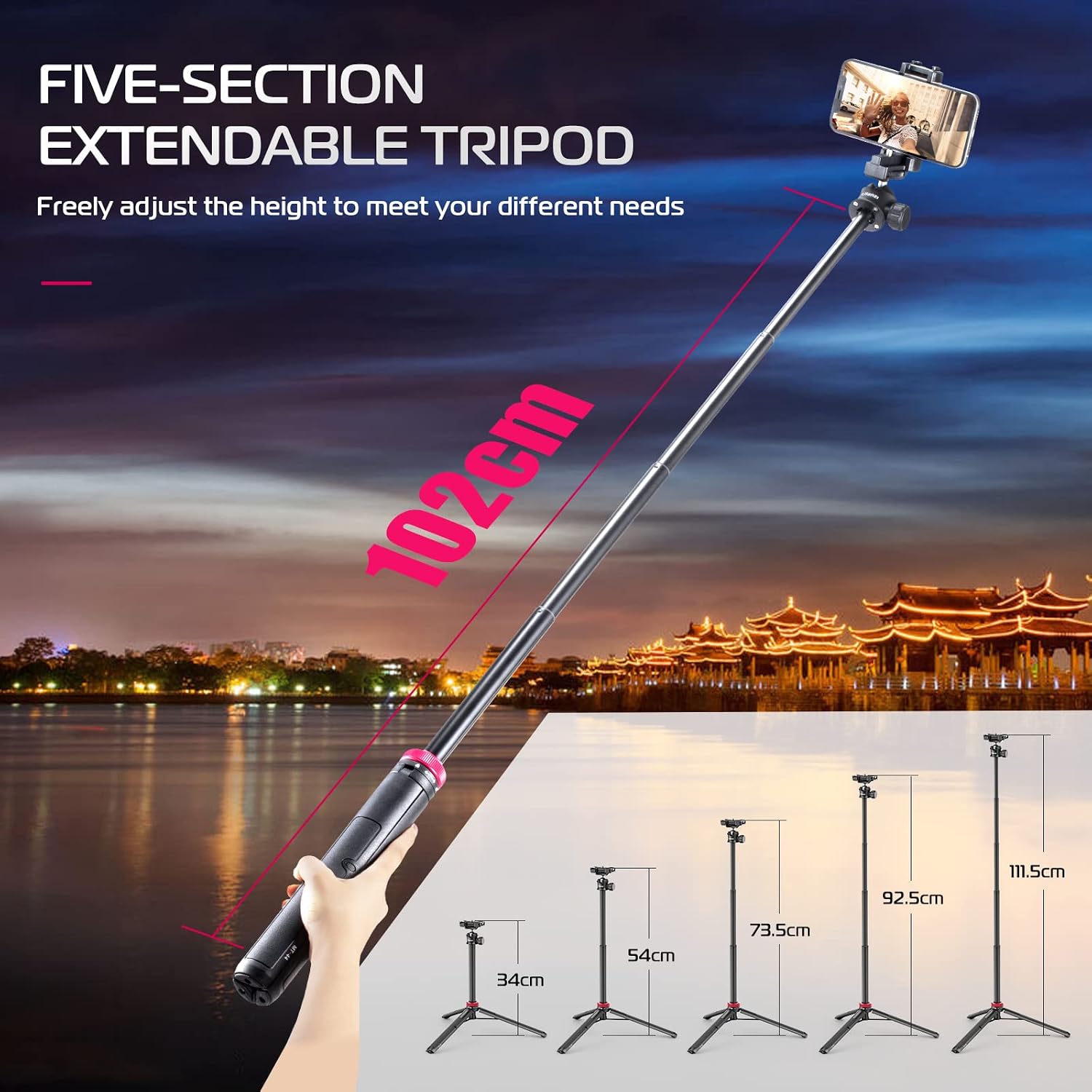
Image: The ULANZI MT-44 tripod illustrating its five-section extendable design, showing different height options from compact to fully extended.
5.2 Adjusting the 360° Panoramic Ball Head
The integrated ball head allows for flexible positioning of your device. Loosen the side knob on the ball head to adjust the angle for horizontal or vertical shooting. Once the desired angle is achieved, tighten the knob securely to lock the position.

Image: The tripod's ball head mechanism, highlighting its 360-degree rotation capability for both horizontal and vertical shooting orientations.
5.3 Mounting a Phone
The top clip expands to function as a universal phone holder, accommodating devices with widths between 60-80 mm. Simply pull the top section of the clip upwards, insert your phone, and release to secure it.
5.4 Mounting a Camera
For cameras, the phone clip can be folded down to reveal a standard 1/4" screw thread. Attach your camera directly to this screw thread. Ensure your camera's weight does not exceed 1.5 kg.
5.5 Using Cold Shoe and 1/4" Screw Thread for Expansion
The MT-44 includes a cold shoe mount on top of the phone clip and an additional 1/4" screw thread on the side of the main column. These allow for the attachment of external accessories such as microphones, LED video lights, or additional phone holders.

Gambar: Detil view of the 2-in-1 integrated clip design, illustrating how it converts between a phone holder with a cold shoe mount and a 1/4-inch screw for camera attachment.
6. Spésifikasi

Image: A graphic displaying the key parameters and dimensions of the ULANZI MT-44 tripod.
| Fitur | Rincian |
|---|---|
| Modél | MT-44 |
| Bahan | Acrylonitrile Butadiene Styrene (ABS) |
| Beurat bersih | 397 Gram (0.87 lbs) |
| Batesan Beurat | 1.5 Kilogram (3.3 lbs) |
| Jangkungna Minimum (Dilipat) | 13 Inci (32.5 cm) |
| Maximum Height (Extended) | 44 Inci (111.5 cm) |
| Tipe Kepala Tripod | Ball Head (360° Panoramic) |
| Jarak Klip Telepon | 6-8 cm |
| Palabuhan ékspansi | Cold Shoe, 1/4" Screw Thread |
| Kasaluyuan | Smartphones (iPhone, Samsung, Huawei), DSLR Cameras (Nikon, Canon, Sony, Fujifilm, Panasonic), GoPro, Micro-single cameras, Fill lights. |
7. Pangropéa
- beberesih: Wipe the tripod with a soft, dry cloth. For stubborn dirt, use a slightly damp cloth and mild soap, then dry thoroughly. Do not use harsh chemicals or abrasive cleaners.
- Panyimpenan: Store the tripod in a cool, dry place away from direct sunlight and excessive humidity. Ensure it is fully collapsed and all knobs are lightly tightened for compact storage.
- Lubrication: Avoid applying lubricants to the telescopic sections or ball head unless specifically recommended by the manufacturer, as this can attract dust and impair function.
8. Cara ngungkulan
- Tripod feels unstable: Ensure the legs are fully spread and the red locking knob at the base is securely tightened. Check that the telescopic sections are also locked at the desired height. Do not exceed the maximum weight limit.
- Device not holding securely: For phones, ensure the phone clip is fully gripping the device. For cameras, verify the 1/4" screw is tightly fastened.
- Ball head movement is stiff or loose: Adjust the side knob on the ball head. Tighten for more resistance, loosen for freer movement. If it remains stiff, check for any debris. If it becomes loose over time, ensure the knob is fully tightened.
- Telescopic sections slide down: Ensure the red locking ring for the telescopic sections is rotated clockwise and fully tightened after extending to the desired height.
9. Garansi jeung Rojongan
ULANZI products are designed for reliability and performance. For specific warranty details, please refer to the warranty card included with your purchase or visit the official ULANZI website. If you encounter any issues or require technical assistance, please contact ULANZI customer support through their official channels.