
Bubuka
This manual provides detailed instructions for the MODESLAB 2 Pack 2.4 GHz Wireless USB SNES Controller Gamepad. It covers setup, operation, compatibility, and maintenance to ensure optimal performance and longevity of your controllers. Please read this manual thoroughly before first use.
Eusi pakét
The MODESLAB Wireless SNES Controller Gamepad package includes the following items:
- 2 x Wireless SNES-style Gamepads
- 2 x USB Receivers
- 2 x SNES Receivers

Image: Contents of the MODESLAB Wireless SNES Controller Gamepad package.
Kasaluyuan
The MODESLAB Wireless SNES Controller Gamepad is designed for broad compatibility with various systems. Please review the compatibility information below:
Sistem anu dirojong:
- Windows PC
- Apple Mac (iOS)
- Linux
- Buah prambus Pi
- Original Super Nintendo Entertainment System (SNES) / Super Famicom / Super Comboy / Super Nintendo
Unsupported Systems:
- Android TV Box
- Commodore 64 (C64)
- Google Chromebook
- Amazon Seuneu TV
- Steam (as a standalone platform)
- Modél Tesla
- Super NES Classic Edition (also known as Nintendo Classic Mini, Super Nintendo Classic Mini)

Image: Visual guide to system compatibility.
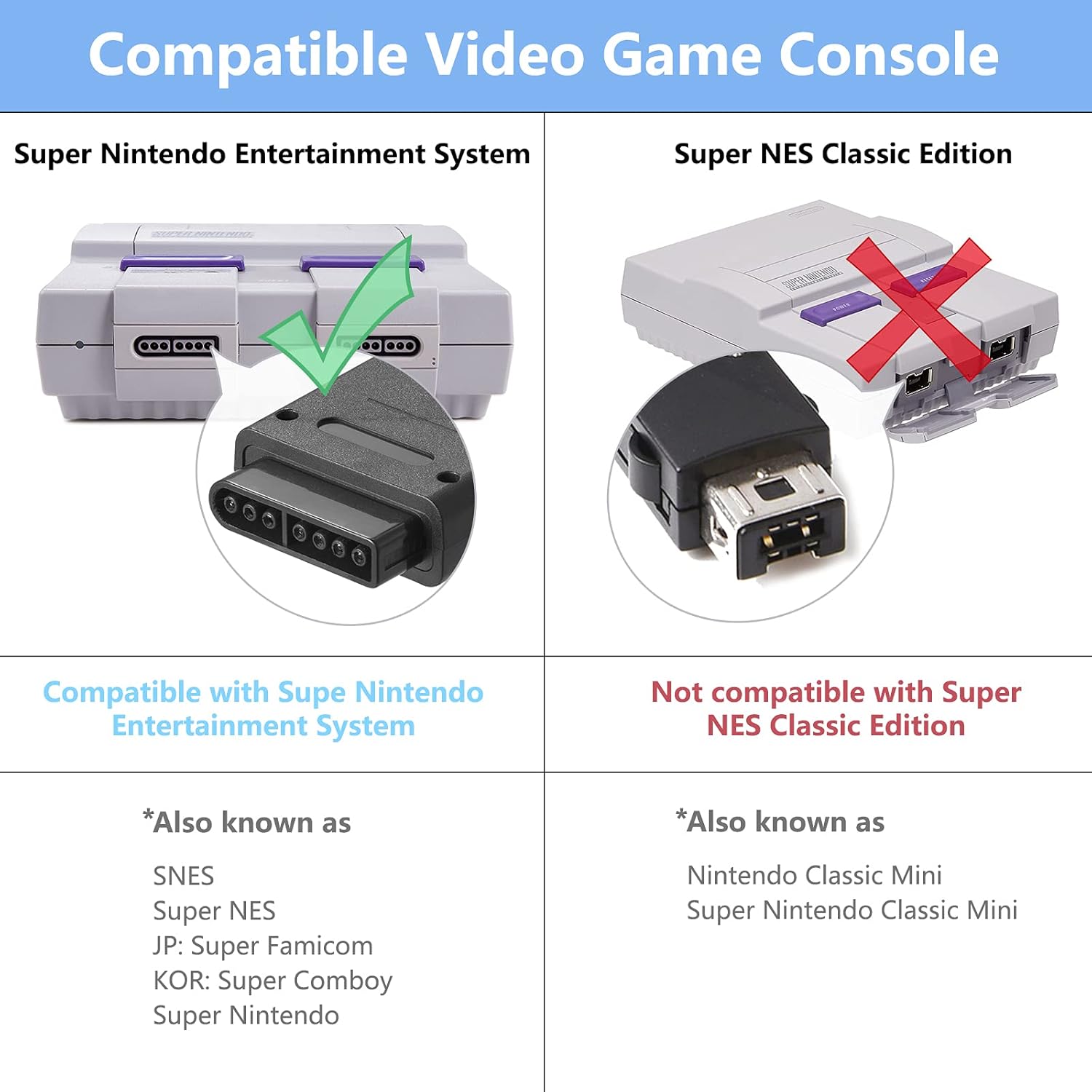
Image: Compatibility details for SNES consoles.
Disetél
Follow these steps to set up your MODESLAB Wireless SNES Controller Gamepad:
- Initial Controller Reset (Recommended for First Use or Pairing Issues): Before the first use, or if you encounter pairing difficulties, perform a controller reset. Simultaneously press and hold the PILIH, MULAI, jeung D-PAD DOWN buttons on the controller for a few seconds. This action resets the controller's internal state.
- Sambungkeun panarima:
- For PC, Mac, Linux, or Raspberry Pi: Insert the Panarima USB into an available USB port on your device.
- For Original SNES Console: Insert the SNES panarima into a controller port on your SNES console.
- Power On Controller: Pencét éta MULAI button on the controller to power it on. The controller will automatically attempt to pair with the connected receiver.
- Konfirmasi pasangan: Once successfully paired, the LED indicator on the controller will typically show a solid light, indicating a stable connection.

Image: Controller buttons for the reset procedure.
Parentah Operasi
After successful setup, your MODESLAB Wireless SNES Controller Gamepad is ready for use.
- Hurungkeun/Pareuman: Pencét éta MULAI button to power on the controller. To power off, hold the MULAI button for a few seconds until the LED indicator turns off, or the controller will automatically power off after a period of inactivity to conserve battery.
- midangkeun: Use the D-Pad for movement, and the A, B, X, Y, L, R, SELECT, and START buttons for in-game actions as defined by the game you are playing.
- Sababaraha Controllers: If using two controllers, ensure both receivers are connected to the system and each controller is paired individually.

Gambar: Example of two controllers in use with a SNES console.

Image: Controller in use during gameplay.
Émbaran batré
The MODESLAB Wireless SNES Controller Gamepad is equipped with a high-capacity rechargeable battery for extended gameplay.
- Kapasitas batré: 500 mah
- Waktu maén: Kurang leuwih 16 jam dina muatan pinuh.
- Ngecas: Connect the controller to a USB power source using a compatible charging cable (not explicitly listed in package contents, but implied for rechargeable devices). The LED indicator will typically show charging status and turn off or change color when fully charged.
- Hemat Daya: The controller features intelligent power-saving technology to maximize battery life during periods of inactivity.

Image: Battery specifications and estimated playing time.
Pangropéa
Proper maintenance ensures the longevity and performance of your controllers:
- beberesih: Use a soft, dry cloth to clean the surface of the controllers. Avoid using harsh chemicals or abrasive materials.
- Panyimpenan: Store controllers in a cool, dry place away from direct sunlight and extreme temperatures.
- Hindarkeun tetes: Protect the controllers from drops and impacts, which can damage internal components.
- Ngecas: Ulah ngecas batréna kaleuleuwihi. Cabut kabel ngecas saatos batréna pinuh.
Pamérésan masalah
If you encounter issues with your MODESLAB Wireless SNES Controller Gamepad, refer to the following common solutions:
- Kontroler Teu Sapasang:
- Ensure the receiver is securely plugged into the correct port (USB for PC/Mac/Linux/Raspberry Pi, SNES port for SNES console).
- Perform the controller reset procedure: Press and hold SELECT + START + D-PAD DOWN sakaligus.
- Ensure the controller is charged. Connect it to a power source and try again.
- Try a different USB port or SNES port.
- Input Lag atanapi Pemutusan:
- Ensure the controller is within range of the receiver (typically up to 10 meters, but can be affected by obstacles).
- Minimalkeun gangguan ti alat nirkabel 2.4 GHz anu sanés.
- Ensure the controller battery is sufficiently charged.
- Tombol Teu Ngabales:
- Perform the controller reset.
- Pariksa naha controller parantos dipasangkeun kalayan leres.
- Pastikeun kaulinan atanapi aplikasi ngadukung input controller.
spésifikasi
| Fitur | Rincian |
|---|---|
| Nomer modél | B09YYB7DQW |
| Konektipitas | 2.4 GHz Wireless |
| Kapasitas batré | 500 mah |
| Estimated Play Time | 16 jam |
| Ukuran Paket | 6.38 x 6.22 x 2.52 inci |
| Item Beurat | 10.5 ons |
| Tanggal Sadia munggaran | 27 April 2022 |
Garansi sareng Rojongan
MODESLAB products are designed for reliability and performance. For any questions, technical support, or warranty inquiries, please refer to the seller's contact information or the platform where the product was purchased. Please retain your proof of purchase for warranty claims.