
1. Bubuka
Thank you for choosing the Ctronics RBX-F20 2.5K 4MP Solar WiFi PTZ Outdoor Security Camera. This advanced security camera offers high-resolution surveillance, flexible pan and tilt capabilities, and sustainable solar power. This manual will guide you through the installation, setup, and operation of your camera to ensure optimal performance and security for your property.

Image: The Ctronics RBX-F20 camera with its integrated solar panel, designed for outdoor use.
2. Fitur konci
- 2.5K 4MP Resolution & Color Night Vision: Experience clear 2560x1440 resolution. Equipped with 10 built-in spotlights, the camera provides full-color night vision up to 30 meters, illuminating a wider area.
- 100% Wireless & Solar Powered: Features a 7800mAh rechargeable battery for extended operation. The integrated solar panel continuously recharges the battery, ensuring uninterrupted power and true wireless functionality.
- PIR Sensor & Human Detection: Utilizes a PIR sensor for accurate human shape detection with a rapid 0.2-second wake-up time. Adjustable alarm sensitivity (low, medium, high) sends precise real-time notifications to your smartphone upon human motion detection.
- 355° Pan & 95° Miring: Control the camera's rotation remotely via your smartphone, covering a wide area with 355° horizontal pan and 95° vertical tilt.
- Audio Dua Arah: Built-in microphone and speaker allow for real-time communication with family, visitors, or to deter intruders from anywhere.
- IP66 Tahan Cuaca: Designed with a robust IP66-certified weatherproof casing, ensuring reliable operation in various extreme weather conditions.

Image: Comparison of day and color night vision footage from the 2.5K 4MP camera, showing clarity and detail.
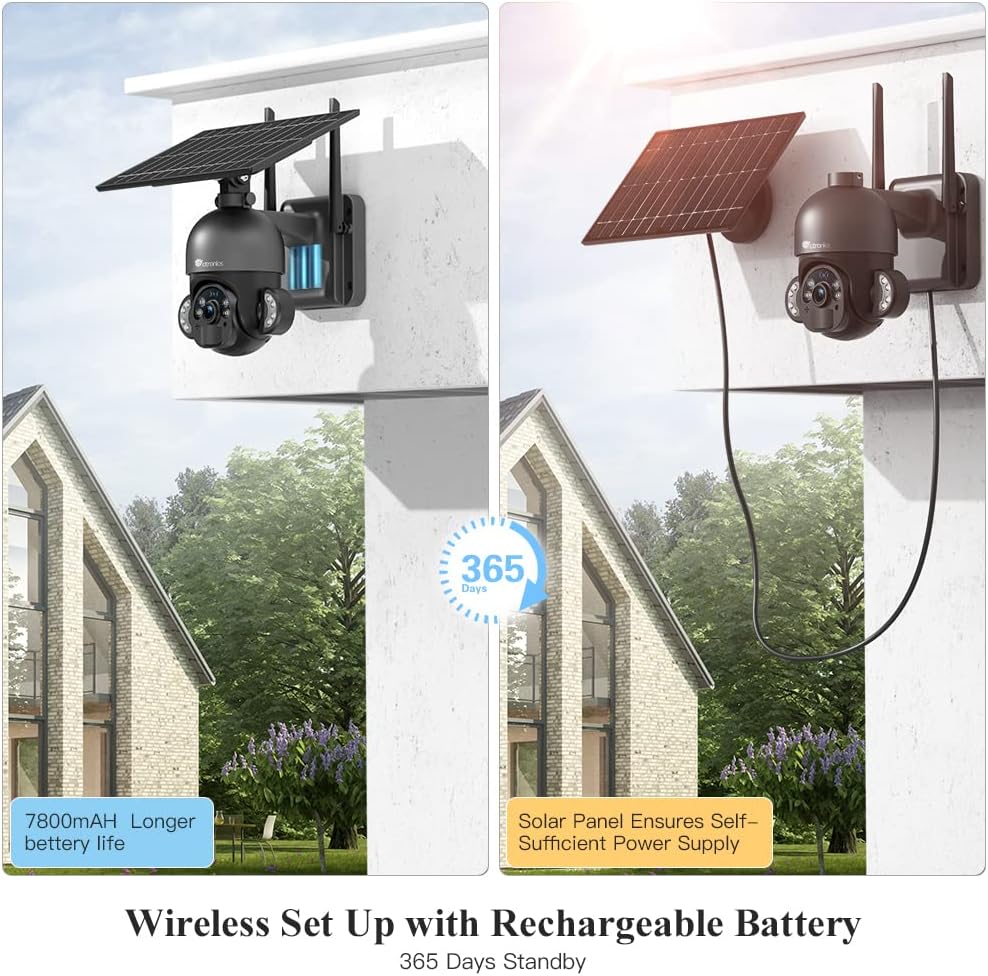
Image: The camera highlighting its 7800mAh battery and the solar panel providing continuous power, indicating 365 days of standby.

Image: A person and a dog in the camera's view, demonstrating the human detection feature distinguishing between human and non-human movement.

Image: The camera mounted on a wall, illustrating its 355-degree pan and 95-degree tilt capabilities for comprehensive coverage.

Gambar: Saurang jalmi nuju berinteraksi sareng supir pangiriman ngalangkungan fitur audio dua arah kaméra, anu dipidangkeun dina layar smartphone.

Image: The camera mounted outdoors, with rain and clouds indicating its IP66 weatherproof design.
3. Eusi Paket
Punten parios eusi bungkusan saatos nampi. Lamun aya item nu leungit atawa ruksak, kontak rojongan customer.
- Ctronics RBX-F20 PTZ Camera with Solar Panel
- Ningkatna Kurung
- Pemasangan Screws sareng Colokan Tembok
- Kabel Ngecas USB
- Manual pamaké
- Gancang Mimitian Guide
4. Setup jeung Instalasi
4.1 Ngecas Awal
Before installation, fully charge the camera's built-in 7800mAh battery using the provided USB cable. Connect the cable to a 5V/2A power adapter (not included) and the camera's charging port. The charging indicator will show the status.
4.2 Pamasangan Aplikasi sareng Nyiptakeun Akun
- Download the "Ctronics" app from the App Store (iOS) or Google Play Store (Android).
- Open the app and register a new account, or log in if you already have one.
4.3 Camera Pairing with App
- Pastikeun telepon pinter anjeun nyambung ka jaringan Wi-Fi 2.4GHz. (Wi-Fi 5GHz henteu dirojong).
- Hurungkeun kaméra.
- In the Ctronics app, tap the "+" icon to add a new device.
- Follow the on-screen instructions to scan the QR code on the camera or manually enter the device ID.
- Pilih jaringan Wi-Fi anjeun sareng lebetkeun kecap akses.
- The camera will attempt to connect. Once connected, you can name your camera and complete the setup.
4.4 Masang kaméra
The camera offers two installation methods: all-in-one (camera and solar panel together) or separated (solar panel mounted separately for optimal sunlight exposure).
- Pilih Lokasi: Select a location with good Wi-Fi signal and sufficient sunlight exposure for the solar panel. Ensure the camera has a clear view wewengkon nu Anjeun hoyong monitor.
- Tandaan liang bor: Anggo braket pemasangan salaku citakan pikeun nandaan liang bor dina témbok.
- liang bor: Bor liang dina posisi anu ditandaan teras pasangkeun colokan témbok.
- Amankeun kurung: Ngagantelkeun bracket ningkatna kana témbok ngagunakeun screws disadiakeun.
- Attach Camera/Solar Panel:
- Sadayana-dina-hiji: Attach the camera unit (with the solar panel already connected) to the mounting bracket.
- Dipisahkeun: Mount the solar panel in a location with maximum sunlight, then connect it to the camera using the extension cable (if needed, not included). Attach the camera to its mounting bracket.
- Saluyukeun Sudut: Saluyukeun sudut kaméra sareng panel surya pikeun jangkauan anu optimal sareng efisiensi ngecas.

Image: Illustrates two installation methods for the camera: integrated solar panel and separate solar panel for flexible placement.
5. Operasi
5.1 Hirup View jeung Kontrol PTZ
Open the Ctronics app and select your camera to access the live view. Use the on-screen controls to pan (355° horizontally) and tilt (95° vertically) the camera lens to monitor different areas.
5.2 Audio Dua Arah
Dina hirup view interface, tap the microphone icon to speak through the camera's speaker. Tap the speaker icon to listen to audio from the camera's surroundings.
5.3 Deteksi Gerak sareng Siaga
The camera uses a PIR sensor for human detection. You can adjust the sensitivity (low, medium, high) in the app settings. When motion is detected, the camera will record and send a push notification to your smartphone.
5.4 Modeu Visi Peuting
The camera supports color night vision up to 30 meters using its built-in spotlights. You can configure night vision settings (e.g., automatic, black & white, color) within the app.
5.5 Ngarekam jeung Playback
The camera supports local storage via a Micro TF card (not included). Recorded footage can be accessed and played back through the Ctronics app. The camera also supports saving to an FTP server.
6. Pangropéa
- beberesih: Bersihkeun lénsa kaméra sareng panel surya sacara rutin nganggo sabun anu lemes sarengamp cloth to ensure clear images and efficient solar charging. Do not use harsh chemicals.
- Perawatan batré: While the solar panel provides continuous charging, ensure the camera receives adequate sunlight. If the camera is installed in a shaded area or during prolonged cloudy periods, occasional manual charging via USB may be necessary.
- Pembaruan firmware: Check the Ctronics app periodically for firmware updates. Keeping your camera's firmware up-to-date ensures optimal performance and security.
- Perlindungan Lingkungan: The IP66 rating protects against dust and water jets. Avoid submerging the camera in water or exposing it to extreme physical impact.
7. Cara ngungkulan
| Masalah | Mungkin Cukang lantaranana | Solusi |
|---|---|---|
| Kaméra gagal nyambung ka Wi-Fi. | Incorrect Wi-Fi password, 5GHz network, weak signal, or MAC address filtering on router. |
|
| False alarms or too many notifications. | High PIR sensitivity, environmental factors (e.g., moving branches, pets). |
|
| Battery not charging or low battery. | Insufficient sunlight, dirty solar panel, faulty connection. |
|
| Kualitas gambar henteu saé. | Lénsa kotor, kaayaan cahaya nu poék, masalah bandwidth jaringan. |
|
8. Spésifikasi
| Ngaran modél | RBX-F20 |
| merek | Ctronics |
| Resolusi | 2.5K 4MP (2560x1440) |
| Téhnologi konektipitas | Wireless (Wi-Fi 2.4GHz), Wired (Ethernet, ONVIF, RTSP) |
| Sumber Daya | Solar Powered / Rechargeable Battery (7800mAh) |
| Sudut Pan / Dengdekkeun | Pan 355°, Dengdekkeun 95° |
| Visi Peuting | Color Night Vision up to 30 meters (with 10 spotlights) |
| Deteksi Manusa | PIR Sensor with adjustable sensitivity |
| Audio | Audio Dua Arah (Mikropon sareng spiker internal) |
| Résistansi Cuaca | IP66 Certified |
| Panyimpenan | Micro TF Card Slot (up to 128GB, not included), FTP Storage |
| Alat nu cocog | Smartphone (Android/iOS) |
| Dianjurkeun Paké | Kaamanan outdoor |
9. Garansi jeung Rojongan
Ctronics products come with a standard warranty. For detailed warranty information, please refer to the warranty card included in your package or visit the official Ctronics website. If you encounter any issues or have questions regarding your camera, please contact Ctronics customer support. Our team is dedicated to providing prompt and helpful assistance.
Inpormasi kontak: Please refer to the contact details provided on the Ctronics official website or in your product packaging for the most up-to-date support channels.