
1. Bubuka
This manual provides essential information for the safe and efficient operation of your TechniSat DIGITRADIO 370 IR. Please read these instructions carefully before using the device and retain them for future reference.
2. Parentah Kasalametan
- Ulah ngalaan alat ka hujan atawa Uap pikeun nyegah seuneu atawa shock listrik.
- Do not block ventilation openings. Ensure adequate space around the device for proper airflow.
- Paké ngan adaptor kakuatan disadiakeun kalawan alat.
- Ulah neundeun alat ieu caket sumber panas sapertos radiator, pancatat panas, kompor, atanapi alat-alat sanésna (kalebet ampLiifiers) anu ngahasilkeun panas.
- Nangtayungan kabel listrik tina leumpang atawa diciwit, utamana dina colokan, wadah merenah, jeung titik dimana aranjeunna kaluar tina aparat.
- Cabut colokan alat ieu nalika badai kilat atanapi nalika henteu dianggo kanggo waktos anu lami.
- Rujuk sadayana jasa ka tanaga jasa anu mumpuni. Diperlukeun ngalayanan nalika aparatur ruksak ku cara naon waé, sapertos kabel catu daya atanapi colokan rusak, cairan tumpah atanapi barang murag kana aparatur, aparatur parantos kakeunaan hujan atanapi lembab, henteu beroperasi normal. , atawa geus turun.
3. Eusi Paket
Pastikeun yén sadaya item aya dina bungkusan:
- TechniSat DIGITRADIO 370 IR (Black)
- Kadali jauh
- Adaptor kakuatan
- Manual pangguna (dokumén ieu)
4. Kontrol jeung sambungan

Gambar 4.1: Panel hareup Leuwihview
The image above displays the front panel of the DIGITRADIO 370 IR, featuring the central display, volume and tuning/OK rotary knobs, and various control buttons such as Power, Mode, Preset, Scan, and Back.
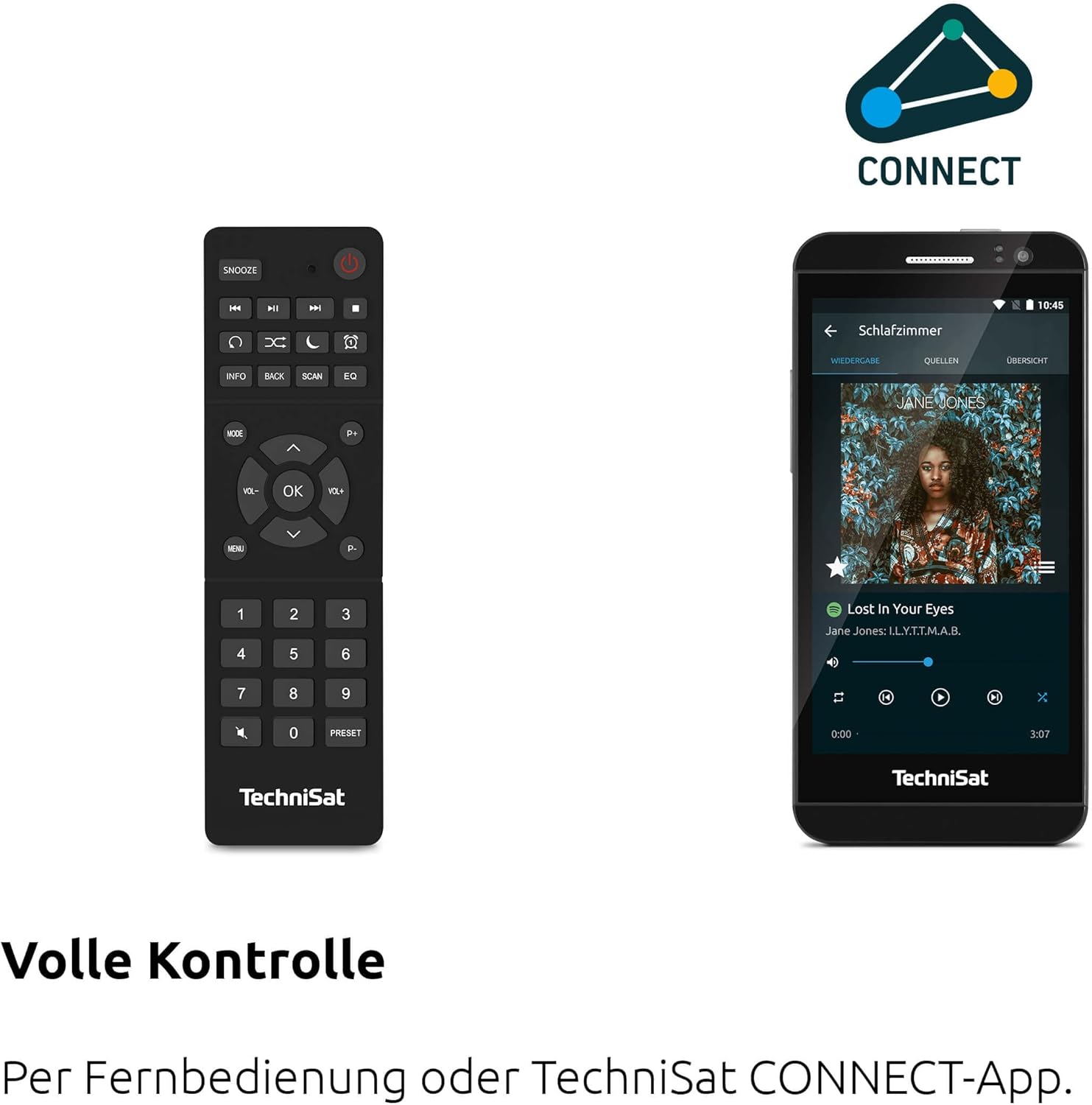
Figure 4.2: Remote Control and App Interface
This image shows the included remote control with buttons for power, snooze, mode, info, scan, EQ, preset numbers, volume, and navigation. It also illustrates the TechniSat CONNECT app interface on a smartphone, providing an alternative control method.
Kontrol Panel hareup:
- Tombol Daya: Ngahurungkeun / mareuman alat.
- Tombol Mode: Switches between DAB+, FM, Internet Radio, Bluetooth, AUX, and USB modes.
- Tombol prasetél: Ngaksés prasetél stasiun radio anu disimpen.
- Jilid Kenop: Saluyukeun tingkat kaluaran audio.
- Tuning/OK Knob: Navigates ménu jeung confirms selections.
- Tombol Scan: Initiates station scanning in radio modes.
- Tombol Balik: Mulih ka ménu atawa layar saméméhna.
- tampilan: 2.4-inch TFT color display for information and menu navigation.
Sambungan Panel Belakang:
- Input kakuatan: Sambungkeun adaptor listrik anu disayogikeun.
- AUX-IN: Jack 3.5mm pikeun nyambungkeun alat audio éksternal.
- Jack headphone: 3.5mm jack pikeun déngékeun swasta.
- Port USB: For MP3 playback from USB drives and charging external devices.
5. Setélan
5.1 Mimiti Power-Up
- Place the DIGITRADIO 370 IR on a stable, flat surface.
- Extend the telescopic antenna for optimal DAB+ and FM reception.
- Connect the power adapter to the DC IN port on the rear of the radio and then to a wall outlet.
- Press the Power button on the front panel or remote control to turn on the device.
- Follow the on-screen prompts for initial setup, including language selection and network configuration.
5.2 Network Configuration (WLAN)
To access Internet Radio and app control, the device must be connected to a Wi-Fi network.
- Navigate to the 'Settings' menu using the Tuning/OK knob.
- Select 'Network' and then 'Wi-Fi Setup'.
- The radio will scan for available networks. Select your desired network from the list.
- Enter the Wi-Fi password using the on-screen keyboard and the Tuning/OK knob.
- Confirm the connection. Once connected, the Wi-Fi icon will appear on the display.
6. Parentah Operasi

Figure 6.1: Radio Diversity
This image highlights the multiple radio reception options available: DAB+ Digital Radio, Internet Radio via WLAN, and UKW/FM analog radio.
6.1 DAB + Radio
- Press the 'Mode' button until 'DAB+' is selected.
- The radio will automatically scan for available DAB+ stations during the first use. To initiate a scan manually, press the 'Scan' button.
- Use the Tuning/OK knob to scroll through the list of available stations. Press the knob to select a station.
- To save a station as a preset, press and hold the 'Preset' button, then select a preset number and confirm.
6.2 Radio FM
- Press the 'Mode' button until 'FM' is selected.
- Press the 'Scan' button to automatically search for and store FM stations.
- Alternatively, use the Tuning/OK knob to manually tune to a frequency.
- To save a station as a preset, press and hold the 'Preset' button, then select a preset number and confirm.
6.3 Internét Radio
Pastikeun radio nyambung ka jaringan Wi-Fi (tingali Bagian 5.2).
- Press the 'Mode' button until 'Internet Radio' is selected.
- Anjeun tiasa ngotéktak stasiun dumasar lokasi, genre, atanapi milarian stasiun khusus.
- Use the Tuning/OK knob to navigate and select stations.
- To save a station as a preset, press and hold the 'Preset' button, then select a preset number and confirm.
6.4 Streaming Audio Bluetooth

Figure 6.2: Bluetooth Audio Streaming
This image demonstrates a smartphone wirelessly streaming music to the radio via Bluetooth, indicating the device's capability for wireless music enjoyment.
- Press the 'Mode' button until 'Bluetooth' is selected. The radio will enter pairing mode.
- Dina smartphone Anjeun atawa alat Bluetooth sejen, aktipkeun Bluetooth tur neangan alat nu sadia.
- Select 'DIGITRADIO 370 IR' from the list to pair.
- Once paired, you can play audio from your device through the radio.
6.5 Putereun sareng Ngecas USB

Figure 6.3: USB Playback and Charging Function
This image illustrates the dual functionality of the USB port: connecting USB storage devices for MP3 playback and using the port to charge compatible devices like smartphones.
- Selapkeun USB flash drive nu ngandung MP3 filekana port USB di tukang radio.
- Press the 'Mode' button until 'USB' is selected.
- Use the Tuning/OK knob to navigate through folders and select tracks for playback.
- The USB port can also be used to charge compatible smartphones and other devices. Connect your device's charging cable to the USB port.
6.6 Ngecas Nirkabel

Figure 6.4: Wireless Charging Function
This image shows a hand placing a smartphone on the top surface of the radio, demonstrating the wireless charging capability for compatible smartphones.
The DIGITRADIO 370 IR features a wireless charging surface on its top panel.
- Pastikeun telepon pinter atanapi alat anjeun ngadukung ngecas nirkabel Qi.
- Place your compatible device centrally on the designated wireless charging area on top of the radio.
- The device should indicate that charging has begun.
6.7 Alarm Clock, Sleep Timer, and Snooze
The radio includes an alarm clock, sleep timer, and snooze function.
- Jam alarem: Set up to two independent alarms with customizable sources (buzzer, DAB+, FM, Internet Radio) and volume. Access via the 'Settings' menu.
- Timer Saré: Allows the radio to turn off automatically after a set period (e.g., 15, 30, 60 minutes). Access via the 'Settings' menu.
- Hususkeun: When an alarm sounds, press the 'Snooze' button on the remote control to temporarily pause the alarm.
6.8 App Control (UNDOK App)
The DIGITRADIO 370 IR can be controlled via the UNDOK app on your smartphone or tablet.
- Download the 'UNDOK' app from your device's app store.
- Pastikeun telepon pinter/tablet sareng radio anjeun nyambung ka jaringan Wi-Fi anu sami.
- Open the UNDOK app; it should automatically detect your DIGITRADIO 370 IR.
- You can now control all major functions of the radio, including mode selection, station tuning, volume, and presets, directly from the app.
7. Pangropéa
7.1 beberesih
- Sok cabut colokan alat tina stop kontak samemeh beberesih.
- Anggo kaén anu lembut sareng garing pikeun ngusap permukaan luar.
- Ulah nganggo pembersih cair, pembersih aerosol, atanapi pelarut kimia anu kuat, sabab ieu tiasa ngaruksak lapisan akhir.
7.2 Panyimpenan
If storing the device for an extended period, unplug it from the power source and store it in a cool, dry place, away from direct sunlight and extreme temperatures.
8. Cara ngungkulan
| Masalah | Mungkin Cukang lantaranana | Solusi |
|---|---|---|
| Taya kakuatan | kabel kakuatan teu disambungkeun; stop kontak listrik lepat | Pariksa sambungan kabel kakuatan; Coba colokan listrik anu béda. |
| Taya sora | Volume teuing leutik; Bisu diaktipkeun; Sumber anu dipilih salah | Increase volume; Check if mute is active; Select the correct input source (DAB+, FM, Internet, Bluetooth, USB, AUX). |
| Resepsi radio goréng (DAB+/FM) | Antenna not extended; Weak signal; Interference | Fully extend the telescopic antenna; Reposition the radio; Avoid placing near other electronic devices. |
| Internet Radio not working | No Wi-Fi connection; Incorrect Wi-Fi password; Router issue | Check Wi-Fi connection in settings; Re-enter Wi-Fi password; Restart your Wi-Fi router. |
| Nyapasangkeun Bluetooth gagal | Radio not in pairing mode; Device too far; Bluetooth off on source device | Ensure radio is in Bluetooth mode; Move devices closer; Enable Bluetooth on your source device. |
| Ngecas nirkabel teu jalan | Device not Qi-compatible; Device not placed correctly; Phone case too thick | Verify device supports Qi charging; Adjust device position on charging pad; Remove thick phone cases. |
9. Spésifikasi
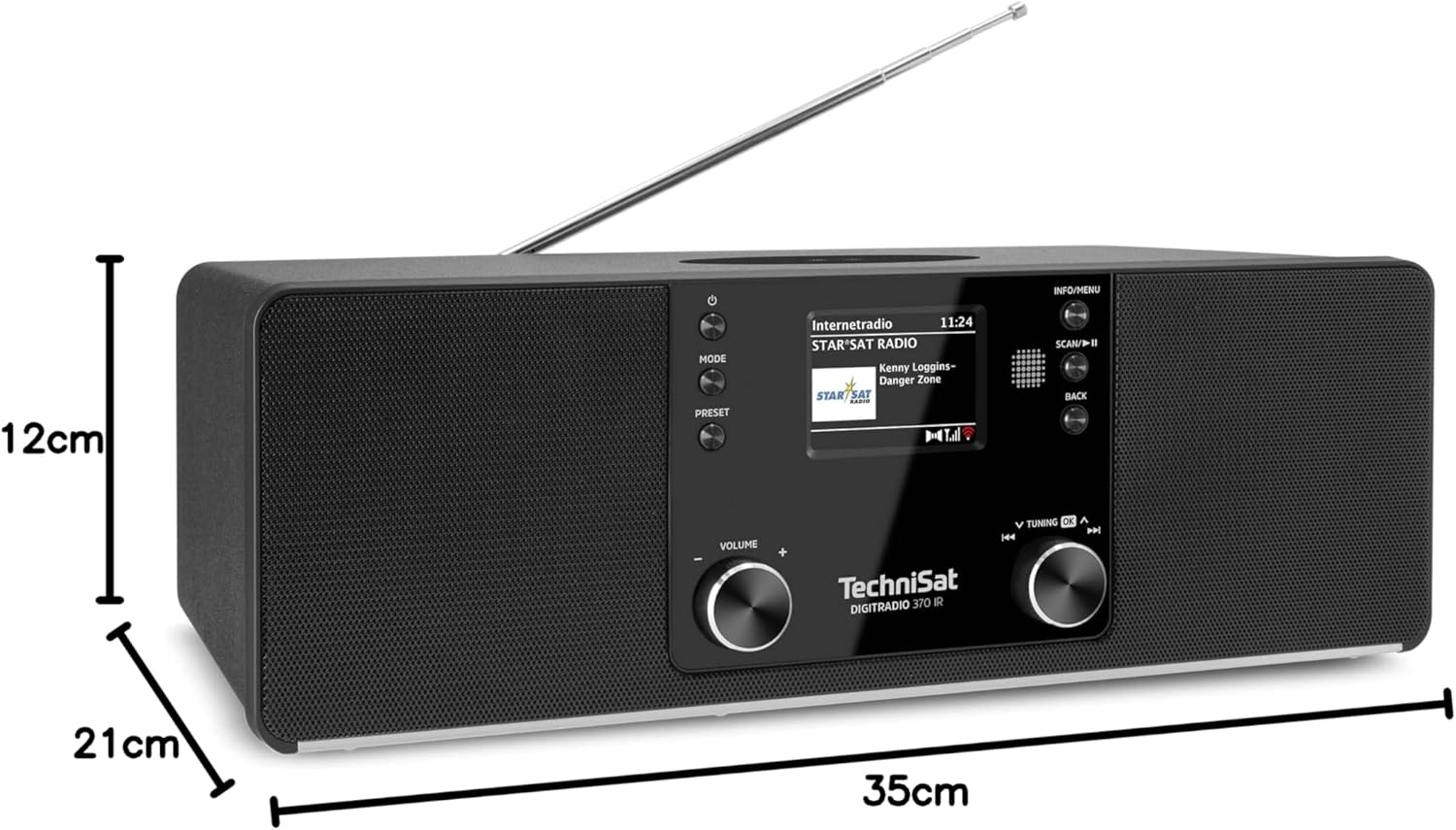
Gambar 9.1: Dimensi Produk
This image provides a visual representation of the radio's dimensions: 35 cm (length), 12 cm (height), and 21 cm (depth).
| Fitur | Rincian |
|---|---|
| Nomer modél | 0000/3971 |
| merek | TechniSat |
| Pita Radio Dirojong | DAB+, FM, Radio Internét |
| Téhnologi konektipitas | Bluetooth, USB, Wireless-Charging, WLAN (2.4 GHz & 5 GHz) |
| Fitur husus | Wireless Charging, Bluetooth Audio Streaming, USB Playback & Charging, Alarm Clock, Sleep Timer, Snooze, App Control (UNDOK) |
| Mode Kaluaran Audio | Stereo |
| Speaker Kaluaran Power | 2 x 5 Watts RMS (10 Watts total) |
| Tipe tampilan | 2.4 inci TFT Warna LCD |
| Sumber Daya | Electric Cord (230 Volts, 60 Hz) |
| Ukuran (L x W x H) | 35 x 21 x 12 cm |
| Beurat | 2.7 kg |
| Bahan Perumahan | Kai |
| Alat nu cocog | Smartphone, MP3 player, tablet, laptop, headphones |
| Antarbeungeut | 3.5 mm Audio (AUX-IN), USB 2.0, 3.5 mm Headphone |
10. Garansi jeung Rojongan
10.1 Émbaran jaminan
This product comes with a 2-year warranty (Gewährleistung) from the date of purchase. Please retain your proof of purchase for any warranty claims. The warranty covers manufacturing defects and malfunctions under normal use. It does not cover damage caused by misuse, accidents, unauthorized modifications, or normal wear and tear.
10.2 Rojongan Palanggan
For technical assistance, troubleshooting beyond this manual, or warranty inquiries, please contact TechniSat customer support. Refer to the TechniSat official websitus pikeun wincik kontak husus pikeun wewengkon Anjeun.
Sumberdaya Online: Visit the official TechniSat website for updated manuals, FAQs, and support information.