
1. Bubuka
Hatur nuhun pikeun meuliasing the DUAL DL-DAB3-001 DAB+/Bluetooth Alarm Clock Radio. This device combines a digital radio (DAB+ and FM), Bluetooth connectivity for audio streaming, a dual alarm clock, and convenient induction charging for compatible smartphones. This manual provides essential information for safe operation, setup, and maintenance of your device. Please read it thoroughly before use and retain it for future reference.
Gambar 1.1: The DUAL DL-DAB3-001 alarm clock radio positioned on a bedside table, demonstrating its compact design and integration into a modern bedroom environment. A smartphone is shown on the induction charging pad, and the digital display shows the time and date.
2. Parentah Kasalametan
- Baca sadaya parentah sateuacan ngoperasikeun alat.
- Ulah ngalaan alat ka hujan, beueus, atawa suhu ekstrim.
- Mastikeun ventilasi ditangtoskeun; ulah ngahalangan sagala bukaan ventilasi.
- Use only the provided AC adapter. Using unauthorized adapters may damage the device and void the warranty.
- Ulah nyobian ngabongkar atawa ngaropéa alat. Rujuk sadayana jasa ka tanaga anu mumpuni.
- Jauhkeun alat tina médan magnét anu kuat.
- Buang batré sacara tanggung jawab nurutkeun peraturan lokal.
3. Eusi Paket
Mangga parios heula sadaya barang anu didaptarkeun di handap ieu aya dina pakét anjeun:
- DUAL DL-DAB3-001 Alarm Clock Radio
- AC Power Adapter (Input: AC 100-240V ~ 50/60 Hz 1A; Output: DC 9V 2.5A)
- Manual pangguna (dokumén ieu)
Note: 2 x AAA R4 batteries for backup are not included and must be purchased separately.
4. Produk Langkungview
4.1 Hareup jeung Luhur View

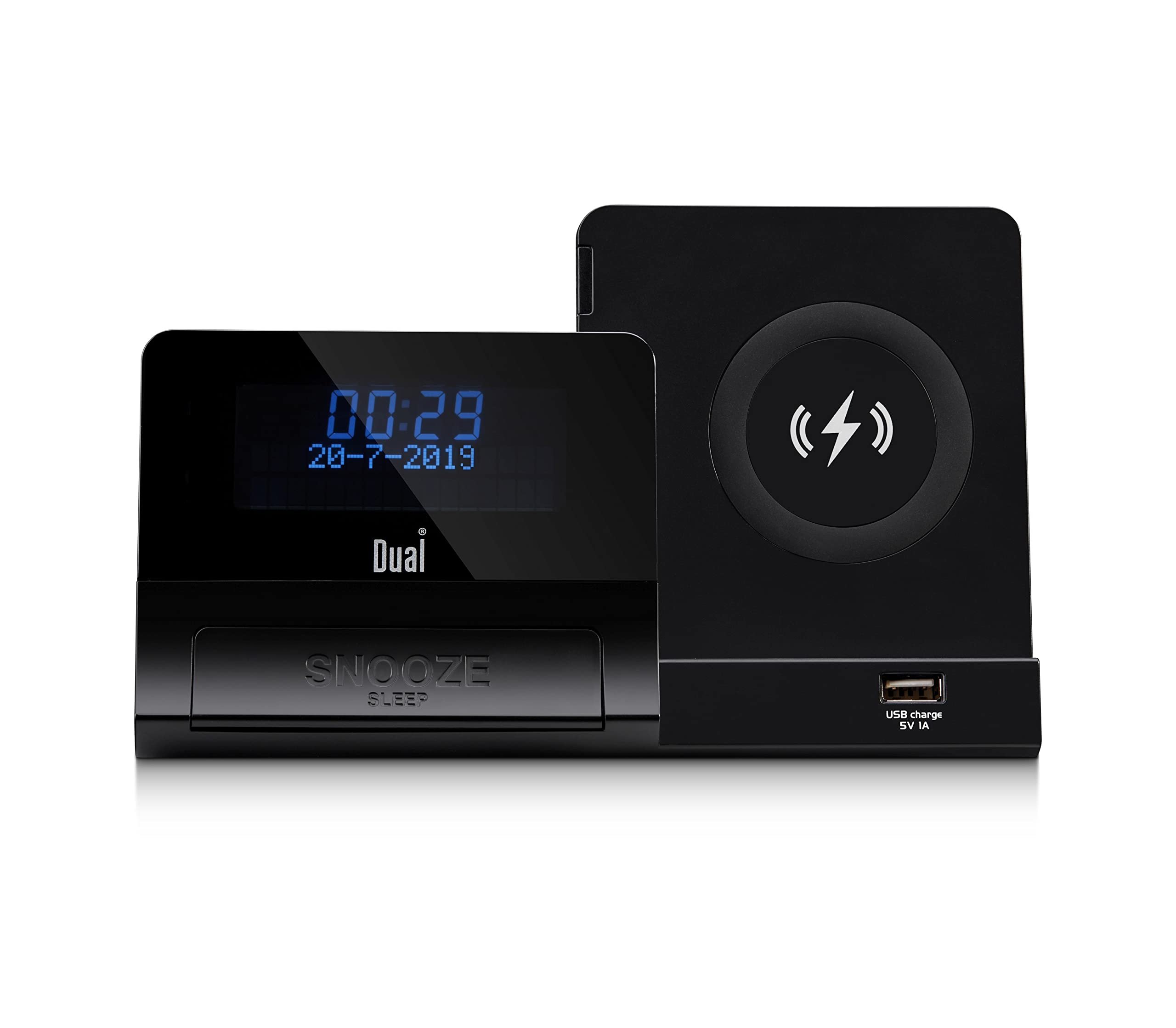
Gambar 4.1: Diwincik view of the DUAL DL-DAB3-001, highlighting the 5-inch LCD display, the large 'SNOOZE' button, the circular wireless induction charging pad on the right, and the USB charging port (5V 1A) located below the charging pad.
- Layar LCD: Shows time, date, radio information, and alarm status.
- Tombol SNOOZE/SLEEP: Activates snooze during an alarm or sleep timer during playback.
- Pad ngecas nirkabel: For induction charging of compatible smartphones.
- USB Charging Port (5V 1A): For charging other USB-powered devices.
- Control Buttons (not visible in this view, typically on top/side): Power, Mode, Tune/Scan, Volume, Alarm Set, Presets.
4.2 Rear Panel (General Description)
Panel pungkur biasana kalebet:
- DC IN Jack: Pikeun nyambungkeun adaptor kakuatan AC.
- AUX IN Jack: Pikeun nyambungkeun alat audio éksternal.
- Jack headphone: Pikeun déngékeun pribadi.
- Kompartemen batré: For 2 x AAA R4 backup batteries.
5. Setélan
5.1 Sambungan Daya
- Insert the DC plug of the supplied AC adapter into the DC IN jack on the rear of the unit.
- Plug the AC adapter into a standard wall outlet (AC 100-240V ~ 50/60 Hz).
- Unit bakal hurung atawa asup ka modeu standby.
5.2 Battery Installation (Backup)
For time and alarm settings backup during power outages:
- Buka panutup kompartemen batré dina pungkur unit.
- Insert 2 x AAA R4 batteries (not included), observing the correct polarity (+/-).
- Tutup panutup kompartemen batré aman.
5.3 Initial Power On and Time Synchronization
Upon first power-on, the unit will typically attempt to synchronize the time and date automatically via DAB+ signal. Ensure the antenna is extended for optimal reception.
6. Parentah Operasi
6.1 Operasi Radio (DAB+/FM)
- Daya Hurung: Pencét éta Kakuatan tombol pikeun ngahurungkeun radio.
- Pilih Mode: Pencét éta Modus button to switch between DAB+ and FM radio.
- Auto Scan (DAB+): In DAB+ mode, the radio will automatically scan for available stations upon first use. For a manual scan, refer to the specific button (e.g., Nyeken or ménu pilihan).
- Tuning (FM): Dina modeu FM, anggo Nada +/- buttons to manually tune or press and hold for auto-scan to the next available station.
- Nyimpen prasetél: To save a station, tune to the desired station, press and hold the Prasetél button, select a preset number using Nada +/-, sarta pencét Prasetél deui pikeun mastikeun.
- Nginget-nginget Préparasi: Pencét éta Prasetél button briefly, then use Nada +/- to select the desired preset.
6.2 Operasi Bluetooth
- Lebetkeun Modeu Bluetooth: Pencét éta Modus button until "Bluetooth" appears on the display. The unit will enter pairing mode, indicated by a flashing Bluetooth icon.
- papasangan: On your smartphone or other Bluetooth device, enable Bluetooth and search for available devices. Select "DL-DAB3-001" from the list.
- Sambungan: Sakali dipasangkeun, ikon Bluetooth dina tampilan radio bakal eureun kedip-kedip sareng tetep hurung. Anjeun ayeuna tiasa ngalirkeun audio tina alat anjeun ka radio.
- Kontrol Puteran: Use your connected device or the radio's controls (if available) to play, pause, skip tracks, and adjust volume.
6.3 Fungsi Jam Alarm
The DL-DAB3-001 features a dual alarm system.
- Setélan Alarm: Pencét jeung tahan tombol Siapkeun Alarm button (or similar, refer to specific button labels). Use Nada +/- pikeun nyetel waktos alarm, teras pencét Siapkeun Alarm to confirm. Repeat for the second alarm.
- Sumber Alarm: Select your preferred alarm source (DAB+ radio, FM radio, or buzzer) using the Modus or Siapkeun Alarm button during the alarm setup process.
- Ngaktipkeun/Nonaktipkeun Alarm: Pencét sakeudeung Siapkeun Alarm button to toggle alarms on/off. An alarm icon will appear on the display when active.
- Hususkeun: Sawaktos alarm disada, pencét tombol SNOOZE button to temporarily silence it for a set period (e.g., 9 minutes).
- Ngeureunkeun Alarm: Pencét éta Kakuatan button to turn off the alarm completely until the next set time.
- Timer Saré: While playing audio, press the SNOOZE / SARE button repeatedly to cycle through sleep timer options (e.g., 15, 30, 60, 90 minutes) before the unit automatically turns off.
6.4 Induction Charging
The unit features a wireless induction charging pad for Qi-compatible smartphones.
- Ensure the radio is powered on and connected to the AC adapter.
- Simpen telepon pinter anu cocog sareng Qi anjeun langsung kana bantalan ngecas nirkabel.
- The charging indicator on your phone should activate, confirming that charging has begun.
- If charging does not start, adjust the position of your phone on the pad. Remove any thick cases that may interfere with charging.
6.5 Ngecas USB
The USB port on the front of the unit provides 5V 1A power output for charging other devices.
- Connect your device's USB charging cable to the USB charging port on the radio.
- Ensure the radio is powered on and connected to the AC adapter.
- Ngecas bakal otomatis dimimitian.
6.6 Input Bantu
Connect external audio sources (e.g., MP3 player) via the AUX IN jack.
- Connect a 3.5mm audio cable (not included) from your external device's headphone jack to the AUX IN jack on the radio.
- Pencét éta Modus tombol pikeun milih modeu AUX.
- Kontrol playback sareng volume tina alat éksternal anjeun.
7. Pangropéa
- beberesih: Disconnect the power before cleaning. Use a soft, dry cloth to wipe the unit. Do not use abrasive cleaners or solvents.
- Panyimpenan: If storing the unit for an extended period, disconnect it from power and remove the backup batteries. Store in a cool, dry place.
- anteneu: Handle the telescopic antenna carefully to avoid damage.
8. Cara ngungkulan
| Masalah | Mungkin Cukang lantaranana | Solusi |
|---|---|---|
| Taya kakuatan | AC adapter not connected or faulty; Power outlet not working. | Check AC adapter connection. Try a different power outlet. |
| Resepsi radio goréng (DAB+/FM) | anteneu teu ngalegaan; sinyal lemah; gangguan. | Fully extend the telescopic antenna. Reposition the unit. Perform a new auto-scan for DAB+ stations. |
| Nyapasangkeun Bluetooth gagal | Device not in pairing mode; Bluetooth disabled on smartphone; Already connected to another device. | Ensure the radio is in Bluetooth pairing mode. Enable Bluetooth on your smartphone. Disconnect from other Bluetooth devices. |
| Induction charging not working | Phone not Qi-compatible; Phone not positioned correctly; Thick phone case. | Verify phone compatibility. Adjust phone position on the pad. Remove phone case. |
| Alarm teu disada | Alarm teu diaktipkeun; Volume teuing leutik. | Ensure alarm is set and activated (check display icon). Increase volume. |
9. Spésifikasi
- model: DL-DAB3-001
- Sasayogian tanaga: DC 9V 2.5A (via AC adapter)
- Batré cadangan: 2 x AAA R4 (not included)
- Radio Tuner: DAB+, FM
- Vérsi Bluetooth: 5.0
- Daya kaluaran: 2 x 3 Watt
- tampilan: 5-inch LCD (adjustable brightness)
- Induction Charging: Qi-cocog
- USB Ngaluarkeun Kaluaran: 5V 1A
- Konektipitas: Auxiliary Input, Headphone Jack
- Ukuran (L x W x H): 18 x 10.8 x 9.8 cm
- beurat: 800 gram
10. Garansi jeung Rojongan
This DUAL product is covered by a manufacturer's warranty. Please refer to the warranty card included in your package or contact your retailer for specific warranty terms and conditions. For technical support or service inquiries, please contact the customer service department of your place of purchase or visit the official Dual websitus pikeun bantuan salajengna.