
FIFINE H6 Gaming Headset User Manual
Modél: H6
1. Bubuka
Thank you for choosing the FIFINE H6 Gaming Headset. This headset is designed to provide an immersive audio experience for gaming on PC, PS4, and PS5. It features virtual 7.1 surround sound, a detachable microphone for clear communication, three EQ modes, and comfortable ear cushions for extended use.
Please read this manual carefully before using the product to ensure proper operation and to maximize your gaming experience.
2. Eusi Paket
- FIFINE H6 Gaming Headset
- Mikropon anu tiasa dicabut
- Manual pamaké
3. Produk Langkungview
3.1 Komponén headset
The FIFINE H6 headset is designed for comfort and durability, featuring soft ear cushions and an adjustable headband.

Gambar 3.1: The headset features breathable ear cushions, a soft headband, and an adjustable metal frame for a comfortable fit. It weighs approximately 330g.
3.2 Kadali Inline
The headset includes an inline control unit for easy access to audio settings.
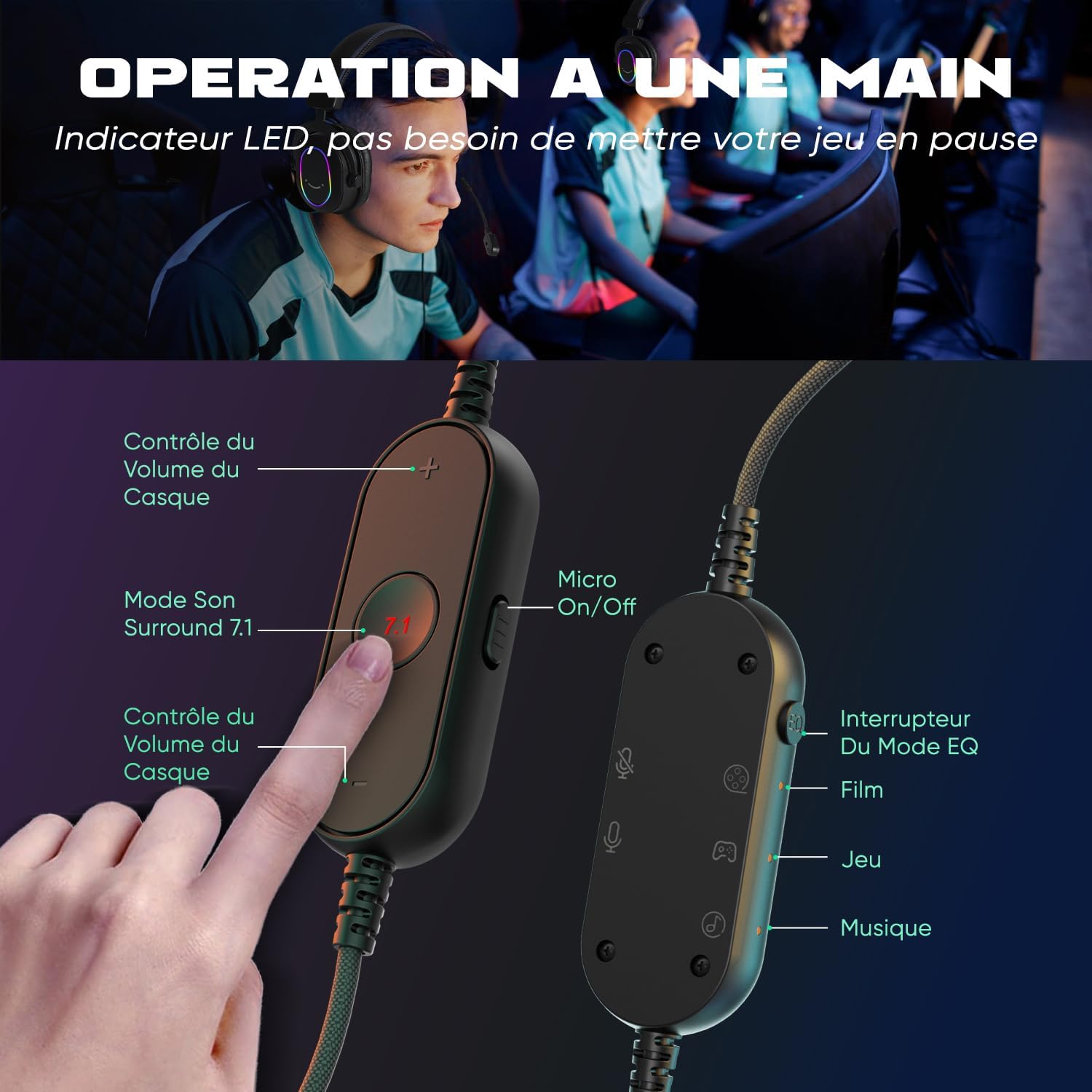
Gambar 3.2: The inline controller allows for quick adjustments. It includes headset volume control, a 7.1 surround sound activation button, a microphone on/off switch, and an EQ mode selector for Film, Game, and Music modes.
3.3 Téhnologi Audio
Equipped with 50mm drivers, the H6 headset delivers enhanced sound quality for an immersive experience.

Gambar 3.3: The headset features 50mm drivers designed to improve overall sound quality and enhance your audio experience.
4. Setélan
The FIFINE H6 headset offers plug-and-play functionality, making setup quick and easy.
4.1 Nyambungkeun Headsét
- Connect the USB-A cable of the headset to an available USB port on your PC, PS4, or PS5.
- The headset is automatically recognized by your device. No additional drivers are typically required.
- Ensure the headset is selected as the default audio input and output device in your system's sound settings.

Gambar 4.1: The headset connects via USB and is compatible with Windows, PS4/PS5, and Mac OS devices, offering simple plug-and-play installation.
4.2 Ngapasangkeun Mikropon
- Insert the detachable microphone into the designated port on the left earcup until it clicks into place.
- Adjust the flexible microphone boom to position it optimally for your voice.
- To remove, gently pull the microphone out of its port.

Gambar 4.2: The headset features a detachable and 360-degree flexible microphone. A red light on the inline control indicates when the microphone is muted.
5. Parentah Operasi
5.1 Sora Sakuriling Virtual 7.1
Activate the virtual 7.1 surround sound for an immersive gaming experience, allowing you to pinpoint audio cues like footsteps and gunfire.
- Pencét éta 7.1 button on the inline control unit to toggle virtual 7.1 surround sound on or off.
- An LED indicator on the control unit will confirm the status.

Gambar 5.1: Virtual 7.1 surround sound provides an immersive gaming experience, allowing precise localization of in-game sounds such as explosions, gunshots, footsteps, aircraft, and vehicles.
5.2 Modeu EQ
The headset offers three equalization (EQ) modes optimized for different audio scenarios.
- Pencét éta EQ Mode Pindah button on the inline control unit to cycle through the modes:
- Modeu Pilem: Optimized for movie watching.
- Modeu Kaulinan: Enhanced audio for gaming, highlighting in-game sounds.
- Modeu Musik: Audio anu saimbang kanggo ngadangukeun musik.
- An LED indicator will show the currently active EQ mode.
5.3 Volume Control
- Ngagunakeun éta Volume Naik (+) jeung Volume Turun (-) buttons on the inline control unit to adjust the headset's audio output level.
5.4 Mikropon Bisu
- Geser ka Micro On/Off switch on the inline control unit to mute or unmute the microphone.
- A red LED light on the control unit indicates when the microphone is muted.
6. Pangropéa
- beberesih: Anggo lawon anu lemes sareng garing pikeun ngabersihkeun headset. Entong nganggo bahan kimia anu keras atanapi bahan anu kasar.
- Panyimpenan: Simpen headset di tempat anu tiis sareng garing jauh tina sinar panonpoé langsung sareng suhu anu ekstrim.
- Perawatan kabel: Avoid bending or twisting the cable excessively to prevent damage. The braided cable material is designed for durability.
- Mikropon: When not in use, you can detach the microphone to prevent accidental damage.
7. Cara ngungkulan
| Masalah | Solusi |
|---|---|
| Taya sora tina headset |
|
| Mikropon teu jalan |
|
| Sound quality issues (e.g., static, distortion) |
|
8. Spésifikasi
| Fitur | Rincian |
|---|---|
| merek | FIFINE |
| Ngaran modél | H6 (also referred to as MI4 in some documentation) |
| Warna | Hideung |
| Téhnologi konektipitas | Kabel (USB-A) |
| Panempatan Ceuli | Luhureun Ceuli (Sirkum-Aural) |
| Tipe Supir | Dinamis |
| Ukuran supir | 50 mm |
| Rentang Frékuénsi | 20 Hz - 20,000 Hz |
| Fitur husus | Virtual 7.1 Surround Sound, Detachable Microphone, 3 EQ Modes (Film, Game, Music), RGB Lighting, Inline Controls |
| Alat nu cocog | Desktop Computers, Gaming Consoles (PS4, PS5) |
| Fitur kabel | Braided, Durable, Sufficient Length |
| Bahan | Logam, Plastik |
| Tingkat Résistansi Cai | Henteu Waterproof |
9. Jaminan & Dukungan
9.1 Émbaran jaminan
FIFINE products typically come with a standard manufacturer's warranty. Please refer to your purchase documentation or the official FIFINE websitus pikeun istilah jeung kaayaan jaminan husus lumaku pikeun wewengkon Anjeun.
9.2 Rojongan Palanggan
For technical assistance, troubleshooting, or any questions regarding your FIFINE H6 Gaming Headset, please contact FIFINE customer support through their official websitus atanapi pangecér dimana anjeun mésér produk.
You can often find support contact information on the FIFINE brand store page or by visiting www.fifinemic.com.