
1. Bubuka
Thank you for choosing the YULED S1-B 1-Channel Wireless AC Triac Dimmer. This compact dimmer is designed for precise brightness control of single-color LED light sources. It operates on a reliable 2.4GHz wireless frequency and features a convenient Push-DIM function for easy operation. The Triac dimming technology ensures smooth, flicker-free light adjustment. This manual provides essential information for safe installation, operation, and maintenance of your device.
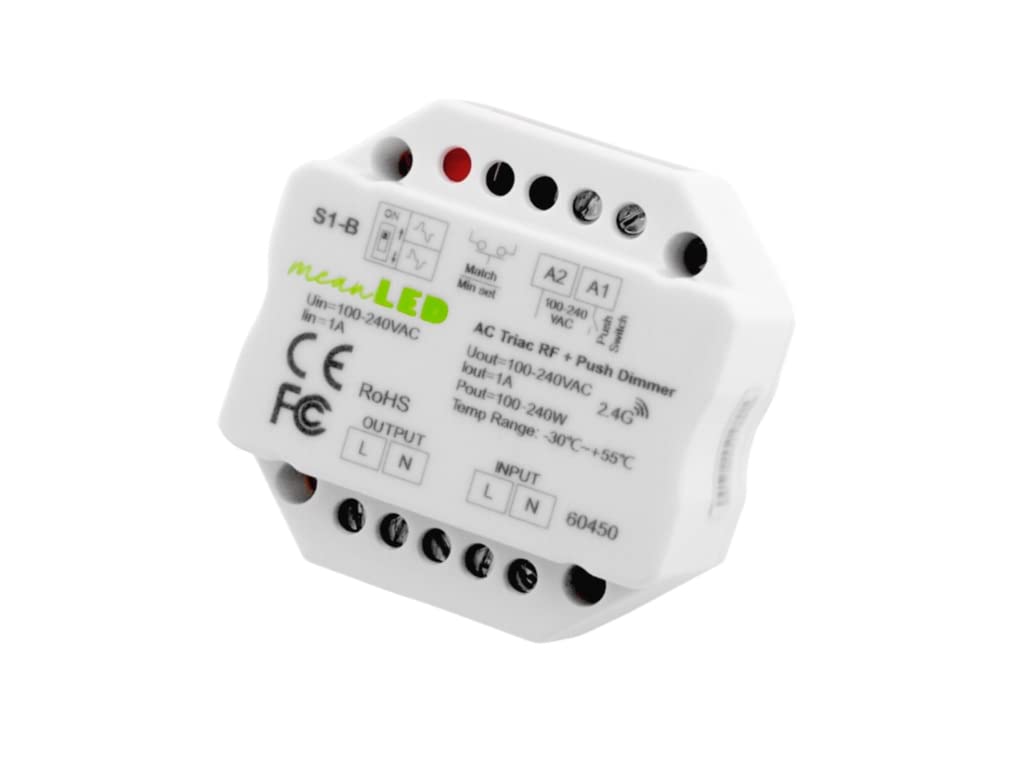
Gambar 1.1: Hareupeun view of the YULED S1-B 1-Channel Wireless AC Triac Dimmer, showing input/output terminals and control switches.
2. Émbaran Kasalametan
Please read this section carefully before installation and use. Failure to follow these instructions may result in electric shock, fire, or other hazards.
- Pamasangan ngan ukur kedah dilakukeun ku tukang listrik anu mumpuni.
- Pastikeun catu daya dicabut sateuacan padamelan pamasangan atanapi pangropéa dimimitian.
- Ulah ngalaan alat ka beueus atawa suhu ekstrim.
- Pariksa yén input voltage and load current are within the specified limits.
- Alat ieu dirarancang pikeun pamakéan jero rohangan wungkul.
- Do not attempt to repair or modify the device yourself. Contact qualified personnel for service.
3. Produk Langkungview
3.1 Fitur konci
- Compact 1-Channel Dimmer: Specifically designed for single-color light sources, allowing precise brightness control.
- 2.4GHz Wireless Frequency: Ensures stable and secure communication with compatible devices.
- Push-DIM Function: Enables easy on/off switching and brightness adjustment with a simple button press.
- Triac Dimmable: Utilizes Triac dimming technology for smooth, flicker-free dimming without unwanted effects.
- kasaluyuan luhur: Compatible with all meanLED R-series remote controls for seamless integration into existing lighting systems.
3.2 Komponén
The YULED S1-B dimmer features input and output terminals, a match button, and a minimum dimming level adjustment switch.

Gambar 3.1: Luhur view of the YULED S1-B Dimmer, highlighting the input (L, N) and output (L, N) terminals, Match button, and Min Set switch.

Gambar 3.2: Sisi view of the YULED S1-B Dimmer, illustrating the wiring connections for input and output.
4. Spésifikasi
| Fitur | Spésifikasi |
|---|---|
| merek | YULED |
| Nomer modél | S1-B (60450) |
| Masukan Voltage | AC 100-240V |
| Kaluaran Voltage | AC 100-240V |
| Kaluaran Ayeuna | Max 1A |
| Daya Kaluaran | Max 240W |
| Jenis Dimming | Triac (Phase-cut) |
| Frékuénsi nirkabel | 2.4GHz |
| Métode kontrol | RF Wireless, Push-DIM |
| Suhu Operasi | -30°C nepi ka +55°C |
| Ukuran (L x W x H) | 5.2 x 5.2 x 2.6 cm |
| Beurat | 90 g |
| Tipe Pamasangan | Tembok Gunung |
5. Instalasi (Setup)
penting: Ensure the main power supply is switched off before commencing any wiring. Incorrect wiring can cause damage to the device or connected lighting.
5.1 Diagram Wiring
The S1-B dimmer can be wired in two primary configurations: directly to a dimmable LED light or to a dimmable LED power supply (driver) which then connects to the LED light.

Image 5.1: Wiring diagrams for the S1-B dimmer. The left diagram shows direct connection to a dimmable LED light. The right diagram shows connection to a dimmable LED power supply (driver) which then connects to the LED light. Both diagrams illustrate input (L, N) and output (L, N) connections, as well as connections for external push switches (A1, A2).
5.2 Léngkah Sambungan
- Pegatkeun Daya: Turn off the main power supply at the circuit breaker before starting.
- Wiring Input: Connect the AC power input (Live 'L' and Neutral 'N') to the "INPUT" terminals of the S1-B dimmer.
- Wiring kaluaran: Connect the dimmable LED light or dimmable LED power supply to the "OUTPUT" terminals (Live 'L' and Neutral 'N') of the S1-B dimmer.
- Push Switch (Optional): If using an external push switch for Push-DIM functionality, connect it to the A1 and A2 terminals.
- Sambungan Aman: Pastikeun sadaya sambungan kabel aman sareng insulated leres.
- Mulangkeun Daya: Sakali sadaya sambungan parantos diverifikasi, balikkeun deui daya ka sirkuit.
6. Operasi
6.1 Push-DIM Function
The Push-DIM function allows for basic control using a standard momentary push switch connected to the A1 and A2 terminals.
- Pencét pondok: A quick press and release of the push switch will turn the light ON or OFF.
- Pencét Panjang: Press and hold the push switch to gradually increase or decrease the brightness. Release the switch to set the desired brightness level.
6.2 Wireless Control (2.4GHz RF)
The S1-B dimmer can be paired with compatible meanLED R-series 2.4GHz RF remote controls for wireless dimming.
6.2.1 Pairing with a Remote Control
- Siklus kakuatan: Turn off the power to the S1-B dimmer.
- Mulangkeun Daya: Hurungkeun deui kakuatan.
- Mimitian pasangan: Within 5 seconds of restoring power, quickly press the "Match" button on the S1-B dimmer (or the corresponding ON/OFF button on your meanLED R-series remote control) 3 times.
- Konfirmasi: The connected light will flash 3 times to indicate successful pairing.
6.2.2 Unpairing from a Remote Control
- Siklus kakuatan: Turn off the power to the S1-B dimmer.
- Mulangkeun Daya: Hurungkeun deui kakuatan.
- Initiate Unpairing: Within 5 seconds of restoring power, quickly press the "Match" button on the S1-B dimmer (or the corresponding ON/OFF button on your meanLED R-series remote control) 5 times.
- Konfirmasi: The connected light will flash 5 times to indicate successful unpairing.
6.3 Minimum Dimming Level Adjustment
The S1-B dimmer includes a "Min Set" switch (often a small potentiometer or switch) to adjust the minimum dimming level. This can help prevent flickering or instability at very low brightness settings, especially with certain types of LED lights.
- Nyaluyukeun: Use a small screwdriver to carefully turn the "Min Set" adjustment. Test the dimming range after each adjustment until the desired stable minimum brightness is achieved.
7. Pangropéa
The YULED S1-B dimmer requires minimal maintenance.
- beberesih: Ensure power is off before cleaning. Wipe the device with a soft, dry cloth. Do not use liquid cleaners or abrasive materials.
- Pamariksaan: Pariksa sambungan kabel sacara berkala pikeun ayana pageuh sareng tanda-tanda karusakan atanapi karusakan.
- Lingkungan: Keep the device in a dry environment, away from direct sunlight and heat sources.
8. Cara ngungkulan
| Masalah | Mungkin Cukang lantaranana | Solusi |
|---|---|---|
| Lampu henteu hurung. | No power supply, incorrect wiring, faulty light source, dimmer not paired. | Check power connections. Verify wiring according to diagram. Test light source. Attempt to re-pair the dimmer with the remote. |
| Light flickers or dims unevenly. | Incompatible light source, minimum dimming level too low, loose connection. | Ensure light source is Triac dimmable. Adjust the "Min Set" switch. Check all wiring connections. |
| Kadali jauh teu jalan. | Remote not paired, remote battery low, remote out of range. | Re-pair the remote control. Replace remote battery. Ensure remote is within 30m range of the dimmer. |
| Push-DIM function not working. | Incorrect push switch wiring, faulty push switch. | Verify push switch wiring to A1/A2 terminals. Test the push switch for functionality. |
9. Inpormasi Daur Ulang sareng Pamiceunan
This product contains electronic components and should not be disposed of with general household waste. Please follow local regulations for the recycling of electronic waste. Proper disposal helps prevent potential negative consequences for the environment and human health.
Kanggo inpo tentang daur ulang lampsareng miceun barang anu rusak atanapi ruksakamps, please refer to local guidelines or contact your municipal waste management authority.
10. Garansi jeung Rojongan
Kanggo inpormasi garansi atanapi dukungan téknis, mangga ngahubungi pangecér anjeun atanapi produsén langsung. Simpen resi pameseran anjeun salaku bukti pameseran.
Manufacturer: YULED