
BOYA BY-V10
BOYA Wireless Lavalier Microphone User Manual
Model: BY-V10
1. Bubuka
Thank you for choosing the BOYA BY-V10 Wireless Lavalier Microphone. This innovative microphone system is designed to provide high-quality audio for your video recording, live streaming, podcasting, and online conferencing needs. Its compact design, easy setup, and advanced features make it an excellent tool for content creators and professionals alike.
2. Naon dina Box
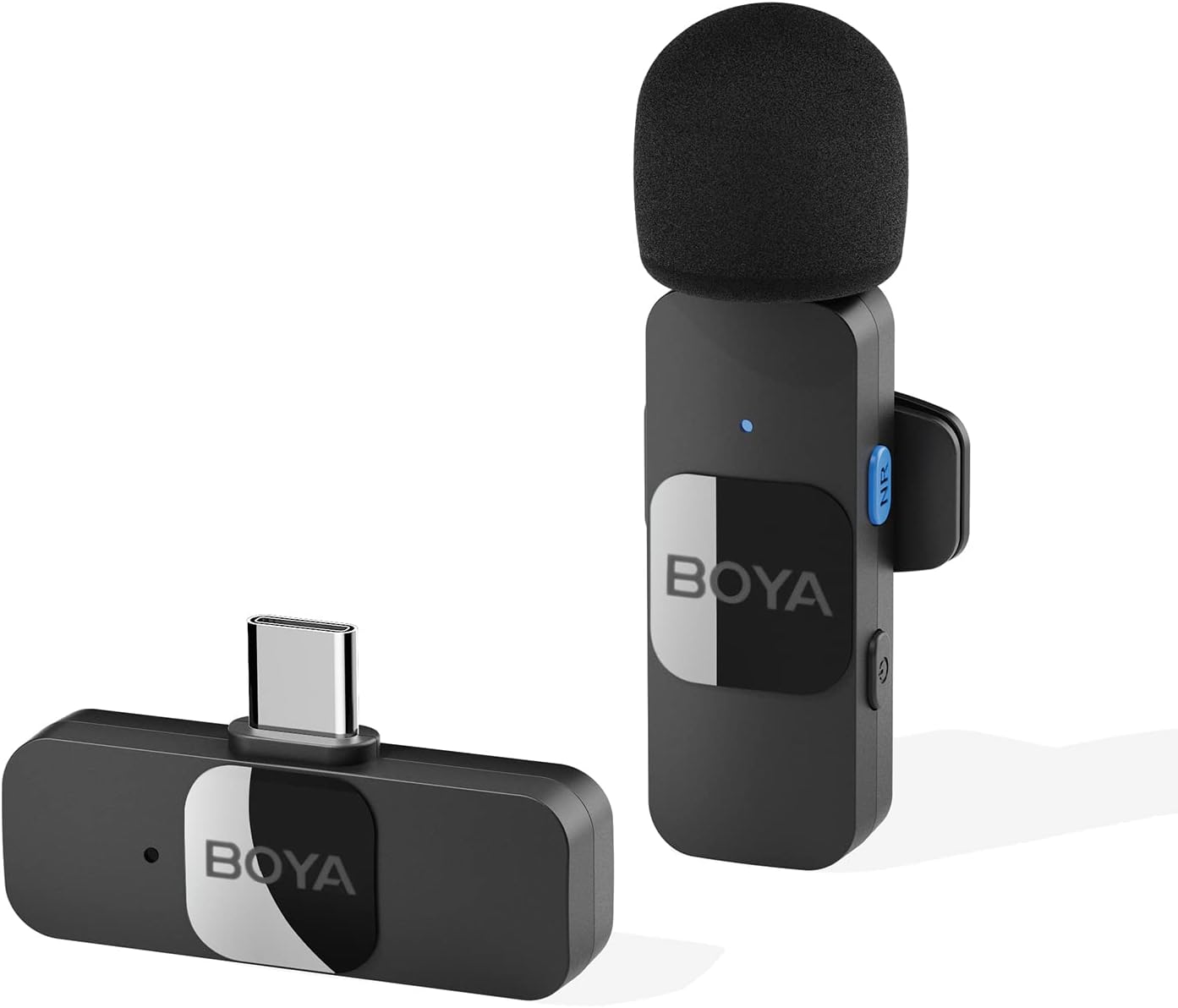
- BY-V10-TX Transmitter ×1
- BY-V10-RX Receiver ×1
- Kabel Ngecas USB-C ×1
- Foam Windscreen ×1
3. Setup Guide
3.1 Ngecas Awal
Before first use, ensure both the transmitter and receiver are fully charged. Connect the provided USB-C charging cable to the charging ports on both units and a power source. A full charge takes approximately two hours, providing up to 9 hours of operation time.

3.2 Sambungan otomatis
- Plug the BY-V10-RX receiver directly into the USB-C port of your smartphone, tablet, or laptop.
- Turn on the BY-V10-TX transmitter. The units will automatically pair within seconds.
- Catetan penting: For Android devices, ensure the USB OTG (On-The-Go) setting is enabled in your device's settings for proper microphone recognition.

4. Parentah Operasi
4.1 Nempatkeun Mikropon
The BY-V10 transmitter can be handheld or clipped onto your shirt using its rotatable back clip. For optimal sound capture, position the microphone approximately 6-8 inches from your mouth.
4.2 Pangurangan Bising
The microphone features advanced noise reduction technology. To activate or deactivate noise cancellation, press the dedicated NR (Noise Reduction) button on the transmitter. This feature helps to minimize background noise for clearer audio, especially in noisy environments.

4.3 Omnidirectional Sound Pickup
Equipped with an omnidirectional pickup microphone, the BY-V10 captures 360-degree sound with precision. This ensures that no audio detail is missed, regardless of the surrounding environment or the direction of the sound source.
4.4 Pangiriman nirkabel
The system operates on a 2.4G signal, providing stable and low-latency audio transmission. It supports a wireless range of up to 164 feet (50 meters) in open environments without obstacles or interference, allowing for flexible recording distances.

4.5 Ngecas sakaligus
The receiver allows you to charge your device simultaneously while recording, ensuring uninterrupted long recording sessions for live streaming or course recording.
5. Pangropéa
- Jaga mikropon sareng panarima tetep bersih sareng bébas tina lebu. Anggo lawon anu lemes sareng garing pikeun ngabersihkeun.
- Simpen unit-unitna di tempat anu tiis sareng garing, jauh tina sinar panonpoé langsung sareng suhu anu ekstrim.
- Ensure the foam windscreen is securely attached to the transmitter to prevent loss and provide optimal wind noise reduction. Replacement windscreens can be acquired if needed.
- Hindarkeun ngaragragkeun atanapi nahan unit kana dampak anu kuat.
6. Cara ngungkulan
| Masalah | Mungkin Cukang lantaranana | Solusi |
|---|---|---|
| Microphone not connecting/pairing. | USB OTG not enabled (Android). Unit-unitna teu dihurungkeun. batré lemah. | Enable USB OTG in your device settings. Ensure both transmitter and receiver are turned on. Cas kadua unit sacara pinuh. |
| Poor sound quality/excessive background noise. | Noise cancellation off. Microphone too far from source. Gangguan lingkungan. | Press the NR button to activate noise cancellation. Ensure microphone is within optimal range (6-8 inches). Move to a less noisy environment if possible. |
| hirup batré pondok. | Incomplete charging. Frequent use of power-intensive features. | Ensure units are charged for the full 2 hours. Minimize continuous use of noise cancellation if not critical. |
7. Spésifikasi
| Fitur | Spésifikasi |
|---|---|
| Nomer modél | BY-V10 |
| Faktor Bentuk Mikropon | Lavalier |
| Pola Polar | Omnidirectional |
| Téhnologi konektipitas | Tanpa kabel 2.4GHz |
| Tipe Panyambung | USB Tipe-C |
| Alat nu cocog | Smartphone, Laptop, Tablet |
| Sensitipitas Audio | 42 dB |
| Rasio Signal-to-Noise | 78 dB |
| Rentang Frékuénsi | 20Hz-16kHz |
| Item Beurat | 5.3 ons (150 gram) |
| Dimensi produk | 4.72 x 3.15 x 1.18 inci |
| Sumber Daya | Didukung ku batré (perlu 3 batré Lithium Ion) |
8. Garansi jeung Rojongan
For detailed warranty information and further support, please refer to the official Instructions for Use (IFU) PDF document provided by BOYA.
Ask a question about this manual
Ask about setup, troubleshooting, compatibility, parts, safety, or missing instructions. Manuals+ will review the question and use this page’s manual context to help answer it.