
ErGear EGCD3V
ErGear L-Shaped Computer Desk (Model EGCD3V) Instruction Manual
Pituduh komprehensif pikeun assembly, operasi, sarta perawatan.
Bubuka
Thank you for choosing the ErGear L-Shaped Computer Desk. This manual provides detailed instructions for the safe and efficient assembly, operation, and maintenance of your new desk. Please read this manual thoroughly before beginning assembly or use, and retain it for future reference.
This L-shaped computer desk is designed to enhance your workspace with integrated features such as an electrical outlet, monitor stand, storage shelves, CPU holder, storage pocket, and storage hook.
Émbaran Kasalametan penting
- Majelis Dua Jalma: For safety and ease of assembly, it is highly recommended that two people assemble this desk.
- Batesan Beurat: Do not exceed the maximum weight limit of 176 pounds (80 kg) on the desktop. Distribute weight evenly.
- Stabilitas: Ensure the desk is stable on an even surface. Use the adjustable foot pads to level the desk if the floor is uneven.
- Kasalametan listrik: The integrated power outlet features 3 AC outlets and 2 USB-A ports. While convenient, these are not surge protected. Consider using an external surge protector for sensitive electronics. Ensure the power cable is not pinched or damaged during assembly or use.
- Barudak jeung Pets: Jauhkeun bagian-bagian alit sareng bahan kemasan tina jangkauan barudak sareng piaraan nalika dirakit pikeun nyegah bahaya kaselek.
- Pamakéan Alat: Use appropriate tools as specified in the assembly instructions. Do not overtighten screws, especially when attaching wooden components, to avoid stripping.
Eusi pakét
Before beginning assembly, verify that all parts listed in the included assembly guide are present and undamaged. If any parts are missing or damaged, please contact ErGear customer support.

Gambar: Leuwihview of the ErGear L-Shaped Computer Desk, showcasing its various components including the L-shaped desktop, monitor stand, shelves, and power outlet.
Setup sareng Majelis
This desk offers flexible configuration, allowing the side-section to be assembled on either the left or right side to suit your space and preference. Refer to the detailed assembly instructions provided in the product packaging for step-by-step guidance.
Pertimbangan Majelis Utama:
- Two Assembly Options: The manual will illustrate both left and right-hand configurations. Choose your preferred layout before starting.
- Labeling: All pieces are clearly labeled. Ensure you match the labels to the corresponding steps in the instruction manual.
- Hardware: Hardware is also clearly labeled. Use the provided Allen key for assembly. An electric screwdriver with an appropriate Allen key bit can speed up the process, but avoid overtightening, especially on wooden parts.
- Alas Kaki adjustable: Install the rubber foot pads on the bottom of the desk legs. These can be adjusted to level the desk on uneven floors.

Image: Illustration showing the two possible assembly configurations for the L-shaped desk, allowing for a left or right-hand setup.
Parentah Operasi
Stopkontak Terpadu:
The desk is equipped with a built-in power strip featuring 3 standard AC outlets and 2 USB-A charging ports. This allows for convenient power access for your devices directly on your desk.
- Sambungan: Plug the desk's 6.7ft power cable into a wall outlet.
- Pamakéan: Connect laptops, monitors, phone chargers, and other compatible devices to the AC outlets or USB ports.
- Catetan: These outlets are for power distribution and charging. They do not provide surge protection.

Image: Detail of the integrated power outlet, showing 3 AC sockets and 2 USB ports in use, charging various electronic devices.
Monitor Riser:
The elevated monitor stand helps improve your workplace posture by raising your monitors to eye level. This can reduce neck and eye strain during long periods of use.
- panempatan: Position your monitors on the riser.
- Ergonomis: Adjust your chair height and monitor angle for optimal viewing kanyamanan.

Image: A user working at the ErGear desk, demonstrating how the monitor riser elevates screens to eye level for better posture.
Fitur Panyimpenan:
The desk includes multiple storage solutions to keep your workspace organized:
- CPU Shelf: The dedicated CPU shelf is height-adjustable, allowing you to customize its position to accommodate different CPU sizes or other storage needs. Adjust by repositioning the shelf supports during assembly or by carefully loosening and re-securing the shelf.
- Book Shelf: Provides space for books, binders, or decorative items.
- Fabric Storage Pocket: Ideal for documents, magazines, or small accessories.
- Panyekel Piala: Keeps your beverage secure and prevents spills on the desktop.
- Storage Hook: Convenient for hanging headphones, cables, or bags.
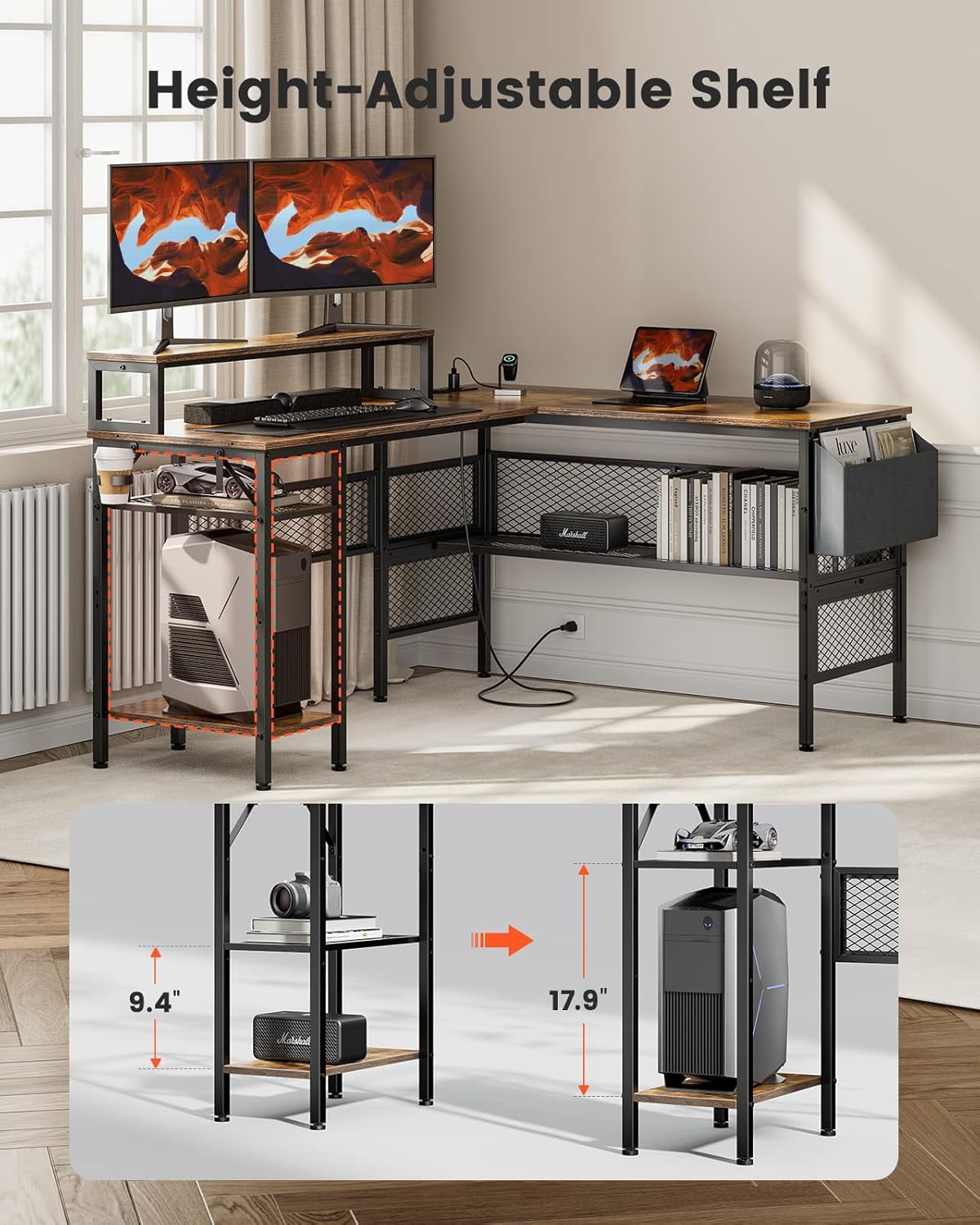
Image: The ErGear desk highlighting the height-adjustable CPU shelf, demonstrating its flexibility to accommodate different item heights.
Pangropéa sareng Perawatan
- beberesih: Ngusap permukaan méja kalayan lemes, damp lawon. Hindarkeun bahan kimia anu kasar atanapi pembersih abrasive, anu tiasa ngarusak finish.
- Tumpahan: Bersihkeun tumpahan langsung pikeun nyegah ngawarnaan atanapi ngarusak permukaan kai.
- Pengikat: Pariksa sadaya sekrup sareng baut sacara berkala pikeun mastikeun éta pageuh. Kencengkeun deui upami diperyogikeun pikeun ngajaga stabilitas.
- Panas sareng Uap: Ulah neundeun barang panas langsung dina méja. Anggo tatakan gelas pikeun inuman pikeun nyegah cairan nu ngebul.
Pamérésan masalah
- Issue: Desk wobbles or is unstable.
- Solusi: Check that all assembly screws are securely tightened. Adjust the height-adjustable foot pads on the bottom of the legs to level the desk on uneven flooring.
- Issue: Power outlets are not working.
- Solusi: Ensure the desk's main power cable is securely plugged into a functional wall outlet. Check if the wall outlet itself is receiving power (e.g., by plugging in another device). If the issue persists, contact customer support.
- masalah: Kasesahan salila assembly.
- Solusi: Review the assembly instructions carefully, paying close attention to diagrams and part labels. Ensure you are using the correct screws for each step. If a part seems difficult to fit, double-check its orientation. Remember that two-person assembly is recommended.
spésifikasi
| Fitur | Rincian |
|---|---|
| merek | ErGear |
| Nomer modél | EGCD3V |
| Tipe | Méja Komputer L-ngawangun |
| Warna | Coklat Rustic |
| Dimensi produk | 49.78 x 139.7 x 73.91 cm (P x L x T) |
| Item Beurat | 24.5 kg |
| Bahan | Engineered Wood (Top), Steel (Base) |
| Max Beban Kamampuh | 176 lbs (80 kg) |
| Outlet listrik | 3 Stop Kontak AC, 2 Port USB-A |
| Panjang Kabel Daya | 6.7 ft |
| Fitur husus | Monitor Riser, Height-Adjustable CPU Shelf, Storage Pocket, Cup Holder, Storage Hook, Adjustable Foot Pads |

Image: Detailed diagram illustrating the product dimensions of the ErGear L-Shaped Computer Desk, including length, width, and height measurements for various sections.
Garansi sarta Rojongan Palanggan
For warranty information, missing parts, or any questions regarding your ErGear L-Shaped Computer Desk, please refer to the warranty card included in your product packaging or contact ErGear customer support directly. Contact details are typically available on the manufacturer's official websitus atawa ngaliwatan platform pameseran Anjeun.
When contacting support, please have your model number (EGCD3V) and purchase information readily available.
Ask a question about this manual
Ask about setup, troubleshooting, compatibility, parts, safety, or missing instructions. Manuals+ will review the question and use this page’s manual context to help answer it.