
1. Produk Langkungview
The Icom HM195 CommandMic IV is a remote control microphone designed to provide full control over compatible Icom marine transceivers. It features a user-friendly menu system with a dot-matrix display and a directional keypad for various operations and settings. This device enhances communication functionality and integration with your marine radio system.
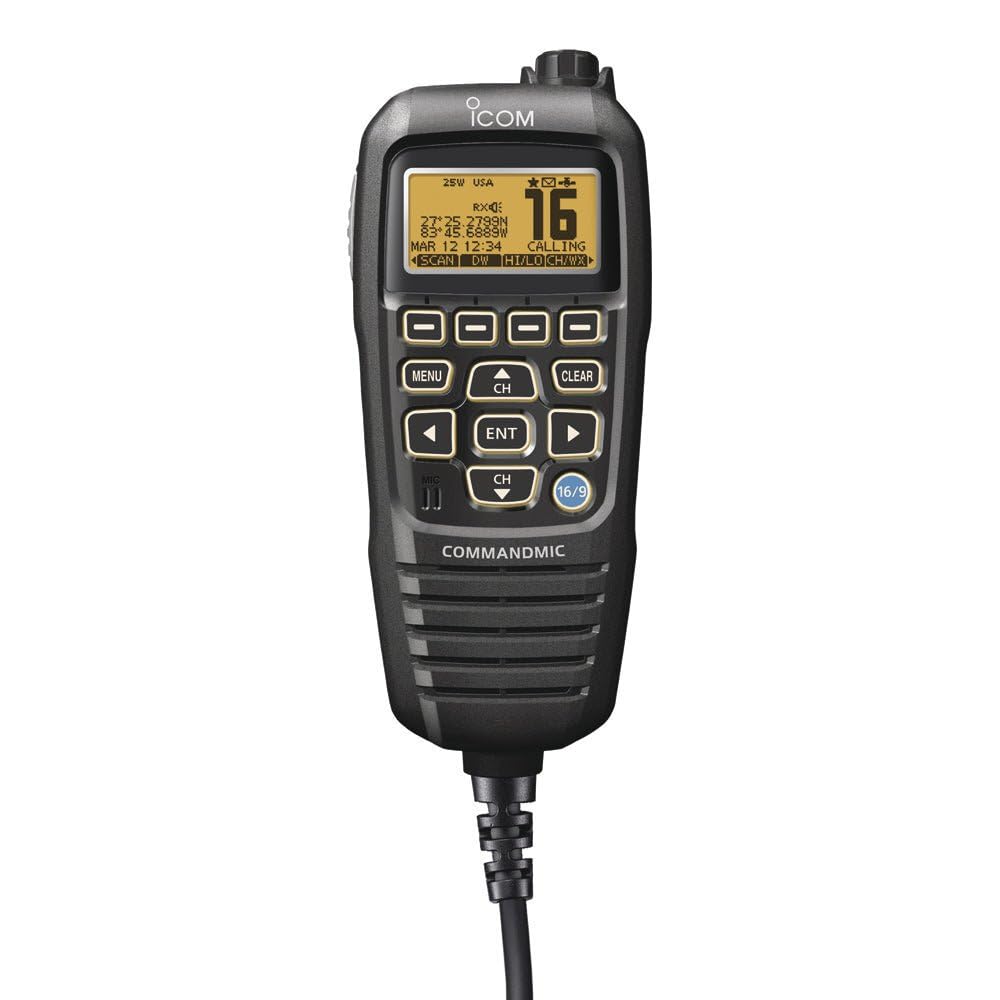
Image of the Icom HM195 CommandMic IV, a black remote control microphone with a yellow backlit LCD display.
Fitur konci:
- Waterproof Rating: IPX7 (Submersible for 30 minutes at 1m depth)
- Ningkatkeun Kualitas Sora
- Complete Control Over Communications & Class D DSC Functions
- AquaQuake Technology for water removal from the speaker
- Full Remote Control Capability for Icom Marine Transceivers
- User-Friendly Interface with dot-matrix display and directional keypad
- Intercom Functionality with Compatible Transceivers
- DSC 'Distress' Button for emergency situations
2. Naon dina Box
Pastikeun yén sadaya barang aya nalika ngabongkar:
- Icom HM195 CommandMic IV Remote Control Microphone
- 2x OPC-1541 Extension Cables
3. Setup jeung Instalasi
The HM195 CommandMic IV is designed for remote installation and requires connection to a compatible Icom marine transceiver.
Kasaluyuan:
This CommandMic is compatible with a broad range of Icom two-way radios, including but not limited to: M400BB, M410BB, M424G, M510BB, M510 Series, and M510 Evo Series.
Léngkah Sambungan:
- Ensure the marine transceiver is powered off before connecting the CommandMic.
- Connect one end of an OPC-1541 extension cable to the designated CommandMic port on your Icom marine transceiver.
- Connect the other end of the extension cable to the HM195 CommandMic IV.
- For remote installations up to 18.3 meters, additional OPC-1541 extension cables may be required. Ensure all connections are secure to maintain the waterproof integrity.
- Once connected, power on your marine transceiver. The CommandMic IV display should illuminate, indicating a successful connection.
4. Parentah Operasi
The HM195 CommandMic IV provides intuitive control over your marine transceiver's functions.
Napigasi Menu:
- The dot-matrix display shows various menu options and information.
- The bottom line of the display indicates software key functions. Use the left and right buttons to toggle through these functions.
- The directional keypad (up, down, left, right, enter) allows for navigation through menus, selection of options, and adjustment of settings.
Communication Functions:
- Nepikeun / Nampi: Use the dedicated PTT (Push-To-Talk) button for transmitting. Release to receive.
- Pilihan Saluran: Use the directional keypad to select desired channels.
- Penyesuaian volume: Adjust the speaker volume directly from the CommandMic.
Digital Selective Calling (DSC):
- The CommandMic IV provides complete control over Class D DSC functions.
- Distress Button: A dedicated DSC 'Distress' button is available for emergency situations. Refer to your transceiver's manual for proper use of this critical safety feature.
Fungsi interkom:
When connected to a compatible transceiver, the CommandMic IV supports intercom functionality, allowing communication between the main transceiver unit and the remote microphone.
AquaQuake Technology:
The AquaQuake draining function emits a vibrating sound to clear water from the speaker grille, maintaining clear audio output after exposure to water.
5. Pangropéa sarta perawatan
Proper maintenance ensures the longevity and reliable operation of your HM195 CommandMic IV.
- Tahan cai: The device has an IPX7 waterproof rating, meaning it can withstand submersion in 1 meter of water for 30 minutes. Ensure all caps and connectors are securely fastened to maintain this rating.
- beberesih: Ngusap unit kalayan lemes, damp cloth. Do not use harsh chemicals or abrasive cleaners. For saltwater exposure, rinse thoroughly with fresh water and dry completely.
- Panyimpenan: Store the CommandMic in a dry, cool place when not in use. Avoid extreme temperatures and direct sunlight.
6. Cara ngungkulan
If you encounter issues with your HM195 CommandMic IV, refer to the following basic troubleshooting steps:
- Taya Daya/Tampilan:
- Ensure the main transceiver is powered on.
- Check all cable connections between the CommandMic and the transceiver for security.
- Pariksa kabel pikeun sagala karuksakan katempo.
- Taya Audio/Kualitas Audio Kurang:
- Adjust the volume level on the CommandMic.
- Ensure the AquaQuake function has been used if the speaker has been exposed to water.
- Verify that the CommandMic is properly connected to the transceiver.
- Tombol teu responsif:
- Restart the main transceiver.
- Pastikeun euweuh lebu anu ngahalangan tombol.
For persistent issues, consult the full manual of your Icom marine transceiver or contact Icom customer support.
7. Spésifikasi
| merek | ICOM |
| Nomer modél | HM195B |
| Peunteun waterproof | IPX7 (Submersible for 30 minutes at 1m depth) |
| Ukuran (L x W x H) | 67.5 x 144.5 x 37 mm (Approximate) |
| Weight (excluding cables) | 400g (Perkiraan) |
| Alat nu cocog | Icom two-way radios (M400BB, M410BB, M424G, M510BB, M510 Series, M510 Evo Series) |
| Sumber Daya | Corded Electric (powered by transceiver) |
| Komponén Kaasup | CommandMic™ (HM-195), 2x OPC-1541 extension cables |
8. Garansi jeung Rojongan
For detailed warranty information, please refer to the warranty card included with your Icom marine transceiver or contact your authorized Icom dealer or the manufacturer directly. Warranty terms and conditions may vary by region and retailer.
For technical support, service, or further inquiries, please contact the retailer where the product was purchased or visit the official Icom websitus pikeun sumber daya dukungan palanggan.