
1. Bubuka
Thank you for choosing the FLEXISPOT EF1 Basic Plus Electric Height-Adjustable Desk. This manual provides essential information for the safe and efficient assembly, operation, and maintenance of your new desk. Please read these instructions thoroughly before use and retain them for future reference.
Peringatan Kasalametan
- Always follow the assembly instructions carefully to prevent accidents and ensure proper function.
- Do not exceed the maximum load capacity of 70 kg (154 lbs) on the desktop. Overloading can compromise stability and cause damage.
- To prevent tipping, especially when the desk is at its maximum height (121 cm), ensure the desk is anchored correctly to a stable wall.
- Keep children and pets away from the desk during operation to avoid injury from moving parts.
- Pastikeun teu aya halangan dina jalur meja nalika adjustment jangkungna.
- Ulah diuk atawa nangtung dina meja.
- Pegatkeun sambungan kakuatan saméméh meresihan atawa ngalakukeun sagala pangropéa.
2. Setup jeung Majelis
The FLEXISPOT EF1 Basic Plus desk requires assembly. Please ensure all components are present before beginning. Refer to the included assembly guide for detailed step-by-step instructions.
Ngabongkar bungkusan sareng Cék Komponén
Carefully unpack all parts and lay them out on a soft, clean surface to prevent scratches. Verify that all components listed in the packing list are present.
Majelis Liwatview
- Pasangkeun kolom pengangkat kana suku méja.
- Sambungkeun palang ka kolom angkat.
- Secure the desktop to the assembled frame.
- Install the control panel and cable management tray (if included).
- Connect all motor and control cables according to the wiring diagram.
- Colokkeun kabel listrik kana stop kontak.

Gambar 1: The FLEXISPOT EF1 Basic Plus Electric Height-Adjustable Desk with a black tabletop and white frame, set up in a home office environment.

Gambar 2: This image illustrates the smooth, single-piece desktop construction of the FlexiSpot desk, contrasting it with typical multi-piece desktops that may have uneven surfaces.

Gambar 3: An illustrative diagram detailing various desktop size and color options, along with key specifications for the desk frame, including adjustable height range, static and dynamic load capacities, and lifting noise levels.
3. Parentah Operasi
Kontrol Panel Langkungview

Gambar 4: A lengkep view of the desk's Smart Control Panel, highlighting the LED display, the up and down adjustment buttons, and four numbered buttons for memory presets.
The desk is equipped with an advanced all-in-one keypad for easy height adjustment and memory functions.
- Témbong LED: Némbongkeun jangkungna méja ayeuna dina séntiméter.
- Up/Down Buttons (⌃ / ⌄): Pencét terus tahan pikeun nyaluyukeun jangkungna méja ka luhur atanapi ka handap sacara manual. Lepaskeun tombol pikeun eureun dina jangkungna anu dipikahoyong.
- Preset Mémori (1, 2, 3, 4): Four programmable buttons to save and recall your preferred sitting and standing heights.
Nyetél Preset Mémori
- Atur méja kana jangkungna anu dipikahoyong nganggo tombol Luhur/Turun.
- Press the "M" or "SET" button (if available, otherwise proceed to step 3) to activate memory mode.
- Press one of the numbered preset buttons (1, 2, 3, or 4) within 3 seconds. The LED display will show "S-1", "S-2", etc., indicating the height has been saved to that preset.
Recalling Memory Presets
Kantun pencét tombol preset anu dinomeran anu dipikahoyong (1, 2, 3, atanapi 4). Méja bakal otomatis ngalih ka jangkungna anu disimpen.
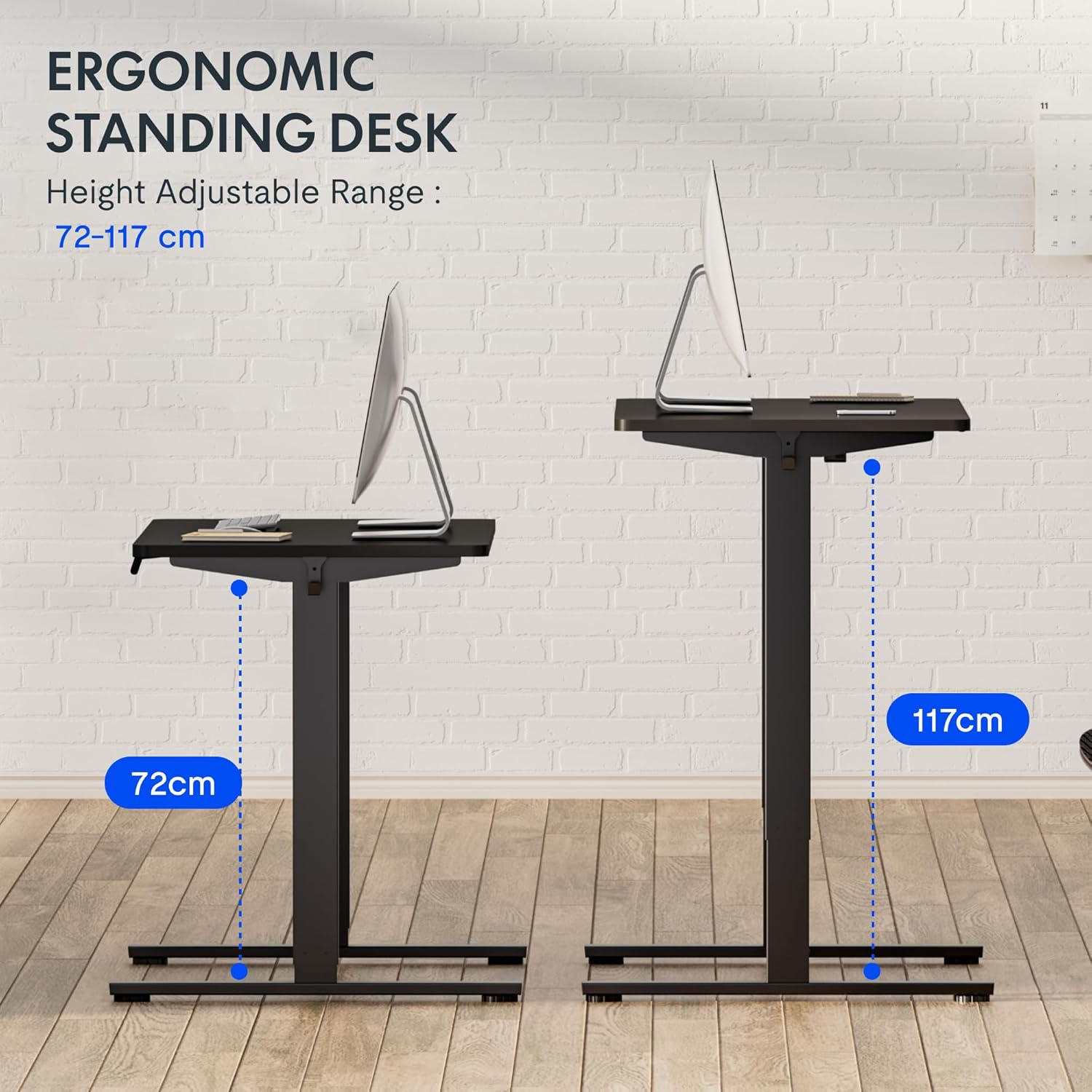
Gambar 5: This image demonstrates the height adjustment capabilities of the desk, showing a range from 72 cm (sitting height) to 117 cm (standing height). Note that the full adjustable range for this model is 71 cm to 121 cm.
4. Pangropéa
Regular maintenance ensures the longevity and optimal performance of your FLEXISPOT desk.
- beberesih: Lap méja sareng pigura nganggo kaén anu lemes,amp lawon. Hindarkeun pembersih abrasive atanapi bahan kimia kasar anu tiasa ngarusak finish.
- Manajemén Kabel: Periodically check and organize cables to prevent tangles and ensure smooth operation.
- Pamariksaan: Regularly inspect all screws and bolts to ensure they are tight. Retighten if necessary.
- Lubrication: The lifting columns are generally maintenance-free. Do not attempt to lubricate internal components unless specifically instructed by customer support.
5. Cara ngungkulan
Upami anjeun ngalaman masalah sareng méja anjeun, tingali masalah sareng solusi umum ieu.
| Masalah | Mungkin Cukang lantaranana | Solusi |
|---|---|---|
| Méja teu obah. |
|
|
| Méja obah teu rata atawa ngaluarkeun sora anu teu biasa. |
|
|
| Kode kasalahan ditampilkeun dina LED. |
|
|
Reset Prosedur
If the desk is not functioning correctly, a reset may resolve the issue.
- Press and hold the "Down" button until the desk reaches its lowest position and slightly retracts, then releases.
- If this does not initiate a reset, unplug the desk from the power outlet for at least 10 seconds, then plug it back in.
- Repeat step 1. The desk should now be reset.
6. Spésifikasi
| merek | FLEXISPOT |
| Nomer modél | HU-XI-201 |
| Desktop Dimensions (L x W x Thickness) | 120 x 80 x 2.5 cm |
| Adjustable Height Range (without tabletop) | 71 cm - 121 cm |
| Max Lifting Speed | 2.5 cm/s |
| Max Beban Kamampuh | 70 kg (154 lbs) |
| Lifting Noise Level | <50 dB |
| Bahan Desktop | Engineered Wood (MDF) with High-Pressure Laminate |
| Bahan Pigura | Bubuk-coated Steel |
| Warna | Black tabletop + White frame |
| Fitur | Electric height adjustment, 4 memory presets |
7. Garansi jeung Rojongan
Émbaran jaminan
FLEXISPOT stands behind the quality of its products. Your EF1 Basic Plus desk comes with the following warranty:
- Garansi 3 Taun: Covers controllers and motors.
- Garansi 5 Taun: Covers the desk frame.
Please retain your proof of purchase for warranty claims. The warranty covers manufacturing defects under normal use. It does not cover damage caused by misuse, accidents, unauthorized modifications, or failure to follow the instructions in this manual.

Gambar 6: An image outlining the warranty coverage for FlexiSpot desks, specifically mentioning a 3-year warranty for controllers and motors, and a 5-year warranty for the desk frame.
Rojongan Palanggan
For technical assistance, warranty claims, or any questions regarding your FLEXISPOT EF1 Basic Plus desk, please contact FLEXISPOT customer support.
Websitus: www.flexispot.com (or regional equivalent)
Surélék: Refer to your purchase documentation or the official FlexiSpot websitus pikeun email kontak.
Telepon: Refer to your purchase documentation or the official FlexiSpot websitus pikeun nomer telepon kontak.