
Bubuka
This manual provides essential information for the safe and efficient use of your ONN 42-Inch Full HD LED Smart TV, Model 100018254. Please read these instructions thoroughly before operating your television and retain them for future reference.
Naon dina Box
Pastikeun yén sadaya komponén aya sateuacan neraskeun setelan.
- ONN 42-Inch Full HD LED Smart TV
- Kadali jauh
- Stand TV (2 buah)
- Screws pikeun TV Stand
- Kabel listrik
- Pituduh Mimiti Gancang (henteu kalebet dina manual ieu)

Gambar: Hareupeun view of the ONN 42-inch Smart TV displaying the Roku TV home screen with various streaming app icons like Netflix, Disney+, Apple TV, Hulu, Peacock, and Roku Channel. The TV is black with slim bezels and two stand feet.
Disetél
1. Ngagantelkeun TV Stand
- Teundeun layar TV sacara saksama dina permukaan anu lemes sareng bersih pikeun nyegah karuksakan.
- Sejajarkeun unggal sapotong nangtung jeung liang screw nu pakait dina handap TV.
- Ngamankeun unggal sapotong nangtung kalawan screws disadiakeun. Pastikeun aranjeunna tightened pageuh.

Image: A diagram illustrating the dimensions of the ONN 42-inch TV, showing its width as 43 inches and height as 37 inches when placed on its stand.
2. Pamasangan Tembok (Opsional)
This TV is compatible with VESA standard wall mounts. Refer to your wall mount's instructions for proper installation. Ensure the wall mount can support the weight of the television.

Gambar: Tukangeun view of the ONN 42-inch TV, highlighting the VESA mounting screw holes in a square pattern and various input ports on the side and bottom right.
3. Alat Sambungkeun
Sambungkeun alat éksternal anjeun sapertos kotak kabel, konsol kaulinan, atanapi pamuter Blu-ray ka palabuhan input TV.
- HDMI: For high-definition audio and video. Use an HDMI cable to connect devices like set-top boxes, game consoles, or streaming sticks.
- USB: Pikeun nyambungkeun alat panyimpenan USB pikeun muterkeun media files.
- Wifi: For internet connectivity to access smart TV features and streaming services.
4. Daya Awal Hurung sareng Setup Wizard
- Colokkeun kabel listrik kana TV teras kana stop kontak témbok.
- Pencét tombol daya dina kadali jauh atawa dina TV sorangan.
- Follow the on-screen instructions to complete the initial setup, including language selection, network connection (Wi-Fi), channel scanning, and linking to your Roku account (if applicable).
Ngoperasikeun TV
1. Jauh Control Leuwihview
The remote control allows you to navigate the TV's interface and control various functions.
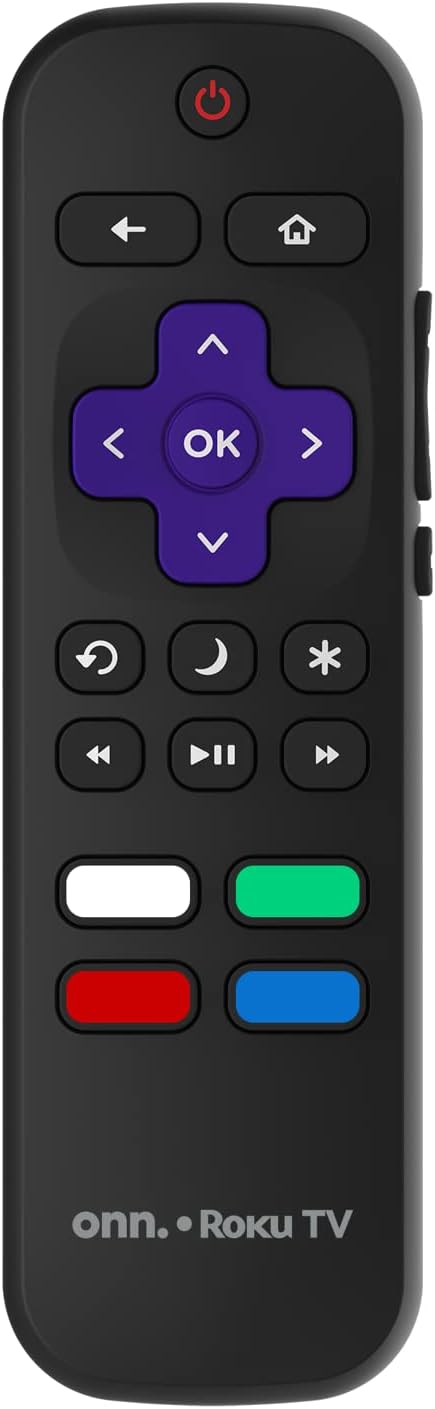
Image: The ONN Roku TV remote control, featuring a power button, directional pad, OK button, home button, back button, volume controls, and dedicated buttons for popular streaming services.
- Tombol Daya: Ngahurungkeun atawa mareuman TV.
- Directional Pad (D-Pad) & OK: Navigates ménu jeung confirms selections.
- Tombol imah: Mulih ka layar utama Roku TV.
- Tombol Balik: Mulih ka layar atawa ménu saméméhna.
- Volume Kaluhur/Turun: Saluyukeun polumeu audio.
- Tombol Bisu: Ngajempékeun atanapi nganonaktipkeun audio.
- Saluran luhur/handap: Changes channels (for antenna/cable inputs).
- Tombol Aplikasi khusus: Quick access to popular streaming services like Netflix, Hulu, etc.
2. Fitur TV Smart
Your ONN Smart TV provides access to a wide range of streaming content and smart functionalities.
- Layanan streaming: Access pre-installed apps like Netflix, YouTube, and many more through the Roku Channel Store.
- Kontrol sora: Compatible with Alexa and Google Assistant for hands-free control (requires a separate compatible voice assistant device).
- Apdet Parangkat Lunak Otomatis: The TV will automatically update its software when connected to the internet, ensuring you have the latest features and security.
3. Pamilihan Input
To switch between connected devices (e.g., cable box, game console), use the Input button on your remote or select the desired input from the Roku TV home screen.
4. Gambar jeung Sora Setélan
Access the TV's settings menu to customize picture and sound preferences. Navigate to Settings > TV picture settings or Setelan > Audio to adjust options like brightness, contrast, color, sound mode, and equalizer settings.
Pangropéa
1. Ngabersihan Layar
- Always turn off the TV and unplug it before cleaning.
- Make lawon anu lemes, teu aya lint, rada dampdilengkepan ku cai atanapi pembersih layar khusus.
- Ulah menyemprot cleaner langsung kana layar. Larapkeun heula kana lawon.
- Hindarkeun nganggo pembersih abrasive, alkohol, bénzéna, atanapi thinners, sabab ieu tiasa ngaruksak layar.
2. Apdet parangkat lunak
Ensure your TV is connected to the internet to receive automatic software updates. These updates improve performance, add features, and enhance security. You can manually check for updates in the Setélan > Sistem > Apdet sistem ménu.
Pamérésan masalah
Upami anjeun ngalaman masalah sareng TV anjeun, tingal solusi umum ieu:
Taya Daya
- Pariksa naha kabel listrik dicolokkeun sacara aman kana TV sareng stop kontak témbok.
- Pariksa stop kontak témbok naha jalan ku cara nyolokkeun alat anu sanés.
- Coba pencét tombol daya dina TV sorangan, teu ngan jauh.
Taya Gambar / Gambar menyimpang
- Pastikeun sumber input anu leres dipilih (contona, HDMI 1, HDMI 2).
- Pariksa sadaya sambungan kabel antara TV jeung alat éksternal.
- Coba kabel HDMI anu béda upami tiasa.
- Adjust picture settings (brightness, contrast) in the TV menu.
Taya Sora / Sora Lemah
- Check if the TV is muted or if the volume is turned down.
- Ensure external audio devices (soundbars, receivers) are properly connected and powered on.
- Pariksa setélan audio dina menu TV.
Masalah Sambungan Jaringan
- Verify your Wi-Fi router is powered on and functioning.
- Balikan deui router sareng modem anjeun.
- Pindah ka Setelan > Jaringan > Pariksa sambungan on your TV to diagnose the issue.
- Pastikeun anjeun ngasupkeun sandi Wi-Fi anu bener.
spésifikasi
| Fitur | Rincian |
|---|---|
| Nomer modél | 100018254 |
| Ukuran layar | 42 inci |
| Téknologi tampilan | LED |
| Resolusi | 1080p (HD lengkep) |
| Refresh Laju | 60 Hz |
| Konektipitas | USB, Wi-Fi |
| Dirojong jasa Internét | Netflix, YouTube (and others via Roku platform) |
| Métode kontrol | Voice (via Alexa & Google Assistant compatible devices), Remote Control |
| Tipe Pamasangan | Wall Mount (VESA compatible) |
| Warna | Hideung |
| UPC | 671227025567 |

Image: Energy Guide label for Television Model 100018254, indicating an estimated yearly energy cost of $11 based on 12 cents per kWh and 5 hours use per day.
Garansi sareng Rojongan
For warranty information and technical support, please refer to the documentation included with your purchase or visit the official ONN support websitus. Simpen resi pameseran anjeun pikeun klaim jaminan.


