
Bubuka
Welcome to your new TechniSat Viola CD-1. This portable stereo CD player offers versatile audio playback options including CD, FM radio, and Bluetooth streaming. Its compact design and battery operation make it suitable for both home and on-the-go use. This manual provides essential information for setting up, operating, and maintaining your device.
Émbaran Kasalametan penting
- Baca sadaya parentah sacara saksama sateuacan nganggo alat ieu.
- Simpen manual ieu pikeun rujukan ka hareup.
- Ulah ngantepkeun unit ieu ka hujan, kalembaban, atanapi kalembaban anu kaleuleuwihi.
- Pastikeun liang ventilasi henteu katutup pikeun nyegah panas teuing.
- Paké ngan kantétan jeung asesoris dieusian ku produsén.
- Rujuk sadayana jasa ka tanaga jasa anu mumpuni.
Produk Leuwihview
Familiarize yourself with the main components and controls of your Viola CD-1.

Hareupeun view of the TechniSat Viola CD-1, highlighting its main controls and central display.

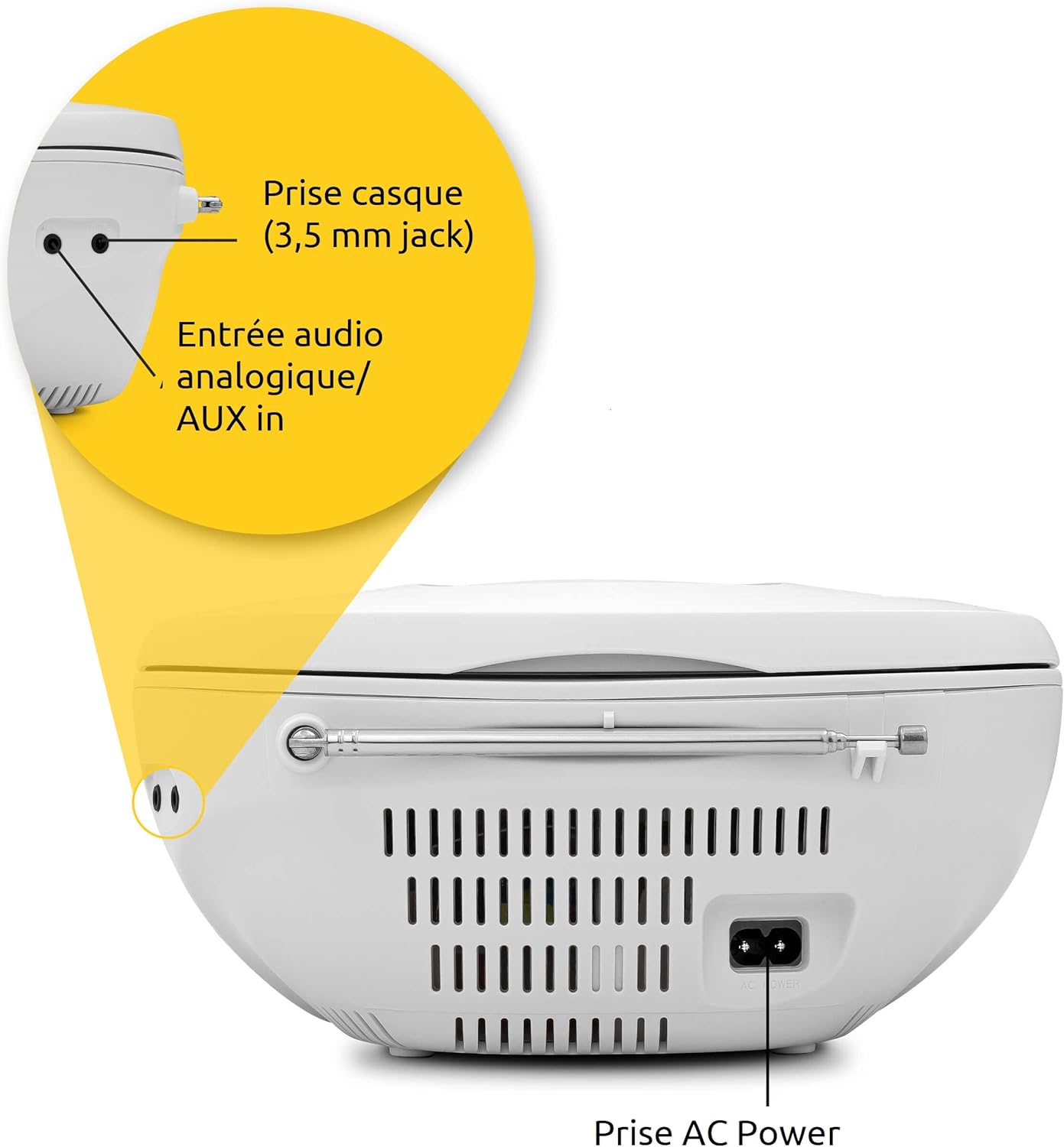
The rear panel of the Viola CD-1 features the AC power input, a 3.5mm AUX in port for external devices, and a 3.5mm headphone jack.
Kontrol sareng Fitur Konci:
- Tombol Daya: Ngahurungkeun atanapi mareuman unit.
- Tombol Mode: Switches between CD, FM, Bluetooth, and AUX input modes.
- Volume +/- Tombol: Saluyukeun tingkat kaluaran audio.
- Tombol Puter/Reureuh: Starts or pauses playback in CD and Bluetooth modes.
- Tombol Luncat/Setel: Navigates tracks on a CD or tunes radio stations.
- Tombol Scan: Initiates automatic station search in FM mode.
- Tombol Albeum: For MP3 CDs, navigates between folders.
- Antena Teleskopik: Pikeun panarimaan radio FM.
- Mawa cecekelan: Pikeun portability gampang.
Disetél
Sasayogian tanaga
The Viola CD-1 can be powered by either AC mains or batteries.
- Daya AC: Connect the provided power cable to the AC power input on the rear of the unit and then to a standard wall outlet (230V).
- Daya Batré: For portable use, open the battery compartment located on the bottom of the unit. Insert 6 x 1.5V C-type batteries (R14), ensuring correct polarity (+/-). Close the compartment securely.
Anténeu Setup
Pikeun panarimaan radio FM anu optimal, panjangkeun anteneu teleskopik sapinuhna.
Parentah Operasi
Puteran CD
- Buka tutup kompartemen CD anu aya di luhur unit.
- Carefully place a CD (standard audio CD or MP3 CD) onto the spindle with the label side facing up.
- Tutup tutup kompartemen CD kalawan aman.
- Pencét éta Modus button repeatedly until "CD" appears on the display.
- Pencét éta Play / Reureuh tombol pikeun ngamimitian playback.
- Ngagunakeun éta Skip buttons (forward/backward) to navigate between tracks.
- If playing an MP3 CD with multiple folders, use the albeum button to switch between folders.

To insert a CD, lift the compartment lid as shown and place the disc with the label facing upwards.

The integrated CD player supports standard audio CDs, CD-R, CD-RW, and MP3 CDs.
Operasi Radio FM
- Fully extend the telescopic antenna for best reception.
- Pencét éta Modus button repeatedly until "FM" appears on the display.
- Pencét jeung tahan tombol Nyeken tombol pikeun otomatis milarian sareng nyimpen stasiun FM anu sayogi.
- Ngagunakeun éta Skip buttons (forward/backward) to select a stored station.
The Viola CD-1 features an FM radio tuner, allowing reception of various regional radio stations. Extend the telescopic antenna for best reception.
Streaming Audio Bluetooth
- Pencét éta Modus button repeatedly until "BT" appears on the display. The "BT" indicator will flash, signifying that the unit is in pairing mode.
- On your smartphone or other Bluetooth-enabled mobile device, enable Bluetooth and search for available devices.
- Select "TechniSat Viola CD-1" from the list of devices to initiate pairing.
- Once successfully paired, the "BT" indicator will stop flashing, and you can stream audio wirelessly from your device to the Viola CD-1.

Wirelessly stream music from your smartphone or tablet to the Viola CD-1 via Bluetooth.
Input AUX
- Sambungkeun alat audio éksternal (contona, pamuter MP3, smartphone) ka AUX Di jack on the rear of the unit using a 3.5mm audio cable.
- Pencét éta Modus Pencét tombol "AUX" sababaraha kali nepi ka muncul dina layar.
- Control audio playback and volume directly from your external device.
Paké Headphone
Connect headphones with a 3.5mm jack to the headphone output on the rear of the unit for private listening. When headphones are connected, sound from the speakers will be muted.

The practical carry handle makes transporting the boombox comfortable and easy.

Integrated stereo speakers provide clear audio with a total output of 2 x 1 Watt.
Pangropéa
beberesih
- Wipe the exterior of the unit with a soft, dry cloth. Do not use abrasive cleaners, solvents, or chemical sprays, as these can damage the finish.
- For cleaning the CD lens, use a specialized CD lens cleaner disc according to its instructions.
Ngagantian batré
When using battery power, replace all 6 C-type batteries when the unit's performance (e.g., sound quality, volume) begins to degrade. Always replace all batteries at once with new ones of the same type.
Pamérésan masalah
If you encounter issues with your Viola CD-1, refer to the table below for common problems and solutions.
| Masalah | Mungkin Cukang lantaranana | Solusi |
|---|---|---|
| Unit teu hurung. | No power supply or dead batteries. | Check AC power connection or replace all batteries. |
| CD teu bisa diputer. | CD inserted incorrectly, dirty, scratched, or unsupported format. | Ensure CD is inserted correctly (label side up). Clean the CD. Try a different CD. Ensure it's an audio CD or MP3 CD. |
| panarimaan radio FM goréng. | Antena teu manjang atanapi sinyalna lemah. | Fully extend the telescopic antenna. Try repositioning the unit for better signal. |
| Alat Bluetooth teu tiasa dipasangkeun. | Unit not in pairing mode, device too far, or previously paired. | Ensure Viola CD-1 is in Bluetooth pairing mode (BT flashing). Move devices closer. On your device, forget/unpair the Viola CD-1 and try pairing again. |
| Taya sora tina speaker. | Volume too low, headphones connected, or incorrect mode selected. | Increase volume. Disconnect headphones. Press the Modus tombol pikeun milih sumber input anu leres. |
spésifikasi
Detailed technical specifications for the TechniSat Viola CD-1.
| Fitur | Rincian |
|---|---|
| merek | TechniSat |
| Nomer modél | 0001/2980 |
| Warna | Bodas |
| Téhnologi konektipitas | Auxiliary, Bluetooth (reception) |
| Fitur husus | AC and Battery operation, MP3 CD Player, Convenient carry handle, Bluetooth audio streaming (reception) |
| Alat nu cocog | Headphone |
| Sumber Daya | AC and Battery operation |
| Tipe Speaker | Stereo |
| Daya Kaluaran | 2 x 1 Watt RMS |
| Ukuran (L x W x H) | 21.5 x 21.5 x 10 cm |
| Item Beurat | 828 gram |
| Sarat batré | 6 x 1.5V C-type batteries (R14) |
Garansi sareng Rojongan
Émbaran jaminan
This product comes with a manufacturer's warranty. Please refer to the warranty card included in the product packaging for specific terms, conditions, and duration of the warranty. (Note: Specific warranty details were not available in the provided product data.)
Rojongan Palanggan
For technical assistance, troubleshooting beyond this manual, or service inquiries, please visit the official TechniSat websitus atanapi ngahubungan rojongan customer maranéhanana langsung.
Resmi Websitus: www.technisat.com