1. Bubuka
Thank you for choosing the Roidmi X20S XCQ06RM Cordless 2-in-1 Vacuum and Mop. This appliance is designed to provide efficient and convenient cleaning for various floor types in your home. This manual contains important information regarding the safe use, operation, and maintenance of your device. Please read it thoroughly before first use and keep it for future reference.
2. Parentah Kasalametan
Pikeun ngirangan résiko kahuruan, kejutan listrik, atanapi tatu, punten perhatikeun pancegahan kaamanan ieu:
- Baca sadaya parentah sateuacan nganggo alat.
- Ulah make di luar atawa dina surfaces baseuh.
- Ulah ngantep dipaké salaku cocooan. Perhatian caket diperyogikeun nalika dianggo ku atanapi caket barudak.
- Anggo ngan sakumaha anu dijelaskeun dina manual ieu. Paké ngan kantétan dianjurkeun produsén urang.
- Entong dianggo nganggo kabel atanapi colokan anu rusak. Upami alat henteu jalan sakumaha sakuduna, parantos turun, ruksak, ditinggalkeun di luar, atanapi turun kana cai, balikkeun deui ka pusat layanan.
- Ulah narik atawa mawa ku ari, make ari salaku cecekelan, nutup panto dina ari, atawa narik ari sabudeureun ujung seukeut atawa juru. Ulah ngajalankeun alat ngaliwatan kabel. Tetep ari jauh ti surfaces dipanaskeun.
- Ulah cabut colokan ku cara narik kana kabel. Pikeun cabut colokan, keupeul colokan, teu ari.
- Ulah nanganan colokan atawa alat ku leungeun baseuh.
- Ulah nempatkeun obyék nanaon kana bukaan. Entong nganggo sareng bukaan anu diblokir; tetep bébas tina lebu, serat, rambut, sareng naon waé anu tiasa ngirangan aliran hawa.
- Jauhkeun buuk, pakean longgar, ramo, sareng sadaya bagian awak tina bukaan sareng bagian anu obah.
- Pareuman sadaya kadali sateuacan cabut colokan.
- Paké perawatan tambahan nalika meresihan dina tangga.
- Entong dianggo pikeun nyandak cairan anu gampang kaduruk atanapi kaduruk, sapertos béngsin, atanapi dianggo di daérah anu aya.
- Ulah nyokot naon bae anu kaduruk atawa ngaroko, kayaning roko, korek api, atawa lebu panas.
- Ulah make tanpa cangkir lebu jeung/atawa saringan di tempat.
- Nyegah ngamimitian teu dihaja. Pastikeun saklar dina posisi pareum samemeh nyambung ka pak batre, nyokot atawa mawa alat.
- Ngecas ukur nganggo carjer anu ditunjuk ku produsén.
3. Eusi Paket
Mangga parios eusi bungkusan nalika muka bungkus pikeun mastikeun sadaya barang aya:
- Unit utama vacuum cleaner
- sikat multi-fungsi
- Mite removal brush
- Washing brush (mop attachment)
- Sikat kasur listrik
- carjer nirkabel
- Nyaring
- Alat cékéng
- Stasion beberesih
- tabung vakum
- Mop heads x2
4. Produk Langkungview
The Roidmi X20S XCQ06RM is a powerful and versatile cleaning solution, combining vacuuming and mopping capabilities. Its lightweight design and advanced features make home cleaning efficient.

Gambar 1: The Roidmi X20S XCQ06RM cordless vacuum cleaner in its upright configuration.
Fitur konci:
- 2-in-1 Vakum sareng Pel: Easily switch between vacuuming and mopping functions by attaching the appropriate head. The mop brush rotates at approximately 200 RPM for deep cleaning.
- Nyeuseup kuat: Features a new generation Engine-x brushless digital motor (up to 120,000 rpm) delivering 138 watts of suction power and 25,000 Pa air intake pressure. Air-x technology ensures consistent suction by separating dust from air.
- Sistim Filtrasi 6-Tingkat: A multi-level system effectively separates dust, filtering impurities as small as 0.3 µm with a 99% purification rate. The device includes a safety mechanism that prevents operation if filters are not correctly installed.
- Konéktivitas Aplikasi Mobile: Connects via Bluetooth to your smartphone. The app allows monitoring of remaining operating time, cleaning time, and provides notifications for dustbin full or filter replacement.
- Manjangkeun Umur Batré: Optimized by the BMS-X system, the 8 LG/Samsung lithium batteries provide approximately 65 minutes of runtime. The app displays battery status and alerts.
- Ngecas Nirkabel Magnét: Convenient and cable-free charging.
- Desain anu ramah-pamaké: Operates at a reduced noise level of approximately 72 dB (A). The electric brush includes an LED light for improved visibility in dark areas. Weighing 1.5 kg, it is lightweight for easy handling.

Gambar 2: The Roidmi X20S main unit shown with both the vacuum brush head and the mop attachment.

Gambar 3: A user operating the Roidmi X20S to vacuum a rug in a living room setting.

Gambar 4: The mop attachment of the Roidmi X20S cleaning a wet spill on a tiled kitchen floor.
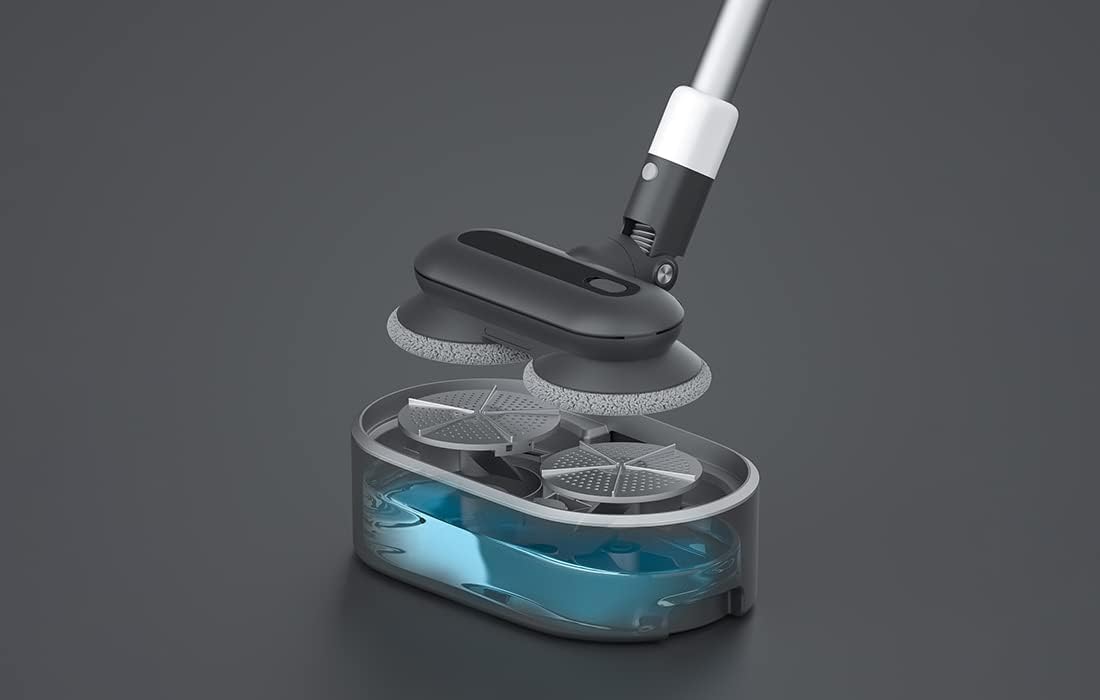
Gambar 5: Hiji ngabeledug view showing the internal components of the Roidmi X20S mop attachment, including the water tank.
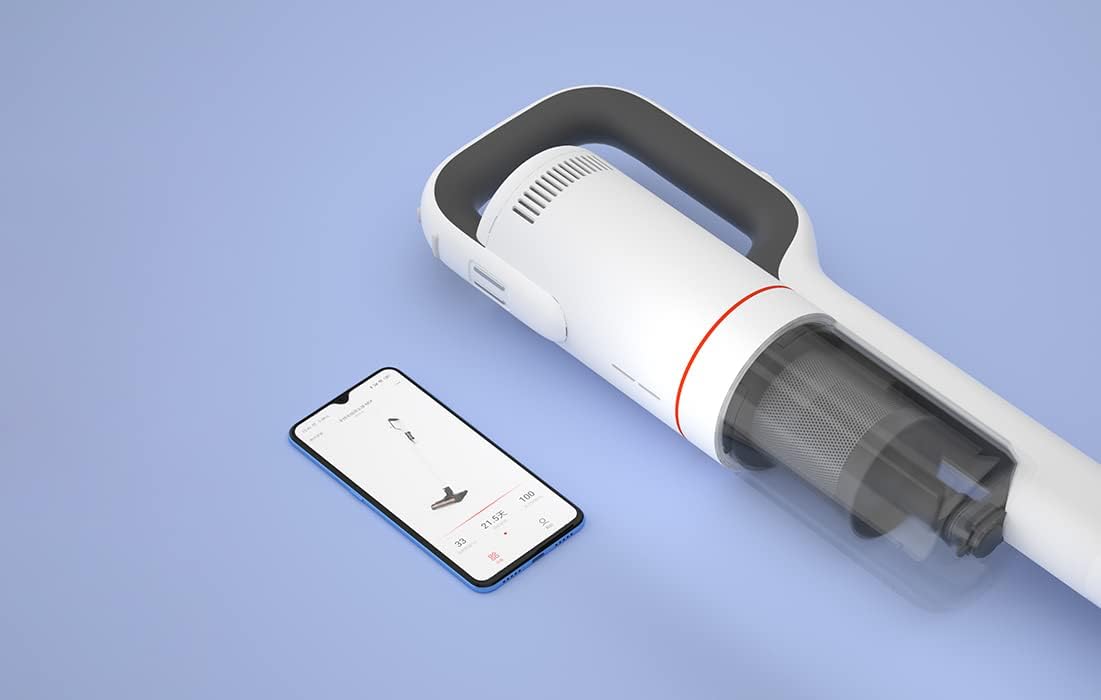
Gambar 6: The Roidmi X20S main unit positioned next to a smartphone, illustrating its connectivity with the Roidmi mobile application.

Gambar 7: A user demonstrating the Roidmi X20S in handheld mode, cleaning a sofa with an attachment.
5. Setélan
5.1 Majelis
- Connect the Vacuum Tube: Insert the vacuum tube into the main unit until it clicks into place.
- Pasangkeun Hulu Bebersih: Select the desired cleaning head (multi-function brush for vacuuming, or washing brush for mopping) and attach it to the end of the vacuum tube until it clicks.
- Install Mop Pads (for mopping): If using the washing brush, attach the mop pads to the bottom of the mop attachment.
5.2 Ngecas
Before first use, fully charge the appliance. The Roidmi X20S uses magnetic wireless charging.
- Mount the cleaning station to a wall in a convenient location, ensuring it is near a power outlet.
- Connect the wireless charger to the cleaning station and plug it into a power outlet (220 Volts).
- Place the Roidmi X20S onto the cleaning station. The magnetic connection will secure it, and charging will begin automatically.
- Monitor the battery status via the indicator lights on the device or through the Roidmi mobile application.
6. Parentah Operasi
6.1 Vacuuming
- Ensure the multi-function brush or appropriate vacuum attachment is securely installed.
- Pencét tombol daya pikeun ngaktipkeun vakum.
- Select the desired suction mode (if applicable) using the mode selection button.
- Begin vacuuming the desired surface. The LED light on the brush head will illuminate dark areas.
- After use, press the power button to turn off the vacuum.
6.2 Ngepel
- Detach the vacuum brush head and attach the washing brush (mop attachment) with mop pads installed.
- Fill the water tank on the mop attachment with clean water. Do not use corrosive liquids or hot water.
- Press the power button to turn on the device. The mop pads will begin to rotate.
- Gently guide the mop attachment over the floor surface to clean.
- After use, press the power button to turn off the device. Empty any remaining water from the tank and clean the mop pads.
6.3 Mobile Application Usage
- Download the Roidmi app from your smartphone's app store (compatible with Android and iOS).
- Enable Bluetooth on your smartphone and open the Roidmi app.
- Follow the in-app instructions to pair your Roidmi X20S with your smartphone.
- Sakali disambungkeun, anjeun tiasa view battery status, remaining operating time, cleaning history, and receive notifications for dustbin full or filter replacement.
7. Pangropéa
Regular maintenance ensures optimal performance and extends the lifespan of your Roidmi X20S.
7.1 Ngosongkeun tong sampah
- When the dustbin full notification appears on the app or when visibly full, detach the dustbin from the main unit.
- Open the dustbin and empty its contents into a waste bin.
- Close the dustbin and reattach it to the main unit.
7.2 Ngabersihkeun/Ngaganti Filter
- The Roidmi X20S features a washable filter. When the app notifies you to clean or replace the filter, remove the filter from the dustbin.
- Rinse the filter under running water until clean. Ensure it is completely dry before reinserting.
- Ganti filter upami ruksak atanapi tos aus teuing.
7.3 Cleaning Brushes and Mop Pads
- Regularly remove hair and debris from the multi-function brush and electric mattress brush. Use the crevice tool or scissors if necessary.
- After mopping, detach the mop pads from the washing brush and rinse them thoroughly. Allow them to air dry completely before storing or reusing.
8. Cara ngungkulan
If you encounter issues with your Roidmi X20S, refer to the following common problems and solutions:
| Masalah | Mungkin Cukang lantaranana | Solusi |
|---|---|---|
| Henteu aya kakuatan / Henteu hurung | Batréna béak Device not properly assembled | Ngecas batré pinuh Ensure all parts are clicked into place |
| kakuatan nyeuseup low | Tong sampah pinuh Saringan mampet Hulu sikatna tersumbat | Kosongkeun tong sampah Ngabersihan atawa ngaganti saringan Remove any obstructions from the brush head |
| Mop function not effective | Tangki cai kosong Mop pads are dirty or worn | Eusian deui bak cai Clean or replace mop pads |
| Alat eureun teu disangka-sangka | Batré lemah Filtration system parts not installed correctly | Ngecas batré Check all filter components are securely in place |
| Masalah konektipitas aplikasi | Bluetooth pareum Paranti henteu dipasangkeun | Ensure Bluetooth is enabled on your phone Follow app instructions to re-pair the device |
If the problem persists after attempting these solutions, please contact Roidmi customer support.
9. Spésifikasi
| Fitur | Spésifikasi |
|---|---|
| merek | ROIDMI |
| Nomer modél | XCQ06RM |
| Warna | Bodas |
| Kakuatan | 34.2 Watt |
| Voltage | 220 volt |
| Tingkat Noise | 72 Desibel (A) |
| Kahirupan batré | Kira-kira. 65 menit |
| Item Beurat | 3.95 kg |
| Jenis Filter | Cartridge (Washable, HEPA) |
| Sumber Daya | Batré Powered (1 batré Litium-ion kaasup) |
| Kasaluyuan | Android, iOS (via Roidmi App) |
| Fitur husus | Compact, Lightweight, Portable, Bagless, Wet/Dry (mop function) |
| Produsén | Wuxi Roidmi Information Technology Co., Ltd. |
10. Garansi jeung Rojongan
For warranty information, please refer to the warranty card included with your product or contact Roidmi customer service directly. Information regarding the availability of spare parts is not provided in the product details.
For technical support or service inquiries, please visit the official Roidmi websitus atanapi ngahubungan saluran rojongan customer maranéhanana.