
DEERC DE28S
DEERC DE28S RC Helicopter User Manual
Model: DE28S | Brand: DEERC
1. Bubuka
Welcome to the user manual for your new DEERC DE28S RC Helicopter. This remote-controlled helicopter is designed for both indoor and outdoor use, featuring a durable, anti-collision design with a stable aluminum frame and flexible ABS blades. It incorporates advanced features such as 3.5-channel control, 2.4 GHz interference-free connection, automatic altitude hold, and LED lights for enhanced visibility. This manual provides essential information for safe operation, setup, maintenance, and troubleshooting to ensure you get the most out of your DE28S helicopter.
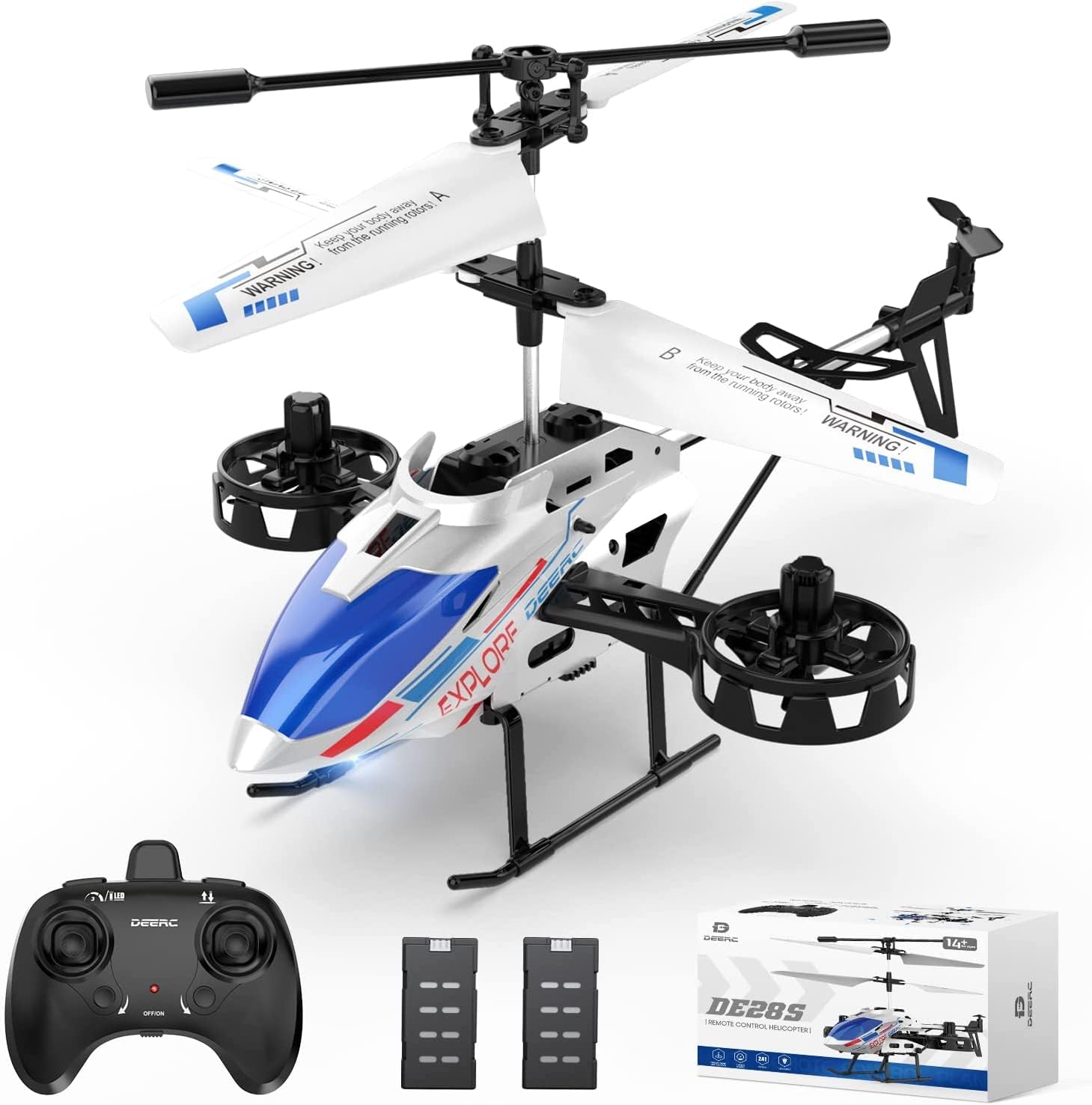
Figure 1: DEERC DE28S RC Helicopter, remote control, and two modular batteries.
2. Eusi Paket
Before first use, please verify that all items are present in the package.
- DEERC DE28S RC Helicopter
- 2.4 GHz Remote Controller
- Modular Lithium-ion Batteries (Quantity: 2)
- Kabel Ngecas USB
- Spare Blades (if included)
- Screwdriver (if included)
- Manual pangguna (dokumén ieu)

Figure 2: All components included in the DEERC DE28S package.
3. Setélan
3.1 Ngecas Batré Helikopter
- Ensure the helicopter is powered off.
- Remove the modular battery from the helicopter.
- Sambungkeun kabel ngecas USB ka batréna.
- Plug the USB cable into a standard USB power adapter (e.g., computer USB port, wall charger).
- The charging indicator light on the USB cable will show charging status (refer to cable's specific indicator behavior).
- Charging typically takes approximately 60-90 minutes for a full charge, providing up to 11-12 minutes of flight time per battery.
- Once fully charged, disconnect the battery from the USB cable.

Figure 3: The DE28S comes with two modular batteries for extended flight time.
3.2 Masang Batré Helikopter
- Carefully insert the charged modular battery into the battery compartment of the helicopter.
- Ensure it clicks securely into place.
3.3 Masang Batré Kontroler Jarak Jauh
- Buka kompartemen batré dina tonggong controller jauh.
- Insert 3 x AAA batteries (not included) according to the polarity markings (+/-).
- Tutup panutup kompartemen batré.
3.4 Pairing the Helicopter and Remote Controller
- Teundeun helikopter dina datar, permukaan datar.
- Turn on the helicopter's power switch. The LED lights on the helicopter will flash.
- Turn on the remote controller's power switch. The indicator light on the remote will flash.
- Dorong joystick kénca (gas throttle) ka luhur, teras tarik ka handap.
- The helicopter and remote controller lights will become solid, indicating successful pairing.
4. Parentah Operasi
4.1 Jauh Controller Leuwihview
Familiarize yourself with the remote controller's layout and functions.

Figure 4: The remote controller allows selection of 3 different speed modes.
- Joystick kénca (Throttle): Ngatur luhurna (naék/handap).
- Joystick Kanan (Arah): Ngadalikeun gerakan ka hareup/mundur, ka kénca/katuhu.
- Tombol Lepas/Darat Hiji-Konci: Ngamimitian lepas landas atanapi badarat otomatis.
- Speed Mode Button: Cycles through 3 speed levels (low, medium, high).
- Tombol motong: Used to correct unwanted drifting (e.g., if the helicopter drifts left, press the right trim button).
4.2 Take-off jeung badarat
- Lepas landas hiji konci: After pairing, press the One-Key Take-off/Landing button. The helicopter will automatically ascend and hover at a stable altitude.
- Manual take-off: Slowly push the left joystick (throttle) upwards to make the helicopter ascend.
- Landing Hiji-Konci: During flight, press the One-Key Take-off/Landing button. The helicopter will automatically descend and land gently.
- Landing Manual: Slowly pull the left joystick (throttle) downwards to make the helicopter descend. Once on the ground, hold the joystick down for a few seconds until the rotors stop.

Figure 5: The helicopter features Altitude Hold and One-Key Take-off/Landing for ease of use.
4.3 Fungsi Nahan Ketinggian
The DE28S is equipped with an automatic altitude hold function. After take-off, release the throttle joystick, and the helicopter will maintain its current altitude, making it easier to control for beginners.
4.4 Drifting Movement
Unlike many other RC helicopters, the DE28S can perform side-to-side drifting movements in addition to standard forward, backward, and rotational movements. Use the right joystick to control these directional movements.

Figure 6: The DE28S helicopter is capable of unique side-to-side drifting movements.
4.5 Modeu Speed
The helicopter offers 3 speed modes to suit different skill levels and flying environments. Press the speed mode button on the remote to switch between low, medium, and high speeds. Low speed is recommended for beginners and indoor flying, while high speed is suitable for experienced pilots and outdoor conditions.
5. Pangropéa
5.1 beberesih
To maintain optimal performance, regularly clean your helicopter. Use a soft, dry cloth to wipe down the body and blades. Avoid using water or chemical cleaners, as they can damage electronic components.
5.2 Inspection agul jeung ngagantian
Periodically inspect the main and tail rotor blades for any signs of damage, cracks, or deformation. Damaged blades can affect flight stability and safety. If a blade is damaged, replace it with a genuine DEERC spare part. Refer to the package contents for included spare blades or contact DEERC support for replacements.

Figure 7: The DE28S features durable and flexible blades.
5.3 Panyimpenan
When not in use, store the helicopter and remote controller in a cool, dry place, away from direct sunlight and extreme temperatures. Remove batteries from the remote controller if storing for extended periods to prevent leakage.
6. Cara ngungkulan
If you encounter issues with your DEERC DE28S helicopter, refer to the table below for common problems and solutions.
| Masalah | Mungkin Cukang lantaranana | Solusi |
|---|---|---|
| Helikopter teu ngabales jauh. | Not paired, low battery in remote or helicopter, out of range. | Re-pair the helicopter and remote. Charge helicopter battery. Replace remote batteries. Ensure helicopter is within 2.4 GHz range. |
| Helicopter cannot take off or flies weakly. | Low helicopter battery, damaged blades, motor issue. | Fully charge the helicopter battery. Inspect and replace damaged blades. If motor issue persists, contact support. |
| Helikopter drifts salila hiber. | Needs trimming, uneven surface for take-off. | Use the trim buttons on the remote to correct drift. Always take off from a flat, level surface. |
| Lampu LED teu jalan. | Power issue, damaged LED. | Ensure helicopter is powered on and battery is charged. Contact support if lights remain non-functional. |
7. Spésifikasi
| Fitur | Rincian |
|---|---|
| Ngaran modél | DE28S |
| merek | DEERC |
| Ukuran (L x W x H) | 20.5 x 14 x 12.5 cm |
| Beurat | 350 gram |
| Bahan | Acrylonitrile Butadiene Styrene (ABS), Aluminium |
| Saluran kontrol | 3.5 Saluran |
| Frékuénsi | 2.4 GHz |
| Battery Type (Helicopter) | Litium-ion (kaasup) |
| Jinis Batré (Jauh) | AAA (not included) |
| Waktos hiber | Up to 12 minutes per battery (approx. 22 minutes with two batteries) |
| Fitur husus | Altitude Hold, One-Key Take-off/Landing, 3 Speed Modes, LED Lights, Gyroscope System, Drifting Movement |
8. Garansi jeung Rojongan
DEERC products are manufactured to high quality standards and undergo rigorous testing. Your DEERC DE28S RC Helicopter is covered by a manufacturer's warranty against defects in materials and workmanship. For specific warranty terms and conditions, please refer to the warranty card included in your product packaging or visit the official DEERC websitus.
If you experience any issues or have questions regarding your DEERC DE28S, please do not hesitate to contact DEERC customer support. Our dedicated team is ready to assist you with troubleshooting, spare parts, or any other inquiries.
Inpormasi kontak:
Please refer to the contact details provided on the DEERC official websitus wéb atanapi kemasan produk anjeun kanggo inpormasi dukungan anu pangénggalna.
Ask a question about this manual
Ask about setup, troubleshooting, compatibility, parts, safety, or missing instructions. Manuals+ will review the question and use this page’s manual context to help answer it.