
DEERC DE28
DEERC DE28 RC Helicopter User Manual
Model: DE28 | Brand: DEERC
1. Bubuka
This manual provides essential information for the safe operation and maintenance of your DEERC DE28 RC Helicopter. Please read this manual thoroughly before operating the helicopter to ensure proper function and to prevent damage or injury. The DEERC DE28 is designed for indoor use and features a durable metal airframe, altitude hold, one-key take-off/landing, and multiple speed modes for various skill levels.

Image: The DEERC DE28 RC Helicopter, its remote control, and two interchangeable body shells (red and blue/white).
2. Pedoman Kasalametan
WARNING: Failure to follow these instructions may result in injury or damage to the product.
- Pamakéan jero rohangan wungkul: This helicopter is designed for indoor flight. Do not operate outdoors, as wind can cause loss of control.
- Saran umur: Recommended for users aged 14 years and up. Adult supervision is advised for younger users.
- Hapus Jalur Hiber: Ensure the flight area is clear of obstacles, people, and pets. Maintain a safe distance from walls, furniture, and other objects.
- Kasalametan batré:
- Anggo ngan ukur carjer sareng batré anu disayogikeun.
- Ulah ngecas batré kaleuleuwihi atanapi nyababkeun korsleting.
- Ulah ngalaan accu ka suhu ekstrim atawa sinar panonpoé langsung.
- If batteries swell or leak, discontinue use immediately and dispose of them properly.
- Bilah Rotor: Keep fingers, hair, and loose clothing away from rotating blades. Do not touch the helicopter while the blades are spinning.
- pangawasan: Always supervise children when they are operating the helicopter.
- Ngahindarkeun Dampak: While durable, repeated hard impacts can damage the helicopter. Avoid crashing.
3. Package Contents and Component Identification
Verify that all items listed below are included in your package. If any items are missing or damaged, please contact DEERC customer support.
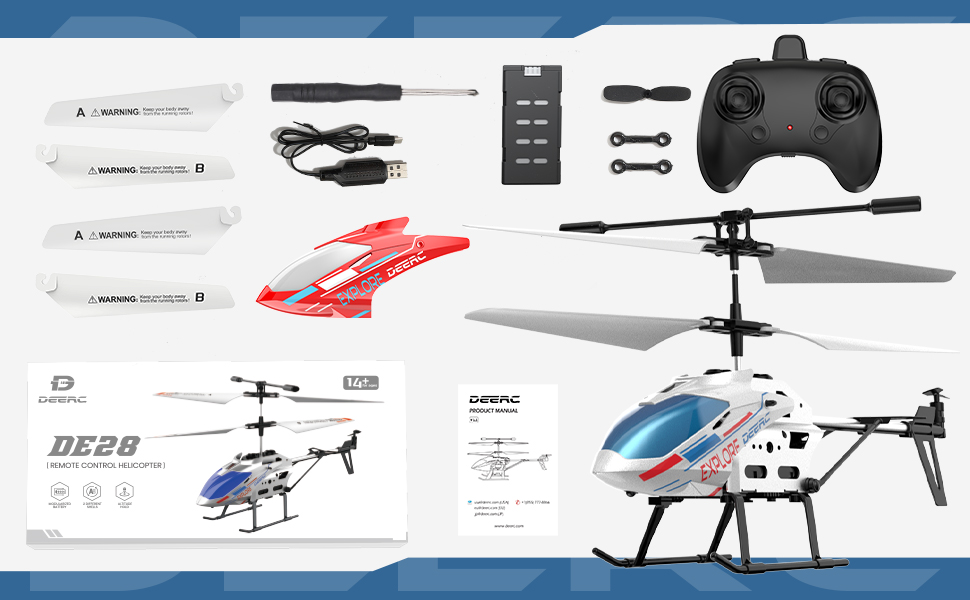
Gambar: Leuwihview of the DEERC DE28 RC Helicopter package contents.
Eusi pakét:
- DEERC DE28 RC Helicopter (1)
- Kadali Jarak Jauh 2.4GHz (1)
- Rechargeable Helicopter Batteries (2)
- Kabel Ngecas USB (1)
- Spare Main Rotor Blades (A & B) (2 sets)
- Spare Tail Rotor Blade (1)
- Obeng (1)
- Extra Helicopter Shell (1)
- Manual pamaké (1)
Idéntifikasi komponén:

Image: The DEERC DE28 helicopter showcasing its full aluminum alloy body and key features like fast acceleration, altitude hold, one-key takeoff/land, LED light, 2.4GHz, 3 speed modes, gyroscope system, and 2 shells.
- Bilah rotor utama: Provide lift and thrust.
- Tail Rotor Blade: Controls yaw (rotation around vertical axis).
- Lampu LED: Front-mounted light for visibility and aesthetics.
- Landing Skids: Provide stable landing and protect the helicopter.
- Kompartemen batré: Located on the underside of the helicopter.
- Saklar kakuatan: On/Off switch for the helicopter.
- Port ngecas: Pikeun nyambungkeun kabel ngecas USB.
- Kadali jauh:
- Left Stick: Throttle (up/down) and Yaw (left/right).
- Right Stick: Forward/Backward, Left/Right Sideways flight.
- One-Key Take-off/Landing Button.
- Speed Mode Button.
- Power Indicator LED.
- Saklar Daya.

Image: The DEERC DE28 helicopter with its two interchangeable shells, blue/white and red.
4. Setup Guide
4.1 Ngecas Batré Helikopter
- Connect the USB charging cable to the helicopter's charging port.
- Plug the other end of the USB cable into a USB power adapter (e.g., computer USB port, phone charger, power bank).
- Lampu indikator ngecas dina kabel USB bakal hurung nalika ngecas sareng pareum nalika dicas pinuh.
- A full charge typically takes approximately 60-90 minutes. Do not leave charging unattended.
- Pegatkeun sambungan kabel saatos ngecas parantos réngsé.

Image: The helicopter's battery compartment, illustrating the battery and its approximate 12-minute flight time per charge.
4.2 Masang Batré Kadali Jarak Jauh
- Buka kompartemen batré dina tonggong kadali jauh.
- Insert 3 x AAA batteries (not included) into the compartment, ensuring correct polarity (+/-).
- Tutup panutup kompartemen batré aman.
4.3 Ngapasangkeun Helikopter sareng Remote Control
- Ensure both the helicopter and remote control are fully charged/have fresh batteries.
- Teundeun helikopter dina datar, permukaan datar.
- Hurungkeun saklar daya helikopter. Lampu LED helikopter bakal kedip-kedip.
- Turn on the remote control's power switch. The remote control's indicator light will flash.
- Push the left throttle stick (left joystick) all the way up, then pull it all the way down.
- Both the helicopter's and remote control's indicator lights will become solid, indicating successful pairing.
- Upami pasangan gagal, pareuman kadua alat teras balikan léngkah-léngkahna.

Image: The 2.4GHz remote control in use, demonstrating its connection to the helicopter.
5. Operasi
5.1 Kontrol hiber dasar
- Lepas landas hiji konci: After pairing, press the One-Key Take-off/Landing button. The helicopter will automatically ascend and hover at a stable altitude.
- Gas (Tongkat Kénca Luhur/Handap): Controls the helicopter's altitude. Push up to ascend, pull down to descend.
- Yaw (Tongkat Kénca Kénca/Katuhu): Controls the helicopter's rotation. Push left to rotate counter-clockwise, right to rotate clockwise.
- Maju/Mundur (Tongkat Katuhu Luhur/Handap): Controls the helicopter's forward and backward movement.
- Left/Right Sideways (Right Stick Left/Right): Controls the helicopter's sideways movement (strafe).
- Ketinggian Tahan: The helicopter will automatically maintain its current altitude when the throttle stick is released, allowing for easier control.
- Landing Hiji-Konci: During flight, press the One-Key Take-off/Landing button again. The helicopter will slowly descend and land automatically.

Image: The helicopter demonstrating its One-Key Take-off and Altitude Hold features.
5.2 Modeu Speed
The DEERC DE28 features 3 speed modes to accommodate different skill levels. Press the Speed Mode button on the remote control to cycle through the modes:
- Laju low: Ideal for beginners and indoor flight in confined spaces. Provides stable and gentle control.
- Laju Sedeng: A balanced mode for intermediate users, offering more responsiveness.
- Gancang: For experienced pilots seeking maximum agility and faster flight.

Image: The helicopter demonstrating its three speed levels, suitable for both adults and children.
5.3 Control Lampu LED
The helicopter is equipped with bright LED lights for enhanced visibility, especially in low-light conditions. The LED lights typically turn on automatically when the helicopter is powered on. Refer to the remote control diagram for any dedicated light control buttons, if available.

Image: The helicopter's front LED light illuminated.
6. Pangropéa
6.1 beberesih
- Always turn off the helicopter and remote control before cleaning.
- Wipe the helicopter with a soft, dry cloth. Do not use water or chemical cleaners, as they may damage the electronics.
- Remove any dust or debris from the rotor blades and motors.
6.2 agul ngagantian
If a rotor blade becomes damaged, it can be replaced using the spare blades provided and the included screwdriver.
- Identify the damaged blade (A or B).
- Carefully unscrew the small screw holding the blade in place.
- Remove the damaged blade.
- Align the new blade (ensure it's the correct A or B type) and secure it with the screw. Do not overtighten.

Image: The durable and flexible design of the helicopter blades.
6.3 Panyimpenan
- Store the helicopter and remote control in a cool, dry place away from direct sunlight and moisture.
- Upami disimpen kanggo waktos anu lami, cabut batréna tina remot kontrol pikeun nyegah bocor.
7. Cara ngungkulan
| Masalah | Mungkin Cukang lantaranana | Solusi |
|---|---|---|
| Helikopter teu ngaréspon kana remot kontrol. | Not paired; Low battery (helicopter or remote); Remote control off. | Ensure both are on and paired. Charge helicopter battery. Replace remote control batteries. |
| Helicopter cannot take off or flies weakly. | Low helicopter battery; Damaged blades; Obstruction. | Charge helicopter battery fully. Replace damaged blades. Clear any obstructions. |
| Helicopter drifts or spins uncontrollably. | Not calibrated on a flat surface; Damaged tail rotor; Strong airflow. | Ensure helicopter is placed on a flat surface for pairing. Check and replace tail rotor if damaged. Fly in a calm environment. |
| Lampu LED teu jalan. | Helicopter off; Malfunction. | Ensure helicopter is powered on. If still not working, contact support. |
8. Spésifikasi
| Fitur | Rincian |
|---|---|
| Nomer modél | CADE4-DE28 |
| Ukuran (L x W x H) | 19.99 x 4.5 x 12.5 cm (7.87 x 1.77 x 4.92 inci) |
| Beurat | 290 g |
| Frékuénsi kontrol | 2.4 GHz |
| Saluran | 3.5 CH |
| Waktos hiber | Kira-kira. 12 menit per batré |
| Waktu Ngecas | Kira-kira. 60-90 menit |
| Disarankeun Umur | 14 taun ka luhur |
| Fitur | Altitude Hold, One-Key Take-off/Landing, 3 Speed Modes, LED Light, Gyroscope System |

Image: Dimensions of the DEERC DE28 RC Helicopter.
9. Garansi jeung Rojongan
DEERC products are manufactured to high quality standards. For information regarding warranty coverage, returns, or technical support, please refer to the official DEERC websitus atanapi ngahubungan layanan palanggan maranéhanana langsung.
DEERC Official Websitus: www.deerc.com
Please have your model number (DE28) and purchase details ready when contacting support.
Ask a question about this manual
Ask about setup, troubleshooting, compatibility, parts, safety, or missing instructions. Manuals+ will review the question and use this page’s manual context to help answer it.