
1. Bubuka
This manual provides detailed instructions for the installation, operation, and maintenance of the Generic WS C621E SAGE Motherboard. This motherboard supports 1st and 2nd Generation Intel Xeon Scalable Processors with an LGA3647 socket and features support for 4-way SLI™ / CrossFireX™ technologies. Please read this manual thoroughly before beginning installation to ensure proper setup and to prevent damage to your components.
2. Émbaran Kasalametan
- Salawasna pegatkeun sambungan kabel listrik ti stop kontak témbok saméméh noel komponén nanaon.
- Anggo tali pigeulang anti statik pikeun nyegah karusakan éléktrostatik (ESD) kana komponén.
- Nanganan komponén ku edges maranéhanana, Ngahindarkeun kontak sareng pin atanapi circuitry.
- Pastikeun ventilasi anu pas dina wadah PC anjeun pikeun nyegah overheating.
- Tetep motherboard jauh ti Uap jeung hawa ekstrim.
3. Eusi Paket
Verify that all items are present in your motherboard package. If any items are missing or damaged, contact your retailer.
- Generic WS C621E SAGE Motherboard
- Kabel Data SATA
- Abdi / O Perisai
- Manual pangguna (dokumén ieu)
- Support DVD/USB drive (containing drivers and utilities)
- SLI/CrossFireX Bridge (if applicable)
4. Setup jeung Instalasi
4.1 Pamasangan motherboard
Carefully align the motherboard with the standoffs in your PC case. Ensure the I/O shield is properly seated in the case opening before securing the motherboard with screws. Do not overtighten the screws.

Figure 4.1: WS C621E SAGE Motherboard installed in a system chassis. This image displays the overall layout of the motherboard within a computer case, including the dual CPU sockets, multiple RAM slots, and various expansion slots, along with connected power supply cables and storage bays.
4.2 Pamasangan CPU (LGA3647)
The WS C621E SAGE motherboard features dual LGA3647 sockets for Intel Xeon Platinum 8100/8200, Gold 6100/6200, and Silver 4100/4200 processors. Follow these steps:
- Buka mékanisme ingetan stop kontak CPU.
- Carefully align the processor with the socket, ensuring the triangular markers match. Do not force the CPU into the socket.
- Tutup mékanisme ingetan pikeun ngamankeun CPU.
- Larapkeun némpelkeun termal kana beungeut CPU.
- Install the CPU cooler according to its manufacturer's instructions. Ensure proper contact and secure mounting.
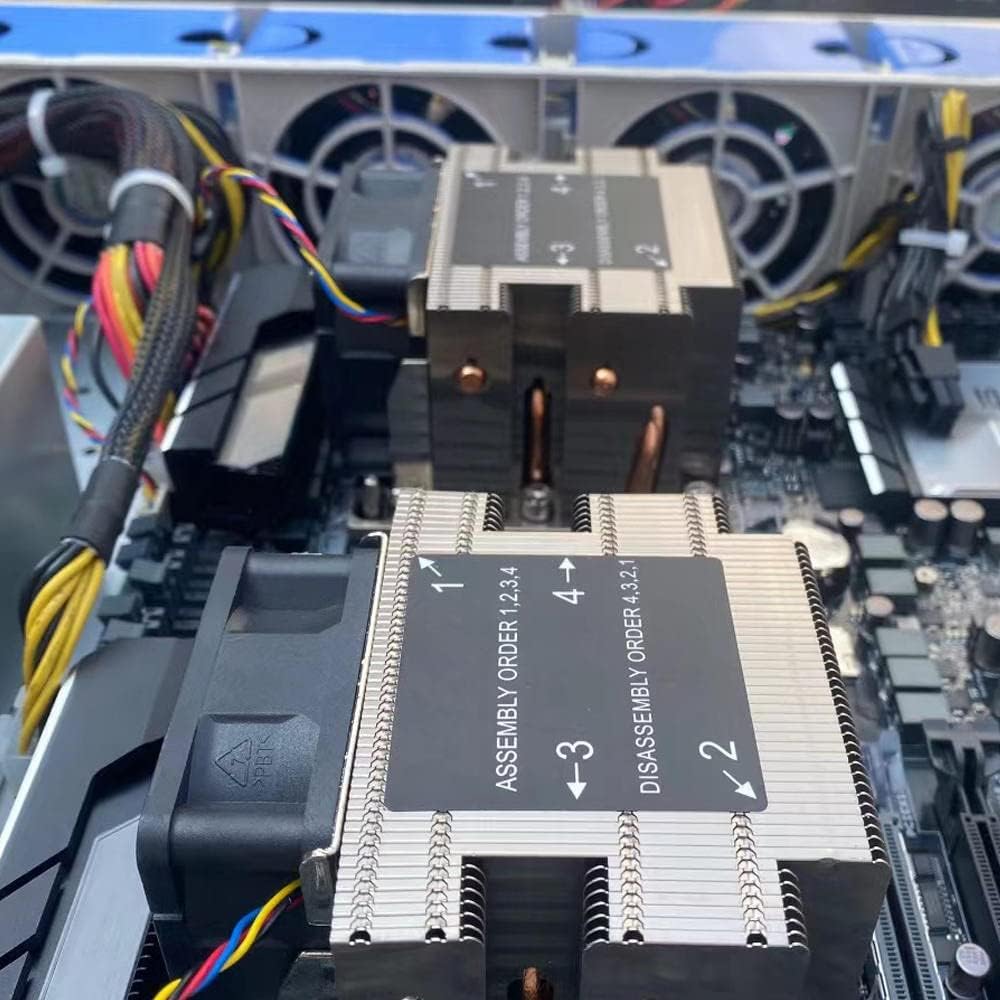
angka 4.2: Tutup-up view of the CPU coolers on the WS C621E SAGE motherboard. The image highlights the heatsinks and fans, with labels indicating the recommended assembly order (1, 2, 3, 4) and disassembly order (4, 3, 2, 1) for securing the coolers to the CPU sockets.
4.3 Pamasangan RAM (DDR3)
This motherboard supports DDR3 RAM. Refer to the motherboard manual for specific memory slot population guidelines for optimal performance (e.g., quad-channel configuration).
- Buka klip dina kadua tungtung slot DIMM.
- Sejajarkeun modul RAM sareng slotna, pastikeun takik dina modul cocog sareng konci dina slotna.
- Pencét pageuh dina duanana tungtung modul RAM nepi ka klip snap kana tempat.
4.4 Pamasangan Alat Panyimpenan
The motherboard provides 8 SATA 3 ports. Connect your SATA storage devices (HDDs/SSDs) using SATA data cables to these ports. Connect the power cables from your power supply to the devices.
4.5 PCIe Expansion Cards
Install graphics cards or other PCIe expansion cards into the available PCI Express slots. This motherboard supports 4-way SLI™ and CrossFireX™ configurations. Ensure the card is fully seated and secured with the case latch or screw.
4.6 Sambungan kakuatan
Connect the 24-pin ATX main power connector and the CPU power connectors (e.g., 8-pin EPS12V) from your power supply to the corresponding ports on the motherboard. Ensure all connections are secure.
4.7 Konektor Panel Hareup
Connect the front panel cables from your PC case (power button, reset button, USB ports, audio jacks, LED indicators) to the corresponding headers on the motherboard. Refer to the motherboard's silkscreen labels for correct pin alignment.
5. Parentah Operasi
5.1 Boot munggaran
After completing all hardware installations, connect your monitor, keyboard, and mouse. Power on your system. The system should perform a Power-On Self-Test (POST). If successful, you will see the BIOS/UEFI screen or a prompt to install an operating system.
5.2 Setélan mios / UEFI
Pikeun asup ka utilitas setelan BIOS/UEFI, pencét tombol anu ditunjuk (biasana DEL or F2) during the POST sequence. Here you can configure boot order, system time, CPU settings, memory timings, and other advanced features. Save changes before exiting.
5.3 Pamasangan Supir
After installing your operating system, install the necessary drivers for the motherboard chipset, LAN, audio, and any other integrated components. These drivers are typically provided on the included support DVD/USB or can be downloaded from the manufacturer's websitus.
6. Pangropéa
- beberesih: Regularly clean dust from inside your PC case, especially from CPU coolers, fans, and heatsinks, using compressed air. Ensure the system is powered off and unplugged before cleaning.
- Pembaruan BIOS: périodik pariksa produsén urang websitus pikeun apdet BIOS/UEFI. Apdet tiasa ningkatkeun stabilitas, nambihan dukungan pikeun perangkat keras énggal, atanapi ngalereskeun bug. Turutan pitunjuk apdet kalayan saksama supados henteu ngaruksak motherboard.
- Cék komponén: Periodically inspect cables for secure connections and check for any signs of physical damage or corrosion on components.
7. Cara ngungkulan
7.1 Isu umum
- Henteu aya kakuatan: Ensure the power supply is connected correctly to the motherboard (24-pin and CPU power) and that the power supply switch is on. Check the front panel power button connection.
- Teu Aya Tampilan/POST: Verify that the CPU, RAM, and graphics card are properly seated. Try booting with only one RAM stick. Check monitor connections.
- Instabilitas Sistem / Kacilakaan: This can be caused by overheating, faulty RAM, or an unstable overclock. Check temperatures, run memory diagnostic tools, and reset BIOS settings to default.
- Sistem Operasi Teu Booting: Check boot order in BIOS/UEFI. Ensure the storage drive with the OS is detected and functional.
7.2 Diagnostic LEDs/Beep Codes
The motherboard may feature diagnostic LEDs or emit beep codes during POST to indicate specific issues. Refer to the motherboard's specific documentation (if available) for a detailed explanation of these indicators.
8. Spésifikasi
| Fitur | Spésifikasi |
|---|---|
| merek | Generik |
| Ngaran modél | WS C621E SAGE |
| CPU Socket | LGA 3647 |
| Prosesor cocog | Intel Xeon Platinum 8100/8200, Intel Xeon Gold 6100/6200, Intel Xeon Silver 4100/4200 |
| Téhnologi Mémori RAM | DDR3 |
| Tipe Chipset | WS C621E SAGE |
| Jinis Panyambung Daya Utama | 24-pin |
| Panganteur Kartu grafik | PCI Express |
| Total Port SATA | 8 |
| Total PCIe Ports | 8 |
| Alat nu cocog | Server, Komputer Pribadi |
9. Garansi jeung Rojongan
For warranty information and technical support, please refer to the documentation provided by your retailer or the manufacturer's official websitus. Simpen bukti pameseran anjeun pikeun klaim garansi.