
1. Bubuka jeung Leuwihview
The AFK BT512-009 is a versatile 4-in-1 device designed to enhance your daily routine. It integrates a wireless charging station, a Bluetooth speaker, a digital alarm clock, and hands-free calling capabilities into a single compact unit. This manual provides detailed instructions for setup, operation, and maintenance to ensure optimal performance.

Image: The AFK 4-in-1 Wireless Charging Station showcasing its multiple functions: wireless charging a smartphone, displaying time on the alarm clock, and indicating Bluetooth speaker functionality with musical notes.
2. Parentah Setup
- Ngabongkar bungkusan: Carefully remove all components from the packaging. Verify that all items are present: the AFK BT512-009 unit, power adapter, and this user manual.
- Sambungan Daya: Connect the provided power adapter to the DC input port on the back of the charging station. Plug the other end of the adapter into a standard electrical outlet (Type A - 2 pin, North American). The digital display should illuminate, indicating the device is powered on.
- Setélan waktos mimiti: Upon first power-up, the clock may display a default time. Refer to the 'Alarm Clock Operation' section for instructions on setting the correct time and date.

Image: The AFK Wireless Charging Station on a desk, connected to a power outlet via its USB-A adapter, with a smartphone placed on the charging pad.
3. Parentah Operasi
3.1 Fungsi Ngecas Nirkabel
The charging station is compatible with Qi-enabled smartphones. It provides up to 15W wireless charging output.
- panempatan: Place your compatible smartphone directly onto the charging pad. Ensure the phone is centered on the charging area for optimal contact.
- Kasaluyuan Kasus: The charger can accommodate phone cases with a thickness of less than 5mm. Remove any magnetic, metal accessories, or other foreign objects from your phone case as these may interfere with charging.
- Orientasi: Your phone can be charged both horizontally and vertically, allowing for convenient viewing of videos or notifications while charging.
- Indikator ngecas: A charging indicator light will illuminate on the device when a phone is successfully placed and charging.
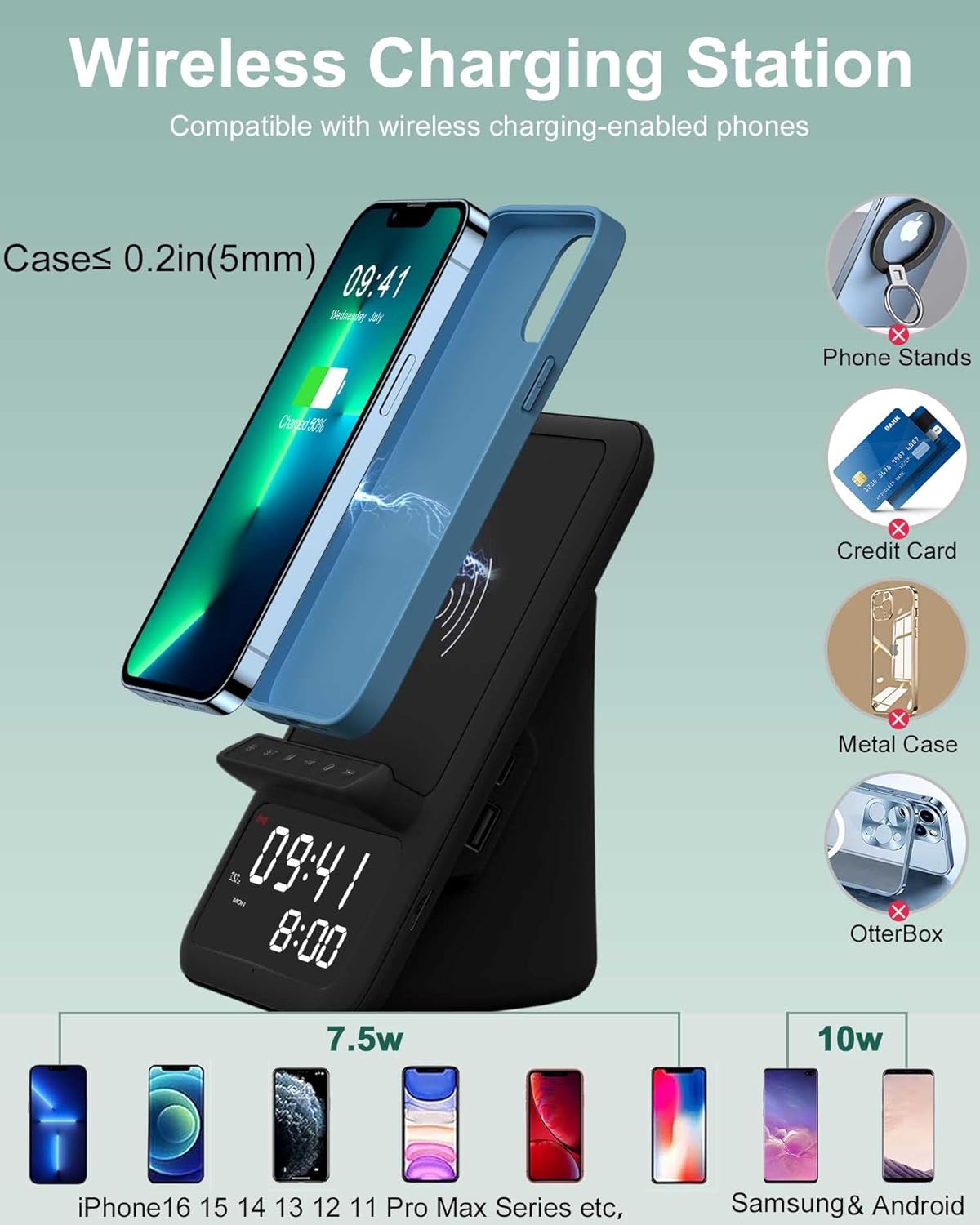
Image: A smartphone being wirelessly charged on the AFK station, illustrating compatibility with cases up to 5mm thick and showing various incompatible items like metal cases or phone stands.
3.2 Operasi Spiker Bluetooth
The integrated Bluetooth speaker allows you to stream audio wirelessly from your devices.
- Mode Papasangan: Press and hold the 'M' (Mode) button on the device until the Bluetooth indicator light starts flashing, indicating it is in pairing mode.
- Sambungkeun Alat: On your smartphone, tablet, laptop, or computer, navigate to Bluetooth settings and search for available devices. Select "BT512" from the list to connect. A confirmation sound will play upon successful pairing.
- Puteran Audio: Once connected, you can play music, audiobooks, or other audio content from your device.
- Kadali: Use the physical buttons on the charging station to adjust volume (short press +/-), skip tracks (long press +/-), and play/pause (press 'O' button).

Image: The AFK Wireless Charging Station on a desk, wirelessly connected to a laptop via Bluetooth, with musical notes emanating from the speaker, indicating audio playback.
3.3 Fungsi Jam Alarm
The device features a digital clock with dual alarm settings.
- Setélan waktos: Press and hold the 'SET' button to enter time setting mode. Use the '+' and '-' buttons to adjust hours and minutes. Press 'SET' again to confirm each setting.
- Setélan Alarm: Press the 'SET' button repeatedly to cycle through Alarm 1 and Alarm 2 settings. When an alarm time is displayed, press and hold 'SET' to adjust its hour and minute using '+' and '-'. Press 'SET' to confirm.
- Ngaktipkeun/Nonaktipkeun Alarm: Short press the 'SET' button to toggle alarms on or off. An alarm icon will appear on the display when active.
- Fungsi Tungkul When an alarm sounds, press any button (except the power button) to activate snooze. The alarm will sound again after a set interval.
- Volume alarem: The alarm volume is designed to be loud enough for heavy sleepers.

Image: The AFK Wireless Charging Station on a bedside table, displaying two different alarm times (08:00 and 07:30), highlighting its dual alarm functionality.
3.4 Nelepon Bebas Tangan
The built-in microphone allows for hands-free communication when connected via Bluetooth.
- Ngajawab Telepon: When a call comes in, press the 'O' (Play/Pause) button to answer.
- Telepon Akhir: Press the 'O' button again to end the call.
- Ngurangan Noise: The microphone features intelligent noise reduction for clear call quality.

Image: A person using the AFK Wireless Charging Station for a hands-free video call, with a smartphone placed on the charging pad and a computer screen showing a video conference.
4. Pangropéa
- beberesih: Use a soft, dry cloth to clean the surface of the device. Avoid using abrasive cleaners, solvents, or harsh chemicals.
- Panyimpenan: Lamun teu dipaké pikeun période nambahan, nyimpen alat dina tiis, tempat garing jauh ti sinar panonpoé langsung jeung hawa ekstrim.
- Penanganan: Handle the device with care. Avoid dropping it or exposing it to excessive force, which could damage internal components.
5. Cara ngungkulan
| Masalah | Mungkin Cukang lantaranana | Solusi |
|---|---|---|
| Alat teu hurung | Adaptor daya teu nyambung atawa stop kontak faulty. | Pastikeun adaptor daya disambungkeun pageuh kana alat sareng stop kontak anu tiasa dianggo. Cobi stop kontak anu sanés. |
| Ngecas nirkabel teu jalan | Phone not Qi-compatible, misaligned, or thick/metal case. | Verify your phone supports Qi wireless charging. Reposition the phone on the charging pad. Remove thick or metallic cases. |
| Speaker Bluetooth teu nyambung | Alat teu aya dina modeu pasangan, atanapi parantos nyambung ka alat anu sanés. | Ensure the device is in Bluetooth pairing mode (flashing BT indicator). Disconnect from other devices if necessary. Restart both the charging station and your Bluetooth device. |
| Alarm teu disada | Alarm teu diaktipkeun atanapi teu leres disetel. | Check if the alarm icon is displayed. Re-set the alarm time and ensure it is enabled. |
6. Spésifikasi
- merek: AFK
- Jumlah modél: BT512-009
- Téknologi konektipitas: Nirkabel & Bluetooth
- Fitur husus: Wireless Charger, Bluetooth Speaker, Alarm Clock, Hands-Free Calling
- Alat anu cocog: Phones that support wireless charging (e.g., iPhone 8-16 series, Samsung Galaxy S8-S23 series, Note series, Fold/Flip series)
- Masukan Voltage: 12 volt
- Kaluaran Voltage: 5 volt
- Amperage: 1 Amps
- Wattage: 15 watt
- Total palabuhan USB: 1 (for charging other devices via cable)
- Sumber Daya: Battery Powered (internal for clock memory) / Wall Adapter (for main operation)
- Colokkeun kakuatan: Type A - 2 pin (North American)
- Beurat barang: 1.17 pon
- Bahan Kandang: logam
- Spésifikasi patepung: Qi
7. Garansi jeung Rojongan
This product comes with a 1-year warranty. For technical support, troubleshooting assistance, or warranty claims, please contact AFK customer service through the retailer where the product was purchased. Please retain your proof of purchase for warranty validation.