
Bubuka
The DIHOOM DM-P074G is a 4G LTE solar-powered PTZ (Pan-Tilt-Zoom) security camera designed for outdoor surveillance in areas without traditional power or Wi-Fi access. This camera features 2K 4MP resolution, full-color night vision, intelligent motion detection, and two-way audio communication. Its integrated solar panel and high-capacity battery ensure continuous operation, while IP66 waterproofing provides durability in various weather conditions. This manual provides essential information for the proper setup, operation, and maintenance of your security camera.

Figure 1: The DIHOOM 4G LTE Solar PTZ Security Camera mounted with its solar panel, demonstrating wireless installation and remote monitoring via a smartphone app.
Eusi pakét
Punten parios yén sadaya barang anu didaptarkeun di handap kalebet kana pakét anjeun:
- Security Camera Unit
- Panel surya x 1
- Pamasangan Bracket x 1
- Mounting Sticker x 1
- Paket Screw x 2
- Iron Bracket x 1
- Cingcin x 2
- Quick User Manual x 1
- SIM Card (with 300 MB free data)

Figure 2: All components included in the DIHOOM DM-P074G security camera package.
Disetél
1. Pamasangan Kartu SIM sareng Kartu SD
- Panggihan slot kartu SIM dina kaméra.
- Insert the provided 4G LTE SIM card into the slot. Ensure it is correctly oriented.
- For local storage, insert a microSD card (up to 256GB, not included) into the designated slot.
2. App Ngundeur tur Sambungan
- Download the dedicated mobile application from your smartphone's app store.
- Open the app and follow the on-screen instructions to add your new camera. This typically involves scanning a QR code on the camera or its packaging.
- Ensure your smartphone has an active internet connection during the setup process.
3. Pasang Kaméra sareng Panel Surya
The camera supports wall and pole mounting. Choose a location that provides optimal surveillance coverage and receives ampsinar panonpoé langsung pikeun panel surya.
- Use the mounting bracket and screws to securely attach the camera to a wall or pole.
- Mount the 7W solar panel in a position that maximizes sun exposure throughout the day.
- Connect the solar panel cable to the camera's charging port. The camera's battery (18000mAh) will charge via the solar panel.

Figure 3: The camera's IP66 waterproof design and simplified setup steps, including SIM card insertion and app connection.

Figure 4: Details of the 7W solar panel and 18000mAh battery, illustrating the camera's self-sustaining power system.
Parentah Operasi
1. Kontrol Pan-Tilt-Zoom (PTZ)
Aksés langsung view in the mobile app. Use the on-screen controls to remotely adjust the camera's viewing angle. The camera offers 350° horizontal pan and 150° vertical tilt capabilities, allowing comprehensive coverage. Digital zoom is also available to view rinci.

Figure 5: Illustration of the camera's 350-degree pan and 150-degree tilt rotation for wide area surveillance.
2. Deteksi gerak sareng Tanda
The camera features intelligent PIR (Passive Infrared) human and motion detection. When motion is detected, the camera can trigger spotlights, an alarm, and send instant notifications to your smartphone. Sensitivity settings can be adjusted within the app to minimize false alarms.

Figure 6: The camera's smart PIR human detection feature, highlighting detected movement within the surveillance area.
3. Wawasan Peuting
The camera provides 2K 4MP resolution for clear images. It supports full-color night vision, which activates when warm lights are engaged, capturing color video even in low-light conditions. Standard infrared night vision is also available for clear black and white footage in complete darkness.
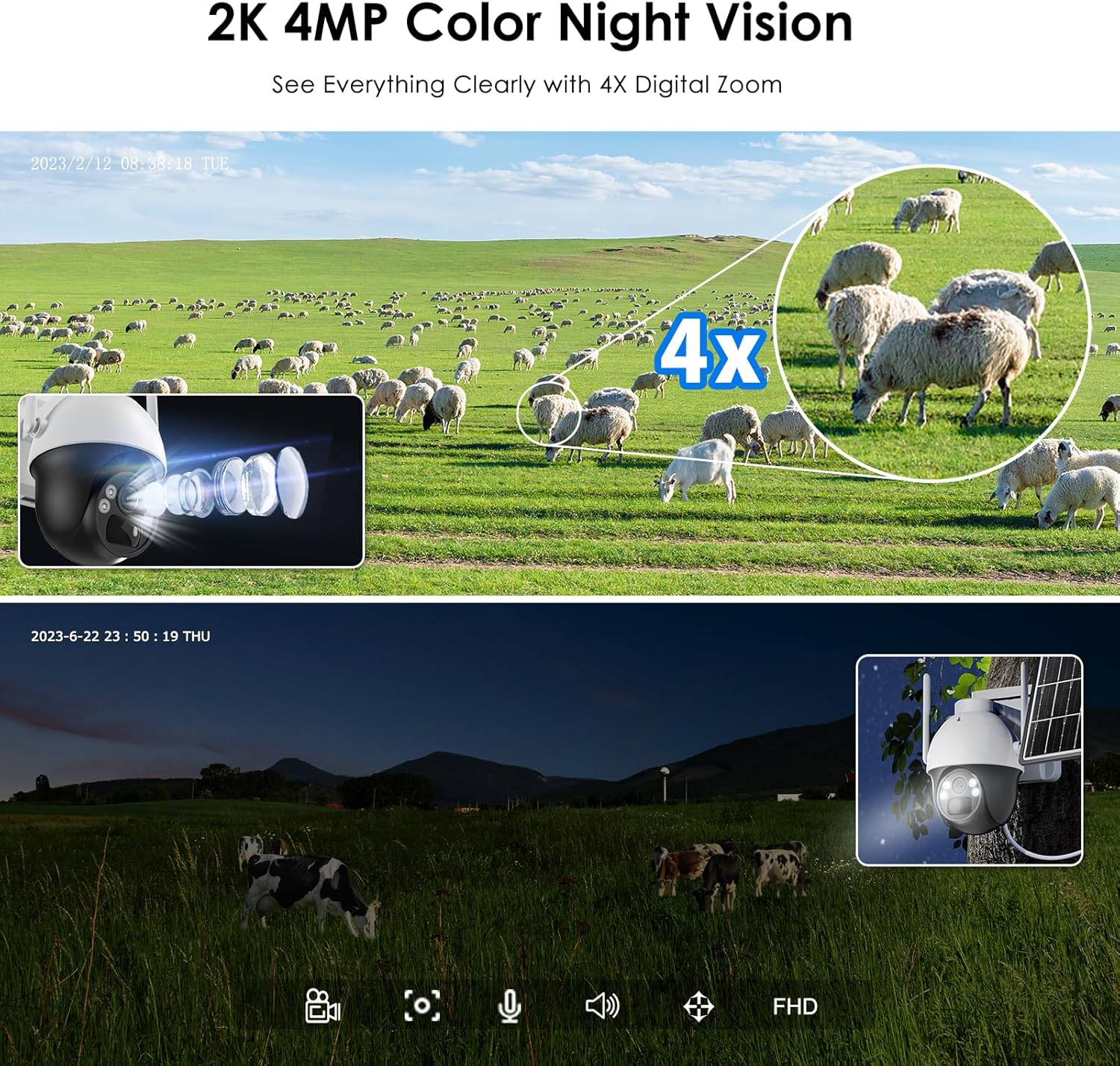
Figure 7: Comparison of daytime 2K 4MP footage with 4X digital zoom and full-color night vision capabilities.
4. Komunikasi Dua Arah
Utilize the built-in microphone and speaker for two-way audio communication. This allows you to speak to individuals near the camera or use the siren function for deterrence.
5. Ngarekam jeung Panyimpenan
The camera supports continuous recording and event-triggered recording to a local microSD card (up to 256GB). Footage can be accessed and managed through the mobile application.
Pangropéa
- beberesih: Périodik ngabersihan lénsa kaméra jeung panel surya ku lemes, damp cloth to ensure optimal image clarity and charging efficiency.
- Pangimeutan batré: Monitor the battery level via the app. Ensure the solar panel is free from obstructions to maintain consistent charging.
- Pembaruan firmware: Check the mobile app regularly for available firmware updates to ensure your camera has the latest features and security enhancements.
- Perlindungan Lingkungan: Bari dipeunteun IP66, ulah ngarahkeun jet cai tekanan luhur langsung ka kaméra.
Pamérésan masalah
- Camera Not Connecting/Offline:
- Ensure the 4G SIM card has an active data plan and good signal strength in the camera's location.
- Restart the camera by powering it off and on.
- Check if the camera's battery is sufficiently charged. - Kualitas Gambar goréng:
- Clean the camera lens for any dirt or smudges.
- Pastikeun teu aya halangan dina widang kaméra view.
- Verify the camera's resolution settings in the app. - Deteksi gerak teu jalan:
- Check the motion detection settings in the app, ensuring it is enabled and sensitivity is adjusted correctly.
- Ensure there are no physical obstructions blocking the PIR sensor. - Batré Teu Ngecas:
- Ensure the solar panel is clean and free from debris.
- Verify the solar panel is positioned to receive maximum direct sunlight.
- Check the connection cable between the solar panel and the camera. - Masalah Audio Dua Arah:
- Ensure the microphone and speaker are not obstructed.
- Check volume settings in the app and on your smartphone.
spésifikasi
| Fitur | Spésifikasi |
|---|---|
| merek | DIHOOM |
| Ngaran modél | 4G Solar Powered Security Camera (DM-P074G) |
| Téhnologi konektipitas | Nirkabel (4G LTE) |
| Alat nu cocog | Smartphone |
| Sumber Daya | Batré Powered, Solar Powered |
| Tipe Pamasangan | Gunung siling, témbok Gunung |
| Resolusi Rekaman Video | 4 MP (2K) |
| Warna | Bodas |
| Tipe Pamasangan | Wall Mounted, Pole Mounted |
| Bahan | palastik |
| Tingkat Résistansi Cai | Waterproof (IP66) |
| Tipe Siaga | Gerak Ngan |
| Resolusi Sénsor Poto | 4 MP |
| Téknologi Komunikasi Nirkabel | 4G |
| Wattage | 5 watts (Camera), 7 watts (Solar Panel) |
| Kapasitas batré | 18000 mAh |
| Jumlah Saluran | 2 |
| Item Dimensi | 10 x 9 x 6 séntiméter |
| Resolusi Video Éféktif | 1080 Pixels (Output) |
| Viewdina Angle | 120 darajat |
| Tipe Fokus | Fokus Manual |
| Téhnologi Sénsor Poto | CMOS |
| Kagunaan Produk Husus | 2K 4MP Super HD, 4G-LTE connection, IP66 waterproof, Continuous solar energy, PIR human and motion detection |
Garansi sareng Rojongan
The DIHOOM DM-P074G security camera comes with a garansi 2 taun ti tanggal beuli.
Kanggo patarosan, bantosan téknis, atanapi klaim garansi, mangga ngahubungi tim dukungan kami:
- Surélék: ukdihoom@hotmail.com
- We offer online service and lifetime technical support.