
1. Bubuka
Thank you for choosing the Rettru Q18 4K Wireless WiFi IP Camera. This manual provides detailed instructions for setting up, operating, and maintaining your camera to ensure optimal performance and security. Please read this manual thoroughly before use and retain it for future reference.
Eusi pakét
Pastikeun yén sadaya item anu didaptarkeun di handap kalebet kana pakét anjeun:
- 1 x Kaméra
- 1 x Manual Pamaké
- 1 x Micro SD Card Reader
- 1 x Dasar Magnetik
2. Émbaran Kasalametan
To prevent damage to the product or injury to yourself or others, please observe the following safety precautions:
- Do not expose the camera to extreme temperatures, direct sunlight, or moisture.
- Hindarkeun leupaskeun atanapi tundukkeun kaméra kana tabrakan anu kuat.
- Anggo ngan ukur asesoris ngecas anu ditangtukeun.
- Jauhkeun kaméra tina jangkauan barudak sareng piaraan.
- Entong nyobian ngabongkar atanapi ngarobih kaméra. Ieu bakal ngabatalkeun jaminan.
- Ensure proper ventilation when operating or charging the device.
3. Produk Langkungview
The Rettru Q18 is a compact 4K wireless IP camera designed for indoor and outdoor surveillance. It features a high-resolution sensor, long-lasting battery, and advanced detection capabilities.

Figure 3.1: Rettru Q18 Camera and Live View Interface. This image illustrates the compact size of the camera, held between two fingers, alongside a smartphone displaying the camera's live 4K Ultra HD feed.
Fitur konci
- Video 4K Ultra HD: Records video at 2560x1440 (2K) resolution for clear imaging.
- Batré 1800 mAh: Provides up to 6 hours of continuous recording and over 100 days of standby time.
- Deteksi Manusa AI: Advanced motion detection specifically identifies human shapes to reduce false alarms.
- Automatic Night Vision: Equipped with 8 straw hat 940nm infrared lights for clear night vision without a visible red glow, effective up to 28 feet.
- Audio Dua Arah: Built-in speaker and microphone for real-time voice communication.
- 160-Degree Wide Angle Lens: Nawiskeun widang anu lega view pikeun sinyalna komprehensif.
- Panyimpenan Lokal: Supports Micro SD cards up to 128GB (card not included).
- Konéktipitas nirkabel: Connects via 2.4G Wi-Fi.
4. Setup Guide
4.1 Ngecas Awal
Before first use, fully charge the camera using a standard 5V USB power adapter and the provided charging cable. The charging indicator light will typically change color or turn off once fully charged.

Figure 4.1: Battery Capacity and Endurance. This image highlights the camera's 1800mAh battery, offering 6 hours of continuous recording and 100 days of standby time.
4.2 Pamasangan Aplikasi
The Rettru Q18 camera operates with the V380 Pro application. Download the app from your smartphone's app store (iOS App Store or Google Play Store).
- Milarian pikeun "V380 Pro" in your app store.
- Unduh sareng pasang aplikasina.
- Ngadaptarkeun akun atanapi log in upami anjeun parantos gaduh.
4.3 Sambungan Wi-Fi
Follow these steps to connect your camera to your home Wi-Fi network. Ensure your Wi-Fi network is 2.4GHz, as 5GHz networks are not supported.
- Hurungkeun kaméra.
- Open the V380 Pro app and tap the "+" icon to add a new device.
- Select the appropriate camera type or scan the QR code on the camera (if available).
- Follow the on-screen instructions to connect the camera to your 2.4GHz Wi-Fi network. This typically involves entering your Wi-Fi password.
- Sakali disambungkeun, anjeun bisa ngaranan kaméra Anjeun tur mimitian hirup viewing.
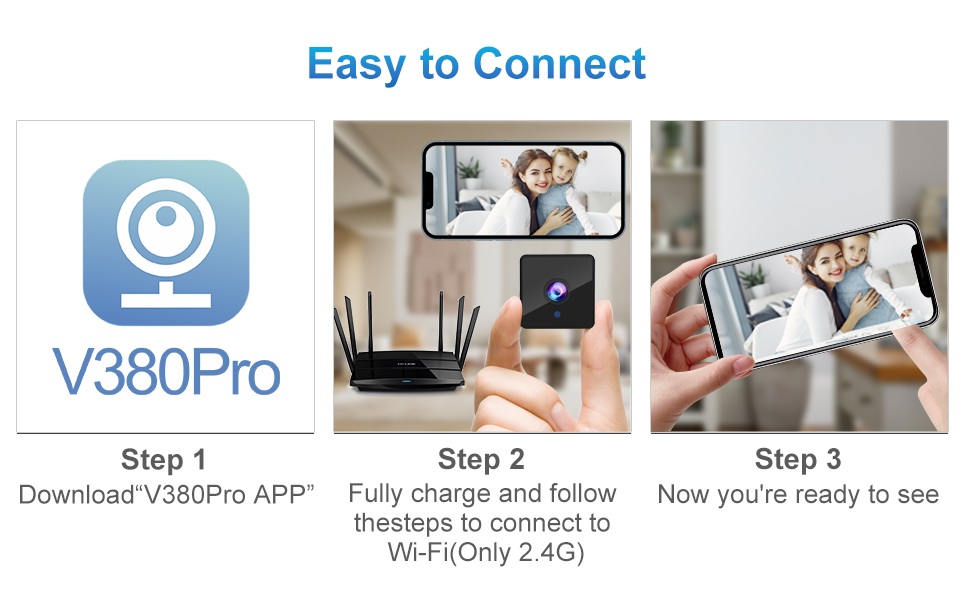
Figure 4.2: Easy Connection Steps. This graphic illustrates the three-step process for connecting the Rettru Q18 camera: downloading the V380 Pro app, charging and connecting to 2.4G Wi-Fi, and then accessing the live view.
5. Operasi
5.1 Hirup View jeung Rékam
Once connected, open the V380 Pro app to access the live video feed. You can manually initiate recording or configure continuous recording if a Micro SD card is inserted.
- Tap on the camera feed in the app to enter live view.
- Use the on-screen controls to take snapshots, record video, or access settings.
- Ensure a Micro SD card (up to 128GB) is inserted for local video storage.
5.2 Deteksi Gerak sareng Siaga
The camera features AI human detection to minimize false alarms. When motion is detected, the camera can send alerts to your smartphone and record video.
- Navigate to the camera settings in the V380 Pro app.
- Enable "Motion Detection" and "AI Human Detection."
- Configure alert sensitivity and notification preferences.
- You can also activate the built-in siren (105dB) through the app to deter intruders.
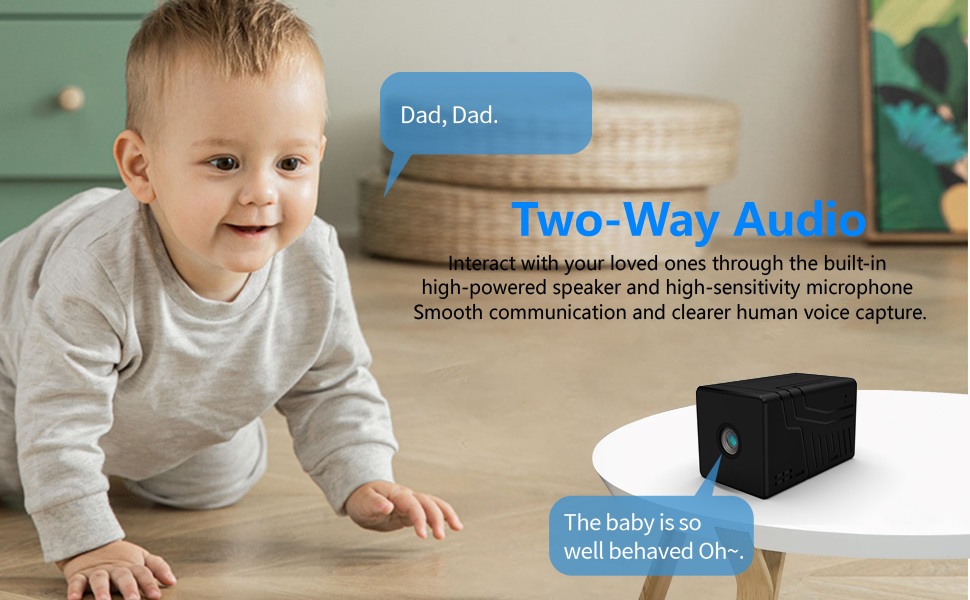
Figure 5.1: AI Motion Detection and Alerts. This image demonstrates the camera's AI motion detection capability, showing a person triggering an alert on a smartphone, with options for notification and video playback.
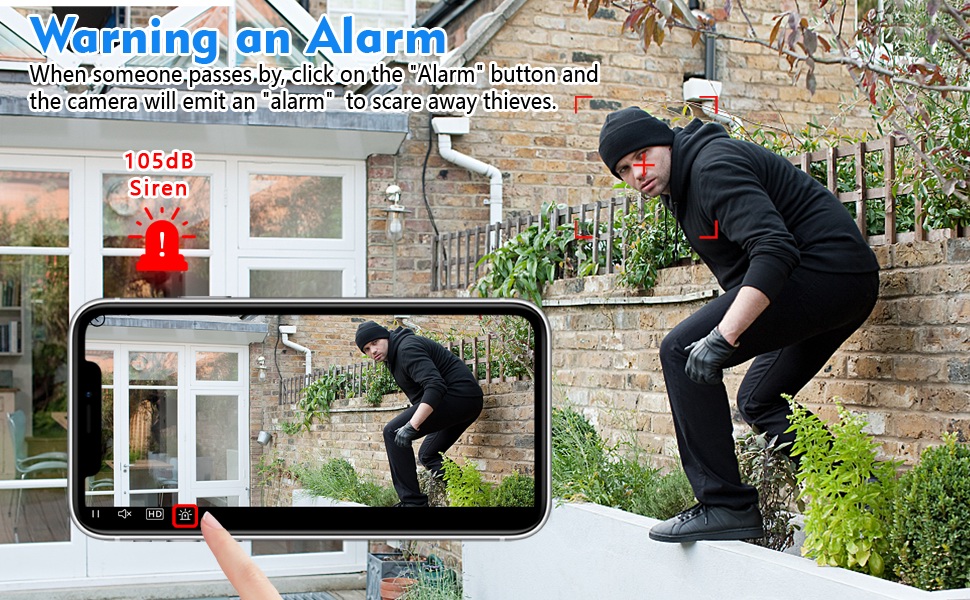
Figure 5.2: Activating the Alarm. This image illustrates the "Warning an Alarm" feature, where a user can click an "Alarm" button on their phone to activate the camera's siren when motion is detected, such as a person climbing a fence.
5.3 Visi Peuting
The camera automatically switches to night vision mode in low-light conditions, providing clear black-and-white video without a visible red glow from infrared LEDs.
- Night vision range is approximately 28 feet.
- Ensure no obstructions block the camera's view for optimal night vision performance.
5.4 Audio Dua Arah
Utilize the built-in speaker and microphone for two-way communication through the V380 Pro app.
- Di hirup view, ketok ikon mikropon pikeun nyarita ngaliwatan kaméra.
- Ensure your phone's volume is adjusted to hear audio from the camera.
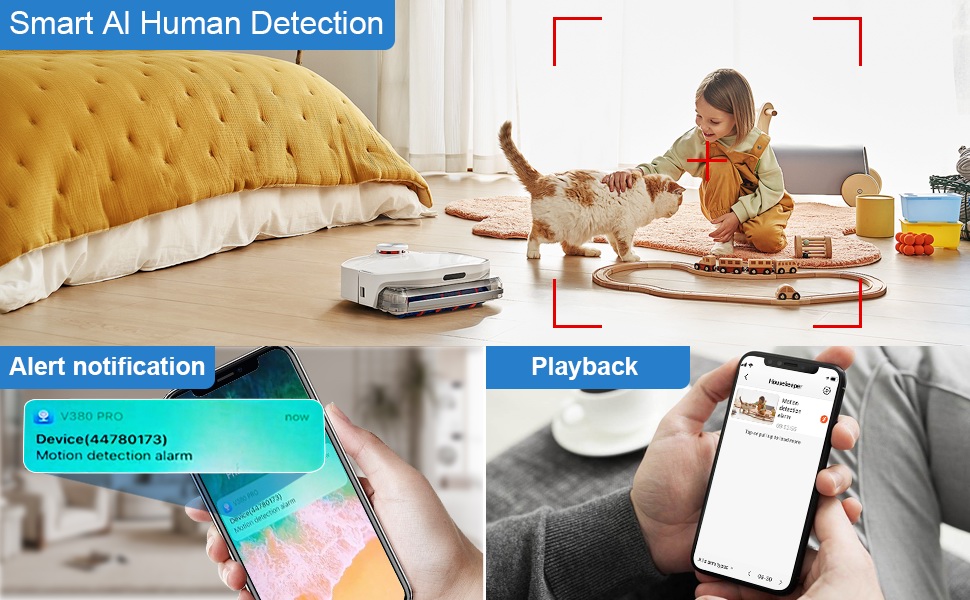
Figure 5.3: Two-Way Audio Communication. This image illustrates the two-way audio functionality, allowing users to interact with individuals near the camera, such as speaking to a baby.
6. Pangropéa
6.1 beberesih
To maintain optimal image quality, regularly clean the camera lens. Use a soft, dry, lint-free cloth. Avoid abrasive cleaners or solvents that could damage the lens or camera body.
6.2 Panyimpenan
When not in use for extended periods, store the camera in a cool, dry place away from direct sunlight and extreme temperatures. Ensure the battery is partially charged (around 50%) before storage to prolong its lifespan.
7. Cara ngungkulan
If you encounter issues with your Rettru Q18 camera, refer to the following common problems and solutions:
| Masalah | Solusi |
|---|---|
| Kaméra gagal nyambung ka Wi-Fi. |
|
| Teu aya eupan pidéo dina aplikasi. |
|
| Panggeuing deteksi gerak teu katampa. |
|
| Poor audio quality during two-way communication. |
|
| Camera battery drains quickly. |
|
8. Spésifikasi
| Fitur | Rincian |
|---|---|
| Ngaran modél | Q18 |
| Resolusi Capture Video | HD 4K Resolution (2560x1440) |
| Resolusi Masih Éféktif | 5 MP |
| Téhnologi konektipitas | Nirkabel (Wi-Fi 2.4GHz) |
| Sumber Daya | Batré (1800mAh Lithium Ion) |
| Kahirupan batré | Up to 6 hours continuous recording, 100 days standby |
| Viewdina Angle | 160 darajat |
| Wengi Sawangan Sawangan | 28 suku |
| Rojongan gudang | Kartu Micro SD dugi ka 128GB (teu kalebet) |
| Tipe Controller | Aplikasi V380 Pro |
| Fitur husus | 2-Way Audio, HD 4K Resolution, Motion Sensor, Night Vision, Portable, AI Human Detection, Built-in Siren |
| Pamakéan jero rohangan / outdoor | Indoor, Outdoor (IP65 rating) |
| Tipe Pamasangan | Wall-Mounted & Surface-Mounted (with magnetic base) |
| Dimensi produk | 21.6 x 13.3 x 13.3 inches (Note: These are likely packaging dimensions; the camera itself is compact.) |
| Item Beurat | 2.65 ons / 75 gram |
9. Garansi jeung Rojongan
Rettru products are manufactured with quality and reliability in mind. For warranty information or technical support, please contact the manufacturer directly through their official website or the contact information provided with your purchase. Please have your model number (Q18) and purchase details ready when contacting support.