
Bubuka
This manual provides comprehensive instructions for the iBUYPOWER Y40WI7N46T01 Gaming PC. It covers essential information regarding setup, operation, maintenance, and troubleshooting to ensure optimal performance and longevity of your system. Please read this manual thoroughly before using your new gaming PC.
Eusi pakét
Pastikeun yén sadaya item anu didaptarkeun di handap kalebet kana pakét anjeun:
- iBUYPOWER Y40WI7N46T01 Gaming PC System
- Mouse kaulinan
- Keyboard kaulinan
- Kabel listrik
Note: A monitor is not included and must be purchased separately.
Guide Setup
1. Unboxing jeung panempatan
Carefully remove the PC from its packaging. Place the PC on a stable, flat surface with adequate ventilation. Ensure there is enough space around the case for proper airflow.

Gambar 1: Hareupeun view of the iBUYPOWER Y40WI7N46T01 Gaming PC, showcasing its transparent side panel and internal RGB lighting.
2. Nyambungkeun périferal
Connect your monitor, keyboard, and mouse to the appropriate ports on the rear and front of the PC. The PC includes a gaming keyboard and mouse.
- Monitor: Connect your monitor using an HDMI cable to the graphics card port.
- Keyboard & Mouse: Connect the included gaming keyboard and mouse to any available USB ports.
- Jaringan: For wired internet, connect an Ethernet cable to the RJ-45 port. For wireless, the PC is equipped with 802.11AC Wi-Fi.
- kakuatan: Connect the power cord to the PC's power supply unit and then to a wall outlet.
Gambar 2: Tukangeun view of the PC, highlighting the connectivity options including USB, Ethernet, and HDMI ports.

Figure 3: Front I/O ports for convenient access to USB and audio connections.

Figure 4: The included iBUYPOWER KM7 RGB Gaming Keyboard and Mouse.
3. Boot-up Awal sareng Setelan Sistem Operasi
Press the power button located on the front of the PC. The system will boot into Windows 11 Home. Follow the on-screen instructions to complete the initial setup, including language, region, network connection, and user account creation.

Figure 5: A complete PC setup with the iBUYPOWER Y40WI7N46T01, monitor, keyboard, and mouse.
Operasi
Pamakéan Umum
Your iBUYPOWER Y40WI7N46T01 is pre-installed with Windows 11 Home, providing a user-friendly interface for all your computing needs. The powerful Intel Core i7 13700KF processor and NVIDIA GeForce RTX 4060 Ti 8GB graphics card are designed for demanding applications, including gaming, content creation, and multitasking.
Kustomisasi cahaya RGB
The PC features a 16-color RGB lighting case and RGB components. Lighting effects can typically be controlled via pre-installed software or motherboard utilities. Refer to the specific component manufacturer's documentation for detailed instructions on customizing RGB lighting.
Video 1: Hiji leuwihview of the iBUYPOWER HYTE Y40 Gaming Desktop PC, showcasing its design and customizable RGB lighting.
Konektipitas
The system offers robust connectivity options:
- Port USB: 6 x USB 3.1 ports for high-speed peripheral connections.
- Jaringan: 1x RJ-45 Network Ethernet 10/100/1000 for stable wired internet. Integrated 802.11AC Wi-Fi for wireless connectivity.
- Audio: On-board audio for headphones, speakers, and microphones.
- Kaluaran Video: HDMI for display connection.
Pangropéa
beberesih
Regular cleaning helps maintain optimal performance and extends the lifespan of your PC.
- Luar: Ngagunakeun lemes, damp lawon pikeun ngusap handap surfaces exterior. Ngahindarkeun cleaners abrasive.
- Saringan debu: The case features patterned airflow panels. Regularly clean any accessible dust filters to prevent dust buildup, which can impede airflow and cooling.
- Komponén internal: For internal cleaning, it is recommended to use compressed air to remove dust from fans, heatsinks, and other components. Ensure the PC is powered off and unplugged before opening the case.

Figure 6: Patterned airflow panels on the PC case, designed for efficient cooling.
Software Apdet
Keep your operating system, drivers, and applications updated to ensure security, stability, and performance. Windows Update will handle OS updates, and graphics card drivers can be updated via NVIDIA's official websitus.
Pamérésan masalah
Bagian ieu ngabahas masalah umum anu anjeun tingali.
- Henteu aya tampilan: Ensure your monitor is correctly connected to the graphics card (not the motherboard's integrated graphics ports) and powered on. Check all cable connections.
- PC Teu Diaktipkeun: Verify the power cord is securely connected to both the PC and the wall outlet. Check the power switch on the power supply unit (PSU) at the back of the PC.
- Sistem Freezes/Kacilakaan: Ensure all drivers are up to date. Monitor system temperatures using software utilities. Excessive heat can cause instability.
- Performance Lambat: Check for background applications consuming resources. Ensure sufficient free space on the 2TB NVMe SSD. Run a malware scan.
- Lampu RGB Teu Gawé: Check software controls for RGB lighting. Ensure all internal RGB cables are properly connected.
If issues persist, refer to the iBUYPOWER support websitus atanapi ngahubungan rojongan teknis.
spésifikasi
| komponén | Spésifikasi |
|---|---|
| merek | iBUYPOWER |
| Ngaran modél | Y40WI7N46T01 |
| Sistem operasi | Windows 11 Imah |
| Modél CPU | Intel Core i7-13700KF (16 Cores, 3.4 GHz) |
| Grafik Coprocessor | NVIDIA GeForce RTX 4060 Ti 8GB GDDR6 |
| Mémori RAM | 32GB DDR5 5200 MHz (16x2) |
| Kapasitas Panyimpenan Mémori | 2TB NVMe SSD |
| Métode Cooling | Water Cooling (240mm liquid cooling system) |
| Konektipitas | 6 x USB 3.1, 1x RJ-45 Ethernet, 802.11AC Wi-Fi, HDMI |
| Fitur tambahan | Tempered Glass RGB Gaming Case, 16 Color RGB Lighting, Vertical GPU Riser, No Bloatware |
| Item Dimensi | 17.28 x 9.4 x 18.58 inci |
| Item Beurat | 35 pon |

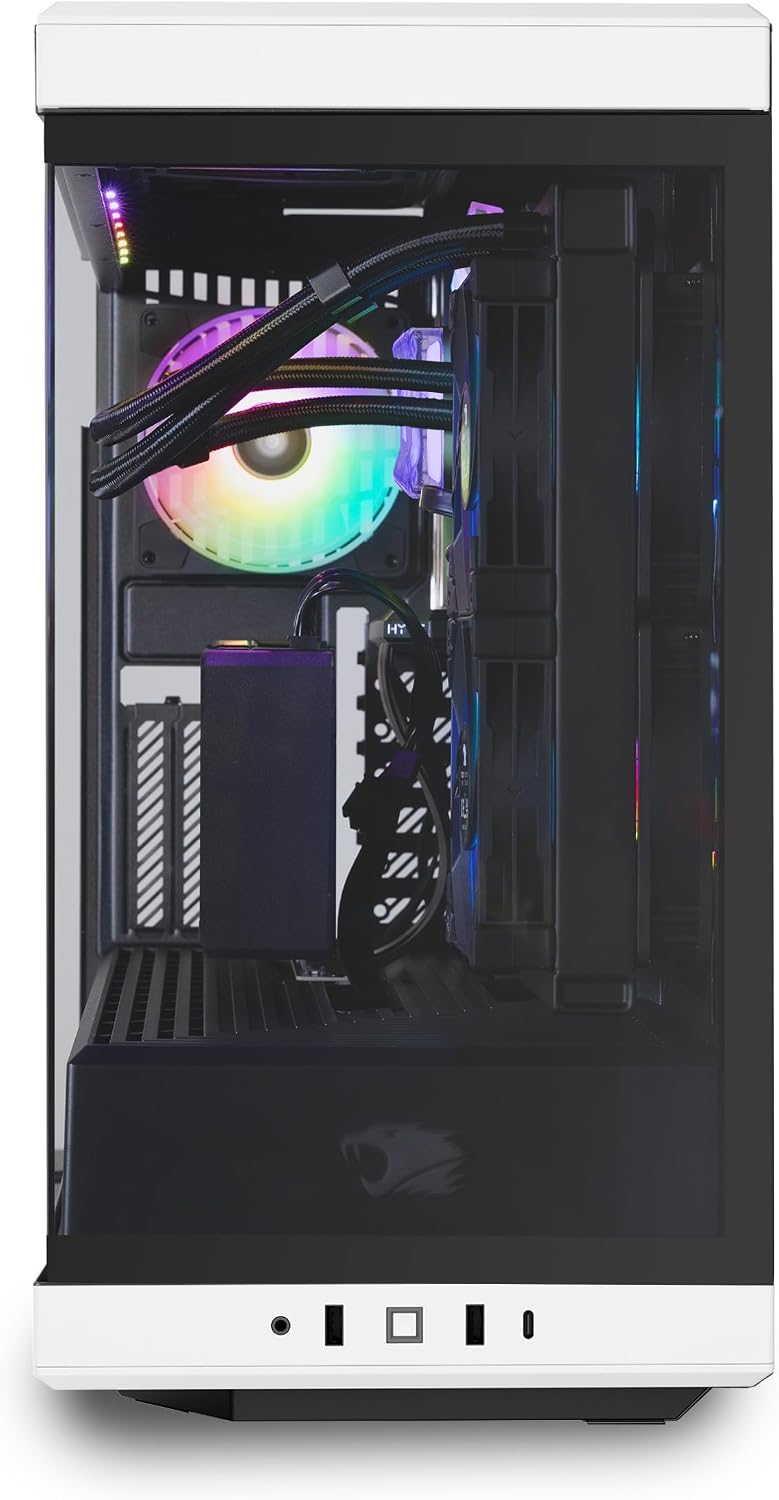
Gambar 7: Sisi view of the PC, revealing the internal components including the GPU, CPU cooler, and RGB fans.

Figure 8: Detail of the vertical GPU riser, providing secure mounting and enhanced aesthetics for the graphics card.

Figure 9: The included PCIe 4.0 Riser Cable, designed for vertical GPU mounting.
Garansi sareng Rojongan
Your iBUYPOWER Y40WI7N46T01 Gaming PC comes with a Bagian 1 Taun & Garansi Buruh. Additionally, iBUYPOWER provides Free Lifetime US Tech Support for your convenience. For technical assistance or warranty claims, please visit the official iBUYPOWER support websitus atanapi ngahubungan layanan palanggan maranéhna.